Every Vercel AI SDK tutorial starts the same way: npx create-next-app. If you don’t use Next.js — if you use plain Node.js, Express, a static site, or a different framework entirely — you are left searching for an answer that doesn’t exist.
This tutorial fills that gap. AI SDK Core works anywhere JavaScript runs. It is not tied to Next.js, not tied to React, and not tied to Vercel’s platform. You can run it in a plain .js script, an Express server, a Cloudflare Worker, or call it from a vanilla HTML page with fetch.
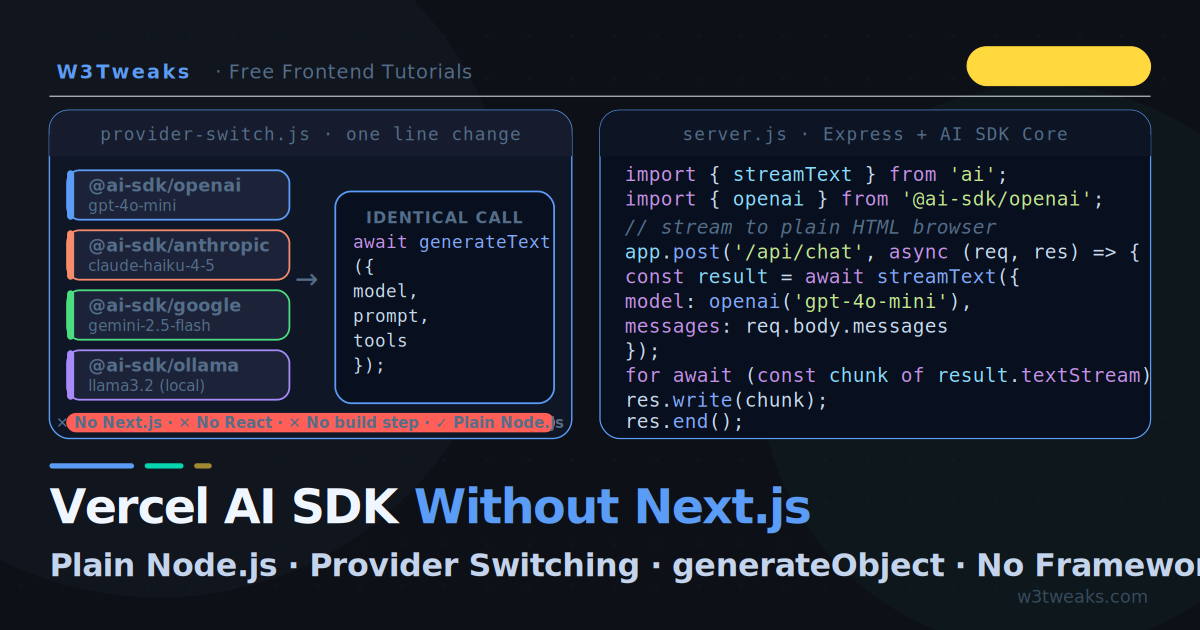
We build four things: a bare Node.js script, a streaming Express server, a generateObject extractor, and a provider switcher that changes from OpenAI to Anthropic to Google with one line of code. Everything runs without a framework, without TypeScript, without a build step.
If you have not called the OpenAI API directly yet, start with How to Call the OpenAI API with Vanilla JavaScript — AI SDK is an abstraction layer on top of those same calls. For function calling patterns, see OpenAI Function Calling in JavaScript — the same tools pattern works identically through the AI SDK.
Live Demo
Enter your OpenAI API key. Tab 1 shows streaming. Tab 2 shows generateObject with Zod. Tab 3 shows provider switching. All patterns work identically through the AI SDK.
What Is AI SDK Core?
The Vercel AI SDK is split into two parts:
AI SDK Core (ai package) — server-side model calls. generateText, streamText, generateObject, streamObject, generateSpeech. Works in Node.js, Deno, Bun, Cloudflare Workers, and any server environment. This is what we use in this tutorial.
AI SDK UI (ai/react, ai/svelte, ai/vue) — client-side hooks like useChat. These require a framework. We do not need them.
AI SDK Core     ← works anywhere Node.js runs, no framework needed
├── generateText
├── streamText
├── generateObject
├── streamObject
└── tool calling

AI SDK UI       ← requires React / Svelte / Vue
├── useChat
├── useCompletion
└── useObject
Most tutorials only show AI SDK UI because it is more dramatic — React hooks with live streaming feel magical. But AI SDK Core is where the real power is, and it works in any JavaScript project.
Step 1 — Install the SDK
You need Node.js 18+ and an API key from at least one provider. No TypeScript compiler, no bundler, no framework.
# Create a project
mkdir ai-sdk-demo && cd ai-sdk-demo
npm init -y

# Install AI SDK Core + your provider
npm install ai @ai-sdk/openai

# Optional — add more providers
npm install @ai-sdk/anthropic @ai-sdk/google

# Optional — Zod for structured output
npm install zod
Provider packages available:
@ai-sdk/openai      # OpenAI (GPT-4o, GPT-4o-mini, o3…)
@ai-sdk/anthropic   # Anthropic (Claude Opus, Sonnet, Haiku…)
@ai-sdk/google      # Google (Gemini 2.5 Flash, Pro…)
@ai-sdk/mistral     # Mistral (Mistral Large, Nemo…)
@ai-sdk/groq        # Groq (fast Llama 3, Mixtral…)
@ai-sdk/ollama      # Ollama (local models — free, private)
Step 2 — generateText: Your First AI SDK Call
generateText waits for the full response. Good for scripts, batch jobs, and any case where you do not need streaming:
// generate-text.js
import { generateText } from 'ai';
import { openai } from '@ai-sdk/openai';

const { text, usage, finishReason } = await generateText({
  model:  openai('gpt-4o-mini'),
  prompt: 'Explain CSS flexbox in three bullet points.',
});

console.log(text);
// • Flexbox is a one-dimensional layout system…
// • Use justify-content to align items on the main axis…
// • Use align-items to align items on the cross axis…

console.log('Tokens used:', usage.totalTokens);
console.log('Finish reason:', finishReason); // 'stop' | 'length' | 'tool-calls'
Run it:
OPENAI_API_KEY=sk-... node generate-text.jsNo configuration file, no .env loader needed for a quick script — just prefix the key inline or export it in your shell.
With a system prompt and conversation history:
const { text } = await generateText({
  model:  openai('gpt-4o-mini'),
  system: 'You are a concise frontend development tutor. Keep answers under 80 words.',
  messages: [
    { role: 'user',      content: 'What is the CSS box model?' },
    { role: 'assistant', content: 'The box model describes how elements are sized: content, padding, border, and margin stack outward from the inside.' },
    { role: 'user',      content: 'What does box-sizing: border-box change?' },
  ],
});
Step 3 — streamText: Real-Time Streaming in Node.js
streamText starts yielding tokens immediately. Use it wherever users should see words appearing as they are generated — chat interfaces, live dashboards, terminal tools:
// stream-text.js
import { streamText } from 'ai';
import { openai } from '@ai-sdk/openai';

const result = await streamText({
  model:  openai('gpt-4o-mini'),
  prompt: 'Write a step-by-step guide for CSS Grid.',
});

// Option 1 — async iterator (cleanest)
for await (const textChunk of result.textStream) {
  process.stdout.write(textChunk); // print each token as it arrives
}

// Option 2 — fullStream (includes metadata like usage)
for await (const part of result.fullStream) {
  if (part.type === 'text-delta')  process.stdout.write(part.textDelta);
  if (part.type === 'finish')      console.log('\n\nUsage:', part.usage);
}
The result object also exposes promises for when you need the complete data:
const result = await streamText({ model: openai('gpt-4o-mini'), prompt });

// These resolve when the stream completes
const text   = await result.text;         // full response as string
const usage  = await result.usage;        // { promptTokens, completionTokens, totalTokens }
const reason = await result.finishReason; // 'stop' | 'length' | 'tool-calls'
Step 4 — Streaming to a Browser (No Framework)
This is the part every other tutorial skips. Here is a minimal Express server that streams AI responses to any browser using fetch and ReadableStream:
// server.js
import express from 'express';
import { streamText } from 'ai';
import { openai } from '@ai-sdk/openai';

const app = express();
app.use(express.json());
app.use(express.static('public')); // serve your HTML files

app.post('/api/chat', async (req, res) => {
  const { messages } = req.body;

  // Set headers for streaming
  res.setHeader('Content-Type', 'text/plain; charset=utf-8');
  res.setHeader('Transfer-Encoding', 'chunked');
  res.setHeader('X-Content-Type-Options', 'nosniff');

  // Cancel the upstream API call when the client disconnects.
  // Without this, the OpenAI bill keeps running after the user
  // closes the tab — see the "Cancel on disconnect" section below.
  const abortController = new AbortController();
  req.on('close', () => abortController.abort());

  try {
    const result = await streamText({
      model:       openai('gpt-4o-mini'),
      system:      'You are a helpful frontend development tutor for W3Tweaks.',
      messages,
      abortSignal: abortController.signal,
    });

    // Pipe each token directly to the HTTP response
    for await (const chunk of result.textStream) {
      res.write(chunk);
    }

    res.end();

  } catch (err) {
    // AbortError is expected when the client disconnects — don't 500 on it
    if (err.name === 'AbortError') return;
    res.status(500).json({ error: err.message });
  }
});

app.listen(3000, () => console.log('Server running on http://localhost:3000'));
npm install express
node server.jsThe browser side — plain HTML, zero framework:
<!-- public/index.html -->
<textarea id="prompt" placeholder="Ask anything…"></textarea>
<button onclick="send()">Send</button>
<div id="output"></div>

<script>
const history = [];

async function send() {
  const text   = document.getElementById('prompt').value.trim();
  const output = document.getElementById('output');
  if (!text) return;

  history.push({ role: 'user', content: text });
  document.getElementById('prompt').value = '';
  output.textContent = '';

  const res = await fetch('/api/chat', {
    method:  'POST',
    headers: { 'Content-Type': 'application/json' },
    body:    JSON.stringify({ messages: history }),
  });

  const reader  = res.body.getReader();
  const decoder = new TextDecoder();
  let   reply   = '';

  while (true) {
    const { done, value } = await reader.read();
    if (done) break;
    const chunk = decoder.decode(value);
    reply += chunk;
    output.textContent += chunk;
  }

  history.push({ role: 'assistant', content: reply });
}
</script>
Why not Server-Sent Events? Plain chunked HTTP works fine for a browser chat. SSE adds MIME type and format overhead. If you need reconnection, persistence, or server-push (unprompted messages from server to client), use SSE. For a chat endpoint that the browser initiates, chunked text/plain is simpler.
The middleware that silently breaks streaming on Express
Three middleware patterns kill streaming in ways that produce no errors — the response just arrives all at once after a delay, defeating the point. Worth checking your server for:
// BAD — compression() buffers the entire response, breaking streaming
import compression from 'compression';
app.use(compression()); // ← applies to ALL routes including streaming ones

// FIX — exclude stream routes
app.use(compression({
  filter: (req, res) => !req.path.startsWith('/api/chat'),
}));
// BAD — body-parser with no limit can stall on large payloads
app.use(express.json()); // default limit is 100kb, sometimes too low
// FIX — explicit limit for chat endpoints
app.use(express.json({ limit: '1mb' }));// Behind nginx, gunicorn, or Cloudflare? You need to disable proxy buffering.
// Without these, the proxy holds tokens until the full response is ready —
// the user sees the same "wait then dump" behaviour even though Express is
// streaming correctly.
res.setHeader('X-Accel-Buffering', 'no'); // nginx
res.setHeader('Cache-Control', 'no-cache'); // belt and suspenders
res.flushHeaders(); // send headers before pipingThe X-Accel-Buffering: no header is the one that catches people deploying to Vercel, Render, or any nginx-fronted host — the SDK streams correctly from Node, but the proxy buffers. Add it to every streaming route by default.
Step 5 — Provider Switching: One Line Change
This is AI SDK’s headline feature — and it actually works as advertised. Change two lines and your entire app switches providers:
import { generateText } from 'ai';

// OpenAI
import { openai }     from '@ai-sdk/openai';
const model = openai('gpt-4o-mini');

// Anthropic — swap this import and model string, NOTHING ELSE changes
import { anthropic }  from '@ai-sdk/anthropic';
const model = anthropic('claude-haiku-4-5');

// Google — same pattern
import { google }     from '@ai-sdk/google';
const model = google('gemini-2.5-flash');

// Groq (fast, free tier available)
import { groq }       from '@ai-sdk/groq';
const model = groq('llama-3.3-70b-versatile');

// Ollama (local, free, private)
import { ollama }     from '@ai-sdk/ollama';
const model = ollama('llama3.2');

// The call is IDENTICAL regardless of provider
const { text } = await generateText({
  model,
  prompt: 'Explain CSS Grid in two sentences.',
});
In practice — build a provider selector:
// providers.js
import { openai }    from '@ai-sdk/openai';
import { anthropic } from '@ai-sdk/anthropic';
import { google }    from '@ai-sdk/google';
import { ollama }    from '@ai-sdk/ollama';

export const PROVIDERS = {
  'gpt-4o-mini':             openai('gpt-4o-mini'),
  'claude-haiku-4-5':        anthropic('claude-haiku-4-5'),
  'gemini-2.5-flash':        google('gemini-2.5-flash'),
  'llama3.2':                ollama('llama3.2'),
};

// Usage — controlled by user selection or config
import { PROVIDERS } from './providers.js';

const { text } = await generateText({
  model:  PROVIDERS[process.env.AI_MODEL ?? 'gpt-4o-mini'],
  prompt: userPrompt,
});
Switch providers by setting AI_MODEL=claude-haiku-4-5 in your environment — no code changes, no redeployment.
The “one line” caveats nobody talks about
The pitch is half true. Three things actually differ between providers — knowing them before you ship saves a 2am debugging session:
1. Tool-calling schema strictness. OpenAI’s strict mode rejects schemas Anthropic happily accepts. Optional Zod fields (z.string().optional()) work fine on Anthropic but trigger Invalid schema errors on OpenAI strict mode. The fix: prefer .nullable() over .optional() for cross-provider tool definitions, or scope strict mode per-provider:
const tools = {
  searchDocs: tool({
    description: 'Search the documentation.',
    parameters: z.object({
      query:    z.string(),
      maxItems: z.number().nullable(), // works everywhere
      // maxItems: z.number().optional(), // breaks on OpenAI strict
    }),
    execute: async ({ query, maxItems }) => { /* ... */ },
  }),
};
2. System prompt handling on Gemini. Google’s Gemini models historically treated the system parameter as a system-instruction (separate field), while OpenAI and Anthropic merge it into the messages array. The AI SDK normalises this — but if you’re hitting older Gemini Pro models, very long system prompts can be silently truncated. Keep system prompts under ~1500 tokens for cross-provider safety, or split them across the first user message.
3. Token costs for identical prompts vary by 30×. The same 500-token chat completion costs $0.000075 on Gemini 2.5 Flash, $0.0003 on GPT-4o-mini, and $0.00125 on Claude Haiku 4.5 (output rates, May 2026). “Switch one line” is true; “the bill is the same” is not. Always log result.usage per provider before switching production traffic.
Step 6 — generateObject: Structured JSON Without Brittle Parsing
generateText returns a string. If you need structured data — a list of items, an extracted object, categorised content — parsing that string is fragile. generateObject guarantees the shape using a Zod schema:
// generate-object.js
import { generateObject } from 'ai';
import { openai }         from '@ai-sdk/openai';
import { z }              from 'zod';

// Define the shape you want back
const ArticleSchema = z.object({
  title:       z.string().describe('SEO-optimised title, under 60 characters'),
  slug:        z.string().describe('URL slug, lowercase with hyphens'),
  description: z.string().describe('Meta description, 150-160 characters'),
  tags:        z.array(z.string()).describe('5–8 relevant tags'),
  readingTime: z.number().describe('Estimated reading time in minutes'),
  difficulty:  z.enum(['beginner', 'intermediate', 'advanced']),
});

const { object } = await generateObject({
  model:  openai('gpt-4o-mini'),
  schema: ArticleSchema,
  prompt: 'Generate metadata for an article about CSS container queries.',
});

console.log(object);
// {
//   title:       "CSS Container Queries Explained",
//   slug:        "css-container-queries-explained",
//   description: "Learn how container queries let components respond to their parent size…",
//   tags:        ["css", "container-queries", "responsive", "layout", "modern-css"],
//   readingTime: 8,
//   difficulty:  "intermediate"
// }

// TypeScript knows the exact type — object.tags is string[]
Why this matters: No JSON.parse, no regex cleanup, no try/catch around malformed AI output. The AI SDK retries automatically if the model returns invalid JSON, and the Zod schema enforces the type at runtime.
When generateObject fails — and what to do about it
Every other tutorial shows the happy path. Production code needs to handle the four real failure modes:
1. NoObjectGeneratedError — the model gave up. Thrown when the model can’t produce output matching your schema after the SDK’s retry budget. Almost always caused by a schema that’s too constrained (mutually exclusive enums, deeply nested unions, or .refine() validators the model can’t satisfy).
import { NoObjectGeneratedError } from 'ai';

try {
  const { object } = await generateObject({ model, schema, prompt });
  return object;
} catch (err) {
  if (NoObjectGeneratedError.isInstance(err)) {
    // err.text contains the model's last attempt — log it to see why
    console.error('Model produced:', err.text);
    console.error('Validation error:', err.cause); // ZodError
    // Fallback: simpler schema, different model, or surface to user
    return null;
  }
  throw err;
}
2. The mode parameter changes everything. generateObject has three modes, and the default isn’t always right:
mode | How it works | When it wins |
|---|---|---|
'auto' (default) | SDK picks based on provider capability | Most cases — let it choose |
'tool' | Wraps the schema as a forced tool call | OpenAI/Anthropic — strongest schema adherence |
'json' | Uses JSON mode if supported, else prompts for JSON | Gemini, Ollama, smaller models |
If 'auto' is giving you junk on Gemini or Ollama, force mode: 'json'. If OpenAI is producing close-but-wrong objects, force mode: 'tool' — the model treats it like a tool call and matches the schema more aggressively.
3. Deeply nested unions silently degrade. A schema like z.union([z.object({ kind: z.literal('a'), data: ComplexA }), z.object({ kind: z.literal('b'), data: ComplexB })]) is technically valid but produces unreliable output on every provider except OpenAI strict mode. Flatten with a discriminated union and let the model fill optional fields:
// Reliable across providers
const FlatSchema = z.object({
  kind: z.enum(['a', 'b']),
  // Make ComplexA and ComplexB fields all nullable, not unions
  a_field1: z.string().nullable(),
  a_field2: z.number().nullable(),
  b_field1: z.string().nullable(),
});
4. Use repairText for tail-end JSON corruption. When a model adds trailing commas or markdown fences around the JSON, the repairText callback patches it before Zod validates:
const { object } = await generateObject({
  model, schema, prompt,
  experimental_repairText: async ({ text, error }) => {
    // Strip markdown code fences if the model wrapped JSON in ```json
    const cleaned = text.replace(/^```(?:json)?\s*|\s*```$/g, '');
    return cleaned;
  },
});
Practical use case — bulk content metadata generation:
async function generateMetadata(articles) {
  return Promise.all(articles.map(async article => {
    const { object } = await generateObject({
      model:  openai('gpt-4o-mini'),
      schema: ArticleSchema,
      prompt: `Generate SEO metadata for this article: ${article.title}\n\n${article.excerpt}`,
    });
    return { ...article, meta: object };
  }));
}
Step 7 — Tool Calling Without a Framework
The same tool calling pattern from the OpenAI Function Calling tutorial works through the AI SDK — with cleaner syntax and automatic multi-step execution:
import { generateText, tool } from 'ai';
import { openai }             from '@ai-sdk/openai';
import { z }                  from 'zod';

const result = await generateText({
  model: openai('gpt-4o-mini'),
  prompt: 'What is the weather in Tokyo and how many celsius is 95 fahrenheit?',

  tools: {
    getWeather: tool({
      description: 'Get the current weather for a city.',
      parameters:  z.object({
        city: z.string().describe('The city name'),
        unit: z.enum(['celsius', 'fahrenheit']).default('celsius'),
      }),
      execute: async ({ city, unit }) => {
        // Real implementation: call a weather API here
        return { city, temp: 22, condition: 'Sunny', unit };
      },
    }),

    calculate: tool({
      description: 'Evaluate a mathematical expression.',
      parameters:  z.object({
        expression: z.string().describe('A JS math expression'),
      }),
      execute: async ({ expression }) => {
        return { result: new Function(`return ${expression}`)() };
      },
    }),
  },

  // AI SDK handles the tool call loop automatically
  maxSteps: 5,
});

console.log(result.text);
// "In Tokyo, it's 22°C and sunny. Converting 95°F to Celsius: (95-32) × 5/9 = 35°C."
maxSteps is the key difference from raw API calls. The AI SDK automatically handles the tool call → result → next call loop for up to maxSteps iterations. You do not write the while loop yourself.
Step 8 — The AI Gateway: One Key for All Providers
AI SDK v6 introduced the AI Gateway — a Vercel-hosted proxy that lets you access OpenAI, Anthropic, Google, and 20+ other providers with a single Vercel API key instead of managing multiple provider accounts:
// Without AI Gateway — need keys from every provider
import { openai }    from '@ai-sdk/openai';    // OPENAI_API_KEY
import { anthropic } from '@ai-sdk/anthropic'; // ANTHROPIC_API_KEY
import { google }    from '@ai-sdk/google';    // GOOGLE_API_KEY

// With AI Gateway — ONE Vercel key for all providers
import { generateText } from 'ai';

const { text } = await generateText({
  model:  'openai/gpt-4o-mini',    // provider/model string
  prompt: 'Hello!',
  // Uses VERCEL_AI_GATEWAY_API_KEY automatically
});

// Switch provider — still one key
const { text: text2 } = await generateText({
  model:  'anthropic/claude-haiku-4-5',
  prompt: 'Hello!',
});
AI Gateway vs direct provider keys:
| Direct Provider Keys | AI Gateway | |
|---|---|---|
| Keys needed | One per provider | One Vercel key |
| Cost | Provider pricing | Provider pricing + small Vercel margin |
| Rate limits | Per-provider limits | Unified across providers |
| Observability | None | Logs, traces in Vercel dashboard |
| Best for | Production with known providers | Prototyping, multi-provider apps |
When the Gateway actually loses
The Gateway pitch is convincing but it adds a network hop — and that hop has real cost. Use direct provider keys when:
- Latency-sensitive endpoints. The Gateway adds ~50–150ms of round-trip latency per call. For a streaming chat that’s a small fraction of total response time, no big deal. For a low-latency interactive feature (autocomplete, inline suggestions), that extra hop is noticeable.
- You only use one provider. All the Gateway’s value comes from multi-provider management. If your app is OpenAI-only, the direct package skips the middleman.
- Your server isn’t on Vercel. Gateway billing is bundled with Vercel hosting. Running on AWS, Fly, or your own VPS? Direct provider keys avoid an awkward billing relationship.
- Cost matters at scale. The Vercel margin is small per call (3–5%) but on a million-call/month app that’s real money. Direct keys + your own observability (Helicone, LangSmith, or homegrown logging) often wins at scale.
The Gateway shines for prototyping, low-volume internal tools, and apps that legitimately switch providers based on cost/quality dynamics. For everything else, direct keys are usually the right call.
Step 9 — Cancel on Disconnect: The Production Footgun
When a user opens a chat, sends a long prompt, then closes the tab — the OpenAI bill keeps running. The SDK has no automatic protection. You have to wire it yourself.
The Step 4 server already includes this — it’s worth understanding why it matters:
app.post('/api/chat', async (req, res) => {
  const abortController = new AbortController();

  // 'close' fires when the client disconnects (browser closes, network drops,
  // user navigates away). Without this listener, the loop below keeps reading
  // tokens from OpenAI and writing them to a dead socket until the model
  // completes — burning your quota for nothing.
  req.on('close', () => {
    abortController.abort();
  });

  const result = await streamText({
    model:       openai('gpt-4o-mini'),
    messages:    req.body.messages,
    abortSignal: abortController.signal, // ← the link
  });

  try {
    for await (const chunk of result.textStream) {
      res.write(chunk);
    }
    res.end();
  } catch (err) {
    if (err.name === 'AbortError') return; // expected on disconnect
    throw err;
  }
});
What this saves you: at OpenAI’s GPT-4o pricing ($10/M output tokens), a 2000-token response that a user abandoned at token 50 still bills the full 2000 tokens without abortSignal. Across a busy app with users who scan-then-leave, this is the #1 source of “why is my OpenAI bill so high” surprises.
Test it: open your chat in two browser tabs, start a long prompt in tab 1, close tab 1 immediately, then run tail -f on your server log. With abortSignal wired, you’ll see the request terminate within ~200ms. Without it, the request runs to completion.
Step 10 — Token Usage and Cost Tracking
Every AI SDK call returns usage data. Track it to understand costs before they become a surprise:
import { generateText } from 'ai';
import { openai }       from '@ai-sdk/openai';

// Approximate costs per 1M tokens (May 2026)
const COSTS = {
  'gpt-4o-mini':      { input: 0.15,  output: 0.60  },
  'gpt-4o':           { input: 2.50,  output: 10.00 },
  'claude-haiku-4-5': { input: 0.25,  output: 1.25  },
  'gemini-2.5-flash': { input: 0.075, output: 0.30  },
};

async function trackCost(model, modelId, prompt) {
  const { text, usage } = await generateText({ model, prompt });

  const rates  = COSTS[modelId];
  const cost   = rates
    ? ((usage.promptTokens     / 1e6) * rates.input  +
       (usage.completionTokens / 1e6) * rates.output).toFixed(6)
    : 'unknown';

  console.log(`${modelId}: ${usage.totalTokens} tokens — $${cost}`);
  return { text, usage, cost };
}
For streamText, await result.usage after the stream completes:
const result = await streamText({ model: openai('gpt-4o-mini'), prompt });
for await (const chunk of result.textStream) { /* render */ }

const usage = await result.usage;
console.log(`Total tokens: ${usage.totalTokens}`);
Complete Express Server Example
A copy-paste ready server with all the patterns covered — streaming chat (with disconnect handling), structured output, tool calling, and provider switching — in one file:
// server.js — Vercel AI SDK without any framework
import express    from 'express';
import { streamText, generateObject, generateText, tool } from 'ai';
import { openai }    from '@ai-sdk/openai';
import { anthropic } from '@ai-sdk/anthropic';
import { z }         from 'zod';

const app = express();
app.use(express.json({ limit: '1mb' }));
app.use(express.static('public'));

// Available models — swap by changing this map
const MODELS = {
  openai:    openai('gpt-4o-mini'),
  anthropic: anthropic('claude-haiku-4-5'),
};

// POST /api/chat — streaming chat endpoint with full production wiring
app.post('/api/chat', async (req, res) => {
  const { messages, provider = 'openai' } = req.body;
  const model = MODELS[provider] ?? MODELS.openai;

  res.setHeader('Content-Type',       'text/plain; charset=utf-8');
  res.setHeader('Transfer-Encoding',  'chunked');
  res.setHeader('Cache-Control',      'no-cache');
  res.setHeader('X-Accel-Buffering',  'no'); // disable nginx buffering
  res.flushHeaders();

  const abortController = new AbortController();
  req.on('close', () => abortController.abort());

  try {
    const result = await streamText({
      model,
      system:      'You are a helpful frontend development tutor for W3Tweaks.',
      messages,
      abortSignal: abortController.signal,
    });

    for await (const chunk of result.textStream) res.write(chunk);
    res.end();
  } catch (err) {
    if (err.name === 'AbortError') return;
    if (!res.headersSent) res.status(500).json({ error: err.message });
  }
});

// POST /api/metadata — structured output endpoint
app.post('/api/metadata', async (req, res) => {
  const { content } = req.body;

  const { object } = await generateObject({
    model:  openai('gpt-4o-mini'),
    schema: z.object({
      title:       z.string(),
      slug:        z.string(),
      description: z.string(),
      tags:        z.array(z.string()),
      difficulty:  z.enum(['beginner', 'intermediate', 'advanced']),
    }),
    prompt: `Generate SEO metadata for: ${content}`,
  });

  res.json(object);
});

// POST /api/tools — tool calling endpoint
app.post('/api/tools', async (req, res) => {
  const { prompt } = req.body;

  const result = await generateText({
    model:    openai('gpt-4o-mini'),
    prompt,
    maxSteps: 3,
    tools: {
      calculate: tool({
        description: 'Evaluate a math expression.',
        parameters:  z.object({ expression: z.string() }),
        execute:     async ({ expression }) =>
          ({ result: new Function(`return ${expression}`)() }),
      }),
    },
  });

  res.json({ text: result.text, steps: result.steps.length });
});

app.listen(3000, () => console.log('AI SDK server: http://localhost:3000'));
Key Takeaways
- AI SDK Core (
aipackage) works in any Node.js project — no Next.js, no React, no build step required generateTextwaits for the full response;streamTextyields tokens as they arrive — use streaming for chat interfaces- Stream to a plain HTML browser with chunked
text/plainandReadableStream— no framework or SSE needed - Always wire
req.on('close')to anAbortController— otherwise abandoned tabs keep billing you for tokens nobody will see - Provider switching is one line, but cost, schema strictness, and system-prompt limits differ — log
usageper provider before swapping production traffic generateObject+ Zod schema guarantees structured output — handleNoObjectGeneratedError, pickmode: 'tool'for OpenAI /'json'for Gemini, flatten deep unions- The
tool()helper withmaxStepshandles the tool call loop automatically — no manual while loop required - The AI Gateway gives one-key access to all providers — but adds ~50–150ms latency; use direct provider keys for low-latency endpoints and single-provider apps
- Disable
compression()and setX-Accel-Buffering: noon stream routes — otherwise nginx/proxy buffering kills the live-token effect
FAQ
Can I use the Vercel AI SDK without Next.js?
Yes — completely. AI SDK Core is a standalone Node.js package with no dependency on Next.js, React, or any Vercel infrastructure. The ai package and any provider package (@ai-sdk/openai, @ai-sdk/anthropic, etc.) install and run in any Node.js 18+ project. The tutorials that assume Next.js are only using AI SDK UI, the hooks layer — the Core package underneath has no framework requirement at all.
Do I need TypeScript to use the Vercel AI SDK?
No. The examples in this tutorial use plain JavaScript (ESM). The AI SDK is written in TypeScript and ships full type definitions, so TypeScript users get full autocomplete and compile-time safety — but you can use it with .js files and standard Node.js ESM without any TypeScript compiler or bundler.
What is the difference between generateText and streamText?
generateText makes the API call, waits for the entire response to be generated, and returns the full text as a string. streamText returns immediately and yields tokens one by one through an async iterator as the model generates them. Use generateText for batch processing, scripts, and server-side extraction tasks. Use streamText for any user-facing chat interface where waiting for the full response would feel slow.
Why does my Vercel AI SDK stream arrive all at once instead of token-by-token?
The SDK is streaming correctly — something between Node and the browser is buffering. Three usual suspects: (1) the compression() Express middleware is gzipping the whole response before sending; (2) you’re behind nginx/Cloudflare/a reverse proxy that’s buffering — fix with res.setHeader('X-Accel-Buffering', 'no'); (3) you forgot res.flushHeaders() before piping. Check the middleware section in Step 4 for the full diagnostic order.
How does provider switching actually work under the hood?
Each provider package (@ai-sdk/openai, @ai-sdk/anthropic, etc.) exports a model factory function that returns a standardised model object conforming to the AI SDK’s LanguageModelV1 interface. The Core functions (generateText, streamText, etc.) call this interface without knowing which provider is underneath. Switching providers means giving the Core a different object that implements the same interface — it is a classic adapter pattern. The pitch is real but the underlying providers still differ in schema strictness, system-prompt handling, and pricing — log result.usage before swapping in production.
How do I prevent the OpenAI bill from racking up when a user closes the browser tab?
Wire an AbortController to the request’s close event and pass its signal as abortSignal to streamText. Without this, the SDK keeps reading tokens from OpenAI until the model completes — even after the user has disconnected. The Step 9 section has the full pattern. This is the single most expensive thing to forget in a production AI SDK app.
What happens when generateObject can’t produce valid JSON?
The SDK throws NoObjectGeneratedError. The error’s text property holds the model’s last attempt and cause holds the Zod validation error, so you can inspect what went wrong. Common fixes: switch to mode: 'tool' on OpenAI/Anthropic for stronger schema adherence, switch to mode: 'json' on Gemini, flatten deeply nested unions, or add an experimental_repairText callback to strip markdown fences. Step 6 has the catch pattern and the mode comparison table.
Is the Vercel AI SDK free to use?
The SDK itself is free and open-source (Apache 2.0). You pay for the AI provider you use — OpenAI, Anthropic, Google, etc. charge per token. The optional AI Gateway proxy is free for low usage on Vercel’s Hobby plan. The SDK does not add any cost on top of provider pricing for direct API calls — though the Gateway adds a small (3–5%) margin on top of provider rates.
Can I use the Vercel AI SDK with Ollama (local models)?
Yes — install @ai-sdk/ollama and replace openai('gpt-4o-mini') with ollama('llama3.2'). All four Core functions — generateText, streamText, generateObject, and tool() — work identically. This is the best way to build locally during development for zero cost, then switch to a cloud provider for production with one line change. See the Ollama JavaScript tutorial for setting up Ollama on your machine first. For an in-browser alternative that runs LLMs without any backend at all, see WebLLM in the Browser.