TL;DR
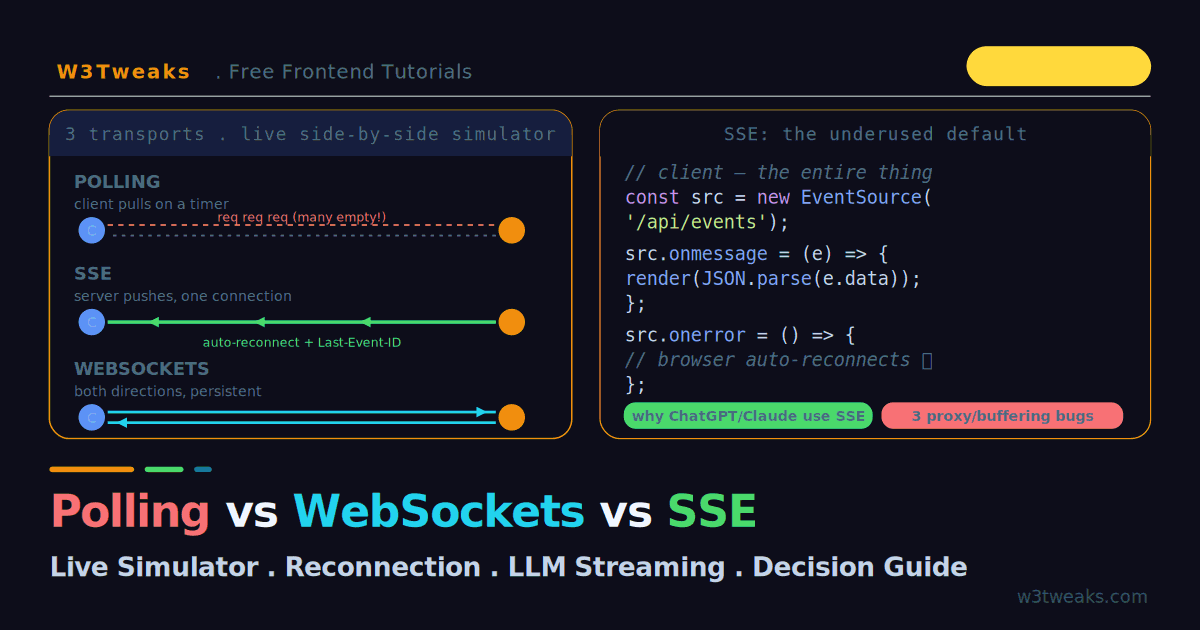
Three transports push server data to the client — pick by direction:
- SSE (server → client) — the right default for notifications, live feeds, dashboards, AI token streaming. Auto-reconnect +
Last-Event-IDresume for free. - WebSockets (both ways) — chat, multiplayer games, collaborative editing. You own reconnection, heartbeats, scaling.
- Polling — legacy or infrequent updates only.
Minimal SSE client:
const src = new EventSource('/api/events');
src.onmessage = (e) => render(JSON.parse(e.data));
// browser auto-reconnects — no code needed
Watch out: proxy buffering silently breaks SSE (set X-Accel-Buffering: no + proxy_buffering off). WebSockets die silently in half-open states — ping/pong heartbeat every 15–30s. Serverless timeouts cut long-lived connections (Vercel Hobby 10s, Netlify 30s — use Cloudflare Workers + Durable Objects for persistent WS).
→ Try it in the live demo — run polling, SSE, and WebSockets side by side and watch polling waste requests while SSE stays on one connection. Deep dive below for the Safari-safe LLM streaming pattern (Fetch + ReadableStream), Node.js ws server, socket.io comparison, WebSocket auth, and the pub/sub backplane.
Your app needs to show data the moment it changes — a live dashboard, a notification feed, a chat, an AI response streaming token by token. HTTP’s request-response model does not do this on its own: the client asks, the server answers, done. To get the server pushing data to the client, you have three real choices: polling, WebSockets, and Server-Sent Events (SSE).
The default instinct is to reach for WebSockets. For most real-time features, that is the wrong call — you take on reconnection logic, heartbeats, sticky sessions, and a protocol upgrade you do not need. This guide runs all three transports in a live side-by-side simulator so you can see the difference: polling firing wasteful empty requests, SSE streaming over a single connection, and WebSockets talking both directions. Then we cover the production bugs — proxy buffering, the HTTP/1.1 connection limit, silent reconnection — that bite every team the first time they ship real-time.
Polling connects directly to the AbortController patterns for cancelling stale requests, and SSE’s streaming model is the same one behind ChatGPT-style token streaming.
Live Demo
Tab 1: run polling, SSE, and WebSockets side by side and watch the request/message counters. Tab 2: trigger SSE reconnection and see Last-Event-ID resume. Tab 3: use the decision flowchart to pick the right transport.
The Three Transports at a Glance
| Polling | SSE | WebSockets | |
|---|---|---|---|
| Direction | Client pulls | Server → client | Both ways |
| Protocol | Plain HTTP | HTTP (text/event-stream) | ws:// (upgraded) |
| Reconnection | N/A (new request each time) | Automatic (built in) | You write it |
| Overhead | High (repeated requests) | Low (one connection) | Lowest per message |
| Through proxies/CDNs | Always | Usually (watch buffering) | Needs config |
| Best for | Legacy, infrequent updates | Feeds, notifications, AI streaming | Chat, games, collab editing |
The pattern most teams miss: most “real-time” is one-directional. A dashboard, a notification feed, a stock ticker, an AI response — the server pushes, the client just listens. That is SSE’s exact use case, and it is dramatically simpler to operate than WebSockets. Live observability dashboards in tools like Datadog, Grafana Live, and Honeycomb push metrics over WebSockets or SSE precisely because sub-second latency is the whole product.
1. Polling — The Simplest (and Most Wasteful)
Polling means the client asks the server for updates on a timer. Two flavours exist.
Short polling — fire a request every N seconds:
// Ask every 3 seconds, whether or not anything changed
setInterval(async () => {
  const res = await fetch('/api/order-status');
  const status = await res.json();
  render(status);
}, 3000);
Long polling — the server holds the request open until it has data:
async function longPoll() {
  try {
    // Server holds this open until there's data (or a timeout)
    const res = await fetch('/api/updates');
    const data = await res.json();
    render(data);
  } catch (err) {
    // handle error
  }
  longPoll();  // immediately re-open the connection
}
longPoll();
Long polling vs short polling: the tradeoff is latency versus request volume. Short polling has predictable server load but a fixed latency floor (the interval). Long polling delivers data as soon as it exists but keeps a connection tied up per client. The problem with either: short polling fires requests even when nothing changed — the demo’s counter shows these empty responses piling up. Every request carries full HTTP headers, so at scale the overhead is significant. Use polling only for legacy environments or genuinely infrequent updates.
2. Server-Sent Events — The Underused Default
SSE is a one-way streaming HTTP response. The client opens a normal GET request; the server responds with Content-Type: text/event-stream and never closes the connection, writing text frames as data becomes available. The browser exposes this as the EventSource API.
Client — this is the entire thing:
const source = new EventSource('/api/events');

source.onmessage = (event) => {
  const data = JSON.parse(event.data);
  render(data);
};

source.onerror = (err) => {
  // The browser AUTOMATICALLY reconnects — no code needed
  console.log('Connection lost, browser will retry');
};
Server (Node/Express):
app.get('/api/events', (req, res) => {
  res.writeHead(200, {
    'Content-Type': 'text/event-stream',
    'Cache-Control': 'no-cache',
    'Connection': 'keep-alive',
    'X-Accel-Buffering': 'no',   // critical behind Nginx — see gotchas
  });

  // Send an event — note the format and the DOUBLE newline
  const send = (data, id) => {
    if (id) res.write(`id: ${id}\n`);
    res.write(`data: ${JSON.stringify(data)}\n\n`);  // \n\n is mandatory
  };

  const timer = setInterval(() => send({ time: Date.now() }, Date.now()), 1000);

  // Cleanup on disconnect — the #1 SSE server bug is leaking these
  req.on('close', () => clearInterval(timer));
});
Why SSE is the right default for one-way data: automatic reconnection, event resumption via Last-Event-ID, HTTP/2 multiplexing, and it travels through every CDN and proxy without a protocol upgrade. This is why OpenAI, Anthropic, and Google Vertex AI all use SSE for LLM token streaming — the data flows one way, and the EventSource reconnection handles network blips for free.
The SSE Wire Format
Each event is plain text with optional fields, terminated by a blank line:
id: 42
event: price-update
data: {"symbol": "AAPL", "price": 142.50}

: this is a heartbeat comment (ignored by the client)
The four fields: data: (the payload, required), id: (for reconnection resume), event: (a named event type), and retry: (reconnect delay in ms). The blank line separating events is mandatory — forgetting the second \n is the single most common SSE bug.
3. Streaming From LLM APIs — Fetch + ReadableStream
Here is a wrinkle the docs bury: the browser’s EventSource cannot talk to OpenAI, Anthropic, or Vertex AI directly. EventSource is GET-only and does not accept custom headers, but every LLM streaming endpoint takes a POST with an Authorization header. So while these APIs emit SSE-formatted data: frames, you have to consume them with fetch() + ReadableStream instead of EventSource.
The pattern:
const res = await fetch('https://api.openai.com/v1/chat/completions', {
  method: 'POST',
  headers: {
    'Authorization': `Bearer ${apiKey}`,
    'Content-Type': 'application/json',
  },
  body: JSON.stringify({ model: 'gpt-4o', stream: true, messages: [...] }),
});

const reader = res.body
  .pipeThrough(new TextDecoderStream())
  .getReader();

let buffer = '';
while (true) {
  const { value, done } = await reader.read();
  if (done) break;
  buffer += value;

  // SSE frames are delimited by \n\n
  const parts = buffer.split('\n\n');
  buffer = parts.pop();   // keep partial frame for next chunk

  for (const part of parts) {
    for (const line of part.split('\n')) {
      if (line.startsWith('data: ')) {
        const payload = line.slice(6);
        if (payload === '[DONE]') return;
        const { choices } = JSON.parse(payload);
        renderToken(choices[0].delta.content);
      }
    }
  }
}
The TextDecoderStream handles UTF-8 continuation bytes across chunk boundaries — do not just decode each chunk with TextDecoder, or a multibyte character split between chunks will corrupt. The buffer.split('\n\n') + parts.pop() pattern preserves any partial frame at the tail for the next iteration; without it you drop tokens on chunk boundaries.
The OpenAI, Anthropic, and Vertex AI streaming endpoints all emit data: SSE frames over POST, so the parser above works for all three (Anthropic uses event: content_block_delta before each data: — check the event: line if you need to distinguish message types).
4. WebSockets — Full Bidirectional Power
WebSockets open a persistent, two-way channel after an HTTP handshake upgrades the connection to the ws:// protocol. Once open, either side can send messages at any time with minimal per-message overhead.
Client:
const socket = new WebSocket('wss://example.com/chat');

socket.onopen = () => socket.send(JSON.stringify({ type: 'join', room: 'general' }));

socket.onmessage = (event) => {
  const msg = JSON.parse(event.data);
  render(msg);
};

socket.onclose = () => {
  // You must write reconnection logic yourself — with backoff
  setTimeout(connect, backoffDelay());
};

// Send anytime — this is what SSE can't do
sendButton.onclick = () => socket.send(JSON.stringify({ text: input.value }));
Server (Node with the ws package):
import { WebSocketServer } from 'ws';

const wss = new WebSocketServer({ port: 8080 });

wss.on('connection', (socket, req) => {
  socket.on('message', (raw) => {
    const msg = JSON.parse(raw);

    // Broadcast to every other connected client
    for (const client of wss.clients) {
      if (client !== socket && client.readyState === 1 /* OPEN */) {
        client.send(JSON.stringify({ from: 'other', text: msg.text }));
      }
    }
  });

  socket.on('close', () => console.log('client gone'));
});
ws is the reference Node.js WebSocket implementation — it powers most higher-level frameworks (socket.io, Fastify WebSocket, uWebSockets). If you are running the socket process yourself, ws is what you use.
Use WebSockets when you genuinely need the client to send a stream of data too: chat, multiplayer games, collaborative editors with live cursors. For full chat features — read receipts, presence, moderation, mobile SDKs — dedicated APIs like Stream, Sendbird, and Twilio Conversations are usually faster to ship than a hand-rolled WebSocket layer. Financial applications — market data feeds and order books — are the tightest real-time deadline on the web, which is why every exchange publishes WebSocket endpoints rather than REST.
When to Reach for socket.io
Most production apps do not use raw WebSockets — they use socket.io, an abstraction that adds features you would otherwise build yourself:
- Automatic reconnection with exponential backoff
- Rooms and namespaces for broadcast targeting
- Event emitter API (
socket.emit('chat', msg)instead of manual JSON parsing) - Acknowledgement callbacks (
socket.emit('save', doc, ack => ...)) - Polling fallback when WebSockets are blocked (corporate proxies, some CDNs)
- Multi-server broadcast via the official
@socket.io/redis-adapter
When to skip socket.io: if you control both ends of the connection, need minimal bundle size, or run at the edge (Cloudflare Workers, Deno Deploy) where socket.io does not fit. For those cases raw ws on the server plus the browser WebSocket API is enough — you write reconnection and heartbeats yourself, but the surface area stays small.
Authenticating a WebSocket
The browser WebSocket API cannot set custom request headers on the handshake — no Authorization: Bearer. This surprises everyone once. Three practical ways to attach an identity:
1. Cookies — the simplest, works automatically for same-origin. Cross-origin cookies need SameSite=None; Secure. The WebSocket handshake sends cookies just like any HTTP request, so a session cookie works as-is.
2. Token in the query string — new WebSocket('wss://api.example.com/socket?token=' + jwt). Works everywhere and cross-origin, but the token appears in access logs on every hop. Mitigate by making the token short-lived (60 seconds), single-use, and issued from an authenticated /wsticket endpoint just before opening the socket.
3. The Sec-WebSocket-Protocol trick — the second argument to WebSocket() is the subprotocol list, which does end up as a header:
const socket = new WebSocket(url, ['bearer', jwt]);
// Server sees: Sec-WebSocket-Protocol: bearer, <jwt>
// The server must echo one of the offered protocols back in the response.
This keeps the token out of URL logs and is the pattern most cross-origin auth systems adopt today.
The Production Bugs Nobody Warns You About
Bug 1 — Proxy Buffering Silently Breaks SSE
Nginx and many CDNs buffer responses by default. Your res.write() lands in the buffer, and the client sees nothing — until the buffer fills or the connection closes. It looks like SSE is broken when it is actually just buffered.
// Server — set this header
'X-Accel-Buffering': 'no',
# Nginx — disable buffering on the SSE route
location /api/events {
proxy_pass http://backend;
proxy_buffering off;
proxy_http_version 1.1;
proxy_set_header Connection '';
}Bug 2 — The HTTP/1.1 Six-Connection Limit
Browsers cap open HTTP/1.1 connections at ~6 per origin. If your app opens an EventSource and the user opens several tabs, the seventh connection hangs — there is no slot. The fix is HTTP/2, which multiplexes all streams over a single TCP connection and eliminates the limit entirely. In 2026, HTTP/2 is near-universal, so this is mostly historical — but only if your server and CDN have it enabled.
Bug 3 — Silent WebSocket Death
A WebSocket can enter a half-open state where one side thinks it is connected and the other has moved on. Proxies and load balancers terminate idle connections (Nginx and AWS ALB default to 60 seconds). The fix is application-level heartbeats — a ping/pong every 15–30 seconds — plus reconnection with exponential backoff. These are day-one requirements, not optimisations.
// WebSocket heartbeat — detect dead connections
let heartbeat;
socket.onopen = () => {
  heartbeat = setInterval(() => socket.send(JSON.stringify({ type: 'ping' })), 20000);
};
socket.onclose = () => clearInterval(heartbeat);
SSE Reconnection and Last-Event-ID
This is SSE’s killer feature. When the connection drops, the browser reconnects automatically after a delay (3 seconds by default) and sends a Last-Event-ID header with the ID of the last event it received. The server can use that to replay missed events — no lost data, no code on your side.
// Client reconnect request (automatic)
GET /api/events
Last-Event-ID: 42

// Server can resume from event 43
With WebSockets you build all of this yourself: tracking message IDs, detecting the drop, reconnecting with backoff, and replaying missed messages. Most teams skip it and just restart — which, for LLM streaming, wastes tokens and money.
Reconnection Storms and Jittered Backoff
When a real-time service restarts — a deploy, an OOM, a load-balancer failover — every connected client tries to reconnect at once. If your backoff is setTimeout(connect, 1000), every client hits the server in the same second and takes it down again. The fix is exponential backoff with jitter:
function backoffDelay(attempt) {
  const base = 500;      // ms
  const cap = 30_000;    // 30s max
  const exp = Math.min(cap, base * 2 ** attempt);
  // Multiply by a random factor in [0.5, 1.5) — spreads the herd
  return exp * (0.5 + Math.random());
}
Managed services (Ably, Pusher, socket.io) do this by default. Hand-rolled WebSocket clients almost never do — and only find out during their first big incident.
Deploying Real-Time on Serverless
SSE and WebSockets are long-lived connections. Most serverless function platforms have a hard execution ceiling that terminates the request — SSE streams get cut off, WebSocket handshakes are refused. Know your ceiling before you ship:
| Platform | Function timeout | Real-time verdict |
|---|---|---|
| Vercel Hobby | 10s | Not viable for persistent SSE/WS |
| Vercel Pro (Fluid) | 300s (and streaming beyond via waitUntil) | Fine for short-lived SSE, LLM streaming |
| Netlify Functions | 30s | Short SSE only |
| AWS Lambda + API Gateway | 15min Lambda, but 29s API Gateway hard cap | Use API Gateway’s WebSocket API instead |
| Cloudflare Workers | 30s CPU, unlimited wall time | SSE works; WebSockets via Durable Objects |
| Fly.io / Railway | Long-running processes | Full WS/SSE, need sticky sessions on the LB |
Cloudflare Workers with Durable Objects is the mainstream serverless answer for stateful WebSockets — a Durable Object gives each room, document, or conversation a single addressable instance with persistent storage, and the WebSocket hibernation API keeps costs low. Firebase Realtime Database and Firestore expose live document listeners so the transport itself is invisible to your client code. AWS AppSync and Azure Web PubSub give you managed WebSocket fan-out on the hyperscalers.
Scaling Past One Server
The moment you add a second app server, in-memory broadcast breaks: a message published on server A is invisible to sockets connected to server B. The standard fix is a pub/sub backplane — every app server both publishes and subscribes to a central bus, and forwards messages to its local sockets.
                    ┌──────────────┐
                    │  Redis /     │
                    │  NATS / Kafka│
                    └──────┬───────┘
              pub/sub      │      pub/sub
              ┌────────────┴────────────┐
              ▼                         ▼
        ┌──────────┐              ┌──────────┐
        │ Server A │              │ Server B │
        │  socket1 │              │  socket2 │
        │  socket2 │              │  socket3 │
        └──────────┘              └──────────┘
              ▲                         ▲
              │        WebSocket        │
              │ (sticky-session routed) │
              └─────────┬───────┬───────┘
                     Client1 Client2
Redis is the pragmatic default (redis pub/sub or Redis Streams). NATS is lighter-weight and gives at-least-once delivery. Kafka is the choice when you also want replay, audit, or fan-out to analytics. socket.io ships an official @socket.io/redis-adapter so this is one line of config. If you would rather not run the backplane, managed services like Ably, Pusher, and PubNub expose a pub/sub API and handle reconnection, presence, and horizontal scaling for you.
WebSockets also need sticky sessions at the load balancer — the handshake and every subsequent frame must land on the same instance. Fly.io, Railway, and AWS ALB all support this, but you have to enable it explicitly (Session Affinity on ALB, headers-based routing on Fly).
Which Should You Use? The Decision
The demo’s third tab is an interactive version of this, but the rule is simple:
Start with polling only for legacy environments or updates so infrequent that a persistent connection is overkill.
Reach for SSE — the right default — whenever data flows one way: notifications, live feeds, dashboards, progress bars, and AI token streaming. It auto-reconnects, multiplexes over HTTP/2, and works through all infrastructure.
Choose WebSockets only when you genuinely need bidirectional, low-latency traffic in the same channel: chat, multiplayer games, collaborative editing. The failure mode to avoid is picking WebSockets “in case we need bidirectionality later” — that adds complexity now for a requirement that often never arrives. Migrating SSE → WebSockets later is straightforward if it does.
One more option: you can combine them. Use SSE for notifications, WebSockets for the chat itself, and polling for background sync — in the same app.
Key Takeaways
- Three transports push server data to the client: polling (client pulls), SSE (server → client), WebSockets (both ways)
- Most “real-time” is one-directional — the server pushes, the client listens — which is SSE’s exact use case, not WebSockets’
- Polling wastes requests firing on a timer whether or not data changed; use it only for legacy or infrequent updates
- SSE gives automatic reconnection,
Last-Event-IDresume, and HTTP/2 multiplexing for free, and works through every proxy and CDN — it is why every major LLM API streams over SSE - LLM streaming cannot use
EventSourcebecause it is GET-only and blocks custom headers — use Fetch +ReadableStream+TextDecoderStreamto parsedata:frames from OpenAI, Anthropic, and Vertex AI - WebSockets are the only option for true bidirectional traffic (chat, games, collab), but you own reconnection, heartbeats, and scaling
- socket.io wraps WebSockets with auto-reconnect, rooms, ack callbacks, polling fallback, and Redis broadcast — skip it only when you control both ends or need to run at the edge
- WebSocket auth cannot use custom headers; use cookies (same-origin), a short-lived JWT in the query string, or the
Sec-WebSocket-Protocolsubprotocol trick - The
data:line in an SSE event must end with a double newline (\n\n) — forgetting it is the most common SSE bug - Proxy buffering silently breaks SSE — set
X-Accel-Buffering: noand disable buffering at every proxy hop - The HTTP/1.1 six-connection-per-origin limit hangs extra tabs; HTTP/2 multiplexing removes it
- WebSockets die silently in half-open states — application-level heartbeats every 15–30s plus exponential backoff with jitter are mandatory in production
- Serverless timeouts kill long-lived connections: Vercel Hobby 10s, Netlify 30s, AWS API Gateway 29s; Cloudflare Workers + Durable Objects is the serverless answer for stateful WebSockets
- Scaling past one server needs a pub/sub backplane (Redis/NATS/Kafka) plus sticky sessions at the load balancer; managed services (Ably, Pusher, PubNub, AWS AppSync, Azure Web PubSub) hide both
- Default to SSE; escalate to WebSockets only when you actually need to send data upstream in the same channel
FAQ
What is the difference between polling, SSE, and WebSockets?
Polling has the client repeatedly ask the server for updates (either on a timer, or long-polling where the server holds the request open). SSE keeps one HTTP connection open and lets the server push events to the client one-directionally, with automatic reconnection built in. WebSockets open a persistent two-way channel where both client and server can send messages at any time. In short: polling pulls, SSE pushes one way, WebSockets talk both ways.
Should I use SSE or WebSockets?
Use SSE when data flows only from server to client — notifications, live feeds, dashboards, AI token streaming. It is simpler, auto-reconnects, resumes with Last-Event-ID, and works through all proxies and CDNs. Use WebSockets only when you need the client to send a continuous stream of data too, such as chat, multiplayer games, or collaborative editing. The common mistake is defaulting to WebSockets for one-way data, which adds reconnection and heartbeat complexity you do not need.
Why do ChatGPT and Claude use SSE for streaming?
LLM token streaming is one-directional — the client sends one request (the prompt) and then receives a stream of tokens back. That matches SSE’s model exactly. SSE also gives automatic reconnection so a network blip does not lose the stream, and it works through every CDN and proxy without a protocol upgrade. Note that the browser’s native EventSource only supports GET, and LLM APIs need POST, so in-browser LLM streaming uses the Fetch API with a ReadableStream rather than EventSource directly.
Does SSE work with HTTP/2?
Yes, and it works better with HTTP/2. Under HTTP/1.1, browsers limit you to about six connections per origin, so multiple SSE streams (or many tabs) can exhaust the slots. HTTP/2 multiplexes all streams over a single TCP connection, removing that limit entirely. Since HTTP/2 is near-universal in 2026, the old six-connection concern is largely historical — provided your server and CDN have HTTP/2 enabled.
Why are my SSE events not arriving in real time?
Almost always proxy buffering. Nginx and many CDNs buffer responses by default, so your events sit in the buffer and the client sees nothing until it fills or the connection closes — making it look broken when it is just delayed. Fix it by setting the X-Accel-Buffering: no response header and disabling buffering at every proxy hop (proxy_buffering off in Nginx). Also confirm each event ends with a double newline, since a missing \n prevents the client from parsing the event.
Do WebSockets need heartbeats?
Yes, in production. A WebSocket can enter a half-open state where one side believes the connection is alive while the other has closed it, and proxies or load balancers often terminate idle connections after around 60 seconds. Application-level heartbeats — a ping/pong every 15 to 30 seconds — detect dead connections so you can reconnect. Pair that with exponential-backoff reconnection logic. SSE handles all of this automatically, which is one of its main advantages.
Should I use socket.io or raw WebSockets?
Use socket.io in most production apps — it gives you auto-reconnect, rooms and namespaces for broadcast targeting, an event emitter API, acknowledgement callbacks, polling fallback for restrictive networks, and a Redis adapter for multi-server broadcast. Use raw WebSockets when you control both ends of the connection, need a minimal bundle, or run at the edge on Cloudflare Workers or Deno Deploy where socket.io does not fit — then you write reconnection and heartbeats yourself, but the surface area stays tiny.
How do I authenticate a WebSocket connection?
Three practical patterns because the browser WebSocket API cannot set custom headers. Cookies work automatically for same-origin (or cross-origin with SameSite=None; Secure). A short-lived JWT in the query string (wss://api/socket?token=...) works everywhere but leaks into access logs — issue the token from a /wsticket endpoint with a 60-second expiry. Or use the Sec-WebSocket-Protocol subprotocol trick: new WebSocket(url, ['bearer', jwt]) sends the token as a header, and the server echoes one protocol back to accept.
Can I deploy SSE or WebSockets on Vercel or Netlify?
Only for short-lived streams. Vercel Hobby caps functions at 10 seconds, Vercel Pro Fluid extends streaming to 300 seconds via waitUntil, Netlify Functions cap at 30 seconds, and AWS API Gateway hard-caps at 29 seconds. For long-lived WebSockets on serverless, use Cloudflare Workers with Durable Objects (unlimited wall time plus WebSocket hibernation), AWS API Gateway’s dedicated WebSocket API, or a managed real-time service like Ably or Pusher. For SSE that must run for minutes at a time, deploy on a persistent host (Fly.io, Railway) instead of a serverless function.