TL;DR
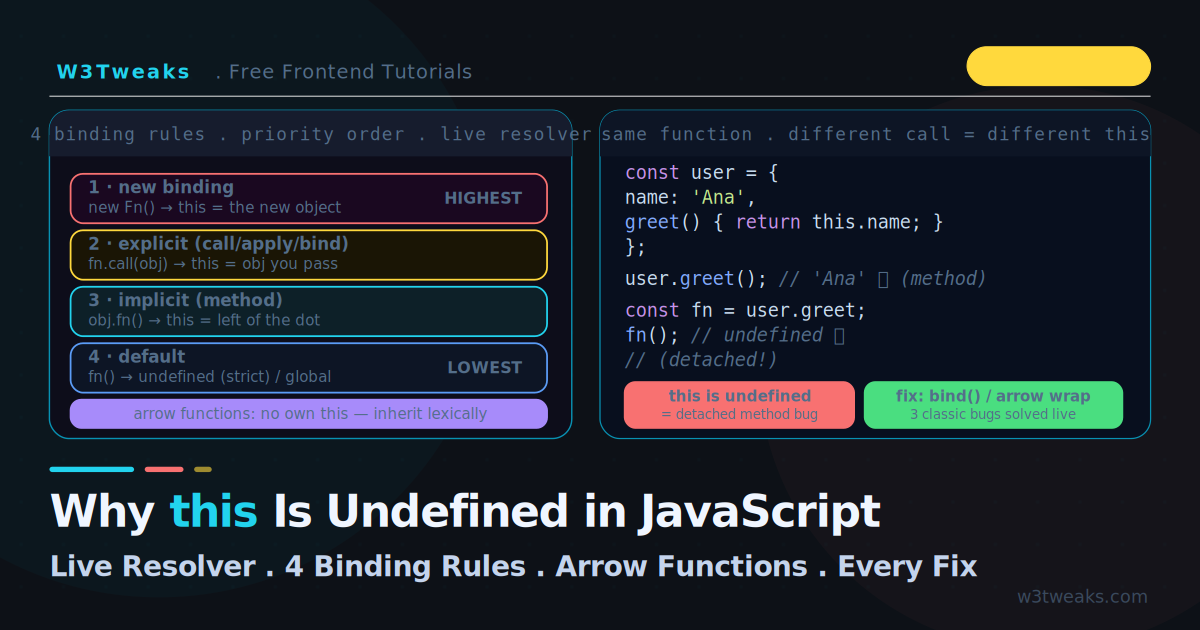
this is decided by how a function is called, not where it’s written. Four rules apply in priority order — the first that applies wins:
new Fn()            → this = the new object
fn.call/apply/bind  → this = the argument you pass
obj.fn()            → this = obj (left of the dot)
fn()                → this = undefined (strict) / globalThis (sloppy)
Watch out: arrow functions have no own this (they capture it lexically), and const fn = obj.method; fn() detaches the method — falls to default binding.
Fix lost context: arrow wrapper (() => obj.method()), .bind(obj), or obj.method() directly.
→ Try it in the live demo — pick a call site and watch this walk the four binding rules to its final value. Deep dive below for the six-call-site simulator, three classic bugs, ES modules vs scripts, event handlers, forEach thisArg, and TypeScript this parameters.
Cannot read property 'x' of undefined — the error appears, you stare at code that looks correct, and the method you called clearly belongs to an object. The cause is almost always the same: this is not what you think it is. In JavaScript, this is decided by how a function is called, not where it is written. Move the same function to a different call site and this changes completely.
This trips up everyone because most languages bind this (or self) lexically — to the class. JavaScript binds it dynamically, at call time, following four rules in a strict priority order. This guide makes those rules concrete: a live resolver where you pick a call site and watch this walk the four rules to its final value, the same function producing six different this values, and the three classic context-loss bugs with every fix.
The lexical-this behaviour of arrow functions builds directly on closures, and the lost-context bug in setTimeout is closely related to the callback issues in the async/await guide.
Live Demo
Tab 1: pick a call site and watch this resolve through the four rules in priority order. Tab 2: see one function get six different this values. Tab 3: fix the three classic context-loss bugs.
The Core Rule: this Is Decided at Call Time
const user = {
  name: 'Ana',
  greet() {
    return `Hi, ${this.name}`;
  },
};

user.greet();              // 'Hi, Ana' — called as a method, this = user

const fn = user.greet;     // detach the method
fn();                      // 'Hi, undefined' — called standalone, this = undefined
Same function, two call sites, two different this values. user.greet() calls it as a method of user, so this is user. fn() calls it standalone, so this defaults to undefined (in strict mode) — and undefined.name would throw. The function did not change; the way it was called did.
The Four Binding Rules (In Priority Order)
When a function runs, JavaScript determines this by checking these four rules in order — the first that applies wins:
1. new binding       → new Fn()           this = the new object
2. explicit binding  → fn.call/apply/bind  this = the argument you pass
3. implicit binding  → obj.fn()            this = obj (the thing left of the dot)
4. default binding   → fn()                this = undefined (strict) or globalThis
The demo’s first tab walks this ladder for any call site you pick. Let’s see each rule.
Rule 1 — new Binding (Highest Priority)
function User(name) {
  this.name = name;   // this = the brand-new object
}

const u = new User('Ana');
u.name;   // 'Ana' — new created a fresh object and bound this to it
new creates a fresh object and binds this to it, regardless of anything else. This is the highest-priority rule.
Rule 2 — Explicit Binding (call, apply, bind)
function greet() {
  return `Hi, ${this.name}`;
}

const person = { name: 'Bob' };

greet.call(person);            // 'Hi, Bob' — call sets this immediately
greet.apply(person);           // 'Hi, Bob' — apply is the same, args as array
const bound = greet.bind(person);
bound();                       // 'Hi, Bob' — bind returns a permanently-bound fn
call and apply invoke the function immediately with a this you specify (the difference is only how arguments are passed — call takes them comma-separated, apply takes an array). bind returns a new function with this permanently locked.
Rule 3 — Implicit Binding (Method Call)
const obj = {
  name: 'Carl',
  greet() { return this.name; },
};

obj.greet();   // 'Carl' — this is whatever is LEFT OF THE DOT
When you call a function as obj.method(), this is obj — the object to the left of the dot at the call site. This is the most common case and the one that breaks when you detach the method.
Rule 4 — Default Binding (Standalone Call)
function show() {
  return this;
}

show();   // undefined in strict mode, globalThis in non-strict
A plain function call with nothing to the left of the dot falls through to the default: undefined in strict mode (and ES modules are always strict), or the global object in sloppy mode. This is where this is undefined comes from.
Arrow Functions: They Have No this of Their Own
Arrow functions break the four rules entirely — they do not have their own this. Instead, they capture this from the surrounding lexical scope at definition time, exactly like any other variable in a closure.
const obj = {
  name: 'Dee',

  // ❌ Arrow as method — this is the OUTER scope, not obj
  greetArrow: () => `Hi, ${this.name}`,

  // ✅ Regular method — this is obj
  greetMethod() { return `Hi, ${this.name}`; },
};

obj.greetArrow();    // 'Hi, undefined' — arrow's this = module/global scope
obj.greetMethod();   // 'Hi, Dee' — method's this = obj
The rule: never use an arrow function as an object method if you need this to be the object. But arrow functions are perfect for callbacks inside methods, because they inherit the method’s this:
const timer = {
  seconds: 0,
  start() {
    // ✅ Arrow inherits `this` from start(), which is `timer`
    setInterval(() => {
      this.seconds++;   // this = timer, correctly
    }, 1000);
  },
};
This is the entire reason arrow functions were added: to fix the lost-this problem in callbacks. bind and call cannot change an arrow function’s this — it is locked to the lexical scope forever.
Top-Level this: Modules vs Scripts vs CommonJS
The exact same code — console.log(this) — prints a different value in every JavaScript environment. This catches everyone the first time they run a file as a module instead of a script:
| Context | Top-level this | Strict by default? |
|---|---|---|
ES module (.mjs, type: "module") | undefined | Yes (always) |
Classic <script> (browser, sloppy) | window / globalThis | No |
<script type="module"> (browser) | undefined | Yes |
CommonJS .js in Node | module.exports ({}) | No |
| Function in strict mode | undefined | — |
| Function in sloppy mode | globalThis | — |
If you switched a file from .js to .mjs (or added "type": "module" to package.json) and suddenly your top-level this is undefined, this table is why. ES modules are strict-by-default and have no global this to fall back on. Use globalThis instead — covered next.
globalThis — One Name for the Global Object
For years, code that needed the global object had to guess: window in browsers, global in Node, self in Web Workers, this in a sloppy script. ES2020 fixed this with globalThis — one name that works everywhere.
// ❌ The old hack — works but ugly
const _global = (function () { return this || (1, eval)('this'); })();

// ✅ Modern, universal
globalThis.fetch;        // ← works in browsers, Node 12+, Deno, Bun, Workers
globalThis.crypto;
globalThis.setTimeout;
globalThis is the right name to use in any library or polyfill that needs the global object. It also makes feature detection portable: if (typeof globalThis.fetch === 'function') runs the same check in every environment without sniffing for window first.
Bug 1 — The Detached Method
The single most common this bug: pulling a method off its object loses the binding.
const counter = {
  count: 0,
  increment() { this.count++; },
};

// ❌ Detached — `this` is lost
const inc = counter.increment;
inc();   // TypeError: Cannot read properties of undefined

// ❌ Same bug passing as a callback
button.addEventListener('click', counter.increment);
// On click: this is the button, not counter

// ✅ Fix 1 — bind
button.addEventListener('click', counter.increment.bind(counter));

// ✅ Fix 2 — arrow wrapper
button.addEventListener('click', () => counter.increment());
When you write const inc = counter.increment, you copy the function without the object. Calling inc() has nothing to the left of the dot, so this defaults to undefined. Both fixes re-attach the context.
Destructuring Detaches Too
Modern syntax hides the detachment in plain sight. These three lines all break the binding in exactly the same way:
const inc = counter.increment;          // assignment — obvious
const { increment } = counter;          // destructuring — sneakier
function run({ increment }) { ... }     // destructuring in a parameter — sneakiest
If you destructure a method out of an object, the function reference is copied without the object. The fix is the same: bind it (const { increment } = counter; const inc = increment.bind(counter)) or call it through the object (counter.increment()). The reason React and Redux examples often use destructured dispatch safely is because those functions never use this — they were specifically designed to be context-free.
Bug 2 — Lost this in setTimeout / Callbacks
const user = {
  name: 'Eve',
  greetLater() {
    // ❌ Regular function callback — this becomes undefined/global
    setTimeout(function () {
      console.log(this.name);   // undefined — this is not user
    }, 1000);
  },
};
setTimeout calls your callback as a standalone function, so this defaults. Three fixes:
greetLater() {
  // ✅ Fix 1 — arrow function inherits this from greetLater
  setTimeout(() => console.log(this.name), 1000);

  // ✅ Fix 2 — bind
  setTimeout(function () { console.log(this.name); }.bind(this), 1000);

  // ✅ Fix 3 — save this in a variable (the old pre-arrow way)
  const self = this;
  setTimeout(function () { console.log(self.name); }, 1000);
}
The arrow function is the modern fix — it captures greetLater’s this (which is user) lexically.
The thisArg Argument on Array Methods
Most array methods accept a second argument — thisArg — that sets this for the callback. It is one of the least-known features in the language and exists specifically to avoid .bind() on every method call:
const inventory = {
  taxRate: 0.08,
  taxFor(item) { return item.price * this.taxRate; },
};

const items = [{ price: 10 }, { price: 25 }];

// ❌ Lost this — taxFor runs standalone, this.taxRate is undefined
items.map(inventory.taxFor);

// ✅ Fix 1 — pass thisArg as the 2nd argument
items.map(inventory.taxFor, inventory);

// ✅ Fix 2 — arrow wrapper
items.map(item => inventory.taxFor(item));

// ✅ Fix 3 — bind
items.map(inventory.taxFor.bind(inventory));
Methods that accept thisArg: forEach, map, filter, every, some, find, findIndex, findLast, findLastIndex, flatMap. The exception is reduce and reduceRight — they do not take a thisArg, because their second argument is the initial accumulator value. This trips people up: if you write arr.reduce(handler, this), the this becomes the initial accumulator, not the binding.
Bug 3 — this in Class Methods Passed as Handlers
The same detachment bug hits React class components and any class method passed as a callback:
class Counter {
  count = 0;

  // ❌ Regular method — loses this when passed as a handler
  handleClick() {
    this.count++;   // this is undefined when called by the event system
  }

  // ✅ Fix 1 — arrow function class field (auto-bound)
  handleClick = () => {
    this.count++;   // this is always the instance
  };
}

// ✅ Fix 2 — bind in the constructor
class Counter2 {
  constructor() {
    this.handleClick = this.handleClick.bind(this);
  }
  handleClick() { this.count++; }
}
An arrow function as a class field is auto-bound to the instance because it closes over the class body’s this. The tradeoff: each instance gets its own copy of the method (slightly more memory), versus a regular prototype method shared across instances.
Working in modern React? This bug doesn’t exist. React function components with hooks have no
this— there is nothing to bind, lose, or fix. If you are debuggingthisin a React component, you are almost certainly inside a legacy class component. Refactoring to a function component eliminates the entire category of bug. Class components remain supported but are no longer the recommended API.
Bug 4 — this in DOM Event Handlers
DOM event listeners have their own this rule that surprises everyone moving between vanilla JS and frameworks. Inside a regular-function listener, this is the element the listener was attached to — but an arrow function captures the surrounding scope and ignores the element entirely:
const button = document.querySelector('#save');

// ✅ Regular function — this is the button
button.addEventListener('click', function () {
  console.log(this);          // <button id="save">
  this.classList.add('saved');
});

// ❌ Arrow function — this is the enclosing scope, NOT the button
button.addEventListener('click', () => {
  console.log(this);          // window / undefined — surprise
  this.classList.add('saved'); // TypeError
});
The arrow looks identical at a glance, which is exactly why this bug ships to production. Two ways to keep both behaviours:
// ✅ Want the element? Use the event argument explicitly
button.addEventListener('click', (e) => {
  e.currentTarget.classList.add('saved');   // always the element with the listener
});

// ✅ Want a class instance method? Bind once when adding the listener
class Form {
  constructor() {
    this.button = document.querySelector('#save');
    this.button.addEventListener('click', this.handleClick.bind(this));
  }
  handleClick(e) {
    // this = Form instance, e.currentTarget = button
  }
}
Prefer e.currentTarget over this even in regular-function listeners — it survives a refactor to an arrow and reads more clearly. There is also a third option: pass an object with a handleEvent method instead of a function. The DOM calls handleEvent with this set to the object, side-stepping the binding question entirely.
The Precedence Test
When multiple rules could apply, the priority order decides. A classic interview question:
function show() { return this.label; }

const a = { label: 'A', show };
const b = { label: 'B' };

a.show();                 // 'A' — implicit binding to a
a.show.call(b);           // 'B' — explicit binding beats implicit
const bound = a.show.bind(b);
bound();                  // 'B' — bind locks it
bound.call(a);            // 'B' — bind can't be overridden by call

const obj = new (a.show.bind(b))();  // the new object — new beats bind
The order that matters: new > explicit (bind/call/apply) > implicit (method) > default. And bind cannot be re-bound — once locked, call and apply cannot override it.
Key Takeaways
thisis determined by how a function is called, not where it is defined — the same function gets differentthisat different call sites- Four binding rules apply in priority order: new > explicit (call/apply/bind) > implicit (method) > default
- Default binding gives
undefinedin strict mode (and ES modules) — this is the source of “this is undefined” - Implicit binding makes
thisthe object left of the dot —obj.method()bindsthistoobj - Detaching a method (
const fn = obj.methodorconst { method } = obj) loses the binding — destructuring is the same bug in disguise - Arrow functions have no own
this— they capture it lexically from the surrounding scope and ignorecall/apply/bind - Never use an arrow as an object method if you need
thisto be the object; always use an arrow for callbacks inside a method to inheritthis - Top-level
thisisundefinedin ES modules,globalThisin classic scripts, andmodule.exportsin CommonJS - Use
globalThisto reference the global object portably across browsers, Node, Workers, and Deno - In DOM event listeners, a regular function gets
this= the element; an arrow ignores the element and captures the outer scope — prefere.currentTarget - Array methods take a
thisArgas their second argument (forEach,map,filter,every,some,find,flatMap) — notreduce - Fix lost context with
bind(permanent), an arrow wrapper, orcall/apply(per-call) - In classes, an arrow class field auto-binds
thisto the instance at the cost of one copy per instance bindlocksthispermanently — a bound function cannot be re-bound bycall,apply, or anotherbind
FAQ
Why is this undefined inside my method?
Almost certainly because the method was called standalone rather than on its object. If you wrote const fn = obj.method; fn(), or passed obj.method as a callback, the function was detached from obj. At the call site there is nothing to the left of the dot, so this falls through to default binding — undefined in strict mode. Fix it by binding (obj.method.bind(obj)) or wrapping in an arrow (() => obj.method()).
Why does this become undefined inside setTimeout?
setTimeout invokes your callback as a plain standalone function, with no object to the left of the dot, so this defaults to undefined (strict) or the global object. The cleanest fix is to pass an arrow function: setTimeout(() => this.method(), 1000). The arrow captures this from the enclosing scope lexically, so it stays bound to whatever this was where you wrote the setTimeout.
Can I use bind on an arrow function?
No — bind, call, and apply have no effect on an arrow function’s this. Arrow functions capture this lexically at definition time and that binding is permanent. You can still use bind on an arrow for partial application (pre-setting arguments), passing null as the first argument, but it cannot change this. If you need to control this, use a regular function.
What is the difference between call, apply, and bind?
All three set this explicitly. call invokes the function immediately with arguments passed comma-separated: fn.call(thisArg, a, b). apply is identical but takes arguments as an array: fn.apply(thisArg, [a, b]). bind does not invoke — it returns a new function with this permanently locked, which you call later: const bound = fn.bind(thisArg); bound(a, b). Use call/apply for a one-time invocation, bind to create a reusable bound function.
Why does this work in a regular method but not an arrow method?
A regular method gets its this from the call site — obj.method() binds this to obj. An arrow function has no own this; it captures this from the scope where it was defined, which for an object literal is the surrounding module or global scope, not the object. So an arrow method’s this is undefined or the global object, never the object itself. Use regular methods when you need this to be the object.
How do I fix this in a React class component event handler?
Either define the handler as an arrow function class field (handleClick = () => { ... }), which auto-binds this to the instance because it closes over the class body, or bind it in the constructor (this.handleClick = this.handleClick.bind(this)). The arrow field is more concise and the common modern choice. Function components with hooks avoid the problem entirely since there is no this.
Why is top-level this undefined in my .mjs file but worked in my .js file?
ES modules run in strict mode automatically and do not expose a top-level this binding — it is undefined by spec. A classic <script> or non-type:"module" file runs in sloppy mode and gives you the global object (window or globalThis). Likewise, a CommonJS .js file in Node sets top-level this to module.exports. If you need the global object portably, use globalThis — it works the same in every environment.
Why does this become the element in addEventListener but the outer scope when I use an arrow?
A regular-function listener gets this set by the DOM to currentTarget — the element the listener was attached to. An arrow function has no own this and captures it lexically from the surrounding scope, so it ignores whatever the DOM sets. If you want the element, use the regular function () { ... } form, or use e.currentTarget from the event argument (which works in both forms and survives a future refactor to an arrow).
How do I fix this inside a forEach or map callback?
Two clean fixes. Pass the second argument — most array methods accept a thisArg: arr.forEach(this.handle, this). Or use an arrow wrapper: arr.forEach(item => this.handle(item)). The arrow inherits this from the surrounding method lexically. One trap: reduce and reduceRight do not take a thisArg — their second argument is the initial accumulator value, so use an arrow there instead.