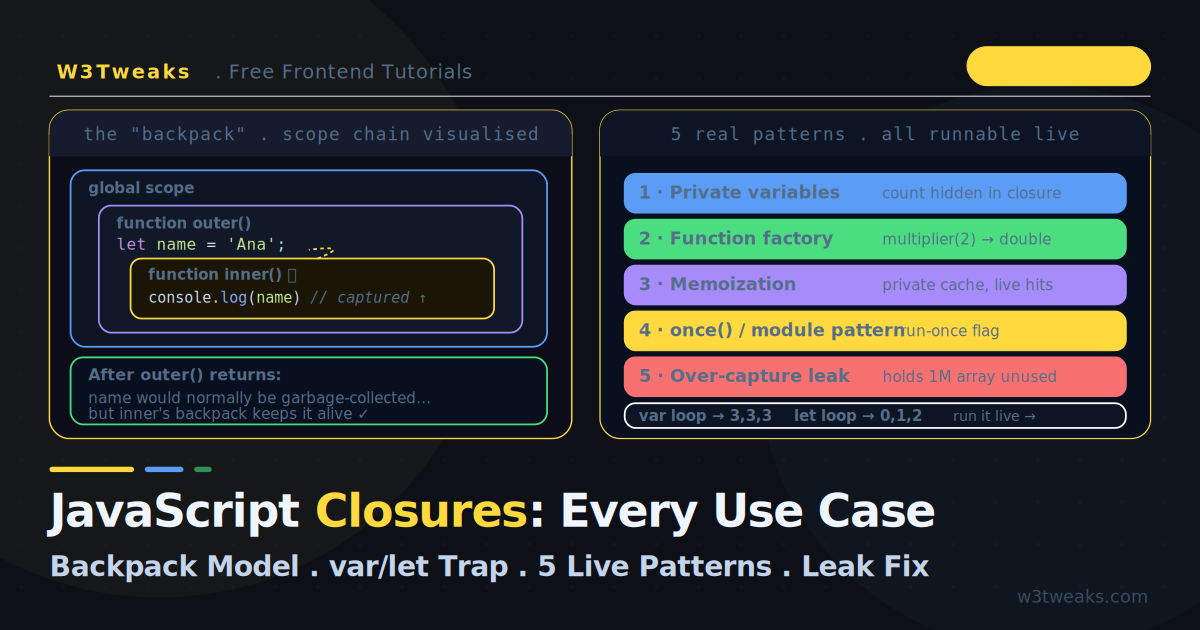
JavaScript closures are functions that remember the variables from the scope where they were defined — and they keep access to those variables even after that outer scope has finished executing. That’s the whole concept. The reason closures confuse people isn’t the definition; it’s that you can’t see the captured variables. They live in an invisible “backpack” the function carries around.
This guide makes them visible. The live demo below shows a closure holding onto a variable after its outer function has returned, lets you run the infamous var-vs-let loop trap and watch each closure’s captured value, and executes five real-world patterns you’ll actually use — memoization with a live cache, the module pattern, once(), and the over-capture memory leak with its fix.
Beyond the basics, we cover what most tutorials skip: #private class fields as the modern alternative for encapsulation, WeakMap memoization for object keys (and the JSON.stringify key footgun), stale closures in vanilla setInterval (not just React), the closure interview-question toolkit (debounce + curry + compose), closure over this (arrow vs regular vs .bind()), React Hooks ARE closures (why exhaustive-deps exists), and WeakRef + Symbol.dispose for resource cleanup.
Closures are the mechanism behind the memory leaks and the debounce/throttle patterns covered elsewhere — understanding them deeply makes those topics click.
Live Demo
Tab 1: watch a closure keep a variable alive. Tab 2: run the var/let/IIFE loop trap. Tab 3: execute five real closure patterns including the memory-leak trap.
What Is a Closure in JavaScript? The Backpack Mental Model
What is a closure in JavaScript? A closure is the combination of a function and the lexical scope it was declared in. When a function is created, it packs every variable from its surrounding scope into an invisible “backpack.” It carries that backpack wherever it goes, so it can read those variables long after the outer function has returned.
function outer() {
  let name = 'Ana';          // lives in outer's scope

  function inner() {
    console.log(name);       // inner packs `name` into its backpack
  }

  return inner;               // outer returns, but `name` survives
}

const greet = outer();        // outer() has finished executing
greet();                      // 'Ana' — inner still has `name`
Normally name would be garbage-collected when outer() returns. But because inner still references it, JavaScript keeps it alive. That is a closure: inner closed over name.
Why Closures Exist: Lexical Scope
Closures fall out of one rule — lexical scoping. A function can access variables from the place where it was written (defined), not where it is called. The scope is determined by position in the source code.
const x = 'global';

function a() {
  const x = 'inside a';
  return function b() {
    return x;          // looks UP the scope chain from where b was written
  };
}

const fn = a();
fn();                  // 'inside a' — not 'global'
// b was written inside a, so it sees a's x first
Each function’s backpack contains its own scope plus a reference to its parent’s scope, forming a scope chain all the way up to global. When you read a variable, JavaScript walks up this chain until it finds it.
var let Closure Loop — The Classic Bug
This is the most famous closure gotcha, asked in nearly every interview. The classic var vs let closure loop bug is the reason let was added to the language. The demo’s second tab runs all three versions live so you can see the captured values.
// ❌ var — prints 3, 3, 3
for (var i = 0; i < 3; i++) {
  setTimeout(() => console.log(i), 100);
}
// All three callbacks share ONE `i` (var is function-scoped).
// By the time they run, the loop is done and i === 3.
// ✅ let — prints 0, 1, 2
for (let i = 0; i < 3; i++) {
setTimeout(() => console.log(i), 100);
}
// let is block-scoped — each iteration gets a NEW binding of `i`.
// Each callback closes over its own copy.// ✅ IIFE — the pre-ES6 fix, prints 0, 1, 2
for (var i = 0; i < 3; i++) {
(function(captured) {
setTimeout(() => console.log(captured), 100);
})(i); // pass i in as an argument — each call gets its own `captured`
}Why var fails: function-scoped var creates a single binding shared by all iterations. All three closures point at the same i. Why let works: block-scoped let creates a fresh binding every iteration, so each closure captures a different i. This single difference is the entire bug — and the reason let exists.
Use Case 1: Private Variables JavaScript with Closures
A JavaScript closure counter is the canonical private-variable demo. Closures are JavaScript’s original way to create truly private state — variables that cannot be accessed or mutated from outside.
function createCounter() {
  let count = 0;             // private — no outside access

  return {
    increment() { count++; return count; },
    decrement() { count--; return count; },
    get value()  { return count; },
  };
}

const counter = createCounter();
counter.increment();   // 1
counter.increment();   // 2
counter.value;         // 2
counter.count;         // undefined — cannot touch `count` directly
count exists only inside the closure. The returned methods can read and modify it, but no outside code can reach it. This is encapsulation without classes or #private fields — but if you’re already using a class, see the next section.
Closure vs Class JavaScript — When to Use #private Fields
Closure vs class in JavaScript: both can hide state — here’s when to pick each. #private class fields shipped in Chrome 74 (April 2019) and are now Baseline across all evergreens. They’re the idiomatic answer when you already have a class.
// Closure-based private state
function createCounter() {
  let count = 0;
  return {
    increment: () => ++count,
    get value() { return count; },
  };
}

// Class with #private field — modern equivalent
class Counter {
  #count = 0;
  increment() { return ++this.#count; }
  get value() { return this.#count; }
}| Closure | #private class field | |
|---|---|---|
| Browser support | Universal | Baseline (Chrome 74+, Safari 14.1+, Firefox 90+) |
instanceof works | ❌ no class identity | ✅ |
| Multiple instances | ✅ each call creates one | ✅ |
| Memory per instance | One closure scope | One field per instance |
this semantics | None (you choose) | Standard class this |
| TypeScript inference | ✅ structural type from return | ✅ class type |
| Idiomatic for | Functional code, factories, decorators | OO code, instanceof checks |
Rule of thumb: use closures for factory functions, functional composition, and when you don’t need class identity. Use #private when you already have a class and want instance methods, instanceof, or inheritance.
Use Case 2: JavaScript Currying with Closures
JavaScript currying with closures lets you build specialized functions from general ones. A closure lets you “pre-fill” some arguments and return a specialised function.
function multiplier(factor) {
  return function(num) {
    return num * factor;     // `factor` captured from the outer call
  };
}

const double = multiplier(2);   // factor is permanently 2
const triple = multiplier(3);   // factor is permanently 3

double(5);   // 10
triple(5);   // 15
Each returned function carries its own factor in its backpack. double and triple are independent — they do not share state. This is the foundation of currying and partial application.
Use Case 3: Memoize JavaScript with Closures
Memoization in JavaScript uses a closure to cache results across calls so expensive computations run only once per input.
function memoize(fn) {
  const cache = new Map();    // private cache, survives across calls

  return function(...args) {
    const key = JSON.stringify(args);

    if (cache.has(key)) {
      return cache.get(key);  // cache hit — instant
    }

    const result = fn(...args);
    cache.set(key, result);   // store for next time
    return result;
  };
}

const slowSquare = (n) => {
  // imagine this is expensive
  return n * n;
};

const fastSquare = memoize(slowSquare);
fastSquare(4);   // computes → 16
fastSquare(4);   // cache hit → 16 (no recomputation)
The cache Map lives in the closure — it is private and persistent. Each call checks the cache before computing.
WeakMap Memoization for Object Keys
Map keys are strong references — if you memoize a function that takes objects, those objects are pinned in memory forever. WeakMap lets the garbage collector reclaim the entry when the object key has no other references:
function memoizeObject(fn) {
  const cache = new WeakMap();   // keys can be garbage-collected

  return function(obj) {
    if (cache.has(obj)) return cache.get(obj);
    const result = fn(obj);
    cache.set(obj, result);
    return result;
  };
}

const expensiveCompute = memoizeObject((user) => {
  return user.posts.reduce((sum, p) => sum + p.score, 0);
});
JSON.stringify Key Gotchas
The JSON.stringify(args) key from the first example has several footguns you should know about:
NaNbecomesnull—memoize(fn)(NaN)collides withmemoize(fn)(null)undefinedis dropped —memoize(fn)(1, undefined)keys to the same string asmemoize(fn)(1)- Functions become
undefined— function args aren’t serializable - Circular references throw —
JSON.stringify({a: someObj, b: someObj})works;JSON.stringify(circular)throws - Key order matters for objects —
{a:1, b:2}and{b:2, a:1}are different strings
For object args, use WeakMap. For mixed primitive args, use a tuple-style key like args.join('|') only when you control the inputs.
Use Case 4: Run Once (once)
A closure remembers whether a function has already run, so it never runs twice — useful for one-time initialisation.
function once(fn) {
  let called = false;
  let result;

  return function(...args) {
    if (!called) {
      called = true;
      result = fn.apply(this, args);  // run once, cache the result
    }
    return result;                     // always return the first result
  };
}

const initialize = once(() => {
  console.log('Setting up...');
  return { ready: true };
});

initialize();   // 'Setting up...' → { ready: true }
initialize();   // (no log) → { ready: true }  — never runs again
The called flag lives in the closure, persisting between calls. This is how libraries implement one-time setup and how lodash.once works.
Module Pattern JavaScript — The Legacy IIFE (and ES Modules)
Before ES modules, closures were how JavaScript created modules with public and private members. The module pattern in JavaScript predates ES modules but still appears in legacy code.
const bankAccount = (function() {
  // ── Private ──
  let balance = 0;
  function validate(amount) {
    return amount > 0;
  }

  // ── Public API ──
  return {
    deposit(amount) {
      if (validate(amount)) balance += amount;
      return balance;
    },
    withdraw(amount) {
      if (validate(amount) && amount <= balance) balance -= amount;
      return balance;
    },
    getBalance() { return balance; },
  };
})();  // IIFE runs immediately, returns the public object

bankAccount.deposit(100);    // 100
bankAccount.withdraw(30);    // 70
bankAccount.balance;         // undefined — private!
ES Module Rewrite (the Modern Way)
IIFE modules are legacy — useful to recognize in old codebases, but write ES modules in new code. The closure mechanics are identical; the syntax is just standardized:
// bank-account.js
let balance = 0;                              // private (module scope)
function validate(amount) { return amount > 0; } // private

export function deposit(amount) {
  if (validate(amount)) balance += amount;
  return balance;
}
export function withdraw(amount) {
  if (validate(amount) && amount <= balance) balance -= amount;
  return balance;
}
export function getBalance() { return balance; }
// main.js
import { deposit, withdraw, getBalance } from './bank-account.js';
deposit(100); // 100Module-level let and const are private to the module just like closure variables — only exported names are visible. Use ES modules for all new code. Recognize the IIFE pattern when you encounter it in pre-2015 codebases.
JavaScript Closure Memory Leak — Over-Capture
A JavaScript closure memory leak happens when a long-lived function holds a reference to a large object it doesn’t need. Closures capture the entire scope they were defined in — not just the variables they use. If a long-lived closure captures a large object it never touches, that object cannot be garbage-collected.
// ❌ LEAK — the closure captures largeData but never uses it
function createHandler() {
  const largeData = new Array(1_000_000).fill('*');  // ~8MB

  return function handler() {
    console.log('clicked');   // never touches largeData
    // ...but largeData is captured anyway and can't be freed
  };
}

button.onclick = createHandler();
// largeData stays in memory as long as the handler is attached
// ✅ FIX — extract what you need, let the rest be collected
function createHandler() {
const largeData = new Array(1_000_000).fill('*');
const summary = largeData.length; // keep only what you need
// largeData is now eligible for GC once this function returns
return function handler() {
console.log('clicked, size was', summary);
};
}The garbage collector cannot tell that handler never reads largeData — the reference exists, so the memory stays. The fix is to be explicit: pull out only the values you need before returning the closure. This is the memory leak pattern #4 in action.
WeakRef and using for Resource Cleanup
For resources that need explicit cleanup, WeakRef (ES2021) and the using declaration (Stage 4, broadly shipping 2025) give you tools the closure-extract trick can’t:
// WeakRef — hold a reference that doesn't prevent GC
const cache = new WeakRef(largeObject);
// Later: const obj = cache.deref(); if (obj) { ... }

// using declaration — auto-disposes a resource when the scope exits
function process() {
  using db = openDatabase();  // db[Symbol.dispose]() runs on scope exit
  return db.query('SELECT 1');
}  // db.close() automatically called here, even on throw
Use using when the resource has a clear lifetime (file handles, DB connections, locks). Use WeakRef when you want the GC to decide whether to keep an optional cache alive.
Stale Closure React — useEffect and setInterval
A stale closure in React happens when a useEffect callback captures an old render’s state. A closure captures variables by reference to their binding, but for state values that get reassigned across renders, the closure sees the value at definition time.
// A closure captures the variable from when it was created
function setup() {
  let message = 'first';

  const printer = () => console.log(message);

  printer();              // 'first'
  message = 'second';
  printer();              // 'second' — same binding, sees the update
}
In React, every render creates new closures over that render’s props/state snapshot. The classic stale closure happens when an event handler or effect captures a state value from a previous render:
// ❌ Stale closure — count is captured from the render when the effect ran
useEffect(() => {
  const id = setInterval(() => {
    console.log(count);   // always logs the count from the FIRST render
  }, 1000);
  return () => clearInterval(id);
}, []);  // empty deps — effect runs once, closure freezes `count`

// ✅ Fix — functional updater always sees current state
useEffect(() => {
  const id = setInterval(() => {
    setCount(c => c + 1);  // functional update — always current
  }, 1000);
  return () => clearInterval(id);
}, []);

// ✅ Or: use a ref for the latest value
const countRef = useRef(count);
useEffect(() => { countRef.current = count; });
useEffect(() => {
  const id = setInterval(() => {
    console.log(countRef.current);  // always the latest
  }, 1000);
  return () => clearInterval(id);
}, []);
JavaScript Closure async — setInterval and Polling Loops
The same stale-closure trap hits JavaScript closures and async/await in vanilla polling loops, not just React. If your poller captures a token at setup time, it’ll keep using the old token after refresh:
// ❌ Stale closure — token captured at setup, never updates
async function startPolling(token) {
  setInterval(async () => {
    const res = await fetch('/api/data', {
      headers: { Authorization: `Bearer ${token}` }
    });
    // ...stale token after refresh
  }, 5000);
}

// ✅ Fix — read the token from a shared ref-like object on each tick
const auth = { token: initialToken };

setInterval(async () => {
  const res = await fetch('/api/data', {
    headers: { Authorization: `Bearer ${auth.token}` }
  });
}, 5000);

// When you refresh:
async function refreshToken() {
  auth.token = await getNewToken();  // every future tick reads the new token
}
It’s the same bug as React: the callback closes over the value at definition time, not at call time. The fix is the same shape — read from a mutable container instead of capturing a primitive.
React Hooks ARE Closures (Why exhaustive-deps Exists)
The single highest-traffic modern angle on closures: React Hooks are built on closures. Every render creates new closures over that render’s state and props. The dependency array tells React when to rebuild the closure:
// On render 1: count = 0 → effect creates a closure over count = 0
// On render 2: count = 1 → effect creates a NEW closure over count = 1
// Without count in deps, render 2's effect doesn't re-run → stale closure
useEffect(() => {
  console.log(count);  // reads count from THIS render's closure
}, [count]);  // ← dependency makes React rebuild the closure when count changes
Forget a dep → React reuses the old closure → you keep reading old data. The react-hooks/exhaustive-deps ESLint rule exists specifically to catch this.
Escape hatches when you genuinely want a value that survives renders without rebuilding the closure:
useRef—ref.currentis the same object across renders; mutate it without re-renderinguseCallback(fn, [deps])— stable function identity when deps haven’t changeduseMemo(() => value, [deps])— stable value identity
Once you internalize “every render is a new closure,” the React Hooks rules stop feeling arbitrary.
Closure Over this — Arrow vs Regular vs .bind()
The single most-Googled JS problem is fundamentally a closure question: closure over this. Arrow functions close over this lexically; regular functions don’t.
class Timer {
  constructor() {
    this.seconds = 0;
  }

  // ❌ Regular function — `this` is dynamic, becomes undefined / window in setTimeout
  startBroken() {
    setTimeout(function() {
      this.seconds++;   // TypeError: undefined.seconds (in strict mode)
    }, 1000);
  }

  // ✅ Arrow function — closes over `this` lexically from the enclosing scope
  startArrow() {
    setTimeout(() => {
      this.seconds++;   // ✓ this is the Timer instance
    }, 1000);
  }

  // ✅ .bind(this) — pre-arrow fix, still works
  startBind() {
    setTimeout(function() {
      this.seconds++;
    }.bind(this), 1000);
  }
}
Performance: arrow functions and .bind() are equivalent in modern V8 for the lexical this use case. Use arrow for readability; .bind() only when you need to keep the function detachable (e.g., adding/removing event listeners).
JavaScript Closure Interview Questions
Three JavaScript closure interview questions you’ll actually be asked: implement debounce, curry, and compose. Each demonstrates a distinct closure pattern.
Implement debounce
function debounce(fn, delay) {
  let timeoutId;    // captured in the closure across calls

  return function(...args) {
    clearTimeout(timeoutId);
    timeoutId = setTimeout(() => fn.apply(this, args), delay);
  };
}

const search = debounce((query) => console.log('search:', query), 300);
search('a'); search('ap'); search('app');   // only 'app' fires after 300ms
Implement curry
function curry(fn) {
  return function curried(...args) {
    if (args.length >= fn.length) {
      return fn.apply(this, args);   // all args provided — call
    }
    // not enough args — return a closure that captures collected args
    return (...more) => curried.apply(this, [...args, ...more]);
  };
}

const add = curry((a, b, c) => a + b + c);
add(1)(2)(3);      // 6
add(1, 2)(3);      // 6
add(1)(2, 3);      // 6
Implement compose and pipe
// compose: f(g(h(x))) — right-to-left
const compose = (...fns) => (x) => fns.reduceRight((acc, fn) => fn(acc), x);

// pipe: h(g(f(x))) — left-to-right (Lodash flow / fp pipe)
const pipe = (...fns) => (x) => fns.reduce((acc, fn) => fn(acc), x);

const trim       = (s) => s.trim();
const lowercase  = (s) => s.toLowerCase();
const exclaim    = (s) => s + '!';

const shout = pipe(trim, lowercase, exclaim);
shout('  HELLO  ');   // 'hello!'
Each closure captures the fns array and applies it to whatever you call the result with. This is the foundation of functional composition.
Key Takeaways
- A closure is a function bundled with the variables from where it was defined — it keeps access to them even after the outer function returns
- Closures exist because of lexical scoping: a function sees variables from where it was written, walking up the scope chain
- The var-vs-let loop trap prints 3,3,3 with
var(one shared binding) but 0,1,2 withlet(a fresh binding per iteration). This single difference is whyletexists - Closures enable private variables — state outside code cannot read or mutate.
#privateclass fields (Baseline since 2022) are the modern alternative when you have a class - Function factories (currying) pre-fill arguments and return specialised functions, each carrying its own captured values
- Memoization uses a closure-held cache. Use
Mapfor primitive keys,WeakMapfor object keys (lets the GC reclaim entries). Watch theJSON.stringifykey footguns (NaN, undefined, functions, circular refs) - The module pattern (IIFE + returned object) predates ES modules. Write ES modules in new code — module-level
let/constare private just like closure variables - Closures capture the entire scope, not just variables they use — a closure holding a large unused object causes a memory leak; extract only what you need
WeakRef(ES2021) and theusingdeclaration (Stage 4) give you explicit cleanup options the extract trick can’t- Stale closures happen in React
useEffectAND in vanillasetIntervalpolling loops — both capture a value at setup and never see updates. Fix with functional updaters, refs, or shared mutable containers - React Hooks ARE closures — every render creates new closures over that render’s state. The dependency array tells React when to rebuild. The
exhaustive-depsESLint rule exists to prevent stale-closure bugs - Closure over
this— arrow functions close lexically; regular functions don’t. Use arrow for callbacks that need the surroundingthis;.bind(this)is the pre-arrow fix - Closure interview toolkit:
debounce(capturedtimeoutId),curry(captured args),compose/pipe(capturedfnsarray)
FAQ
What is a closure in simple terms?
A closure is a function that remembers the variables from the place where it was created, even after that place has finished running. Think of it as a backpack: when a function is defined, it packs up all the variables it can see from its surrounding scope and carries them wherever it goes. So an inner function returned from an outer function can still read the outer function’s variables long after the outer function has returned.
Why does my loop with var print the same number every time?
Because var is function-scoped, not block-scoped — the entire loop shares a single i variable. Every callback you create in the loop closes over that same i, and by the time the callbacks actually run (after a setTimeout, for example), the loop has finished and i holds its final value. Fix it by using let instead of var, which creates a new block-scoped binding of i for each iteration, so each closure captures its own copy.
Are closures bad for performance or memory?
Closures themselves are cheap and fundamental to JavaScript — you cannot avoid them. The risk is memory: a closure keeps every variable in its scope alive as long as the closure exists. If a long-lived closure (an event handler, a timer callback) captures a large object, that object cannot be garbage-collected even if the closure never uses it. The fix is to capture only what you need — extract the specific values into smaller variables before returning the closure. For optional caches that should be reclaimable, use WeakRef.
What is the difference between a closure and a regular function?
Every function in JavaScript technically forms a closure — the term specifically describes the function plus its captured lexical environment. A “regular function” that uses only its own parameters and local variables has an empty or unused backpack. A function becomes a meaningful closure when it references variables from an enclosing scope and outlives that scope, keeping those variables alive. So the distinction is about whether the function captures and depends on outer-scope variables.
How do closures create private variables?
You define a variable inside a function and return an inner function (or object of functions) that uses it, without returning the variable itself. The variable lives only in the closure’s scope — outside code has no reference to it and cannot read or change it directly. The returned functions become the only interface to that private state. This is how the module pattern and factory functions implement encapsulation without classes.
What is a stale closure in React?
A stale closure happens when a function captures a state or prop value from a particular render and then runs later, after that value has changed — so it sees the old, “stale” value. The classic case is a setInterval inside a useEffect with an empty dependency array: the callback closes over the state from the first render and never sees updates. Fix it with the functional updater form of setState, a useRef that always holds the current value, or by including the value in the dependency array. The same trap exists in vanilla JavaScript — any polling loop that captures a token at setup will keep using the stale token after refresh.
When should I use closures vs #private class fields?
Both hide state. Use closures for factory functions, functional composition, and code that doesn’t need class identity. Use #private class fields (Baseline since 2022, Chrome 74+, Safari 14.1+, Firefox 90+) when you already have a class and want instance methods, instanceof checks, or inheritance. The class-with-#private form is more idiomatic in OO code; the closure form is more idiomatic in functional code. Both have universal modern support — pick whichever matches your codebase’s style.
Can I memoize a function that takes an object?
Yes, but don’t use Map — Map keys are strong references, so memoized object keys are pinned in memory forever. Use WeakMap for object keys: const cache = new WeakMap(). When the object key has no other references, the GC reclaims the entry automatically. If you must use Map (e.g., for complex tuple keys), watch out for JSON.stringify footguns: NaN becomes null, undefined is dropped, functions become undefined, and circular references throw. For mixed primitive args you control, prefer a tuple-style key like args.join('|').
Why isn’t my variable updating in setInterval?
You’ve hit a stale closure. Your setInterval callback captured the variable at setup time and is still using that snapshot — it never sees later updates. Three fixes: (1) use a functional updater if it’s React state — setX(prev => prev + 1) always reads the latest. (2) Use a mutable container like an object or useRef — const ref = { value: initial }, then read ref.value on each tick (because objects are captured by reference, mutations are visible). (3) Recreate the interval every time the value changes — useEffect(() => { setInterval(...) }, [value]). The bug isn’t setInterval itself; it’s that primitive values are captured by value, not by reference.