TL;DR
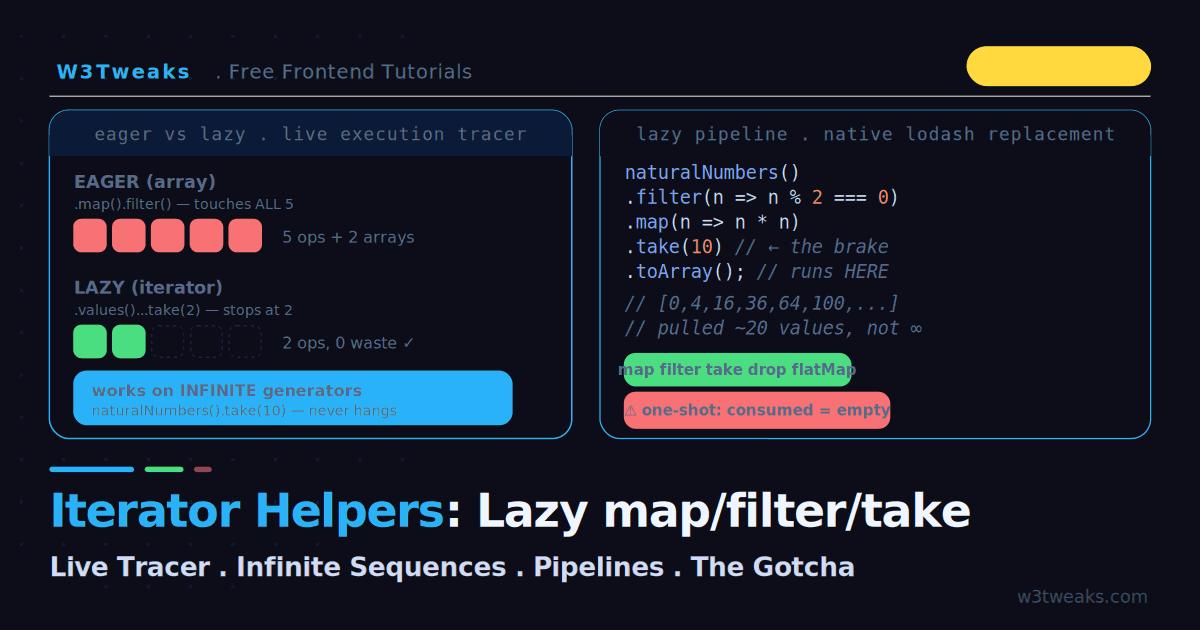
Iterator helpers add lazy .map() / .filter() / .take() / .drop() / .flatMap() / .reduce() / .toArray() to the iterator protocol. Values flow through the chain one at a time, only when consumed — the opposite of array methods that build a throwaway intermediate at every step.
// Eager (array) — touches all 5, builds 2 arrays
[1,2,3,4,5].map(n => n*2).filter(n => n>5);

// Lazy (iterator) — pulls one at a time, stops after 2
[1,2,3,4,5].values()
  .map(n => n*2)
  .filter(n => n>5)
  .take(2)          // the brake
  .toArray();       // the trigger — runs the chain here
The killer property: take(n) works on infinite generators. fibonacci().take(10).toArray() returns the first 10 without hanging the tab — impossible with array methods.
Watch out — iterators are single-use. Once a terminal method (toArray, reduce, forEach, some) consumes an iterator, it’s exhausted. Second call returns []. Fix: materialize once with .toArray() and reuse the array, or do both passes in one reduce().
Get an iterator: .values() on arrays, Iterator.from(iterable) on Sets/Maps/strings/NodeLists, or use a generator directly.
Support: ES2025, native in Node 22+, Deno, Bun, and current Chrome/Firefox/Safari — zero KB, replacing the parts of lodash/ramda/iter-tools you used for lazy sequences.
The one gap: the sync helpers don’t work on async generators. Async pipelines still use for await loops until the async iterator helpers proposal (Stage 2) ships.
→ Try it in the live demo — run the same chain eager vs lazy with an operation counter and step-by-step trace, run map/filter/take on Fibonacci and primes without crashing, and hit the one-shot exhaustion trap live. Deep dive below for streaming fetch response bodies, the async gap workaround, TypeScript types, Iterator.from() vs .values(), and real bundle-size numbers vs lodash.
Chain .map().filter() on an array and JavaScript does all the work immediately: it runs map across every element, builds a new array, then runs filter across all of those, building another array — even if you only wanted the first two results. For a ten-item array nobody notices. For a million items, you just allocated two million-element arrays to throw most of them away. And on an infinite sequence, the tab hangs forever.
Iterator helpers fix this. They add .map(), .filter(), .take(), .drop(), .flatMap(), .reduce(), and more directly to the iterator protocol — and they are lazy, computing values one at a time only as you consume them. That single property is what lets you run map and filter on an infinite generator and pull just the first ten results without crashing. Iterator helpers reached Stage 4 in late 2024, shipped in ES2025, and are natively available in Node 22+, Deno, Bun, and current Chrome, Firefox, and Safari. This guide runs everything live: an execution tracer showing lazy versus eager, an infinite-sequence playground, a pipeline builder, and the one-shot exhaustion trap.
This is the second tutorial in our Modern JavaScript Features series. Iterator helpers pair naturally with generators and the event loop, and the async gap they leave is filled by Array.fromAsync, covered next.
Live Demo
Tab 1: run the same chain eager (array) vs lazy (iterator) and watch each operation fire — count how many elements each touches. Tab 2: run map/filter/take on an infinite generator without crashing. Tab 3: hit the one-shot exhaustion trap and see the fix.
Eager vs Lazy: The Core Difference
Array methods are eager — each one runs to completion and returns a new array before the next begins:
const result = [1, 2, 3, 4, 5]
  .map(n => { console.log(`map ${n}`); return n * 2; })
  .filter(n => { console.log(`filter ${n}`); return n > 5; });

// Logs: map 1, map 2, map 3, map 4, map 5,
//       filter 2, filter 4, filter 6, filter 8, filter 10
// map finished ALL five before filter started
Iterator helpers are lazy — nothing runs until you consume the result, and then values flow through the whole chain one at a time:
const result = [1, 2, 3, 4, 5]
  .values()                                    // → an iterator
  .map(n => { console.log(`map ${n}`); return n * 2; })
  .filter(n => { console.log(`filter ${n}`); return n > 5; })
  .take(2)                                      // only want the first 2
  .toArray();                                   // NOW it runs

// Logs: map 1, filter 2, map 2, filter 4, map 3, filter 6, map 4, filter 8
// Stops as soon as 2 results pass — never touches element 5
Two things changed. First, .values() turns the array into an iterator so the helper methods apply. Second, the values are pulled through the pipeline one at a time: element 1 goes through map and filter before element 2 starts. When take(2) has its two results, the whole thing stops — element 5 is never processed. The demo’s first tab shows both versions running with a live operation counter so you can see eager touch all five and lazy stop early.
Getting an Iterator
Helper methods live on the iterator prototype, not on arrays, so you need an iterator first. Three common ways:
// 1. From an array (or any built-in iterable) — .values()
[1, 2, 3].values().map(x => x * 2).toArray();

// 2. From a Set, Map, string, NodeList — Iterator.from()
Iterator.from(new Set([1, 2, 3])).map(x => x * 2).toArray();

// 3. From a generator — it's already an iterator
function* nums() { yield 1; yield 2; yield 3; }
nums().map(x => x * 2).toArray();
Iterator.from() is the general adapter: give it anything iterable and it hands back an iterator with all the helpers attached.
Iterator.from() vs .values() — Which to Use When
Both work on built-in iterables — but the choice matters most for Map, where the two options iterate different things:
| Source | .values() yields | Iterator.from() yields |
|---|---|---|
[1, 2, 3] (Array) | 1, 2, 3 | 1, 2, 3 |
new Set([1, 2, 3]) | 1, 2, 3 | 1, 2, 3 |
new Map([['a', 1], ['b', 2]]) | 1, 2 (values only) | ['a', 1], ['b', 2] (entries) |
'abc' (string) | 'a', 'b', 'c' | 'a', 'b', 'c' |
document.querySelectorAll('p') | Not a method — use Iterator.from() | Yields each element |
Rule of thumb: use .values() for the “just the data” case (array.values(), map.values(), set.values()); use Iterator.from() for adapters — DOM NodeLists, third-party iterables, custom iterator objects, and any case where you want the default iterator (which for Map is entries, giving you [key, value] pairs).
For maps specifically:
myMap.values()→ the valuesmyMap.keys()→ the keysmyMap.entries()orIterator.from(myMap)→[key, value]pairs
The Helper Methods
The lazy methods return a new iterator (so they chain without doing work):
.map(fn)— transform each value.filter(fn)— keep values wherefnreturns truthy.take(n)— yield at most the firstnvalues, then stop.drop(n)— skip the firstnvalues, yield the rest.flatMap(fn)— map each value to an iterable and flatten one level
The terminal methods consume the iterator and produce a final value (this is what actually triggers the work):
.toArray()— collect everything into an array.reduce(fn, init)— fold to a single value.forEach(fn)— run a side effect for each value.some(fn)/.every(fn)/.find(fn)— short-circuiting checks
A pipeline is lazy helpers ending in one terminal method:
const names = users
  .values()
  .filter(u => u.active)
  .map(u => u.name)
  .take(10)
  .toArray();          // ← terminal: the pipeline runs here
Nothing between .values() and .toArray() executed until toArray() pulled the values through.
The Superpower: Infinite Sequences
Because helpers are lazy, they work on iterators that never end. This is impossible with array methods — Array.prototype.filter would try to process infinity and hang the tab.
function* naturalNumbers() {
  let i = 0;
  while (true) yield i++;      // infinite!
}

const firstTenEvenSquares = naturalNumbers()
  .filter(n => n % 2 === 0)
  .map(n => n * n)
  .take(10)
  .toArray();

// [0, 4, 16, 36, 64, 100, 144, 196, 256, 324]
// Only pulled ~20 values from the generator, not infinity
take(10) is the brake: it stops pulling from the generator once it has ten results. The generator produces values on demand, the pipeline transforms them one at a time, and the whole thing halts exactly when satisfied. The demo’s second tab lets you run this against Fibonacci and naturals with a take slider and shows the exact number of values pulled from the generator.
Fibonacci in One Chain
function* fibonacci() {
  let a = 0, b = 1;
  while (true) { yield a; [a, b] = [b, a + b]; }
}

fibonacci().take(10).toArray();
// [0, 1, 1, 2, 3, 5, 8, 13, 21, 34]
Streaming a fetch Response Body
The real-world case that hits every dev: processing a large HTTP response line by line without loading the whole thing into memory. response.body is a ReadableStream, and Node’s for await protocol iterates it — chain that with an iterator-helpers-shaped transform and you have a memory-safe stream pipeline:
// Stream a large text response, process line by line, stop after 100 matches
async function streamMatches(url, pattern, max = 100) {
  const response = await fetch(url);
  const reader = response.body
    .pipeThrough(new TextDecoderStream())
    .pipeThrough(new TransformStream({
      transform(chunk, controller) {
        // Split by newlines — the last piece may be a partial line
        this.buffer = (this.buffer ?? '') + chunk;
        const lines = this.buffer.split('\n');
        this.buffer = lines.pop();
        for (const line of lines) controller.enqueue(line);
      },
      flush(controller) {
        if (this.buffer) controller.enqueue(this.buffer);
      }
    }));

  const matches = [];
  for await (const line of reader) {                    // async iteration
    if (pattern.test(line)) {
      matches.push(line);
      if (matches.length >= max) break;                 // manual "take"
    }
  }
  return matches;
}
The for await loop is the current async equivalent of .take(max) — you manually break when you have enough. Log-ingestion platforms like Datadog, Sentry, LogRocket, and Grafana Loki stream event data this way; database drivers like Prisma, Drizzle, and Kysely return cursor-backed async iterables from stream() methods; search APIs from Algolia, Meilisearch, Typesense, and Elastic paginate through result sets the same way.
The gap: the sync iterator helpers don’t work on async generators. There’s no .map() or .filter() on async function*. The async iterator helpers proposal is at Stage 2 as of mid-2026 — when it ships, you’ll be able to write stream.filter(...).map(...).take(...) directly on async iterables. Until then, for await loops with manual break and inline conditionals are the pattern.
The One-Shot Exhaustion Gotcha
Here is the trap almost no tutorial mentions: most iterators are single-use. Once consumed, they are exhausted — walking them again yields nothing.
const iter = [1, 2, 3, 4, 5].values().map(n => n * 2);

const first = iter.toArray();    // [2, 4, 6, 8, 10]
const second = iter.toArray();   // [] — EMPTY! the iterator is spent
This bites when your logic needs to walk the data twice — say, count the items and collect them:
// ❌ Broken — the second pass gets nothing
const pipeline = users.values().filter(u => u.active);
const count = pipeline.toArray().length;   // works
const names = pipeline.map(u => u.name).toArray();   // [] — already consumed
Two fixes:
// ✅ Fix 1 — materialize once, then reuse the array
const active = users.values().filter(u => u.active).toArray();
const count = active.length;
const names = active.map(u => u.name);

// ✅ Fix 2 — do both in a single pass with reduce
const { count, names } = users.values()
  .filter(u => u.active)
  .reduce((acc, u) => {
    acc.count++;
    acc.names.push(u.name);
    return acc;
  }, { count: 0, names: [] });
Generators and Iterator.from(generator) are especially single-use — there is no rewinding them. The demo’s third tab lets you consume an iterator twice and watch the second call return empty, then apply the fix.
Bundle Size vs lodash — Real Numbers
The moment iterator helpers ship natively in your target runtime, you can delete a lot of lodash:
| Approach | Bundle cost | Lazy? | Runs on | Notes |
|---|---|---|---|---|
| Native iterator helpers | 0 KB | ✅ | Node 22+, Chrome, Firefox, Safari, Deno, Bun | Ship as-is |
lodash/fp full import | ~72 KB min+gz | Only via _.chain(...).value() | Everywhere | The classic “why is my bundle huge” import |
lodash-es tree-shaken (map, filter, take) | ~4-8 KB gz | ❌ eager — no lazy chain w/o proxy | Everywhere | Best-case lodash bundle |
lodash/fp tree-shaken + _.flow() | ~10-15 KB gz | Semi-lazy via _.flow composition | Everywhere | Still not real laziness |
ramda tree-shaken | ~15-20 KB gz | ❌ eager | Everywhere | Functional-programming API |
iter-tools | ~5-12 KB gz depending on selection | ✅ | Everywhere | The library iterator-helpers replaces |
Native wins the moment your target runtime supports it. For a marketing site on Vercel/Netlify targeting evergreen browsers, that’s already true — drop lodash. For an app supporting older Node versions or iOS < 17.4, keep lodash-es and revisit next quarter. The migration path is one-way: iterator-helper code is straightforwardly writable in lodash-es (and vice versa), so the switch is a low-risk sweep when your baseline moves.
TypeScript Types + Node 22 Shipping Status
Native iterator helpers land in TypeScript 5.6+‘s lib.es2025.iterator.d.ts. The two types you’ll reach for:
IteratorObject<T>— the iterator-with-helpers protocol; return type of.values()andIterator.from()Iterator<T>— the plain iterator interface (predates helpers); still valid, still what generators return
// Explicitly typed lazy pipeline
function activeUserNames(users: User[]): string[] {
  return users.values()
    .filter((u): u is ActiveUser => u.active)      // type predicate narrows
    .map(u => u.name)
    .take(100)
    .toArray();
}

// Generic helper for consuming any iterable
function firstMatching<T>(
  source: Iterable<T>,
  pred: (v: T) => boolean,
  max: number
): T[] {
  return Iterator.from(source)
    .filter(pred)
    .take(max)
    .toArray();
}
Runtime status as of mid-2026:
| Runtime | Native iterator helpers |
|---|---|
| Node.js 22 LTS | ✅ Native (no flag needed since 22.0) |
| Node.js 24 LTS | ✅ Native |
| Deno 2.0+ | ✅ Native |
| Bun 1.1+ | ✅ Native |
| Chrome / Edge 122+ | ✅ Native |
| Firefox 131+ | ✅ Native |
| Safari 18.4+ | ✅ Native |
| Cloudflare Workers | ✅ Native (V8 tracks Chrome) |
| Vercel Edge Functions | ✅ Native |
| Netlify Edge Functions | ✅ Native |
@types/node includes the iterator-helper types automatically from Node 22 onward. On older Node targets, the core-js polyfill (import 'core-js/proposals/iterator-helpers') plus explicit @types/core-js gets you running.
When to Use Which
Iterator helpers are not a blanket replacement for array methods. Reach for them when:
- You are working with large datasets and want to avoid intermediate arrays
- You only need part of the result (an early
take,find, orsome) - The source is a generator, stream, or infinite sequence
- You are chaining several operations where an early
filterdiscards most data
Stick with array methods when the data is small, already an array, and you need the array back anyway — the eager version is simpler and the performance difference is negligible. Iterator helpers shine at scale and with lazy sources, not on a five-item array.
They Replace Most lodash — But Not Everything
For lazy sequences, iterator helpers cover what you used to reach for lodash/fp, ramda, or iter-tools to do — natively, with zero bundle cost. Still worth a library dependency:
- Deep object utilities —
_.get(obj, 'a.b.c', fallback),_.set(),_.merge(),_.cloneDeep()— no native equivalent - Debounce / throttle —
_.debounce()/_.throttle()are still the shortest path - Business-day / date math — use
date-fnsor Temporal (covered separately) - Async pipelines — the sync helpers don’t work on async generators;
for awaitloops orp-map/iter-toolsasyncFilterstill needed
Backend frameworks like NestJS, Fastify, and Hono running on Node 22+ can drop lodash for its iteration parts today. Testing frameworks — Vitest, Jest, Playwright, Cypress — all support the native helpers in their test-runner Node environment out of the box. CI platforms — GitHub Actions, GitLab CI, CircleCI — run Node 22 by default on current standard images, so your CI-only scripts inherit the same access.
Key Takeaways
- Iterator helpers add
.map(),.filter(),.take(),.drop(),.flatMap(), and terminals like.toArray()/.reduce()directly to the iterator protocol — shipped in ES2025, native in Node 22+, Deno, Bun, and current browsers - Array methods are eager (each runs fully, building intermediate arrays); iterator helpers are lazy (values flow one at a time, only when consumed)
- Get an iterator with
.values()(arrays),Iterator.from()(any iterable), or a generator (already one); forMap,.values()gives values whileIterator.from()gives[key, value]entries - Lazy helpers return a new iterator and do no work; terminal methods (
toArray,reduce,forEach,some) trigger execution take(n)acts as a brake, so map/filter/take runs on infinite generators without hanging — impossible with array methods- Laziness means a pipeline processes only what you consume —
take(2)aftermapnever touches later elements - Most iterators are single-use — consuming one exhausts it, and walking it again yields nothing
- Fix double-walk needs by materializing once with
.toArray()or doing both passes in a single.reduce() - Use iterator helpers for large data, partial results, and generator/stream sources; stick with array methods for small in-memory arrays
- Streaming a
fetchresponse body: piperesponse.bodythroughTextDecoderStreamand a line-splittingTransformStream, thenfor awaitwith abreakfor the “take” — the current pattern until async iterator helpers ship - The async gap: sync helpers don’t work on
async function*; the async iterator helpers proposal is at Stage 2 — for now usefor awaitloops withbreak - Bundle cost: 0 KB native beats lodash-es tree-shaken (~4-8 KB),
lodash/fp(~72 KB min+gz), and ramda (~15-20 KB); drop lodash for iteration once your target runtime supports it - TypeScript ships types in
lib.es2025.iterator.d.ts(TS 5.6+);@types/nodecovers Node 22+; type predicates work naturally in.filter() - They natively replace most lazy
lodash/ramdausage, but keep a utility library for deep-object utilities, debounce/throttle, and async pipelines
FAQ
What are JavaScript iterator helpers?
Iterator helpers are methods — map, filter, take, drop, flatMap, reduce, forEach, some, every, find, and toArray — added directly to the iterator prototype in ES2025. Unlike array methods, they are lazy: they return new iterators that compute values one at a time only when consumed, instead of processing the whole collection immediately. This makes them memory-efficient for large datasets and able to work on infinite sequences.
How are iterator helpers different from array methods?
Array methods are eager — each method processes every element and builds a new intermediate array before the next method runs. Iterator helpers are lazy — values are pulled through the entire chain one at a time, and nothing executes until a terminal method like toArray() consumes the result. This avoids intermediate arrays, lets an early take() stop work early, and allows processing of infinite or streaming sources that would hang array methods.
How do I use iterator helpers on an array?
Call .values() on the array to get an iterator, then chain the helpers: [1,2,3].values().map(x => x*2).filter(x => x>2).toArray(). The .values() step is required because the helper methods live on the iterator prototype, not on arrays. End the chain with a terminal method such as toArray(), reduce(), or forEach() to actually run it. You can also use Iterator.from() for Sets, Maps, strings, and other iterables.
Can iterator helpers work with infinite sequences?
Yes — this is their standout feature. Because they are lazy, you can run map, filter, and take on an infinite generator and it will only pull as many values as needed. For example, naturalNumbers().filter(n => n % 2 === 0).take(10).toArray() returns the first ten even numbers and stops, never trying to process infinity. Array methods cannot do this; Array.prototype.filter on an infinite sequence hangs the tab.
Why does my iterator return an empty array the second time?
Because iterators are single-use. Once you consume an iterator with a terminal method like toArray(), it is exhausted, and calling toArray() again returns an empty array. If you need to walk the data twice, either materialize it once into an array with toArray() and reuse that array, or perform both operations in a single pass using reduce(). Generators and Iterator.from(generator) cannot be rewound.
Do iterator helpers replace lodash?
For synchronous lazy sequences, largely yes. Iterator helpers natively provide the lazy map, filter, take, and related operations you previously needed lodash/fp, ramda, or iter-tools for, with zero bundle cost. Keep lodash for deep-object utilities (_.get, _.merge, _.cloneDeep), debounce/throttle, and async pipelines — none of those have native equivalents yet. For iteration alone, drop lodash the moment your target runtime supports the helpers.
Do iterator helpers work with async generators?
Not yet. The sync iterator helpers don’t touch async generators — there’s no .map() or .filter() on async function*. The async iterator helpers proposal is at Stage 2 as of mid-2026 and will add the same methods to async iterables when it ships. Until then, use for await loops with break for the “take” pattern, and libraries like iter-tools’s asyncFilter/asyncMap if you need async pipeline composition today.
How do I stream a fetch response body with iterator helpers?
Pipe response.body through TextDecoderStream for text and a TransformStream that splits on newlines: response.body.pipeThrough(new TextDecoderStream()).pipeThrough(lineSplitter). Then use a for await loop to iterate lines lazily and break when you have enough matches — the equivalent of .take(n) for async streams. This is the pattern log-ingestion platforms and cursor-based database drivers use to process large payloads without loading them into memory.
What’s the bundle-size difference vs lodash?
Native iterator helpers are 0 KB — built into the runtime. Full lodash/fp is ~72 KB min+gz; lodash-es tree-shaken (map, filter, take) is ~4-8 KB but lacks true lazy chaining without proxy tricks; ramda tree-shaken is ~15-20 KB but eager; iter-tools (the library iterator helpers replaces most directly) is 5-12 KB gzipped. Native wins the moment your target runtime supports it — Node 22+, Chrome/Firefox/Safari current stable, Deno, Bun, Cloudflare Workers, Vercel Edge, Netlify Edge.
What browsers and runtimes support iterator helpers?
Native support in mid-2026: Node.js 22 LTS+, Node 24 LTS, Deno 2.0+, Bun 1.1+, Chrome/Edge 122+, Firefox 131+, Safari 18.4+, Cloudflare Workers, Vercel Edge Functions, Netlify Edge Functions. @types/node includes the TypeScript types automatically for Node 22+. For older targets, the core-js polyfill (import 'core-js/proposals/iterator-helpers') provides the full API.