TL;DR
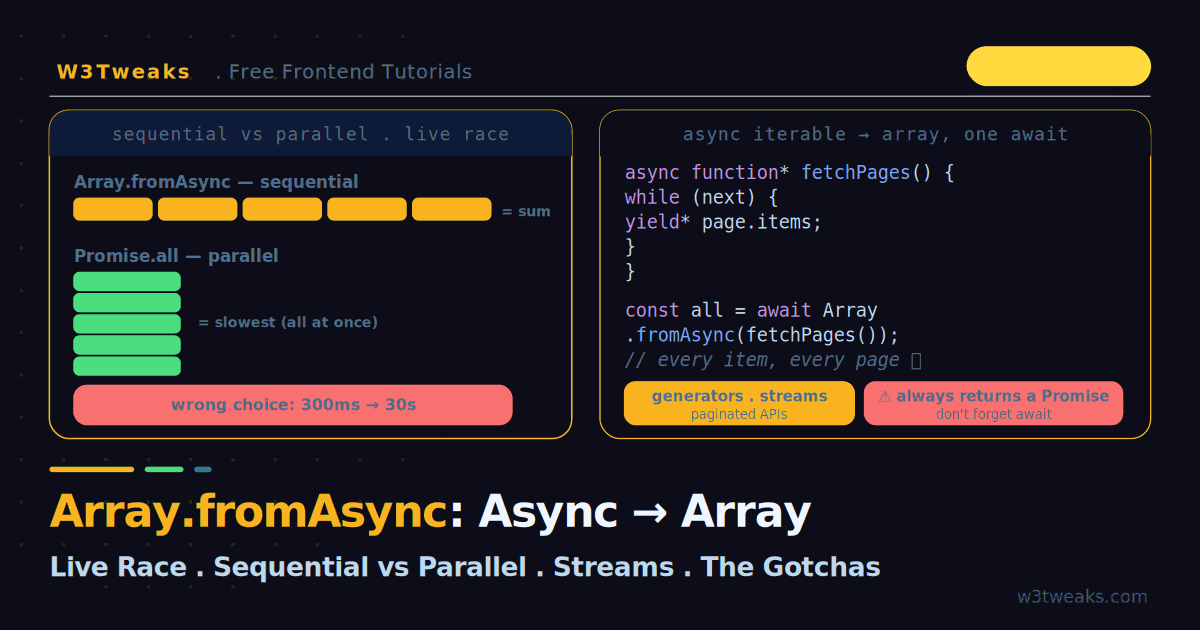
Array.fromAsync turns an async iterable — an async generator, a ReadableStream, a paginated API, an OpenAI/Anthropic streaming response — into a Promise that resolves to an array. Always await it. It awaits each value sequentially and lazily: perfect for rate-limited APIs and streams; catastrophically slow for 100 independent network calls (Promise.all finishes those in the time of the slowest one; fromAsync runs their sum).
const items = await Array.fromAsync(fetchAllPages('/api/products'));
// Or with a mapFn (also awaited):
const users = await Array.fromAsync(ids, async id => (await fetch(`/api/users/${id}`)).json());
Watch out: forgetting await gives you Promise<T[]> instead of the array; a subgridded-axis-style all-or-nothing rejection stops at the first failure; unbounded streams blow memory (use a bounded-concurrency helper); passing a lone Promise.resolve() throws TypeError. Runtime support today: Node 22+, Bun 1.1+, Deno 1.40+, all current browsers, Vercel Edge, Cloudflare Workers, Deno Deploy, AWS Lambda Node 22.
→ Try it in the live demo — race sequential vs parallel with a live timeline, stream a paginated API, and watch a rate-limited endpoint 429 under parallel then survive under sequential.
You have an async generator, a stream, or a paginated API that yields results in batches, and you want it all in one array. Before ES2026 you wrote a manual for await...of loop, pushing each value as it arrived. Array.fromAsync collapses that into a single line — but it is not the Promise.all you might reach for by reflex. It awaits each value sequentially, one at a time, and pulls lazily, never retrieving the next value until the current one settles.
That behaviour is a feature, not a limitation. Sequential-and-lazy is exactly what you want for a rate-limited API, a memory-constrained stream, or an async generator that produces values over time. It is exactly what you do not want for 100 independent network calls, where switching from Promise.all to Array.fromAsync can turn a 300ms job into a 30-second one. This guide makes the difference visible with a live race demo, shows how to consume generators and streams (including the response streams from OpenAI, Anthropic, and the Vercel AI SDK), covers mapFn, AbortController cancellation, bounded-concurrency batching, TypeScript typing, integration with modern data-fetching libraries, and runtime support across Node 22, Bun, Deno, and every major serverless/edge platform.
This is the third tutorial in our Modern JavaScript Features series. Array.fromAsync fills the async gap left by the synchronous iterator helpers, and its parallel counterpart is covered in depth in the Promise combinators guide.
Live Demo
Tab 1: race Array.fromAsync (sequential) against Promise.all (parallel) with a live timeline and total-time clock. Tab 2: consume an async generator / paginated API into an array. Tab 3: the rate-limit trap and the forgotten-await gotcha.
The Basics
Array.fromAsync takes an async iterable and returns a Promise that resolves to an array. Always await it:
async function* generateNumbers() {
  for (let i = 1; i <= 3; i++) {
    await new Promise(r => setTimeout(r, 100));   // simulate async work
    yield i;
  }
}

const result = await Array.fromAsync(generateNumbers());
console.log(result);   // [1, 2, 3]
That replaces the manual loop you used to write:
// The old way — equivalent, but verbose
const result = [];
for await (const value of generateNumbers()) {
  result.push(value);
}
It accepts three kinds of source, in priority order: an async iterable (async generators, ReadableStream), a plain iterable (Map, Set, arrays — each element is awaited), or an array-like object (has length and indexed elements).
The mapFn: Transform As You Collect
Like Array.from, the second argument is a mapping function applied to each value before it lands in the array. With fromAsync, the mapper’s result is also awaited — so it can be async:
// Sync mapper
const doubled = await Array.fromAsync(generateNumbers(), x => x * 2);
console.log(doubled);   // [2, 4, 6]

// Async mapper — await inside the transform
const enriched = await Array.fromAsync(
  userIds,
  async (id) => {
    const res = await fetch(`/api/users/${id}`);
    return res.json();
  }
);
The async mapper is where fromAsync shines: each value is fetched, awaited, and transformed in order, one at a time.
The Core Distinction: Sequential vs Parallel
This is the whole point of the tutorial. Array.fromAsync and Promise.all can both turn a collection of promises into a promise of an array, but they behave in opposite ways:
Array.fromAsync | Promise.all | |
|---|---|---|
| Execution | Sequential — one at a time | Parallel — all at once |
| Retrieval | Lazy — next value only after current settles | Eager — grabs all values upfront |
| Total time | Sum of all durations | Duration of the slowest |
| Source | Any async iterable (generators, streams) | Requires an actual array of promises |
| Throttling | Naturally throttled | No throttle — fires everything |
// Parallel — all 5 fire at once, total ≈ slowest (say 200ms)
const parallel = await Promise.all(tasks.map(t => t()));

// Sequential — each waits for the previous, total ≈ sum (say 600ms)
const sequential = await Array.fromAsync(tasks, t => t());
The demo’s first tab races these side by side with a live timeline: Promise.all’s bars all start together and finish around the slowest task; Array.fromAsync’s bars start one after another and the clock runs to their sum.
When Sequential Is Right
Sequential is not “slower and worse” — it is the correct tool when:
- The API is rate-limited — firing 500 parallel requests earns you
429 Too Many Requestsand, on paid tiers of OpenAI/Anthropic/Stripe/Twilio/SendGrid, a monitoring alert from Datadog, Sentry, Axiom, or Better Stack - The source is a stream or async generator producing values over time
- You are memory-constrained — 500 in-flight operations spike memory
- Operations must run in order or depend on each other
When Parallel Is Right
Reach for Promise.all when the operations are independent and you want speed. Switching 100 independent API calls from Promise.all to Array.fromAsync turns a ~300ms response into a ~30-second one — the single most common mistake with this API.
The Middle Ground: Bounded Concurrency
Neither “all at once” nor “one at a time” fits the common case: run N at a time. That’s what p-limit and its cousins (p-map, p-queue, async-sema) exist for, and every production Node codebase has one in the dependency tree:
import pLimit from 'p-limit';
const limit = pLimit(5);        // at most 5 in flight

const results = await Promise.all(
  ids.map(id => limit(() => fetch(`/api/users/${id}`).then(r => r.json())))
);
Or hand-rolled without a dependency, using a chunked approach — split the input into batches of N, Promise.all each batch, Array.fromAsync the batches:
function chunk(arr, n) {
  const out = [];
  for (let i = 0; i < arr.length; i += n) out.push(arr.slice(i, i + n));
  return out;
}

const results = (await Array.fromAsync(
  chunk(ids, 10),                                    // batches of 10
  batch => Promise.all(batch.map(id => fetchUser(id))) // parallel inside batch
)).flat();
This is the pattern you want for talking to Prisma/Drizzle/Kysely against a Neon or PlanetScale connection pool, for hitting the Supabase REST API without tripping its rate limiter, or for enqueueing jobs to Upstash Redis, Kafka, RabbitMQ, or AWS SQS — parallel enough to be fast, bounded enough not to blow anything up.
Consuming Streams and Paginated APIs
The real value of fromAsync is sources that are not already arrays. A paginated API modelled as an async generator collects cleanly:
async function* fetchAllPages(url) {
  let next = url;
  while (next) {
    const res = await fetch(next);
    const page = await res.json();
    for (const item of page.items) yield item;
    next = page.nextPage;   // null when done
  }
}

// One line collects every item across every page, in order
const allItems = await Array.fromAsync(fetchAllPages('/api/products'));
You cannot do this with Promise.all — it needs a finished array of promises upfront, but the generator does not know how many pages exist until it walks them. HTTP clients like axios, ky, ofetch, and Node’s built-in undici all return promises for a single response; wrap them in a generator like the one above and Array.fromAsync becomes the collector. The demo’s second tab simulates exactly this: batches stream in and fill the array as they arrive.
Consuming LLM Streaming Responses
Every modern AI SDK — the OpenAI Node SDK, @anthropic-ai/sdk, the Vercel AI SDK’s streamText, LangChain’s stream() method, Google Generative AI’s SDK — exposes streaming responses as async iterables. That makes Array.fromAsync the one-line way to collect the full response into an array of chunks (useful for logging, retry buffering, or turning a stream into a completed transcript before feeding it to a downstream tool):
// OpenAI Node SDK — stream is an AsyncIterable<ChatCompletionChunk>
const stream = await openai.chat.completions.create({
  model: 'gpt-4o',
  messages: [{ role: 'user', content: 'Explain Array.fromAsync' }],
  stream: true,
});

const chunks = await Array.fromAsync(stream, chunk => chunk.choices[0].delta.content ?? '');
const fullText = chunks.join('');
// Anthropic SDK — same shape, message deltas are async-iterable
const stream = anthropic.messages.stream({ model: 'claude-opus-5', max_tokens: 1024, ... });
const deltas = await Array.fromAsync(stream);Two production caveats when you do this. First, you’re waiting for the whole stream to complete before doing anything with it, so the user-facing benefit of streaming (early-render tokens) is lost — use Array.fromAsync for logging/retry buffers, not for UI rendering (where you’d stick with for await). Second, AbortController cancellation matters: a user closing the tab or a Vercel/Cloudflare Workers request timeout should stop the token accumulation immediately — the next section covers exactly that.
Cancellation with AbortController
Array.fromAsync doesn’t natively accept a signal, but every downstream call inside your generator or mapFn does. Thread the signal through and the collection stops the moment it’s aborted:
async function* fetchAllPages(url, signal) {
  let next = url;
  while (next) {
    signal?.throwIfAborted();               // fail fast between pages
    const res = await fetch(next, { signal });
    const page = await res.json();
    for (const item of page.items) yield item;
    next = page.nextPage;
  }
}

const ac = new AbortController();
document.getElementById('cancel').onclick = () => ac.abort();

try {
  const items = await Array.fromAsync(fetchAllPages('/api/products', ac.signal));
} catch (err) {
  if (err.name === 'AbortError') {
    // user cancelled — items collected so far are lost; if you need them,
    // accumulate outside the fromAsync call
  } else throw err;
}
Two rules that keep this correct. Check the signal at generator boundaries (signal?.throwIfAborted() between pages), so a long-running loop can’t outlive an abort. Pass the signal to every fetch/DB call — Prisma’s $queryRaw, Drizzle’s queries, the Supabase JS client, and every well-behaved HTTP client accept an AbortSignal; without it the request keeps running server-side even after the client gives up. This is critical inside Vercel Edge Functions, Cloudflare Workers, and Netlify Edge Functions, all of which enforce per-request CPU/duration caps and will kill the whole invocation if you don’t clean up.
Integration with Modern Data-Fetching Libraries
Where Array.fromAsync fits in the client-side data layer:
- TanStack Query (
@tanstack/react-query/@tanstack/vue-query):fromAsyncbelongs inside aqueryFnfor paginated aggregation, or amutationFnfor a sequence of dependent writes. Don’t use it for parallel fanouts — use TanStack Query’suseQueriesfor those. For infinite pagination, preferuseInfiniteQueryoverArray.fromAsyncin a single query — you get lazy fetch, cache reuse, and prefetch for free. - SWR: same story — the fetcher is a single async function;
fromAsyncfits when the fetcher walks a paginated source and returns the flattened array. - Apollo Client: cursor-based pagination via
fetchMorecomposes with a generator that yields per page;Array.fromAsynccollects — but Apollo’s ownmergefield-policy is the idiomatic choice for keeping paginated results in cache. - tRPC: procedures returning async iterables (via the
subscription/streaminterfaces) are directlyArray.fromAsync-consumable on the client. - urql: exchange chains use RxJS
Observables, not async iterables — you’d bridge withObservable.from(iterable)ortoArray()rather thanArray.fromAsync.
Rule of thumb: Array.fromAsync is a primitive, not a caching layer. Use it where the data-fetching library asks you to hand it a promise of data; don’t use it to replace what these libraries do (cache, dedupe, mutate, invalidate).
TypeScript Typing
TypeScript 5.4+ ships the built-in signatures — the important ones:
// Async source, no mapFn → T[]
Array.fromAsync<T>(iterable: AsyncIterable<T> | Iterable<T | PromiseLike<T>>): Promise<T[]>;

// With mapFn (result is awaited automatically)
Array.fromAsync<T, U>(
  iterable: AsyncIterable<T> | Iterable<T | PromiseLike<T>>,
  mapFn: (value: Awaited<T>, index: number) => U | PromiseLike<U>,
  thisArg?: unknown,
): Promise<Awaited<U>[]>;
Two tsconfig.json requirements: "target": "ES2024" or newer (or add "lib": ["ES2024", "DOM"] explicitly for browser projects), and — for Node — @types/node@22 or newer. Older @types/node versions ship without the Array.fromAsync global type and you’ll get a Property 'fromAsync' does not exist on type 'ArrayConstructor' error. If your bundler chain (esbuild, swc, tsup, Vite) targets an older syntax level, the type is fine but the emitted runtime call may not exist — check your target matches your runtime (Node 22+, Bun 1.1+, Deno 1.40+, Chrome 121+, Safari 17.4+, Firefox 121+).
Runtime Support Across Serverless & Edge
The one question production readers actually ask: “can I ship this today, and where?” Native support:
| Runtime | Support | Notes |
|---|---|---|
| Node.js 22+ LTS | ✅ Native | Also in Node 21 unflagged |
| Bun 1.1+ | ✅ Native | Faster startup than Node in serverless |
| Deno 1.40+ | ✅ Native | |
| Vercel Serverless / Edge Functions | ✅ | Runtime = Node 22 (serverless) or a V8 isolate (Edge) — both include it |
| Cloudflare Workers | ✅ | V8 isolate, ships modern language features early |
| Deno Deploy | ✅ | |
| Netlify Functions | ✅ | Node 22 runtime |
| AWS Lambda | ✅ (Node 22 runtime) | Node 20 also has it |
| Fastly Compute@Edge | ✅ | JavaScript builds on modern V8 |
| Chrome / Edge / Safari / Firefox | ✅ | Since Chrome 121, Safari 17.4, Firefox 121 |
There’s no runtime worth mentioning in a new deployment where Array.fromAsync isn’t native. The @core-js/array/from-async polyfill exists for legacy-browser matrices, but for anything you’d ship a fresh backend on today, no shim is needed.
The Gotchas
1. Forgetting to await
Array.fromAsync always returns a Promise, even for a synchronous source. Forget the await and you get a Promise<Item[]>, not the array:
const wrong = Array.fromAsync(gen());        // Promise<number[]> — oops
const right = await Array.fromAsync(gen());  // number[] — correct
2. Expecting parallel speed
Covered above, but it bears repeating because it is the costly one: Array.fromAsync is sequential. If your calls are independent and you switched to it expecting a speedup, you got the opposite. Know which behaviour you need before you choose.
3. Passing a single Promise
The source must be iterable or async iterable. Passing a lone Promise.resolve(1) throws a TypeError — a single promise is not iterable. Wrap it in an array or an async generator.
4. Using it on a plain in-memory array
If your source is already an array, Array.fromAsync gives you nothing over Promise.all except sequential execution (which is usually slower). Its value is with generators, streams, and other async iterables — not arrays you already hold.
5. Backpressure — unbounded streams blow memory
Array.fromAsync materializes the entire stream into memory before resolving. A 100MB paginated API response, or a chat stream that produces 5000 tokens, becomes a 100MB / 5000-item array sitting in RAM. Fine for bounded sources you actually need in full; a memory bomb for unbounded or huge ones. If you don’t need the whole thing, don’t fromAsync it — iterate with for await and process each value, discarding as you go. This matters especially inside Cloudflare Workers (128MB memory cap) and Vercel Edge (128MB), where a runaway collection kills the invocation.
Error Handling
Array.fromAsync rejects as soon as any yielded value rejects — like Promise.all, it is all-or-nothing. Because it runs sequentially, it stops at the first failure and does not start the remaining work. If you need partial results, iterate manually with for await and a try/catch, or model each item as a settled result.
Key Takeaways
Array.fromAsyncturns an async iterable (async generators, streams, paginated APIs, LLM streaming responses) into a Promise that resolves to an array — ES2026, native in Node 22+, Bun 1.1+, Deno 1.40+, all current browsers, every major serverless/edge runtime- It awaits each value sequentially and iterates lazily, never retrieving the next value until the current one settles
Promise.allis the opposite: parallel and eager, firing everything at once and finishing in roughly the time of the slowest promise- Total time:
fromAsync≈ the sum of all durations;Promise.all≈ the slowest single duration - Use
fromAsyncfor rate-limited APIs, streams, memory-limited work, and ordered/dependent operations; usePromise.allfor independent operations you want to run fast; use a bounded-concurrency helper (p-limit) or a chunked pattern for the “N at a time” middle ground - Switching 100 independent calls from
Promise.alltoArray.fromAsynccan turn ~300ms into ~30s — know which you need - The optional
mapFntransforms each value as it is collected and can be async (its result is awaited) - It accepts async iterables, plain iterables (each element awaited), and array-like objects — but not a single Promise (throws
TypeError) - It always returns a Promise — forgetting
awaitgives youPromise<Item[]>instead of the array - It materializes the whole stream into memory — for unbounded or very large sources, iterate with
for awaitinstead - Cancellation is not built in; thread an
AbortControllersignal through your generator (signal?.throwIfAborted()between iterations) and pass it to every fetch/DB call so aborts propagate all the way down - LLM streaming responses (OpenAI, Anthropic, Vercel AI SDK, LangChain) are async iterables —
Array.fromAsynccollects them, but for streaming-UI use cases stick withfor awaitso the user sees tokens as they arrive - Fits inside a TanStack Query
queryFnormutationFn, an SWR fetcher, an Apollo cursor walker, or a tRPC subscription — but doesn’t replace those libraries’ caching / dedupe / invalidation - TypeScript:
"target": "ES2024"intsconfigand@types/node@22+— otherwise you’ll seeProperty 'fromAsync' does not exist on type 'ArrayConstructor'
FAQ
What is Array.fromAsync used for?
Array.fromAsync collects an async iterable into an array with a single await, replacing the manual for await...of loop. Its main use is consuming sources that produce values over time — async generators, ReadableStreams, paginated APIs, and LLM streaming responses from the OpenAI, Anthropic, and Vercel AI SDKs — where you want every value gathered into one array in order. It also accepts plain iterables and array-like objects, awaiting each element, and takes an optional mapping function to transform values as they are collected.
What is the difference between Array.fromAsync and Promise.all?
They solve the same shape of problem in opposite ways. Array.fromAsync processes values sequentially and lazily — it awaits each one before retrieving the next, so total time is the sum of all durations. Promise.all runs everything in parallel and eagerly — it starts all promises at once, so total time is roughly the slowest single promise. Array.fromAsync also works with any async iterable, while Promise.all needs an actual array of promises upfront. For the “run N at a time” middle ground, use a bounded-concurrency helper like p-limit or a chunked pattern.
Is Array.fromAsync slower than Promise.all?
For independent operations, yes — significantly. Because Array.fromAsync runs sequentially, ten 300ms calls take about 3 seconds, whereas Promise.all runs them in parallel and finishes in about 300ms. But “slower” is the wrong frame: sequential is the correct choice for rate-limited APIs (parallel earns 429 errors and monitoring alerts from Datadog, Sentry, or Axiom), streams, and memory-limited work. Choose based on whether your operations are independent and safe to run all at once.
Does Array.fromAsync return a Promise?
Yes, always — even when the source is a synchronous iterable or array-like object. It immediately returns a Promise that resolves to the resulting array, so you must await it or chain .then(). Forgetting the await is a common mistake: you end up with a Promise<Item[]> value instead of the array, which then fails when you try to use array methods on it.
Can Array.fromAsync consume an async generator or stream?
Yes — that is its primary purpose. Pass an async generator or a ReadableStream (both are async iterables) and Array.fromAsync walks it, awaiting each yielded value in order and collecting them into an array. This is something Promise.all cannot do, because it requires a finished array of promises upfront, whereas a generator or stream produces values lazily and may not know its length in advance.
How do I handle errors with Array.fromAsync?
Array.fromAsync rejects as soon as any yielded value rejects, like Promise.all — it is all-or-nothing. Because it runs sequentially, it stops at the first failure and does not start the remaining work. Wrap the await in a try/catch to handle that rejection. If you need partial results (keep the successes, record the failures), iterate manually with for await and a try/catch per item, or have each item resolve to a settled-result object instead of throwing.
How do I cancel an Array.fromAsync collection?
Array.fromAsync doesn’t accept an AbortSignal directly, but every downstream call inside your generator or mapFn does. Create an AbortController, pass its signal to every fetch / DB call inside the generator, and add signal?.throwIfAborted() between iterations so long-running loops fail fast. When the caller runs controller.abort(), the next iteration throws AbortError and the whole fromAsync rejects. This is essential inside Vercel Edge Functions and Cloudflare Workers, which enforce per-request duration caps.
Which runtimes support Array.fromAsync?
Native in Node.js 22+ LTS, Bun 1.1+, Deno 1.40+, and all current browsers (Chrome 121+, Safari 17.4+, Firefox 121+). Every major serverless and edge platform supports it: Vercel Serverless and Edge Functions, Cloudflare Workers, Deno Deploy, Netlify Functions, AWS Lambda (Node 20+ runtime), and Fastly Compute@Edge. For legacy-browser matrices only, the core-js/array/from-async polyfill exists — no shim is needed for any fresh backend deployment.
Can I use Array.fromAsync with OpenAI or Anthropic streaming responses?
Yes — the OpenAI Node SDK, @anthropic-ai/sdk, and the Vercel AI SDK’s streamText all return async iterables, so Array.fromAsync(stream, chunk => chunk.delta ?? '') collects the entire streamed response into an array of chunks. Use it for logging, retry buffering, or turning a stream into a completed transcript before further processing. For streaming-UI use cases where the user should see tokens as they arrive, stick with for await — Array.fromAsync waits for the whole stream before resolving, so the user sees nothing until the last token.