TL;DR
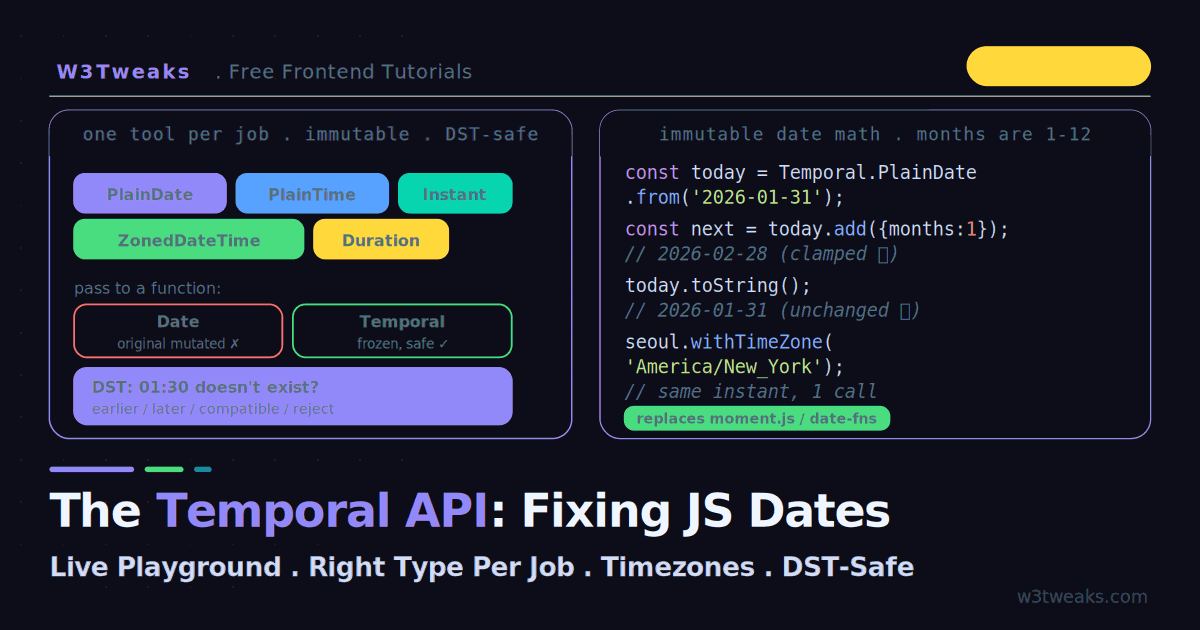
Temporal is the ES2026 replacement for Date — immutable objects, months numbered 1–12, first-class IANA timezones, correct DST. Ships natively in Chrome 144+, Firefox 145+, Node 24 LTS (Safari via @js-temporal/polyfill).
const today   = Temporal.Now.plainDateISO();              // 2026-07-20
const meeting = Temporal.ZonedDateTime.from('2026-07-20T14:00[America/New_York]');
const later   = today.add({ months: 1 });                 // NEW object, today unchanged
const diff    = today.until(Temporal.PlainDate.from('2026-12-25'));  // Duration
Watch out: three specific rules make Temporal safe where Date was broken —
Dateis mutable — functions can silently change your original. Every Temporal object is immutable:add()/subtract()return a new object.- Months are 1-based in Temporal (
.month === 6for June) but 0-based inDate(getMonth() === 5for June). The #1 off-by-one bug is gone. - DST edge cases are explicit — the 2:30 AM that happens twice, or never (spring forward), forces you to pick
earlier/later/compatible/reject. Date silently invented an answer; Temporal makes you decide.
Storage rule for backends: store Temporal.Instant (or epoch nanoseconds) as your source of truth, reconstruct ZonedDateTime in the user’s timezone at display time.
→ Try it in the live playground — pass a Date into a function and watch it mutate live, then run the same code on Temporal and see the original stay frozen. Trigger DST ambiguity errors on the London 2026-03-29 gap. Convert one instant across 5 timezones. Deep dive below for the moment.js/date-fns/dayjs/Luxon comparison, migration recipes, the Instant-vs-ZonedDateTime backend pattern, TypeScript patterns, and the Node.js/edge runtime support matrix.
If you have ever debugged a date bug at 2 AM — an appointment off by exactly one hour, a birthday that shifts across timezones, or a month that is somehow off by one — you have met JavaScript’s Date object. It was rushed into the language in 1995, loosely based on Java’s already-deprecated java.util.Date, and we have been working around its flaws ever since. The Temporal API is the fix.
Temporal reached TC39 Stage 4 in March 2026 and is now part of the ES2026 specification, shipping natively in Chrome 144+, Firefox 145+, and Edge 144+ (Safari is available via the official @js-temporal/polyfill). It replaces Date with immutable objects, correct month numbering, nanosecond precision, and first-class timezone and calendar support. This guide runs everything live: watch a Date mutate under you while Temporal stays frozen, pick the right type for any job, convert timezones, and handle the daylight-saving-time edge cases that silently break Date.
This is the first tutorial in our Modern JavaScript Features series. Temporal pairs naturally with the Intl API for formatting dates per locale, and its immutability echoes the copy-vs-mutate ideas in the non-mutating array methods guide.
Live Demo
Tab 1: watch Date mutate while Temporal stays immutable, plus pick the right type per use case. Tab 2: the DST disambiguation playground with earlier/later/reject. Tab 3: a multi-timezone meeting board and live date-diff calculator.
Why Date Is Broken
Three design flaws have caused a generation of bugs. All three are visible in the demo’s first tab.
1. Date is mutable. Pass a Date into a function and that function can silently change your original — no warning, no error:
const start = new Date('2026-01-01');

function addWeek(date) {
  date.setDate(date.getDate() + 7);   // mutates the argument!
  return date;
}

addWeek(start);
console.log(start);   // 2026-01-08 — the ORIGINAL changed
2. Months are zero-indexed. January is 0, December is 11 — but days start at 1. This inconsistency is a permanent source of off-by-one bugs:
new Date(2026, 0, 15);   // January 15 — month 0 is January
new Date(2026, 12, 15);  // NOT December — rolls over to January 2027
3. Timezone parsing is browser-dependent. The same “almost-ISO” string parses differently across browsers — Chrome may read it as local time, Safari as UTC, Firefox may throw. Your code produces different results on different machines.
Temporal fixes all three: every object is immutable, months run 1–12, and parsing only accepts strictly defined formats, throwing on anything ambiguous.
Temporal vs moment.js vs date-fns vs dayjs vs Luxon
Every senior dev evaluating a migration lands here first. The honest 2026 comparison:
| Library | Bundle (min+gz) | Tree-shakes | Mutable | Timezone support | DST-safe | Calendars | Migration effort |
|---|---|---|---|---|---|---|---|
| Temporal (native) | 0 KB — built-in | N/A | ❌ immutable | ✅ IANA built-in | ✅ explicit | ✅ Hebrew, Islamic, Japanese, etc. | Fresh API |
| Temporal (polyfill) | ~35 KB | Partial | ❌ immutable | ✅ IANA built-in | ✅ explicit | ✅ | Same API |
| date-fns 4 | ~16 KB modular | ✅ full | ❌ immutable | via @date-fns/tz add-on | ✅ | ❌ Gregorian only | Low |
| dayjs 1.11 | ~2 KB + plugins | Plugin-based | ❌ immutable | Plugin (utc, timezone) | ⚠️ plugin-dependent | ❌ | Low (Moment-like API) |
| Luxon | ~23 KB | Partial | ❌ immutable | ✅ via Intl | ✅ | Some (via Intl) | Medium |
| moment.js 2.30 | 67 KB (+~30 KB TZ data) | ❌ | ✅ mutable | via moment-timezone | ⚠️ | ❌ | Native — maintenance-only since 2020 |
The takeaways: Temporal is 0 KB in supported runtimes and 35 KB with the polyfill — cheaper than everything except vanilla dayjs. It’s the only option with built-in IANA timezone data (moment-timezone ships ~30 KB of it separately; date-fns needs an add-on; dayjs needs a plugin). And non-Gregorian calendars — Hebrew, Islamic, Japanese, Buddhist, Persian — are a first-class citizen, which no JS date library has ever offered natively.
For new projects, Temporal is the answer. For maintenance on moment.js codebases (moment still has ~20M weekly downloads despite being in maintenance-only mode since 2020), the migration recipes below cover the 10 patterns you’ll actually hit.
The Temporal Types: One Tool Per Job
Instead of cramming everything into one Date, Temporal splits functionality into distinct, purpose-built types. Choosing the right one makes your intent explicit:
| Type | Represents | Use for |
|---|---|---|
Temporal.PlainDate | A calendar date, no time | Birthdays, deadlines, holidays |
Temporal.PlainTime | A wall-clock time, no date | Opening hours, alarms |
Temporal.PlainDateTime | Date + time, no timezone | Form input before applying a zone |
Temporal.ZonedDateTime | Date + time + IANA timezone | The safe choice for real events |
Temporal.PlainYearMonth | Year + month | Credit-card expiry, “2026-04” |
Temporal.PlainMonthDay | Month + day, no year | Recurring dates, anniversaries |
Temporal.Instant | An exact point on the global timeline | Timestamps, logging |
Temporal.Duration | A length of time | ”3 days, 4 hours” |
The rule of thumb: when in doubt, reach for ZonedDateTime — it carries the timezone with it and handles DST correctly. Use the Plain* types when the timezone genuinely does not matter (a birthday is the same date everywhere).
This is why every scheduling tool from Calendly to Cal.com stores the meeting’s instant and the invitee’s IANA zone separately — a booking made at 3pm New York must still read 3pm New York if the organizer flies to London. Reclaim.ai and Motion apply the same rule for auto-scheduling around DST. And PTO systems like Rippling, Deel, BambooHR, and Gusto are the canonical Temporal.PlainDate use case — an employee’s vacation on July 4 is July 4 regardless of what timezone the HR admin approves it from.
Creating Temporal Objects
Every type has a from() method that accepts a string or an object. Note months are 1-based:
// From a string
const birthday = Temporal.PlainDate.from('2026-06-27');
console.log(birthday.dayOfWeek);   // 6 (Saturday)
console.log(birthday.month);       // 6 — June is actually 6!

// From an object
const date = Temporal.PlainDate.from({ year: 2026, month: 2, day: 7 });

// The current moment, in a specific type
const today = Temporal.Now.plainDateISO();               // just the date
const nowHere = Temporal.Now.zonedDateTimeISO();          // date+time+your zone
const nowSeoul = Temporal.Now.zonedDateTimeISO('Asia/Seoul');

// A zoned date-time carries its IANA zone in brackets
const meeting = Temporal.ZonedDateTime.from('2026-06-27T14:00:00[America/New_York]');
console.log(meeting.toString());   // 2026-06-27T14:00:00-04:00[America/New_York]
The ISO suffix on Now methods means “use the ISO 8601 calendar” — the same calendar Date uses and the one you want unless you specifically need another.
Immutable Date Math
Every Temporal object is immutable, so add() and subtract() return a new object and never touch the original — the exact opposite of Date.setDate():
const today = Temporal.PlainDate.from('2026-02-07');

const later = today.add({ days: 30 });
console.log(later.toString());   // 2026-03-09
console.log(today.toString());   // 2026-02-07 — unchanged!

// Calendar-aware: "1 month" means a real calendar month, not 30 days
const jan31 = Temporal.PlainDate.from('2026-01-31');
console.log(jan31.add({ months: 1 }).toString());   // 2026-02-28, not March 3
That last line matters: Date arithmetic on January 31 + 1 month overflowed into March. Temporal clamps to the real end of February. Stripe Billing, Chargebee, and Recurly all implement this month-end clamping rule — a January 31 subscription renewing monthly must charge on February 28, not March 3, and Temporal’s add({months: 1}) does it out of the box.
Differences Between Dates
until() and since() give you a Duration instead of raw milliseconds:
const start = Temporal.PlainDate.from('2026-01-01');
const end   = Temporal.PlainDate.from('2026-02-07');

const diff = start.until(end);
console.log(diff.days);   // 37

// Ask for larger units
const bigger = start.until(end, { largestUnit: 'month' });
console.log(`${bigger.months} months, ${bigger.days} days`);   // 1 months, 6 days
Time trackers like Toggl, Harvest, and Clockify live and die on since() and until() — a work session is a Duration between two ZonedDateTimes, and rounding it to billable increments is one call to .round({smallestUnit: 'minute', roundingIncrement: 15}).
Timezones Without the Headache
Converting between zones was one of Date’s worst areas. With Temporal it is a single withTimeZone() call, and it stays DST-correct:
const seoul = Temporal.Now.zonedDateTimeISO('Asia/Seoul');
console.log(seoul.toString());   // ...+09:00[Asia/Seoul]

const newYork = seoul.withTimeZone('America/New_York');
console.log(newYork.toString());   // same instant, ...-05:00[America/New_York]
Both objects represent the same instant on the global timeline — just displayed in different local wall-clock time. The demo’s third tab shows one meeting time across five cities, all derived from a single instant.
Analytics platforms from GA4 to Mixpanel, Amplitude, and PostHog store events as UTC instants and re-bucket to the viewer’s zone at query time — the exact pattern Temporal now makes trivial with instant.toZonedDateTimeISO(userZone). Datadog, Sentry, New Relic, and Grafana Loki serialize every log line as an epoch nanosecond precisely because Temporal.Instant is what a log entry actually is — a point in time, zone-free, calendar-free.
The DST Trap: Ambiguous and Skipped Times
This is where Date silently lied and Temporal makes you think. Twice a year, clock time gets weird:
Skipped times (spring forward). When London springs forward on 2026-03-29, the clock jumps 01:00 → 02:00, so 01:30 never exists. Date would invent an arbitrary answer. Temporal lets you choose:
const pdt = Temporal.PlainDateTime.from('2026-03-29T01:30:00');

// This time doesn't exist in London that day:
pdt.toZonedDateTime('Europe/London', { disambiguation: 'reject' });
// → RangeError: this time does not exist

pdt.toZonedDateTime('Europe/London', { disambiguation: 'earlier' }).toString();
// → picks 00:30 (before the gap)
pdt.toZonedDateTime('Europe/London', { disambiguation: 'later' }).toString();
// → picks 02:30 (after the gap)
Ambiguous times (fall back). When clocks fall back, 01:30 happens twice. The four disambiguation strategies are:
'compatible'(default) — matchesDate’s behaviour, picks the earlier instance for gaps'earlier'— the first occurrence'later'— the second occurrence'reject'— throw aRangeErrorand force you to decide
The demo’s second tab lets you pick a DST date and a strategy and see exactly which instant you get — or the error. This is the single biggest reason to move off Date: it never told you the time was ambiguous. Airlines learned this the hard way — a flight scheduled to depart during the fall-back hour is exactly why Google Flights, Expedia, Booking.com, and Kayak pin schedules to specific instants, not wall clocks. Zoom, Google Meet, Microsoft Teams, and Webex hit the same wall at scale — recurring meetings anchored to wall-clock time survive DST, meetings anchored to a fixed instant drift by an hour twice a year.
DST-Aware Arithmetic
When you do math on a ZonedDateTime, Temporal accounts for DST automatically. Adding “1 day” across a DST boundary keeps the wall-clock time correct even though the actual elapsed hours differ:
const before = Temporal.ZonedDateTime.from('2026-03-28T12:00:00[Europe/London]');
const after = before.add({ days: 1 });
console.log(after.toString());   // 2026-03-29T12:00:00 — still noon, though only 23 real hours passed
The Storage Pattern: Instant in the Database, ZonedDateTime at Display
This is THE backend question and it has a definitive answer:
Store Temporal.Instant (or epoch nanoseconds) as your source of truth. Reconstruct ZonedDateTime in the user’s timezone at display time.
// Write path
const eventInstant = someZonedDateTime.toInstant();
await db.events.insert({
  happened_at: eventInstant.toString(),         // PostgreSQL timestamptz
  // or, if the column is BIGINT for nanosecond precision:
  happened_at_ns: eventInstant.epochNanoseconds
});

// Read path
const row = await db.events.findOne(...);
const instant = Temporal.Instant.from(row.happened_at);
const localTime = instant.toZonedDateTimeISO(currentUser.timezone);
PostgreSQL timestamptz maps 1:1 to Temporal.Instant — the column stores UTC internally and hands you back a strict ISO string. Store the user’s IANA zone ('America/New_York') in a separate column on the user record, never baked into the timestamp column.
The one exception — wall-clock-anchored events. For a recurring “9am team meeting” or a “birthday on July 4”, store Temporal.PlainDateTime (or PlainDate) plus the timezone string as separate columns, not as a computed ZonedDateTime. Why: DST rules can change retroactively (governments alter timezone rules — Egypt did in 2023, Chile every year). Storing the wall-clock intent lets you reconstruct the correct instant at read time using current tzdata, rather than being stuck with an instant computed under an obsolete rule.
Node.js and Edge Runtime Support
Serverless devs need the exact status. As of 2026:
| Runtime | Native Temporal support | Notes |
|---|---|---|
| Node.js 22 LTS | Behind --js-temporal flag | Ship polyfill in prod |
| Node.js 24 LTS | ✅ Native | Zero-dep, zero-runtime-cost |
| Deno 2.1+ | ✅ Native | Ships with V8 that has it |
| Bun 1.2+ | ✅ Native | JavaScriptCore-based, tracks TC39 fast |
| Cloudflare Workers | ✅ via compatibility_flags = ["temporal_api"] in wrangler.toml | Landed 2026 |
| Vercel Edge Functions | ❌ polyfill required | V8 isolate without the flag |
| Netlify Edge Functions | ❌ polyfill required | Same |
| AWS Lambda | Node 22 (flag) / Node 24 (native) | Match your runtime version |
The migration path for serverless: ship the polyfill unconditionally. It’s ~35 KB gzipped, the API matches native exactly, and it lets you write one codebase that runs on every runtime without version-sniffing. Drop the polyfill when your target runtime hits native support.
Migration Recipes From moment.js
Ten side-by-side conversions covering ~90% of moment.js usage:
| moment.js | Temporal |
|---|---|
moment() | Temporal.Now.zonedDateTimeISO() |
moment().format('YYYY-MM-DD') | Temporal.Now.plainDateISO().toString() |
moment().format('LLL') | Temporal.Now.zonedDateTimeISO().toLocaleString('en-US', { dateStyle: 'long', timeStyle: 'short' }) |
moment().add(1, 'month') | zdt.add({ months: 1 }) |
moment().subtract(3, 'days') | zdt.subtract({ days: 3 }) |
moment().startOf('month') | zdt.with({ day: 1, hour: 0, minute: 0, second: 0, millisecond: 0 }) |
moment().endOf('day') | zdt.with({ hour: 23, minute: 59, second: 59, millisecond: 999 }) |
moment(a).isBefore(b) | Temporal.ZonedDateTime.compare(a, b) < 0 |
moment.tz(str, 'America/New_York') | Temporal.ZonedDateTime.from(`${str}[America/New_York]`) |
moment.duration(90, 'minutes').humanize() | Temporal.Duration.from({ minutes: 90 }).round({ largestUnit: 'hour' }).toLocaleString('en-US', { style: 'long' }) |
The two footguns during migration:
- Comparison — moment returns a boolean from
.isBefore(), Temporal returns-1/0/1from.compare(). Wrap it in< 0,> 0, or=== 0. - Duration humanization — Temporal’s
.toLocaleString()needs an explicitstyleoption;humanize()had smart defaults.
TypeScript Patterns
Two patterns you’ll write repeatedly:
Discriminated union of date types. Some functions accept “a date or a datetime — pick one”:
type AppTime = Temporal.PlainDate | Temporal.ZonedDateTime;

function isZoned(t: AppTime): t is Temporal.ZonedDateTime {
  return 'timeZoneId' in t;
}

function formatForUser(t: AppTime, userZone: string): string {
  const zdt = isZoned(t) ? t.withTimeZone(userZone) : t.toZonedDateTime(userZone);
  return zdt.toLocaleString('en-US');
}
The polyfill ships types. @js-temporal/polyfill includes complete TypeScript definitions — the same shape native runtimes will expose via lib.es2026.temporal.d.ts once it lands. Import the polyfill and you have working types on any TS version:
import { Temporal } from '@js-temporal/polyfill';

const meeting: Temporal.ZonedDateTime = Temporal.ZonedDateTime.from(
  '2026-07-20T14:00:00[America/New_York]'
);
For projects using the native API only, you’ll want @types/temporal (a community-maintained shim) until the built-in lib file lands in TypeScript.
Formatting for Humans
Temporal objects work directly with Intl.DateTimeFormat and toLocaleString for localized output:
const date = Temporal.PlainDate.from('2026-08-24');

date.toLocaleString('en-US', { year: 'numeric', month: 'long', day: 'numeric' });
// "August 24, 2026"

date.toLocaleString('de-DE', { dateStyle: 'full' });
// "Montag, 24. August 2026"
For the full breakdown of locale-aware formatting, see the upcoming Intl API tutorial in this series.
What Temporal Deliberately Does Not Do
Temporal is the primitive, not the batteries. Three things it deliberately leaves to the ecosystem:
- Recurring events (RRULE) — use
rrule.jsand convert results toTemporal.Instantvia the returnedDate.toTemporalInstant(). Project management platforms like Linear, Asana, Notion, ClickUp, and Jira all wrap rrule.js for repeating tasks and convert results to Temporal instants for display. - Business day / working hours math — Temporal doesn’t ship “next business day”. Keep
date-fns/isBusinessDayand interop through ISO strings. - Cron parsing — libraries like
cronerandnode-croncompute next-fire times asDate; convert toZonedDateTimefor display.
These aren’t gaps — they’re a deliberate scoping decision. The core API stays small and correct; specialized libraries do specialized work.
Should You Adopt It Today?
For new projects, yes. Temporal covers roughly 95% of what moment.js, date-fns, and dayjs do, with zero bundle-size cost where it is natively supported. For Safari and older browsers, add the @js-temporal/polyfill — it is the stable, recommended option and lets you ship the same API everywhere while native support finishes rolling out.
For existing projects, migrate gradually: store a Temporal.Instant (or epoch nanoseconds) as your source of truth, and reconstruct a ZonedDateTime in the user’s timezone at display time. You do not have to rewrite everything at once.
Key Takeaways
- The Temporal API replaces
Date, fixing three decades of design flaws — it reached ES2026 Stage 4 and ships in Chrome 144+, Firefox 145+, Node 24 LTS, Deno 2.1+, and Bun 1.2+ natively; Cloudflare Workers viacompatibility_flags; polyfill for Vercel/Netlify Edge and Safari Dateis mutable (functions can silently change your original), zero-indexed for months, and parses inconsistently across browsers — Temporal fixes all three- Temporal splits time into distinct types —
PlainDate,PlainTime,PlainDateTime,ZonedDateTime,Instant,Duration, and more — so your intent is explicit - When in doubt, use
ZonedDateTime— it carries the IANA timezone and handles DST correctly - Every Temporal object is immutable:
add()andsubtract()return new objects and never mutate the original - Month arithmetic is calendar-aware — January 31 + 1 month clamps to the end of February instead of overflowing
until()andsince()return aDurationinstead of raw milliseconds, with alargestUnitoption- Timezone conversion is a single
withTimeZone()call and preserves the exact instant - DST disambiguation (
earlier,later,compatible,reject) forces you to handle skipped and repeated clock times thatDatesilently got wrong - The definitive storage pattern:
Temporal.Instant(or epoch nanoseconds) in the database,ZonedDateTimereconstructed at display time with the user’s IANA zone stored separately; exception for wall-clock-anchored events (recurring meetings, birthdays) which storePlainDateTime+ zone string to survive retroactive tzdata changes - Bundle-size winner: 0 KB native, ~35 KB polyfill — beats moment (67 KB) and Luxon (23 KB), matches date-fns modular (16 KB), only vanilla dayjs (2 KB) is lighter
- Non-Gregorian calendars (Hebrew, Islamic, Japanese, Buddhist, Persian) are first-class — no other JS date library offers this natively
- Moment.js migration is straightforward:
.add()/.subtract()map directly, comparisons switch from booleans toTemporal.ZonedDateTime.compare()returning -1/0/1, andmoment.tz(str, zone)becomes`${str}[${zone}]`in the string form - TypeScript:
@js-temporal/polyfillships complete types; use'timeZoneId' in valuefor type narrowing betweenPlainDateTimeandZonedDateTime - For Safari and older browsers, use
@js-temporal/polyfill; for existing apps, storeInstantand reconstructZonedDateTimeat display time
FAQ
What is the Temporal API and why is it better than Date?
Temporal is JavaScript’s modern date-time API, part of ES2026, that replaces the legacy Date object. It is better because every object is immutable (no accidental mutation when passing dates to functions), months are numbered 1–12 like a real calendar, it has first-class IANA timezone support via ZonedDateTime, it offers nanosecond precision, and it only parses strictly defined string formats so results are consistent across browsers. Date fails on all of these.
Which Temporal type should I use?
Match the type to your intent. Use PlainDate for dates without a time (birthdays, deadlines), PlainTime for times without a date (opening hours), PlainDateTime for a date and time before you know the timezone, and ZonedDateTime for real events tied to a location. Use Instant for timestamps, Duration for lengths of time, and PlainYearMonth/PlainMonthDay for partial dates. When unsure, start with ZonedDateTime since it handles timezones and DST correctly.
Is the Temporal API supported in all browsers and Node?
Native support in 2026: Chrome 144+, Firefox 145+, Edge 144+, Node 24 LTS, Deno 2.1+, Bun 1.2+. Node 22 supports it behind the --js-temporal flag. Cloudflare Workers enables it via compatibility_flags = ["temporal_api"] in wrangler.toml. Vercel Edge Functions and Netlify Edge Functions do not yet ship it natively; Safari also lags. For those, install the official @js-temporal/polyfill (~35 KB gzipped) and ship the same code everywhere.
How does Temporal handle daylight saving time?
Temporal makes DST explicit instead of guessing. When a wall-clock time is skipped (spring forward) or repeated (fall back), you supply a disambiguation option: earlier, later, compatible (the default, matching old Date behaviour), or reject (which throws a RangeError for impossible times). Arithmetic on a ZonedDateTime is also DST-aware, so adding one day across a boundary keeps the correct wall-clock time even though the elapsed hours differ.
Do I still need moment.js, date-fns, or dayjs with Temporal?
For new projects, largely no. Temporal covers about 95% of what those libraries do — parsing, math, timezones, durations, and formatting via Intl — natively and with zero bundle cost where supported. You’ll keep a utility library only for the deliberate omissions: business-day math (date-fns), recurring events via RRULE (rrule.js), and cron scheduling (croner). moment.js in particular has been in maintenance-only mode since 2020; the migration recipes above cover the common patterns.
Why are months 1-based in Temporal but 0-based in Date?
The original Date copied Java’s zero-indexed months, where January is 0 and December is 11, while days start at 1 — an inconsistency that caused countless off-by-one bugs. Temporal corrects this: months run 1 through 12, matching how humans and every real calendar count them. So Temporal.PlainDate.from('2026-06-27').month returns 6 for June, not 5.
Should I store Instant or ZonedDateTime in my database?
Store Temporal.Instant (as an ISO string in a PostgreSQL timestamptz column or as epoch nanoseconds in a BIGINT) as your source of truth. Store the user’s IANA timezone (like 'America/New_York') in a separate column on the user record. At display time, reconstruct with instant.toZonedDateTimeISO(user.timezone). The one exception: for wall-clock-anchored events (a recurring 9am meeting or a birthday on July 4), store PlainDateTime (or PlainDate) plus the zone as separate columns — that way, if government DST rules change retroactively, your event reconstructs against the current tzdata rather than being stuck with an obsolete instant.
How do I compare two Temporal objects?
Use the static compare() method on the type: Temporal.PlainDate.compare(a, b) returns -1 if a is earlier, 0 if equal, 1 if a is later. Wrap it in an inequality: if (Temporal.PlainDate.compare(a, b) < 0) { … }. This is one of the two big footguns migrating from moment.js — moment’s .isBefore() returned a boolean, Temporal returns a tri-state number so you can also sort with it.
Is Temporal safe to use as React or Vue component state?
Yes — every Temporal object is immutable, so it behaves exactly like a primitive from React’s perspective. Storing a Temporal.ZonedDateTime in useState works cleanly, comparisons in useEffect dependency arrays use referential equality (create a new object only when you actually mean to change the state), and there’s no “did the caller mutate my prop” concern that Date always had.
What’s the bundle size cost of Temporal vs date-fns or moment.js?
Native Temporal in Chrome 144+/Firefox 145+/Node 24 is 0 KB — it’s built into the runtime. The @js-temporal/polyfill for older browsers and edge runtimes is about 35 KB min+gzip. Compare that to date-fns 4 at ~16 KB modular (tree-shakes well), dayjs at ~2 KB plus plugins for real features, Luxon at ~23 KB, and moment.js 2.30 at 67 KB (plus another ~30 KB for moment-timezone for full IANA coverage). Temporal is the smallest option that ships full IANA timezone data — no add-on needed.