If you have ever wondered why console.log inside a setTimeout(fn, 0) runs after a Promise.then callback, or why clicking a button makes the page freeze while a loop runs, you have bumped into the event loop — without knowing it.
The event loop is the single most important concept in JavaScript. Every async call, every Promise, every await, every setTimeout passes through it. Understanding it precisely means you can predict execution order in any async code, diagnose hard-to-reproduce bugs, and write code that stays responsive under load.
Most explanations stop at a static diagram. This one goes further: an embedded event loop visualizer lets you step through real execution scenarios one frame at a time and see exactly where each function goes. It also explains why the mistakes in our async/await debugging guide happen at the engine level — the event loop is the root cause of most of them.
Live Demo
Pick a scenario, predict the output, then step through execution and watch the call stack, queues, and Web APIs update in real time.
Is JavaScript Single-Threaded? The One Sentence That Explains Everything
JavaScript is single-threaded — only one line of code executes at any given moment. But the browser and Node.js can handle timers, network requests, and user events concurrently. The event loop is what connects these two facts — it is the scheduler that decides what single piece of code runs next.
That single line is the answer to half of all event-loop interview questions. The rest of this guide unpacks it.
The Four Zones
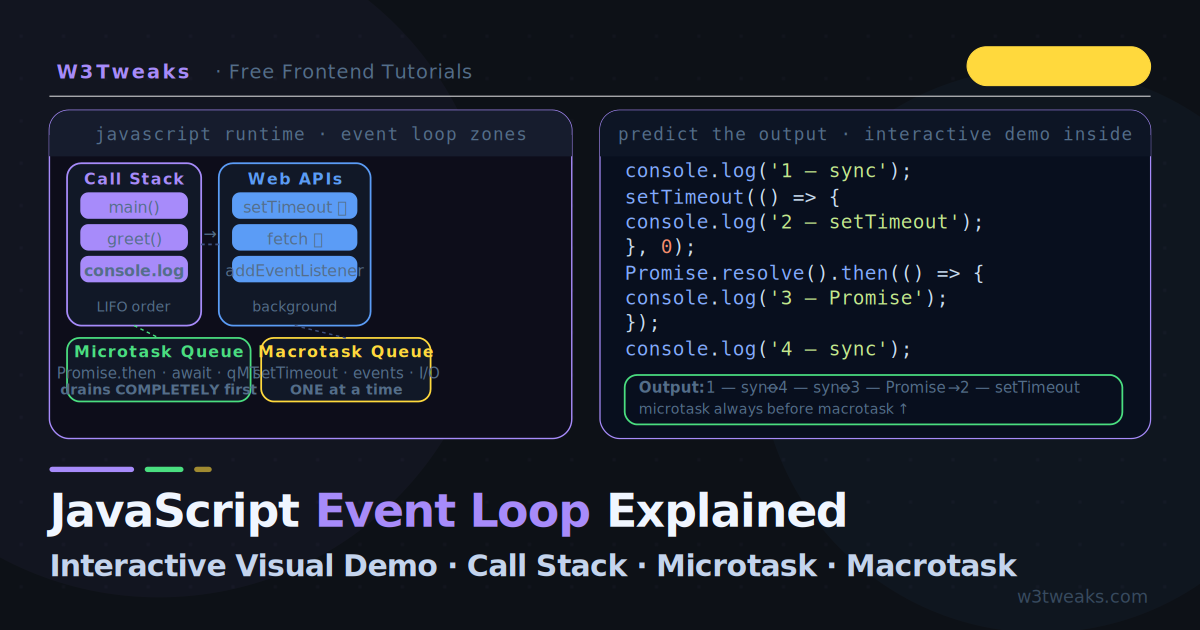
Every piece of JavaScript code passes through one or more of these four zones:
1. The Call Stack
The call stack is where your code actually runs. It follows Last In, First Out (LIFO) — the most recently called function is always the next one to finish.
function greet(name) {
  return 'Hello ' + name;
}
function main() {
  const msg = greet('Alice'); // greet() pushed onto stack
  console.log(msg);           // greet() has popped off
}
main();

// Call stack at peak:
// ┌──────────────┐
// │  greet()     │ ← executing
// │  main()      │
// └──────────────┘
When the call stack is empty, the event loop is allowed to pull from the queues. This is the trigger for all asynchronous behaviour.
2. Web APIs (the Browser’s Background Workers)
Web APIs are features the browser provides outside the JavaScript engine — timers, network requests, DOM events, geolocation. When you call setTimeout, fetch, or addEventListener, you are handing work to these background systems.
setTimeout(() => console.log('timer'), 1000);
// JavaScript continues immediately — it does NOT wait here
// The browser's timer system counts 1000ms in the background
When the background work completes, the callback is placed into a queue — never directly onto the call stack.
3. The Microtask Queue
Microtasks are high-priority callbacks that run immediately after the current task finishes, before anything else. They come from more sources than most tutorials list:
Promise.then(),.catch(),.finally()await(which internally creates a.then())queueMicrotask(fn)— the explicit API, no Promise neededMutationObservercallbacks — DOM-mutation observers fire as microtasks, which is why they can appear to “fire too early”IntersectionObserveris not a microtask (it batches via rAF) — common confusion
The critical rule: the entire microtask queue drains completely before the next macrotask starts. Every last microtask — including any microtasks added during a microtask — runs before the event loop moves on.
4. The Macrotask Queue (Task Queue)
Macrotasks are lower-priority callbacks queued by:
setTimeoutandsetIntervalfetchresponse callbacks (via Web APIs)- DOM event handlers (click, keydown, etc.)
MessageChannel(more on this in the MessageChannel trick section)requestIdleCallback
The event loop picks one macrotask at a time, runs it to completion, then drains the entire microtask queue before picking the next macrotask.
Microtask vs Macrotask Queue — The Difference That Trips Everyone
| Microtask Queue | Macrotask Queue | |
|---|---|---|
| Sources | Promise.then, await, queueMicrotask, MutationObserver | setTimeout, setInterval, fetch response, DOM events, MessageChannel |
| Drain rule | All drain before the next macrotask | One picked per cycle |
| Priority | Always higher than macrotasks | Lower — must wait |
| Render alignment | Runs after each task, before paint | Runs in its own slot |
| Use case | ”After this code, before any UI update" | "Schedule a separate task that’s allowed to yield” |
The practical implication: a Promise.then queued AFTER a setTimeout(0) will still run first. This is the most-asked event loop interview question and the source of half the “wait, what?” moments in async JavaScript.
How the Event Loop Actually Works — The Algorithm
The exact order the event loop follows, every tick:
1. Execute the current synchronous code (the current task)
   until the call stack is empty

2. Drain the entire microtask queue:
   - Run the first microtask
   - If it adds new microtasks, run those too
   - Keep going until the microtask queue is completely empty

3. If a browser render is due (≈60fps):
   - Run requestAnimationFrame callbacks
   - Calculate styles, layout, and paint

4. Pick ONE macrotask from the task queue and execute it
   → Go back to step 1
This is the complete mental model. Every async behaviour in JavaScript follows this exact sequence.
Scenario 1 — Why setTimeout(fn, 0) Runs After Promise.then
This is the most common “wait, what?” moment for developers learning async JavaScript.
console.log('1 — sync');

setTimeout(() => {
  console.log('2 — setTimeout');
}, 0);

Promise.resolve().then(() => {
  console.log('3 — Promise.then');
});

console.log('4 — sync');
Predict the output before reading on. Most people guess: 1, 2, 3, 4 or 1, 4, 2, 3. The actual output is:
1 — sync
4 — sync
3 — Promise.then
2 — setTimeout
Why: Steps 1 and 4 run synchronously on the call stack. When setTimeout(fn, 0) is called, the callback goes to the Web APIs timer (which expires almost immediately and moves the callback to the macrotask queue). When Promise.resolve().then(fn) is called, the callback goes directly to the microtask queue. After the call stack clears, the microtask queue drains first (step 3), then the macrotask queue picks up (step 2).
setTimeout(fn, 0) does not mean “run immediately”. It means “run as soon as the call stack is clear AND after all microtasks have run”.
Scenario 2 — async/await Is Just a Promise
await is syntactic sugar over Promise.then. Understanding this explains every confusing async execution order.
async function fetchData() {
  console.log('A — start');
  const result = await Promise.resolve('data');
  console.log('B — after await:', result);
  return result;
}

console.log('1 — before call');
fetchData();
console.log('2 — after call');
Output:
1 — before call
A — start
2 — after call
B — after await: data
Why: fetchData() runs synchronously until it hits await. At that point, it pauses and everything after await becomes a microtask (a .then() callback internally). Control returns to the caller, so 2 — after call runs next. Then, when the call stack is empty, the microtask queue drains and B — after await runs.
This is exactly why async/await in a forEach loop fails — forEach does not wait for the microtasks queued by each await.
Scenario 3 — Microtask Starvation (The Hidden Production Bug)
If a microtask continuously adds more microtasks, the macrotask queue starves — it never gets to run. This freezes timers, event handlers, and renders.
// ❌ This blocks the event loop permanently
function infiniteMicrotasks() {
  Promise.resolve().then(infiniteMicrotasks);
}
infiniteMicrotasks();

setTimeout(() => {
  console.log('This never prints'); // starved
}, 100);
The microtask queue never empties, so the event loop never reaches the macrotask queue. The setTimeout callback never runs. In a browser, this freezes rendering too.
The real-world equivalent — a poorly written retry loop:
// ❌ Can cause starvation if condition never resolves
async function retryUntilDone() {
  while (!isDone()) {
    await checkStatus(); // queues a microtask every iteration
  }
}

// ✅ Use a macrotask break to let the browser breathe
async function retryWithBreak() {
  while (!isDone()) {
    await new Promise(r => setTimeout(r, 0)); // yields to macrotask queue
    await checkStatus();
  }
}
The setTimeout(r, 0) forces a macrotask cycle, giving the browser a chance to process renders and events between iterations. The modern alternative is await scheduler.yield() — covered later in Yielding to the Browser.
Scenario 4 — Where requestAnimationFrame Fits
requestAnimationFrame (rAF) runs after microtasks but before the next macrotask, aligned with the browser’s paint cycle (≈every 16.7ms at 60fps):
Macrotask → Microtasks drain → rAF callbacks → Render → next Macrotaskconsole.log('1');
setTimeout(() => console.log('2 — setTimeout'), 0);
requestAnimationFrame(() => console.log('3 — rAF'));
Promise.resolve().then(() => console.log('4 — microtask'));
console.log('5');Output (approximately — rAF timing is paint-dependent):
1
5
4 — microtask
3 — rAF         ← before setTimeout, after microtasks
2 — setTimeout  ← next macrotask cycle
requestAnimationFrame vs setTimeout: DOM reads and writes should go inside requestAnimationFrame because it runs just before paint, ensuring your changes appear in the current frame. A setTimeout(fn, 0) fires whenever the next macrotask runs — which could be after multiple paint frames have already been missed.
Scenario 5 — Nested Timeouts and Execution Order
console.log('start');

setTimeout(() => {
  console.log('outer timeout');
  Promise.resolve().then(() => {
    console.log('inner promise'); // microtask inside a macrotask
  });
}, 0);

setTimeout(() => {
  console.log('second timeout');
}, 0);

console.log('end');
Predict the output, then verify:
start
end
outer timeout
inner promise      ← microtask runs before second timeout
second timeout
Key insight: When the first setTimeout callback runs (a macrotask), it queues a microtask. That microtask runs before the second setTimeout because after every macrotask, the full microtask queue drains before the next macrotask starts.
The Node.js Event Loop: Why It’s Different
Most articles cover only the browser event loop. Node.js uses a fundamentally different model — built on libuv, organized into six phases, with its own pre-microtask queue. This is the #1 question on senior JavaScript interviews, and it contradicts almost everything the browser-only model teaches.
The six phases (Node.js event loop phases in order)
Each iteration of the Node event loop (“tick”) visits these phases in fixed order:
┌───────────────────────────┐
│ 1. Timers                 │  setTimeout, setInterval callbacks
│    fire here              │  whose threshold has elapsed
└─────────────┬─────────────┘
              ▼
┌───────────────────────────┐
│ 2. Pending callbacks      │  Deferred I/O callbacks (e.g.
│                           │  ECONNREFUSED from previous tick)
└─────────────┬─────────────┘
              ▼
┌───────────────────────────┐
│ 3. Idle, prepare          │  Internal — not user-facing
└─────────────┬─────────────┘
              ▼
┌───────────────────────────┐
│ 4. Poll                   │  Retrieve new I/O events,
│                           │  execute I/O callbacks (most work
│                           │  happens here)
└─────────────┬─────────────┘
              ▼
┌───────────────────────────┐
│ 5. Check                  │  setImmediate() callbacks
│                           │  fire here
└─────────────┬─────────────┘
              ▼
┌───────────────────────────┐
│ 6. Close callbacks        │  socket.on('close', ...) etc.
└─────────────┬─────────────┘
              ▼
        (back to phase 1)
Between every phase (and after every individual callback within a phase), Node drains:
- The
process.nextTickqueue — Node’s own pre-microtask queue, fires before Promises - The microtask queue —
Promise.then,await,queueMicrotask
This is the source of the most confusing Node behaviours. A process.nextTick callback always beats a Promise.then even though the Promise was already resolved.
process.nextTick vs queueMicrotask vs Promise.then vs setImmediate vs setTimeout
The senior Node interview trio — and the answer most candidates get wrong:
| Function | Runtime | Queue | Fires when | Use for |
|---|---|---|---|---|
process.nextTick(fn) | Node only | nextTick queue | Before microtask queue, after current op | Highest-priority deferred work; don’t recurse — can starve I/O |
queueMicrotask(fn) | Browser + Node | Microtask queue | After current task, before any macrotask | ”After this code, before any paint or timer” |
Promise.resolve().then(fn) | Browser + Node | Microtask queue | Same as queueMicrotask, just with Promise overhead | Use queueMicrotask instead if you don’t need the Promise |
setImmediate(fn) | Node only | Check phase | After poll phase completes — next tick | ”Run after I/O is processed this tick” |
setTimeout(fn, 0) | Browser + Node | Timers phase | Next tick, after timer threshold (minimum 1ms in Node) | Browser: yield to macrotask. Node: prefer setImmediate |
// Node.js execution order test — try it yourself
setImmediate(() => console.log('setImmediate'));
setTimeout(() => console.log('setTimeout 0'), 0);
Promise.resolve().then(() => console.log('Promise.then'));
process.nextTick(() => console.log('nextTick'));
queueMicrotask(() => console.log('queueMicrotask'));

// Output:
// nextTick           ← always first (its own queue, before microtasks)
// Promise.then       ← microtask
// queueMicrotask     ← microtask (queue order)
// setTimeout 0       ← timers phase (or setImmediate first — race)
// setImmediate       ← check phase
The
setImmediatevssetTimeout(0)race: when called from the main module (top-level), their order is non-deterministic — depends on process performance. When called from inside an I/O callback,setImmediatealways fires first because the check phase runs immediately after the poll phase.
Yielding to the Browser: The Modern Way With scheduler.yield()
When INP (Interaction to Next Paint) became a Core Web Vital in March 2024, the old pattern of “break long tasks into chunks with setTimeout(0)” became insufficient. Yielding to a macrotask gives up your scheduling priority — the browser may run a lower-priority task (an ad’s analytics callback, a third-party script) before resuming your work, blowing past the 200ms INP threshold.
The Scheduler API (scheduler.yield() and scheduler.postTask()) is the modern fix — Baseline in Chrome 129+ (October 2024), with explicit task priority:
// ❌ Old pattern — yields to whoever wins the next macrotask race
async function processOldWay(items) {
  for (const item of items) {
    heavyWork(item);
    await new Promise(r => setTimeout(r, 0));
  }
}

// ✅ Modern — yields but keeps your continuation prioritized
async function processModern(items) {
  for (const item of items) {
    heavyWork(item);
    if (scheduler.yield) {
      await scheduler.yield();
    } else {
      await new Promise(r => setTimeout(r, 0)); // fallback
    }
  }
}
For named priority tiers, scheduler.postTask() accepts 'user-blocking', 'user-visible', or 'background':
// Render-critical work — runs ahead of normal tasks
scheduler.postTask(updateUI, { priority: 'user-blocking' });

// Background analytics — runs only when the browser is idle-ish
scheduler.postTask(sendTelemetry, { priority: 'background' });
Browser support: Chrome 94+ for
postTask, Chrome 129+ (October 2024) foryield(). Firefox/Safari still working on it — always feature-detect withif (scheduler && scheduler.yield).
The MessageChannel Trick React Uses to Beat the 4ms Clamp
Browsers clamp setTimeout(fn, 0) to a minimum of 4ms after 5 nested calls, and Node.js enforces a 1ms minimum. That’s a problem when you want to schedule the cheapest possible macrotask — for instance, React Fiber’s scheduler uses macrotasks to yield to the browser between component renders, and a 4ms gap per yield adds up fast.
The trick: MessageChannel produces macrotasks with no clamp. The receiving port’s message event is a real macrotask, but the browser schedules it without the timer-throttling rules.
function scheduleMacrotask(callback) {
  const channel = new MessageChannel();
  channel.port1.onmessage = () => callback();
  channel.port2.postMessage(null);
}

// Usage — same idea as setTimeout(callback, 0) but with zero clamp
scheduleMacrotask(() => {
  console.log('Runs in next macrotask with no 4ms minimum');
});
This is exactly the pattern React’s scheduler library uses internally to break work across paints. Vue, Svelte, and Solid all use variants of the same trick. When you need to yield “as soon as possible without microtask priority,” this is faster than setTimeout(fn, 0).
Why not just use microtasks? Because microtasks block the render. The whole point is to yield to the browser so it can paint between iterations — that requires a macrotask, not another microtask.
How This Explains Real Bugs
Bug 1: UI freezes during a loop
// ❌ Blocks the call stack — event loop cannot run
for (let i = 0; i < 10_000_000; i++) {
  heavyCalculation(i);
}
// Nothing else runs during this entire loop
The call stack is never empty during the loop, so the event loop cannot process user events, timers, or renders. The browser freezes.
Fix: Yield to the event loop using chunks (or move to a Web Worker):
// ✅ Processes in batches, yielding control between each
async function processInChunks(items, chunkSize = 1000) {
  for (let i = 0; i < items.length; i += chunkSize) {
    const chunk = items.slice(i, i + chunkSize);
    chunk.forEach(heavyCalculation);
    // Modern: scheduler.yield() with setTimeout fallback
    await (scheduler.yield ? scheduler.yield() : new Promise(r => setTimeout(r, 0)));
  }
}
If chunking isn’t enough — Web Workers are the escape hatch. When the work itself can’t be broken into small steps (cryptographic hashing, image processing, large parsers), move it off the main thread entirely:
// main thread
const worker = new Worker('/heavy-work.js');
worker.postMessage(data);
worker.onmessage = (e) => { useResult(e.data); };
// Main thread stays responsive — event loop keeps ticking
Workers run JavaScript on a separate thread with its own event loop. They can’t access the DOM, but they can do anything else — fetch, IndexedDB, OffscreenCanvas. The trade-off is memory cost (each worker is a new JS engine instance) and message-passing overhead.
Bug 2: State update not reflected immediately
// ❌ DOM update happens synchronously, but style recalc is a separate task
button.addEventListener('click', () => {
  spinner.style.display = 'block'; // queued for render
  heavySync();                     // blocks the call stack
  // render never happens during heavySync — spinner doesn't show
  spinner.style.display = 'none';
});

// ✅ Let the render happen before starting heavy work
button.addEventListener('click', async () => {
  spinner.style.display = 'block';
  await new Promise(r => requestAnimationFrame(r)); // let it paint
  await new Promise(r => setTimeout(r, 0));         // yield main thread
  heavySync();
  spinner.style.display = 'none';
});
The Complete Mental Model
┌──────────────────────────────────────────────────────┐
│  JAVASCRIPT EVENT LOOP — Full Picture                │
│                                                      │
│  ┌─────────────┐     ┌────────────────────────────┐  │
│  │  Call Stack │     │      Web APIs              │  │
│  │             │ ──► │  setTimeout  fetch         │  │
│  │  fn3()      │     │  addEventListener          │  │
│  │  fn2()      │ ◄── │  (completes → queue)       │  │
│  │  fn1()      │     └────────────────────────────┘  │
│  └──────┬──────┘                                     │
│         │ empty?                                      │
│         ▼                                            │
│  ┌──────────────────┐  drain ALL before next task    │
│  │  Microtask Queue │  Promise.then · await · qMT    │
│  │                  │  MutationObserver              │
│  └──────────────────┘                                │
│         │ empty?                                      │
│         ▼                                            │
│  ┌──────────────────┐  paint-aligned, every ~16ms    │
│  │  rAF callbacks   │  requestAnimationFrame         │
│  └──────────────────┘                                │
│         │                                            │
│         ▼                                            │
│  ┌──────────────────┐  pick ONE, then back to top    │
│  │  Macrotask Queue │  setTimeout · setInterval      │
│  │                  │  events · I/O · MessageChannel │
│  └──────────────────┘                                │
└──────────────────────────────────────────────────────┘
Key Takeaways
- JavaScript is single-threaded — only one thing runs at a time, but the event loop creates the illusion of concurrency
- The call stack must be empty before the event loop can pull from any queue
- Microtasks vs macrotasks — microtasks (Promise.then, await, queueMicrotask, MutationObserver) always drain completely before the next macrotask
setTimeout(fn, 0)does not mean “run immediately” — it means “run in the next macrotask cycle, after all microtasks”. Browsers clamp nested timers to 4ms; inactive tabs throttle to 1000ms+requestAnimationFrameruns after microtasks but aligned with the browser’s paint cycle — use it for DOM writes, notsetTimeout- Node.js has 6 phases — timers, pending callbacks, idle/prepare, poll, check, close — and its own
process.nextTickqueue that fires before the microtask queue setImmediatevssetTimeout(0)in Node: non-deterministic from main module, butsetImmediatealways wins inside I/O callbacksscheduler.yield()(Chrome 129+) is the modern long-task chunking pattern — keeps your continuation prioritized while letting the browser paintMessageChannelproduces unclamped macrotasks — used by React Fiber’s scheduler to beat the 4mssetTimeoutminimum- Microtask starvation happens when microtasks continuously add microtasks — break with
setTimeout(r, 0)orscheduler.yield() - When chunking isn’t enough, Web Workers move the work off the main thread entirely
FAQ
Why is JavaScript single-threaded?
JavaScript was originally designed for simple web interactions and running in a browser where sharing state across multiple threads would require complex synchronisation mechanisms. Single-threading makes JavaScript programs deterministic and avoids race conditions without requiring locks or semaphores. Web Workers were later added to run JavaScript on separate threads for CPU-heavy work, but they cannot share memory directly with the main thread.
What is the difference between microtasks and macrotasks?
Microtasks (Promise callbacks, await continuations, queueMicrotask, MutationObserver) have higher priority and drain completely after every task before the next macrotask starts. Macrotasks (setTimeout, setInterval, DOM events, fetch responses, MessageChannel) are processed one at a time, with a full microtask drain between each one. The practical implication: Promise.then always runs before the next setTimeout, regardless of when they were queued.
Does setTimeout(fn, 0) actually run immediately?
No. setTimeout(fn, 0) schedules the callback as a macrotask with the minimum possible delay (4ms minimum in browsers after 5 nested calls; 1ms minimum in Node.js). It runs after all currently queued microtasks have been processed and after the browser has had a chance to render. For running code “as soon as possible” with higher priority than a setTimeout, use queueMicrotask(fn) or Promise.resolve().then(fn).
Why is my setTimeout not accurate or firing late?
Three reasons. (1) Minimum delay: browsers clamp nested setTimeout(fn, 0) to 4ms after 5 levels of nesting; Node clamps to 1ms. (2) Inactive tab throttling: when a browser tab is in the background, setTimeout and setInterval clamp to a minimum of 1000ms (1 full second) to save battery and CPU. (3) Main-thread blocking: if the call stack is busy when your timer expires, the callback waits in the macrotask queue until the stack clears. None of these are bugs — they’re intentional throttling. Use requestAnimationFrame for animations and the Page Visibility API to pause timers when the tab is hidden.
What is queueMicrotask and when should I use it instead of setTimeout?
queueMicrotask(fn) schedules a function as a microtask without creating a Promise. It is useful when you need something to run after the current synchronous code but before any macrotasks — without the overhead of a Promise. Common uses: flushing a buffer of UI updates, deferring work slightly without losing priority over timers. Use queueMicrotask over setTimeout(fn, 0) whenever you want to run before the next paint and macrotask; use setTimeout(fn, 0) when you specifically want to yield control to the browser.
What is the Node.js event loop and how is it different from the browser?
Node.js uses libuv to implement its event loop, which iterates through six phases: timers (setTimeout/setInterval callbacks), pending callbacks (deferred I/O), idle/prepare (internal), poll (most I/O happens here), check (setImmediate callbacks), and close callbacks. Between every phase, Node drains the process.nextTick queue (Node-specific, runs before microtasks) and then the microtask queue. The browser model has no phases — just one task → microtasks → render → next task cycle. The phase model is why Node interview questions ask about setImmediate vs setTimeout(0) and process.nextTick vs queueMicrotask.
What is the difference between process.nextTick and setImmediate?
process.nextTick is Node-only and runs at the highest possible priority — before the microtask queue, between every phase. It’s intended for deferring work “to right after the current operation completes.” setImmediate is also Node-only but runs in the check phase — after the poll phase. Inside an I/O callback, setImmediate always fires before the next setTimeout(fn, 0) because the check phase runs immediately after the poll phase. From the main module they race non-deterministically. As a rule: use process.nextTick sparingly (recursion can starve I/O); use setImmediate when you want “after this tick’s I/O.”
What is requestAnimationFrame and how does it differ from setTimeout?
requestAnimationFrame (rAF) schedules a callback to run just before the browser’s next paint, aligned with the display refresh rate (≈16.7ms at 60fps). setTimeout(fn, 0) schedules a callback for the next macrotask cycle, which may run multiple times between paints or be delayed when the page is busy. For DOM writes, always use rAF — your changes are guaranteed to appear in the current paint frame. For deferred work that doesn’t update the screen, use setTimeout or queueMicrotask.
What is the Scheduler API and scheduler.yield()?
The Scheduler API (scheduler.postTask() and scheduler.yield()) is a modern browser API for prioritized task scheduling. scheduler.yield() (Chrome 129+, Baseline October 2024) replaces the old pattern of await new Promise(r => setTimeout(r, 0)) for breaking up long tasks. The key difference: setTimeout(0) yields to any macrotask (including lower-priority ones), but scheduler.yield() keeps your continuation prioritized so it resumes ahead of other deferred work. This matters for INP (Interaction to Next Paint) — a Core Web Vital since March 2024 that measures the longest delay between user input and visible response.
What causes “maximum call stack size exceeded”?
Synchronous recursion without a base case fills the call stack until the browser’s stack limit (typically around 10,000–15,000 frames) is reached and throws a RangeError. The fix is either adding a proper base case, or converting deep recursion to iteration, or using setTimeout(recursiveFn, 0) to break the recursion into separate macrotasks (though this is much slower).
Can the event loop be blocked?
Yes — by any synchronous code that runs for a long time: while (true), long loops, heavy JSON.parse, synchronous fs.readFileSync in Node. When the call stack is never empty, the event loop never runs, and the page freezes. The solutions in order of preference: (1) break heavy work into chunks using scheduler.yield() or setTimeout(0); (2) move it to a Web Worker on a separate thread; (3) if it’s Node and CPU-bound, use the worker_threads module instead of the main thread.