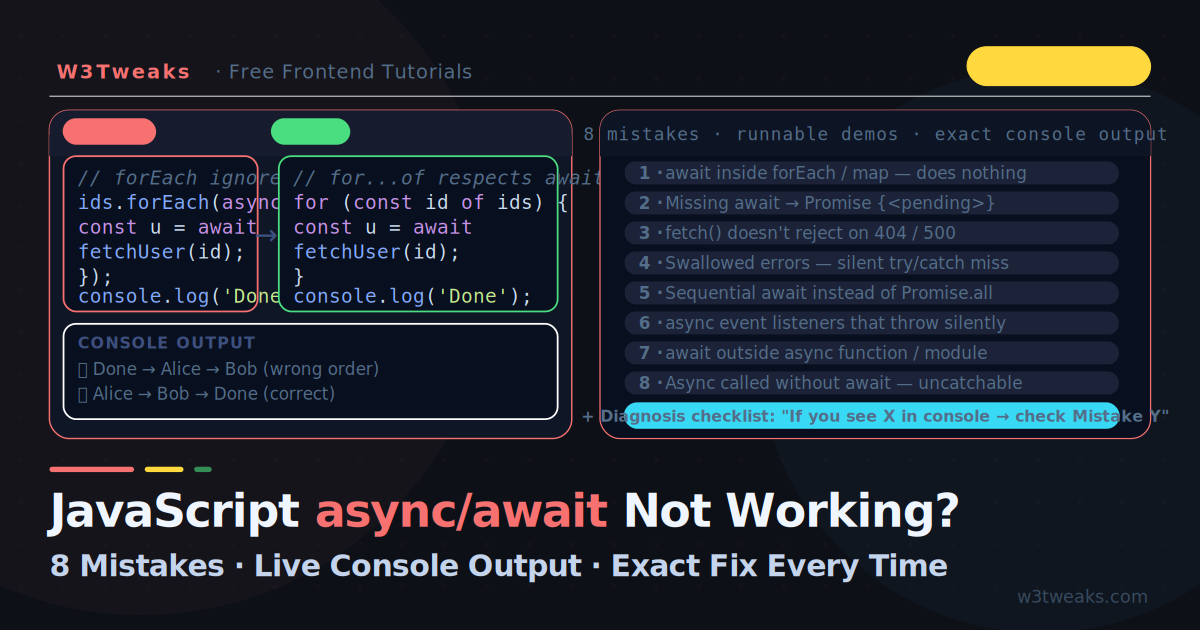
async/await is the most readable way to write asynchronous JavaScript — until it silently fails. The function returns Promise {<pending>} instead of data. The forEach loop completes before a single API call finishes. A 404 sails through your try/catch. A typed-too-fast search response overwrites the one the user actually wanted. An error disappears without a trace. The code looks correct, the console says nothing, and you have no idea why. The frustration is real because most of these mistakes produce no error message. The code runs, it just does the wrong thing. This guide covers the 12 most common reasons async/await stops working — each with the exact broken output you’ll see in your console, the root cause, and the precise fix. Before diving in: async/await is syntactic sugar over Promises. Every async function returns a Promise whether you want it to or not. Every await pauses execution inside its own function — not the entire program, not the calling code outside. That one sentence explains most of the mistakes below.
Related tutorials: 4 Ways to Make an API Call in JavaScript · How to Build a ChatGPT Streaming Text Effect in JavaScript
Live Demo
Click any mistake to see the broken code run vs the fixed version side-by-side. Every output is live — no mocking.
Mistake 1 — await Inside forEach Does Nothing
This is the single most-searched async/await mistake in JavaScript. It looks completely reasonable and fails completely silently.
// ❌ BROKEN — forEach ignores the returned Promise
const ids = [1, 2, 3];

async function loadAll() {
  ids.forEach(async (id) => {
    const user = await fetchUser(id); // ← await is inside here
    console.log(user.name);
  });

  console.log('Done'); // ← prints FIRST, before any user loads
}
What you see in the console:
Done
{name: "Alice"}
{name: "Bob"}
{name: "Charlie"}
Why it breaks: forEach was written before Promises existed. It calls each callback, collects the return value, and discards it. When the callback is async, it returns a Promise — and forEach throws that Promise in the bin. The outer loadAll function has no idea any of this happened, so it moves to console.log('Done') immediately.
The fix — for...of for sequential execution:
// ✅ FIXED — for...of respects await
async function loadAll() {
  for (const id of ids) {
    const user = await fetchUser(id);  // ← waits here before next iteration
    console.log(user.name);
  }
  console.log('Done'); // ← prints LAST, after all users load
}
Or Promise.all for parallel execution (faster):
// ✅ ALSO CORRECT — all fetches run at the same time
async function loadAll() {
  const users = await Promise.all(ids.map(id => fetchUser(id)));
  users.forEach(user => console.log(user.name));
  console.log('Done');
}
Rule: If you need
awaitinside a loop, usefor...of(sequential) orPromise.all(parallel). Never useforEach,map,filter, orreducewithawait— they all discard the returned Promise.
The map() twist — [Promise, Promise, Promise]
map() has its own twist. It doesn’t discard the Promise like forEach — it returns an array of Promises that you forgot to await:
// ❌ BROKEN — map returns [Promise, Promise, Promise]
const results = ids.map(async (id) => {
  return await fetchUser(id);
});
console.log(results); // [Promise {<pending>}, Promise {<pending>}, Promise {<pending>}]

// If you render this directly in a UI, the user sees [object Promise]
results.forEach(r => element.append(r)); // "[object Promise][object Promise]..."

// ✅ FIXED
const results = await Promise.all(ids.map(id => fetchUser(id)));
console.log(results); // [{name: "Alice"}, {name: "Bob"}, {name: "Charlie"}]
Mistake 2 — Missing await on an Async Call
Forgetting await on a call to an async function gives you the Promise object instead of its resolved value. The console is particularly unhelpful here — it shows Promise {<pending>} and nothing else.
// ❌ BROKEN — no await
async function getUser() {
  return { name: 'Alice', age: 30 };
}

async function displayUser() {
  const user = getUser(); // ← missing await
  console.log(user.name); // undefined — user is a Promise, not an object
  console.log(user);      // Promise {<fulfilled>: {name: 'Alice', age: 30}}
}
What you see:
undefined
Promise {<fulfilled>: {name: 'Alice', age: 30}}
Why it breaks: getUser() returns a Promise immediately. Without await, you are assigning that Promise object to user. The Promise resolves a moment later with the actual data — but by then your console.log has already run.
// ✅ FIXED
async function displayUser() {
  const user = await getUser(); // ← now waits for the resolved value
  console.log(user.name);       // 'Alice'
}
How to spot it: If you ever console.log a variable and see Promise {<fulfilled>: ...} or Promise {<pending>}, you forgot await somewhere in the call chain.
Fire-and-forget — the sibling bug
A close cousin: calling an async function and not waiting when you actually needed to. The function returns instantly, the next line runs against stale state, and there’s no error in the console:
// ❌ BROKEN — navigate fires before the save completes
function handleSubmit() {
  saveUser(formData);   // returns instantly — still saving in background
  navigate('/home');    // user is gone before save finishes
}

// ✅ FIXED — propagate async upward
async function handleSubmit() {
  await saveUser(formData);
  navigate('/home');
}
This is the most common bug when refactoring synchronous code to async — you forget to mark handleSubmit as async and propagate the await up the call chain.
Mistake 3 — fetch() Does Not Reject on HTTP Errors
This one surprises almost every developer the first time. fetch() only rejects its Promise on network failures (offline, DNS failure, CORS block). A 404 Not Found or 500 Internal Server Error response resolves successfully — it just has response.ok === false.
// ❌ BROKEN — no check for HTTP errors
async function getPost(id) {
  try {
    const response = await fetch(`https://api.example.com/posts/${id}`);
    const data = await response.json(); // ← runs even on 404!
    return data;
  } catch (error) {
    console.error('Error:', error); // ← never fires for 404 or 500
  }
}

const post = await getPost(99999); // 404 from server
console.log(post); // {message: "Not Found"} — no error thrown
Why it breaks: The HTTP specification considers any response with a status code to be a successful connection. fetch() models this accurately — it only rejects when no response arrives at all. A 404 is a response.
// ✅ FIXED — always check response.ok
async function getPost(id) {
  const response = await fetch(`https://api.example.com/posts/${id}`);

  if (!response.ok) {
    throw new Error(`HTTP ${response.status}: ${response.statusText}`);
  }

  return response.json();
}

try {
  const post = await getPost(99999);
} catch (error) {
  console.error(error.message); // 'HTTP 404: Not Found'
}
The complete safe fetch wrapper:
async function safeFetch(url, options = {}) {
  const res = await fetch(url, options);

  if (!res.ok) {
    const body = await res.text().catch(() => '');
    throw new Error(`HTTP ${res.status} ${res.statusText}: ${body}`);
  }

  const contentType = res.headers.get('content-type');
  if (contentType?.includes('application/json')) {
    return res.json();
  }
  return res.text();
}
Mistake 4 — Swallowed Errors (The Silent Killer)
An async function that throws without a try/catch produces an unhandled Promise rejection. In some environments this crashes the process; in others it silently logs a warning and does nothing. Either way your error handling never runs.
// ❌ BROKEN — error disappears
async function loadConfig() {
  const data = await fetch('/api/config').then(r => r.json());
  return data;
}

// Called without await and without .catch()
loadConfig(); // ← if this throws, nobody knows

console.log('App started'); // ← always prints, even if config failed
What you see in the browser console:
App started
Uncaught (in promise) TypeError: Failed to fetch
The warning appears but your error handling code never ran. The app continues in a broken state.
// ✅ FIXED — handle the rejection
loadConfig()
  .then(config => initialiseApp(config))
  .catch(err => {
    console.error('Config failed:', err.message);
    showErrorScreen();
  });

// OR with top-level await (in a module):
try {
  const config = await loadConfig();
  initialiseApp(config);
} catch (err) {
  console.error('Config failed:', err.message);
  showErrorScreen();
}
Globally catch unhandled rejections as a safety net:
// Browser
window.addEventListener('unhandledrejection', event => {
  console.error('Unhandled Promise rejection:', event.reason);
  // Send to your error monitoring service (Sentry, Datadog, etc.)
  event.preventDefault(); // prevents the browser from logging a second time
});
Node.js changed in 15 — unhandled rejections now crash the process
Node.js 15 changed the default behavior: an unhandled Promise rejection now terminates the process with a non-zero exit code, instead of just logging a warning. If you have any production Node service that calls async functions without await or .catch(), you need a global handler — or your service will crash in random places:
// Node.js — global safety net
process.on('unhandledRejection', (reason, promise) => {
  console.error('Unhandled rejection at:', promise, 'reason:', reason);
  // Send to monitoring; consider graceful shutdown
});

// Older Node.js required: process.on('unhandledRejection', ...)
// Modern Node.js (15+) also kills the process if no handler — register one.
Mistake 5 — Sequential await When You Need Parallel
Three await calls one after another runs them in series — each one waits for the previous to finish. If each call takes 500ms, three calls take 1.5 seconds. With Promise.all they run at the same time and finish in 500ms.
// ❌ SLOW — 1500ms total (sequential)
async function loadDashboard() {
  const user    = await fetchUser();    // 500ms
  const posts   = await fetchPosts();   // 500ms — starts after user finishes
  const stats   = await fetchStats();   // 500ms — starts after posts finishes
  return { user, posts, stats };
}
The mistake is invisible — the code is correct and produces the right result. It is just three times slower than it needs to be because none of these requests depend on each other.
// ✅ FAST — ~500ms total (parallel)
async function loadDashboard() {
  const [user, posts, stats] = await Promise.all([
    fetchUser(),
    fetchPosts(),
    fetchStats(),
  ]);
  return { user, posts, stats };
}
When sequential IS correct: Only when one call depends on the result of the previous one.
// ✅ Sequential is correct here — statsId comes FROM the user
async function loadUserStats() {
  const user  = await fetchUser();
  const stats = await fetchStats(user.statsId); // ← needs user.statsId first
  return { user, stats };
}
The decision rule:
- Do the calls depend on each other’s results? → Sequential
await - Are they independent? →
Promise.all
Mistake 6 — async in Event Listeners Without Error Handling
Attaching an async function to an event listener is perfectly valid. The problem: the browser calls the listener, gets back a Promise, and ignores it. If the async function throws, the error is an unhandled rejection and your user sees nothing.
// ❌ BROKEN — error silently disappears
button.addEventListener('click', async () => {
  const data = await fetch('/api/submit').then(r => r.json());
  renderResult(data);
  // If fetch throws — the button just does nothing. No error. No feedback.
});
The fix — always wrap async event handlers in try/catch:
// ✅ FIXED — errors handled, user gets feedback
button.addEventListener('click', async () => {
  try {
    button.disabled = true;
    button.textContent = 'Saving…';

    const data = await fetch('/api/submit').then(r => r.json());
    renderResult(data);
  } catch (err) {
    showErrorMessage(`Failed: ${err.message}`);
  } finally {
    button.disabled = false;
    button.textContent = 'Save';
  }
});
A reusable wrapper that adds error handling to any async handler:
function asyncHandler(fn) {
  return function(...args) {
    return fn.apply(this, args).catch(err => {
      console.error('Event handler error:', err);
      showGlobalError(err.message);
    });
  };
}

// Usage — clean and safe
button.addEventListener('click', asyncHandler(async () => {
  const data = await fetch('/api/submit').then(r => r.json());
  renderResult(data);
}));
Mistake 7 — await Outside an async Function
Using await at the top level of a regular <script> tag causes a SyntaxError. Top-level await is only valid inside ES modules (files loaded with type="module" or .mjs files).
// ❌ BROKEN — in a regular script tag or CommonJS file
const data = await fetch('/api/data').then(r => r.json());
// Uncaught SyntaxError: await is only valid in async functions,
// async generators, and modules
Fix 1 — wrap in an async IIFE (works everywhere):
// ✅ Works in any script context
(async () => {
  const data = await fetch('/api/data').then(r => r.json());
  console.log(data);
})();
Fix 2 — use type="module" (modern browsers, enables top-level await):
<!-- ✅ Top-level await works here -->
<script type="module">
  const data = await fetch('/api/data').then(r => r.json());
  console.log(data);
</script>
Fix 3 — Node.js (use .mjs extension or set "type": "module" in package.json):
// ✅ In a .mjs file or with "type": "module"
const data = await fetch('https://api.example.com/data').then(r => r.json());
console.log(data);
Mistake 8 — Async Function Called Without await Throws Silently
Calling an async function without await and without .catch() means any error it throws becomes an unhandled Promise rejection. No try/catch in the calling code can catch it — because you already moved past the call.
// ❌ BROKEN — the throw is uncatchable
async function riskyOperation() {
  throw new Error('Something went wrong');
}

try {
  riskyOperation(); // ← no await, no .catch()
} catch (err) {
  console.log('Caught:', err); // ← NEVER RUNS
}

// The error appears as: Uncaught (in promise) Error: Something went wrong
Why it breaks: riskyOperation() returns a rejected Promise immediately. Your try/catch only runs synchronous code — it exits before the Promise rejects. The rejection has nowhere to go.
// ✅ FIXED — await makes the rejection catchable
try {
  await riskyOperation();
} catch (err) {
  console.log('Caught:', err.message); // 'Something went wrong'
}

// OR — chain .catch() directly
riskyOperation().catch(err => console.log('Caught:', err.message));
Mistake 9 — Race Conditions From Out-of-Order Responses
This bug ships to production constantly and is invisible in code review. Picture a search input: the user types r, then re, then react, then backspaces to redux. Four fetch('/api/search?q=' + term) calls fire. The react request happens to take 1.5 seconds, the redux request takes 200ms. The redux response arrives first and renders. Then react’s response arrives — and overwrites the correct results with stale ones. No error. No console warning. The user just sees the wrong thing.
// ❌ BROKEN — last-typed query loses to last-arrived response
let resultsEl = document.querySelector('#results');

input.addEventListener('input', async (e) => {
  const data = await fetch(`/api/search?q=${e.target.value}`).then(r => r.json());
  resultsEl.innerHTML = renderResults(data); // ← whoever arrives last wins
});
Fix 1 — AbortController cancels stale requests
AbortController is the modern, browser-native way to cancel an in-flight fetch. Create a new controller per request, abort the previous one before each new call. The aborted fetch rejects with an AbortError you filter out in your catch:
// ✅ FIXED — AbortController cancels the previous request
let currentController = null;

input.addEventListener('input', async (e) => {
  // Cancel the in-flight request from a previous keystroke
  currentController?.abort();
  currentController = new AbortController();

  try {
    const data = await fetch(
      `/api/search?q=${e.target.value}`,
      { signal: currentController.signal }
    ).then(r => r.json());

    resultsEl.innerHTML = renderResults(data);
  } catch (err) {
    if (err.name === 'AbortError') return; // expected — ignore
    showError(err.message);
  }
});
Fix 2 — request-ID guard pattern (when you can’t cancel)
If the work you’re racing isn’t a fetch (a Web Worker, a database call, something that doesn’t support AbortSignal), guard with a monotonic request ID:
// ✅ FIXED — only the most recent request gets to render
let latestRequestId = 0;

input.addEventListener('input', async (e) => {
  const myId = ++latestRequestId;
  const data = await searchSomething(e.target.value);

  if (myId !== latestRequestId) return; // stale — drop it
  resultsEl.innerHTML = renderResults(data);
});
Where this lurks: search inputs, tab switchers (clicking Tab A then Tab B before A loads), filter pickers, infinite-scroll list pages, autosave debouncers. Anywhere a user can trigger the same async action twice before the first one finishes.
Mistake 10 — Promise.all Short-Circuits on the First Rejection
Promise.all is the right answer for parallel execution — but it has a foot-gun. The moment any of its Promises rejects, the whole Promise.all rejects, and the resolved values from the others are lost. The other Promises don’t get cancelled — they keep running in the background, just with nowhere to deliver their results.
// ❌ BROKEN — if `fetchStats` rejects, you lose the user and posts data
async function loadDashboard() {
  try {
    const [user, posts, stats] = await Promise.all([
      fetchUser(),   // ← resolves with data
      fetchPosts(),  // ← resolves with data
      fetchStats(),  // ← rejects with 500 Internal Server Error
    ]);
    return { user, posts, stats };
  } catch (err) {
    return null; // user and posts data thrown away
  }
}
If your dashboard can render usefully even when stats are missing, this is the wrong shape entirely.
Pick the right combinator
| Combinator | Resolves when | Rejects when | Use for |
|---|---|---|---|
Promise.all([a, b, c]) | All succeed | Any one rejects | Operations that need every result — abort on any failure |
Promise.allSettled([a, b, c]) | All settle (success or fail) | Never | Always-render dashboards — handle each result individually |
Promise.any([a, b, c]) | First success | All fail (AggregateError) | Fastest mirror/CDN/replica wins |
Promise.race([a, b, c]) | First settles either way | First settle is a rejection | Timeouts, “first response wins” |
// ✅ FIXED — always render with whatever we got
async function loadDashboard() {
  const results = await Promise.allSettled([
    fetchUser(),
    fetchPosts(),
    fetchStats(),
  ]);

  const [userResult, postsResult, statsResult] = results;

  return {
    user:  userResult.status  === 'fulfilled' ? userResult.value  : null,
    posts: postsResult.status === 'fulfilled' ? postsResult.value : [],
    stats: statsResult.status === 'fulfilled' ? statsResult.value : null,
  };
}
Side-effect warning: when
Promise.allrejects, the other Promises keep running. If they have side effects (writes to a database, charges a credit card, logs to analytics), those side effects still happen. Don’t rely onPromise.allrejection to “cancel” the other operations — useAbortControllerto actually cancel them.
Mistake 11 — setInterval With an Async Callback Stacks Calls
setInterval(fn, 5000) fires fn every 5 seconds, regardless of whether the previous call finished. If fn is async and takes 6 seconds, you now have two overlapping calls. Then three. Then four. The “interval” turns into a queue of stacked, simultaneous executions — duplicating writes, crashing the server, and draining the user’s battery. The bug is invisible until traffic hits a slow path.
// ❌ BROKEN — if pollServer() takes longer than 5s, calls stack indefinitely
setInterval(async () => {
  const data = await pollServer();
  updateUI(data);
}, 5000);
Fix — recursive setTimeout chained after await
Replace the interval with a recursive setTimeout that fires after the previous call finishes. The interval becomes “5 seconds between completions” instead of “5 seconds between starts”:
// ✅ FIXED — next poll starts only after the previous one finishes
async function poll() {
  try {
    const data = await pollServer();
    updateUI(data);
  } catch (err) {
    console.error('Poll failed:', err);
  } finally {
    setTimeout(poll, 5000); // schedule the next one only after this one is done
  }
}
poll();
This guarantees you never have more than one in-flight pollServer() call, regardless of how slow the server is responding.
Mistake 12 — return promise Loses Stack Traces (the return await Debate)
When an async function inside a try/catch returns a Promise without awaiting it, two things go wrong: (1) the rejection escapes the try/catch you wrote, because you returned before the Promise settled, and (2) the stack trace loses the calling function’s frame in many older Node and browser versions. Both issues are fixed by writing return await fn() instead of return fn().
// ❌ BROKEN — catch block does NOT catch the rejection
async function fetchUser(id) {
  try {
    return fetchAPI(`/users/${id}`); // ← no await
  } catch (err) {
    // Never runs — we returned before the Promise rejected
    console.error('Inside fetchUser catch');
    throw new Error('User fetch failed');
  }
}

// ✅ FIXED — return await makes the rejection catchable
async function fetchUser(id) {
  try {
    return await fetchAPI(`/users/${id}`); // ← awaits before returning
  } catch (err) {
    // Now this runs when fetchAPI rejects
    console.error('Inside fetchUser catch');
    throw new Error('User fetch failed');
  }
}
The old ESLint rule no-return-await told you to drop the await because the runtime would auto-flatten the returned Promise anyway. That advice is wrong today. Modern V8 has zero performance cost for return await, and the await is what restores the calling frame in the async stack trace and what makes the surrounding try/catch actually catch. If you’ve been removing awaits to satisfy the lint rule, put them back.
// Stack trace without `return await`:
//   at fetchAPI (api.js:42)
//   (no frame for fetchUser — the calling context is lost)

// Stack trace with `return await`:
//   at fetchAPI (api.js:42)
//   at fetchUser (users.js:8)  ← the frame you need to debug from
The Modern rule: inside a
try/catch, always writereturn await. Outside atry/catch, both forms are equivalent — but staying consistent (alwaysreturn await) makes the code easier to read and debug.
Bonus — The Explicit Promise Constructor Antipattern
Wrapping an already-Promise-returning API in new Promise((resolve, reject) => …) is the most common antipattern AI coding tools generate. It looks like you’re “controlling” the Promise — but if the wrapped call throws inside a nested callback, the executor’s try/catch won’t catch it and the outer Promise stays pending forever.
// ❌ BROKEN — fetch error never reaches the outer Promise
function getUser(id) {
  return new Promise((resolve, reject) => {
    fetch(`/api/users/${id}`)
      .then(r => r.json())
      .then(resolve);
    // If fetch rejects → who calls reject? Nobody.
    // The returned Promise hangs forever.
  });
}

// ✅ FIXED — just return the existing Promise
function getUser(id) {
  return fetch(`/api/users/${id}`).then(r => r.json());
}

// ✅ EVEN BETTER — async/await
async function getUser(id) {
  const res = await fetch(`/api/users/${id}`);
  return res.json();
}
The only legitimate use of new Promise(...) is wrapping an old-style callback or event-based API — setTimeout, XMLHttpRequest, FileReader, DOM events. If the thing you’re wrapping already returns a Promise, you don’t need the constructor.
Quick Diagnosis Checklist
If you see Promise {<pending>} in the console:
→ You forgot await on an async function call (Mistake 2)
If console.log('Done') fires before your async operations complete:
→ You used await inside forEach, map, or filter (Mistake 1)
If a 404 or 500 response is not triggering your catch block:
→ fetch() does not reject on HTTP errors — check response.ok (Mistake 3)
If an error disappears with no trace:
→ Unhandled Promise rejection — add .catch() or try/catch (Mistakes 4, 8)
If three independent API calls take 3× as long as one:
→ Sequential await — switch to Promise.all (Mistake 5)
If clicking a button does nothing and there is no error:
→ Async event handler is throwing silently — wrap in try/catch (Mistake 6)
If you see SyntaxError: await is only valid in async functions:
→ Top-level await outside a module — use IIFE or type="module" (Mistake 7)
If the user types fast and the wrong search results appear:
→ Out-of-order response race condition — use AbortController (Mistake 9)
If one of three parallel API calls fails and you lose the other two:
→ Promise.all short-circuit — use Promise.allSettled instead (Mistake 10)
If your polling loop is hammering the server and not slowing down:
→ setInterval with async stacks overlapping calls — use recursive setTimeout (Mistake 11)
If your stack trace is missing the calling function’s frame:
→ Add await to the return — return await fn() (Mistake 12)
Key Takeaways
forEach,map,filter, andreducediscard returned Promises — usefor...oforPromise.allinstead.map()specifically returns an array ofPromiseobjects that render as[object Promise]in your UI- Forgetting
awaitgives you the Promise object, not its value — look forPromise {<pending>}in the console. The “fire-and-forget” version (calling without await when you meant to wait) is the same bug with no console signal fetch()only rejects on network failure, not on404or500— always checkresponse.ok- An unhandled Promise rejection does not trigger nearby
try/catchblocks — onlyawait+try/catchor.catch()can catch it. Node 15+ now crashes the process on unhandled rejections — registerprocess.on('unhandledRejection') - Sequential
awaitcalls that don’t depend on each other are a performance bug —Promise.allruns them in parallel - Async event listeners throw silently without
try/catch— always wrap async handlers - Top-level
awaitonly works in ES modules — use an async IIFE in regular scripts - Any
asyncfunction call withoutawaitor.catch()makes its errors uncatchable - Search inputs and tab switchers without
AbortControllercause out-of-order response race conditions — the last response, not the last request, wins.AbortControlleris the modern fix Promise.allshort-circuits on the first rejection and loses the other resolved values. UsePromise.allSettledwhen partial success is acceptable;Promise.anyfor “first success wins”;Promise.racefor timeoutssetIntervalwith an async callback stacks overlapping calls when the callback is slower than the interval — replace with recursivesetTimeoutafterawait- Inside a
try/catch, always writereturn await fn()— the old ESLintno-return-awaitrule is wrong . Theawaitis what makes the catch fire and what preserves the stack trace - Never wrap an already-Promise-returning API in
new Promise((resolve, reject) => ...)— it’s the most common AI-generated antipattern. Just return the existing Promise
FAQ
Why does async/await look like it works but the data is undefined?
The most common cause is a missing await. When you call an async function without await, you get back the Promise object instead of the resolved value. Try console.log() on the variable — if you see Promise {<pending>} or Promise {<fulfilled>: ...}, you forgot to await the call.
Why does forEach with async/await not work?
forEach was designed before Promises existed. It calls each callback synchronously and discards the return value. When the callback is async, it returns a Promise — and forEach silently throws it away. JavaScript cannot await a Promise that has been discarded. Use for...of for sequential execution or Promise.all + map for parallel execution.
Why is my fetch() error not being caught?
fetch() only rejects when no response arrives (network error, DNS failure, CORS). An HTTP error like 404 Not Found or 500 Internal Server Error is still a response, so fetch() resolves successfully. Check response.ok immediately after awaiting fetch() and throw an error manually when it is false.
What is an unhandled Promise rejection?
An unhandled Promise rejection happens when a Promise rejects and no .catch() handler or try/catch block is attached to it. In browsers it appears in the console as Uncaught (in promise) Error: .... In Node.js 15 and later, it crashes the process by default. Always attach error handling to every Promise you create — either with await inside try/catch or with .catch().
Can I use await at the top level of a JavaScript file?
Only in ES modules. A file is a module when it has type="module" on its <script> tag in HTML, uses the .mjs extension in Node.js, or has "type": "module" in package.json. In any other context, top-level await throws a SyntaxError. Use an async IIFE (async () => { await ...; })() as the universal alternative that works everywhere.
Why does Promise.all fail if one request fails?
Promise.all rejects as soon as any of its Promises rejects, and the resolved values from the others are lost — but the other Promises don’t get cancelled and their side effects still happen. If you need all results regardless of individual failures, use Promise.allSettled instead. It waits for all Promises to settle and returns an array of {status: 'fulfilled', value: ...} or {status: 'rejected', reason: ...} objects for each one.
How do I cancel a fetch when the user types a new search query?
Use AbortController. Create a new AbortController per request, pass its signal to fetch, and call .abort() on the previous controller before each new request. The aborted fetch rejects with an AbortError that you should filter out of your catch block. This is the modern fix for the search-input race condition where stale responses overwrite fresh ones.
Should I use Promise.allSettled or Promise.all?
Use Promise.all when you need every operation to succeed and you want to abort on any failure — typical for transactional code. Use Promise.allSettled when partial success is acceptable and you want to inspect each result individually — typical for dashboards, batch operations, and any UI that should render with whatever loaded.
How do I poll an API every 5 seconds with async/await?
Don’t use setInterval — if the async callback takes longer than the interval, calls stack. Use a recursive setTimeout that schedules the next poll inside the previous call’s finally block. The interval becomes “5 seconds between completions” instead of “5 seconds between starts”, so you can never have more than one in-flight request regardless of API latency.
Why does my stack trace not show the calling function?
You probably wrote return fn() instead of return await fn() inside an async function. Without await, the calling frame is dropped from the async stack trace in many environments and the surrounding try/catch won’t catch the rejection. Modern V8 has zero performance cost for return await — always use it inside a try/catch. The old ESLint no-return-await rule is outdated.