Every AI agent tutorial says the same things: install LangChain, use LangGraph, deploy to a framework. The JavaScript ones are no different — Mastra, LangChain.js, AutoGen. All of them hand the hard parts to a library and skip the part that actually matters: what is an agent loop and how does it work?
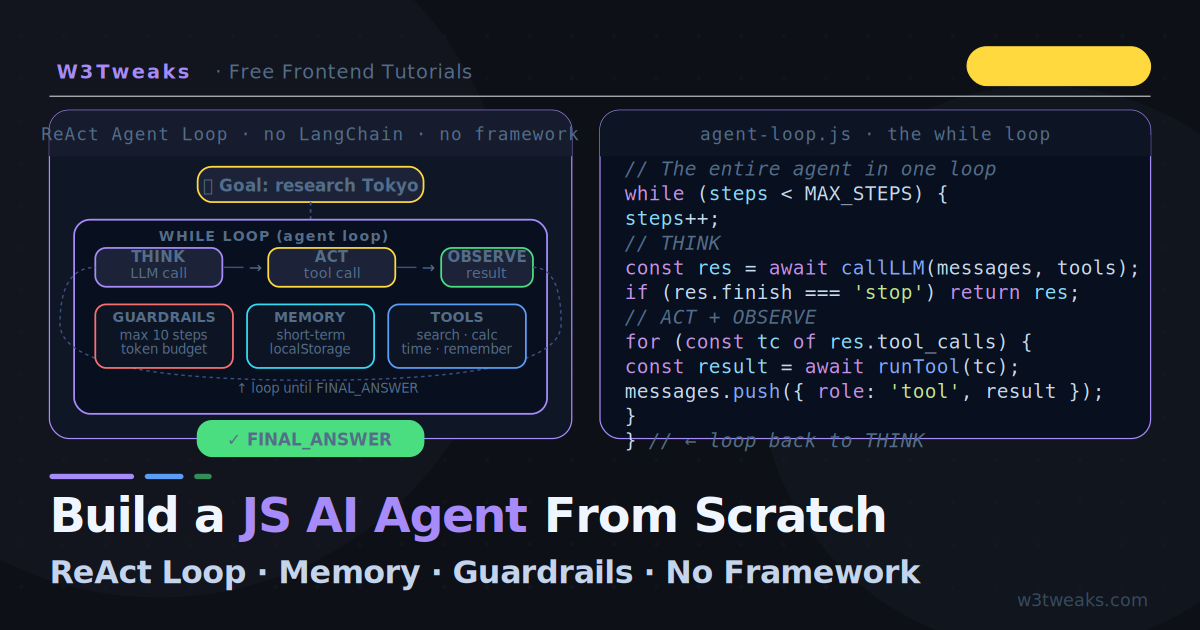
This tutorial skips the frameworks entirely and builds a complete, working AI agent from scratch in vanilla JavaScript. You will see the actual while loop. You will see how Thought, Action, and Observation connect. You will see how memory works without a vector database, how guardrails prevent infinite loops and cost overruns, how to handle parallel tool calls (the 2024+ OpenAI feature most tutorials still miss), how to defend against hallucinated tool names (the model invents search_v2 when you registered search), and how to add observability without LangSmith in 20 lines.
The result is a research agent that can search for information, calculate numbers, check the time, and reason across multiple steps — all visible in a streaming browser UI that shows the agent’s thinking in real time.
This builds directly on the tool calling pattern from OpenAI Function Calling in JavaScript and the memory concepts from Build a RAG App in the Browser. The Vercel AI SDK tutorial shows a framework-based alternative — this article is what happens when you remove the framework entirely.
Live Demo
Enter your OpenAI API key and give the agent a multi-step task. Watch it Reason → Act → Observe in real time. Token cost tracked live.
Agent vs Chatbot — Make Sure You Actually Need an Agent
A chatbot answers one prompt at a time. An AI agent receives a goal and works through multiple steps to complete it — calling tools, checking results, adjusting its plan, deciding when it is done.
Chatbot:  user says X → AI responds → done
Agent:    user sets goal → AI thinks → calls tool → observes result
                       → AI thinks again → calls another tool → ...
                       → AI decides goal is achieved → done
The honest test: if your problem can be solved by one LLM call (with or without a single tool call), you don’t need an agent. You need a chatbot or a single function call. Agents are 3–10× more expensive per task than a single completion and add a whole class of failure modes (infinite loops, runaway cost, hallucinated tool names). Don’t reach for an agent because it sounds advanced — reach for one when the task genuinely requires multiple decisions across multiple unknown steps.
An agent has four components working together:
- LLM (the brain) — reasons, plans, decides what to do next
- Tools — the actions the agent can take (search, calculate, fetch, etc.)
- Memory — context from previous steps in the current task
- The loop — the cycle of think → act → observe that runs until the goal is met
The framework you use (or don’t use) just wires these four things together differently.
The ReAct Pattern: Thought → Action → Observation
ReAct (Reasoning + Acting) is the most widely used agent architecture because it makes the agent’s decision process readable and debuggable. Every step follows the same format:
Thought:     I need to find the current population of Tokyo.
Action:      search({ query: "Tokyo population 2026" })
Observation: Tokyo population is approximately 13.96 million (city) or 37.4 million (metro area).

Thought:     I have the population. Now I need to calculate what percentage
             of Japan's 125.7 million population lives in Tokyo metro.
Action:      calculate({ expression: "37400000 / 125700000 * 100" })
Observation: 29.75

Thought:     I have both numbers. I can now give a complete answer.
Action:      FINAL_ANSWER
Result:      About 29.75% of Japan's entire population lives in the Tokyo metro area.
Each Thought is the LLM’s reasoning. Each Action is a tool call. Each Observation is the tool’s result. The loop continues until the agent emits its final answer.
Step 1 — Define the Tools
Tools are the actions your agent can take. Define them as a schema (what the AI sees) and an implementation (what actually runs):
// tools.js

const TOOL_SCHEMAS = [
  {
    type: 'function',
    function: {
      name:        'search',
      description: 'Search for current information on any topic. Use this when you need facts, data, news, or information you do not already know.',
      parameters: {
        type:       'object',
        properties: {
          query: {
            type:        'string',
            description: 'The search query. Be specific.'
          }
        },
        required: ['query']
      }
    }
  },
  {
    type: 'function',
    function: {
      name:        'calculate',
      description: 'Evaluate any mathematical expression. Use for arithmetic, percentages, unit conversions, statistics.',
      parameters: {
        type:       'object',
        properties: {
          expression: {
            type:        'string',
            description: 'A JavaScript math expression, e.g. "Math.sqrt(144)" or "37400000 / 125700000 * 100"'
          }
        },
        required: ['expression']
      }
    }
  },
  {
    type: 'function',
    function: {
      name:        'get_current_time',
      description: 'Get the current date and time. Use when the task involves scheduling, deadlines, or "today" / "now".',
      parameters:  { type: 'object', properties: {}, required: [] }
    }
  },
  {
    type: 'function',
    function: {
      name:        'remember',
      description: 'Store a key piece of information for the current task. Use to avoid re-fetching facts you already found.',
      parameters: {
        type:       'object',
        properties: {
          key:   { type: 'string', description: 'Short label for this fact' },
          value: { type: 'string', description: 'The fact to remember' }
        },
        required: ['key', 'value']
      }
    }
  }
];

// Tool implementations — the actual code that runs
const TOOL_FUNS = {
  search: async ({ query }) => {
    // In production: call Bing Search API, Brave Search, SerpAPI, etc.
    // For this demo: return a structured mock result
    return JSON.stringify({
      query,
      note: `This is a simulated search result for: "${query}". In production, replace with a real search API call (Brave Search, SerpAPI, Bing Search API). The agent will reason with whatever you return here.`,
      tip: 'Return a concise, factual string — not raw HTML.'
    });
  },

  calculate: ({ expression }) => {
    try {
      const result = new Function(`"use strict"; return (${expression})`)();
      return String(Math.round(result * 10000) / 10000);
    } catch (e) {
      return `Error: ${e.message}`;
    }
  },

  get_current_time: () => {
    return new Date().toLocaleString('en-US', {
      dateStyle: 'full',
      timeStyle: 'long',
      timeZone: Intl.DateTimeFormat().resolvedOptions().timeZone
    });
  },

  remember: ({ key, value }) => {
    // Short-term: store in the task's scratchpad (we handle this in the loop)
    return `Remembered: ${key} = ${value}`;
  }
};
Step 2 — Build the Agent Loop
This is the core of everything. The agent loop runs until the agent emits a final answer or a guardrail triggers:
// agent.js

const MAX_STEPS    = 10;       // Guardrail: prevent infinite loops
const MAX_TOKENS   = 8000;     // Guardrail: prevent cost overruns
const COST_PER_1K  = 0.00015;  // gpt-4o-mini input pricing per 1K tokens

class Agent {
  constructor(apiKey, tools, onStep) {
    this.apiKey      = apiKey;
    this.tools       = tools;       // TOOL_SCHEMAS array
    this.onStep      = onStep;      // callback: emit each step to UI
    this.memory      = {};          // short-term scratchpad
    this.messages    = [];          // conversation history for this task
    this.totalTokens = 0;
    this.steps       = 0;
    this.recentActions = [];
  }

  /** Run the agent on a goal. Returns the final answer. */
  async run(goal) {
    this.messages = [
      {
        role:    'system',
        content: `You are a helpful research agent. Break goals into steps.
Use tools when you need information you do not have.
Always reason explicitly before acting.
When you have enough information, give a final answer.

Current scratchpad: ${JSON.stringify(this.memory)}
Today's date: ${new Date().toLocaleDateString('en-US', { dateStyle: 'full' })}`
      },
      { role: 'user', content: goal }
    ];

    this.onStep({ type: 'goal', content: goal });

    // ──────────────────────────────────────────
    // THE AGENT LOOP — the heart of any agent
    // ──────────────────────────────────────────
    while (this.steps < MAX_STEPS) {
      this.steps++;

      // Guardrail: token budget
      if (this.totalTokens > MAX_TOKENS) {
        this.onStep({ type: 'guardrail', content: `Token budget exceeded.` });
        return 'Agent stopped: token budget exceeded.';
      }

      // 1. THINK — call the LLM
      this.onStep({ type: 'thinking', step: this.steps });
      const response = await this.callLLM();
      this.totalTokens += response.usage?.total_tokens ?? 0;

      const choice = response.choices[0];
      this.messages.push(choice.message);

      // 2. CHECK — final answer or more tool calls?
      if (choice.finish_reason !== 'tool_calls') {
        const answer = choice.message.content;
        this.onStep({ type: 'answer', content: answer });
        return answer;
      }

      // 3. ACT — execute every tool call (see Step 3 for the parallel version)
      await this.executeToolCalls(choice.message.tool_calls);
    }

    // Max steps reached — force a final answer
    this.messages.push({
      role:    'user',
      content: 'You have used your maximum steps. Give your best answer with what you have.'
    });
    const final = await this.callLLM();
    return final.choices[0].message.content;
  }

  async executeToolCalls(toolCalls) {
    // CRITICAL: every tool_call_id MUST get a tool message response before
    // the next API call, or you get a 400 error. So we never break/skip —
    // even short-circuited calls (loop detection, unknown tool) get an
    // error observation pushed back as their tool response.
    for (const tc of toolCalls) {
      const name = tc.function.name;
      let args;
      try { args = JSON.parse(tc.function.arguments); }
      catch { args = {}; }

      const result = await this.runOneTool(tc.id, name, args);
      this.messages.push({ role: 'tool', tool_call_id: tc.id, content: String(result) });
    }
  }

  async runOneTool(callId, name, args) {
    const actKey = `${name}:${JSON.stringify(args)}`;

    // Guardrail: repeated-action loop detection
    if (this.recentActions.slice(-3).includes(actKey)) {
      const msg = 'You are repeating the same action. Try a different approach or give your best answer.';
      this.onStep({ type: 'guardrail', content: msg });
      return msg;
    }
    this.recentActions.push(actKey);

    // Guardrail: hallucinated tool name (see Step 4)
    const fn = TOOL_FUNS[name];
    if (!fn) {
      const err = `Tool "${name}" is not available. Available tools: ${Object.keys(TOOL_FUNS).join(', ')}`;
      this.onStep({ type: 'guardrail', content: err });
      return err;
    }

    this.onStep({ type: 'action', tool: name, args });
    try {
      const result = await Promise.race([
        fn(args),
        new Promise((_, reject) =>
          setTimeout(() => reject(new Error('Tool timed out (5s)')), 5000)
        )
      ]);
      if (name === 'remember') this.memory[args.key] = args.value;
      this.onStep({ type: 'observation', content: result });
      return result;
    } catch (e) {
      const err = `Tool error: ${e.message}`;
      this.onStep({ type: 'observation', content: err, error: true });
      return err;
    }
  }

  async callLLM() {
    const res = await fetch('https://api.openai.com/v1/chat/completions', {
      method:  'POST',
      headers: {
        'Content-Type':  'application/json',
        'Authorization': `Bearer ${this.apiKey}`
      },
      body: JSON.stringify({
        model:       'gpt-4o-mini',
        messages:    this.messages,
        tools:       this.tools,
        tool_choice: 'auto',
      })
    });
    if (!res.ok) {
      const err = await res.json();
      throw new Error(err.error?.message ?? `API error ${res.status}`);
    }
    return res.json();
  }
}
The entire agent is this loop: call the LLM → check if it wants tools → run them → send results back → repeat. When the LLM stops requesting tools, it is giving its final answer. That is all an agent is.
Step 3 — Parallel Tool Calls (The 2024+ Feature Most Tutorials Miss)
Modern OpenAI models return tool_calls as an array — they can decide to make multiple tool calls in a single response when they’re independent. Most tutorials (including ones written in 2025) still iterate them sequentially with for...of and await. That works, but it serialises tool calls that don’t need to be serial.
The fix: Promise.all over the tool calls when they’re independent of each other.
async executeToolCallsParallel(toolCalls) {
  // Each tool runs concurrently — the agent gets all observations back in
  // the same iteration. Cuts wall-clock latency 2-5× on multi-tool steps.
  const results = await Promise.all(
    toolCalls.map(async tc => {
      const name = tc.function.name;
      let args;
      try { args = JSON.parse(tc.function.arguments); }
      catch { args = {}; }
      const result = await this.runOneTool(tc.id, name, args);
      return { tc, result };
    })
  );

  // Push all tool responses to messages array — order must match the
  // tool_calls order from the assistant message.
  for (const { tc, result } of results) {
    this.messages.push({ role: 'tool', tool_call_id: tc.id, content: String(result) });
  }
}
When to use parallel vs sequential: if your tools are independent (search + get_time + calculate), parallel wins. If they’re dependent (search for X then search for something based on X’s result), the model will naturally serialise them across iterations anyway — Promise.all doesn’t hurt, it just doesn’t help.
The orphan-tool-call gotcha: OpenAI requires every tool_call from an assistant message be answered with a matching tool message before the next API call. If you break out of the loop mid-way (loop detection, error), you must still push a tool response for every remaining tool_call_id or the next API call fails with 400 — must respond to each tool_call_id. The runOneTool helper above always returns a string (success, error, or guardrail message), so every tool call gets a response. Don’t break mid-loop without sending placeholder responses for the rest.
Step 4 — Defend Against Hallucinated Tool Names
This is one of the most common production agent failures and nobody documents it. The model decides it wants to search the web and calls search_web — but you registered the tool as search. The agent crashes.
// What the model emits (sometimes):
{
  tool_calls: [{
    id: 'call_abc123',
    function: { name: 'search_web', arguments: '{"query":"Tokyo population"}' }
  }]
}

// Your tool registry:
const TOOL_FUNS = { search: ..., calculate: ..., get_current_time: ... };

// Without defence: TypeError: TOOL_FUNS['search_web'] is not a function
The fix isn’t to crash. Return an error observation that names the available tools, and the model will self-correct on the next iteration:
const fn = TOOL_FUNS[name];
if (!fn) {
  const err = `Tool "${name}" is not available. Available tools: ${Object.keys(TOOL_FUNS).join(', ')}`;
  // Push the error AS THE TOOL RESPONSE — not as a thrown exception
  return err;
}
What the model sees in the next iteration:
Observation: Tool "search_web" is not available. Available tools: search, calculate, get_current_time, remember.Almost always, the next thought is something like “I should use ‘search’ instead” and the agent recovers. Without this defence, your agent dies the first time the model invents a tool name — and it will happen. Even GPT-4o invents tool names roughly 1 in 200 calls based on plural forms, descriptive names, and confident guessing.
The same pattern handles malformed arguments JSON (rare but real — wrap JSON.parse in try/catch, default to {}, let the model see the empty-args error in the observation and retry).
Step 5 — Memory Systems (Without a Vector Database)
Agents need two types of memory. Tutorials always jump to vector databases — but for most use cases, you do not need one.
Short-Term Memory (Rolling Context Window)
The messages array is your short-term memory. It holds the entire Thought/Action/Observation history for the current task. The agent reads it on every loop iteration to understand where it is.
For very long tasks, the context window fills up. The solution is a sliding window that keeps the most recent steps:
function trimContext(messages, maxTokens = 6000) {
  // Rough estimate: 4 chars ≈ 1 token
  const totalChars = messages.reduce((sum, m) =>
    sum + JSON.stringify(m).length, 0);

  if (totalChars / 4 < maxTokens) return messages;

  // Always keep the system prompt (index 0) and the original goal (index 1)
  const system = messages[0];
  const goal   = messages[1];

  // Drop older middle messages but keep the last 6 exchanges
  const recent = messages.slice(-12);

  return [system, goal, ...recent];
}
Long-Term Memory (localStorage)
Between sessions, use localStorage to persist facts the agent has discovered. This costs zero API calls on the next run:
const MEMORY_KEY = 'agent_long_term_memory';

function loadLongTermMemory() {
  try {
    const raw = localStorage.getItem(MEMORY_KEY);
    return raw ? JSON.parse(raw) : {};
  } catch {
    return {};
  }
}

function saveLongTermMemory(facts) {
  try {
    localStorage.setItem(MEMORY_KEY, JSON.stringify(facts));
  } catch {
    console.warn('localStorage full — long-term memory not saved');
  }
}

function buildMemoryPrompt(longTerm) {
  const entries = Object.entries(longTerm);
  if (!entries.length) return '';
  return `\n\nLong-term memory (from previous sessions):\n` +
    entries.map(([k, v]) => `• ${k}: ${v}`).join('\n');
}
Inject the long-term memory into the system prompt so the agent can use it without re-fetching:
const longTerm = loadLongTermMemory();

{
  role:    'system',
  content: `You are a helpful research agent...${buildMemoryPrompt(longTerm)}`
}
When you actually need a vector DB: if your long-term memory grows past ~30 entries, the system prompt starts to bloat and the agent gets distracted. At that point, switch to a semantic-retrieval pattern — load only the top-3 memory entries relevant to the current goal. The RAG tutorial covers the embedding + cosine similarity pattern that works for agent memory the same way it works for document retrieval. For most agents, this threshold is months away.
Step 6 — The Guardrails Section Everyone Skips
Without guardrails, agents enter infinite loops, exceed token budgets, and produce unpredictable behaviour. Four essential guardrails:
Guardrail 1 — Max Steps
const MAX_STEPS = 10;

// Inside the loop:
if (this.steps > MAX_STEPS) {
  // Force a graceful summary using the context collected so far
  this.messages.push({
    role:    'user',
    content: `You have used ${MAX_STEPS} steps. Summarise what you have found and give your best answer.`
  });
  const fallback = await this.callLLM();
  return fallback.choices[0].message.content;
}
Rather than hard-stopping, inject a prompt that forces a graceful summary. The agent still gives a useful (if incomplete) answer.
Guardrail 2 — Token Budget
const BUDGET_TOKENS = 10000;

// After each LLM call:
this.totalTokens += response.usage.total_tokens;

if (this.totalTokens > BUDGET_TOKENS) {
  return `Task stopped: token budget ($${(BUDGET_TOKENS / 1000 * 0.00015).toFixed(3)}) exceeded after ${this.steps} steps.`;
}
Guardrail 3 — Loop Detection (with the orphan-call fix from Step 3)
const actKey = `${toolName}:${JSON.stringify(args)}`;
if (recentActions.slice(-3).includes(actKey)) {
  // CRITICAL: still return a tool response — never break the for loop
  // without responding to all tool_call_ids (see Step 3).
  return 'You are repeating the same action. Try a different approach or give your best answer.';
}
recentActions.push(actKey);
Guardrail 4 — Tool Timeout
Prevent a hanging tool call from stalling the agent:
async function withTimeout(promise, ms = 5000) {
  return Promise.race([
    promise,
    new Promise((_, reject) =>
      setTimeout(() => reject(new Error(`Tool timed out after ${ms}ms`)), ms)
    )
  ]);
}

// Usage
const result = await withTimeout(fn(args), 5000);
Step 7 — DIY Observability (No LangSmith Required)
Every agent framework’s pitch eventually mentions “use our observability tool to debug what your agent is doing.” The reality: you can get 90% of that value in 20 lines of vanilla JS. Wrap each step in a tracer:
class AgentTracer {
  constructor() { this.trace = []; this.t0 = Date.now(); }

  step(type, data) {
    this.trace.push({
      t:       Date.now() - this.t0,           // ms since trace start
      type,                                     // 'thinking' | 'action' | 'observation' | 'answer' | 'guardrail'
      ...data,
    });
  }

  // Returns a structured JSON trace you can console.log, post to a logging
  // endpoint, render as a tree in the UI, or save to localStorage.
  export() {
    return {
      duration_ms:    Date.now() - this.t0,
      total_steps:    this.trace.filter(s => s.type === 'thinking').length,
      total_tokens:   this.trace.reduce((sum, s) => sum + (s.tokens ?? 0), 0),
      tool_calls:     this.trace.filter(s => s.type === 'action').length,
      tool_breakdown: this.trace.filter(s => s.type === 'action')
        .reduce((acc, s) => ({ ...acc, [s.tool]: (acc[s.tool] ?? 0) + 1 }), {}),
      timeline: this.trace,
    };
  }
}

// Wire it into the agent's onStep callback:
const tracer = new AgentTracer();
const agent = new Agent(apiKey, tools, (step) => tracer.step(step.type, step));

await agent.run(goal);
console.log(tracer.export());
// {
//   duration_ms: 4823,
//   total_steps: 4,
//   total_tokens: 2847,
//   tool_calls: 5,
//   tool_breakdown: { search: 2, calculate: 2, remember: 1 },
//   timeline: [...]
// }
For a richer UI, render tracer.export() as a collapsible JSON tree in a sidebar next to the agent output. You now have everything LangSmith gives you for the cost of Date.now() calls. When you need to ship to production and want hosted dashboards, then consider Langfuse or LangSmith — but most production agents never need them.
Step 8 — Connecting to Real Tools
The search tool in the demo returns mock results. In production, swap the implementation for any search API. The agent code never changes — only the tool implementation:
// Brave Search API (free tier available, privacy-respecting)
async search({ query }) {
  const res = await fetch(
    `https://api.search.brave.com/res/v1/web/search?q=${encodeURIComponent(query)}&count=5`,
    { headers: { 'X-Subscription-Token': BRAVE_API_KEY } }
  );
  const data = await res.json();
  return data.web.results
    .slice(0, 3)
    .map(r => `${r.title}: ${r.description}`)
    .join('\n');
}

// SerpAPI (Google Search results)
async search({ query }) {
  const res = await fetch(
    `https://serpapi.com/search?q=${encodeURIComponent(query)}&api_key=${SERP_API_KEY}`
  );
  const data  = await res.json();
  return data.organic_results?.slice(0, 3)
    .map(r => `${r.title}: ${r.snippet}`).join('\n') ?? 'No results found';
}

// Jina AI Reader (free, no API key for basic use)
async search({ query }) {
  const res = await fetch(`https://r.jina.ai/search:${encodeURIComponent(query)}`);
  return (await res.text()).slice(0, 1000); // truncate to 1000 chars
}
The same swap pattern applies to any tool — file readers, database queries, email senders, calendar APIs. The agent does not care what the tool does internally.
Step 9 — Designing Good Agent Tasks
The quality of your agent’s output depends as much on task design as on the code. Three rules that matter:
Rule 1 — Be specific about the goal
// Vague — leads to hallucinations and infinite search loops
'Research AI trends'

// Specific — clear stopping criteria, bounded scope
'Find the three most-cited AI research papers from 2026 and summarise their key findings in 2 sentences each'
Rule 2 — Give the agent an escape hatch
Always include instructions for what to do when information is unavailable:
{
  role:    'system',
  content: '...If you cannot find reliable information for any part of the task, say so explicitly rather than guessing...'
}
Rule 3 — Scope the tool set
Only give the agent the tools it needs for the task. An agent with 20 tools will pick the wrong one more often than one with 4. The tool_choice parameter can force a specific tool when the agent keeps choosing incorrectly:
// Force the agent to always calculate rather than search for math answers
tool_choice: { type: 'function', function: { name: 'calculate' } }

// After the forced step, return to auto
tool_choice: 'auto'
Key Takeaways
- An AI agent is a
whileloop: call the LLM → check for tool calls → run tools → observe results → repeat until final answer - You probably want a chatbot, not an agent — if the task fits in one LLM call, agents are 3–10× more expensive and add a whole class of failure modes for no benefit
- The ReAct pattern (Thought → Action → Observation) is the most readable and debuggable agent architecture — build it explicitly, not behind a framework
- Parallel tool calls with
Promise.allcut wall-clock latency 2–5× on multi-tool steps — modern OpenAI models returntool_callsas an array - Every
tool_call_idMUST get a matchingtoolresponse before the next API call — never break the loop mid-way without sending placeholder responses for the rest, or you get a 400 error - Defend against hallucinated tool names — return an error observation listing the real tools rather than throwing. The model self-corrects on the next iteration
- Short-term memory is the
messagesarray — no vector database needed for most tasks - Long-term memory is
localStoragefor browser agents or a simple JSON file for Node.js — start here before reaching for Pinecone or FAISS - Guardrails are not optional: max steps, token budget, loop detection, and tool timeout. Implement all four from day one
- DIY observability in 20 lines — a tracer that records
{type, t, tool, tokens}per step gives you 90% of what LangSmith does, with no infrastructure - Only give the agent the tools it actually needs — a smaller tool set means fewer wrong choices
- Tool implementations are fully swappable — the agent loop never changes when you upgrade a tool
FAQ
What is the difference between an AI agent and a chatbot?
A chatbot reacts to each message independently — it answers and waits for the next input. An AI agent receives a goal and autonomously takes multiple steps to achieve it: searching the web, calling APIs, performing calculations, and deciding when the goal is complete. The defining characteristic of an agent is the loop — the ability to observe the result of an action and decide what to do next without human intervention. If your task fits in one LLM call (with or without one tool call), you want a chatbot, not an agent — agents are 3–10× more expensive and add infinite-loop, runaway-cost, and hallucinated-tool failure modes.
Do I need LangChain or another framework to build an AI agent?
No. As this tutorial shows, the core agent loop is a JavaScript while loop with a fetch call inside. LangChain, Mastra, and LangGraph provide useful abstractions for complex multi-agent systems, but they add significant complexity for simple agents. Start with the bare loop — add a framework when the bare loop becomes genuinely difficult to maintain.
How do I prevent my agent from running forever?
Four guardrails: max steps limit (abort after N LLM calls), token budget cap (abort when cumulative tokens exceed a threshold), repeated-action detection (abort or redirect when the same tool is called with the same arguments twice in a row), and tool timeout (abort if a single tool call hangs). Implement all four from the start — they prevent the most common agent failure modes.
Why does my agent crash with “must respond to each tool_call_id”?
OpenAI requires every tool_call from an assistant message be answered with a matching tool message before the next API call. If your loop breaks out of the inner tool-call loop after a guardrail trips (loop detection, unknown tool, timeout), the remaining tool calls from that step never get tool responses — and the next API call fails with 400 because of the orphan tool_call_ids. The fix: always push a tool response for every tool_call_id, even if it’s a synthetic error string. Never break mid-loop without responding.
What happens when the model invents a tool that does not exist?
It happens roughly 1 in 200 GPT-4o calls — the model decides it wants search_web when you registered search, or get_weather when you only have a calculator. If you simply look up TOOL_FUNS[name] you get undefined and crash. The fix: when the name isn’t in your registry, return an error observation listing the actual tool names. The model reads this in the next iteration and almost always self-corrects to a real tool name. Never throw for a missing tool — wrap it as a tool response.
How do I make my agent’s tool calls run in parallel?
When the LLM returns tool_calls as an array of independent tool calls, run them concurrently with Promise.all instead of for...of + await. Wall-clock latency drops 2–5× on steps with multiple tool calls. The catch: order matters when pushing tool responses to the messages array — your responses must be in the same order as the assistant’s tool_calls to satisfy OpenAI’s strict tool_call_id matching. Step 3 shows the pattern.
How much does running an agent cost?
A 5-step agent task with gpt-4o-mini typically uses 500–1,500 tokens per step, totalling 2,500–7,500 tokens for the full task. At $0.00015 per 1K input tokens, that is $0.0004–$0.001 per task — less than a tenth of a cent. For gpt-4o, multiply by approximately 17×. Track response.usage.total_tokens on every call and accumulate it to see exactly what each task costs.
How do I add observability without LangSmith or Langfuse?
In 20 lines. Wrap your agent’s onStep callback in a tracer class that pushes each event to an array with {type, t, tool, tokens, latency_ms}. Add an export() method that aggregates totals (duration, step count, token count, tool breakdown) and returns the full timeline as JSON. Render it as a collapsible tree in the UI or POST it to your own logging endpoint. You get 90% of LangSmith’s value for the cost of Date.now() calls. Step 7 has the complete implementation. Adopt a hosted dashboard like Langfuse later if you genuinely need cross-session analytics — most production agents never do.
Can I build a multi-agent system using this pattern?
Yes. A multi-agent system is just multiple agent loops where one agent (the orchestrator) can call another agent as a tool. Define a tool called delegate_to_researcher or delegate_to_coder whose implementation instantiates a second Agent and calls its .run() method. The result is returned as a tool observation to the orchestrator. The loop pattern is identical — only the tool implementations differ.
What search API should I use for a real production agent?
Three options at different cost/quality points: Brave Search API (free tier available, privacy-respecting, good results), SerpAPI ($50/month, real Google results, very reliable), Jina AI Reader (free for basic use, no API key needed). For internal company data, replace the search tool with a database query or vector similarity search using the patterns from the RAG tutorial.