Regular AI chat answers questions with text. Function calling makes the AI an active participant in your application — it can fetch live weather, query your database, run calculations, or trigger any action your JavaScript can perform.
The key insight: the AI does not execute your functions directly. Instead, it returns a structured JSON object saying “I want to call getWeather with { city: 'London' }” — and your JavaScript decides whether to actually run it. You stay in full control; the AI just decides when and with what arguments. The OpenAI function-calling docs cover the formal API surface; this guide focuses on the vanilla-JS patterns you’ll actually ship.
This tutorial builds three real function-calling examples from scratch using vanilla JavaScript and the OpenAI API. If you haven’t called the OpenAI API from JavaScript before, start with How to Call the OpenAI API with Vanilla JavaScript first — this article builds directly on that request/response pattern. For the local, free alternative, the same function-calling technique works with Ollama using any model that supports tools. The tool-parameter schema follows the JSON Schema spec — if you’ve used Zod, TypeBox, or any validator, you already know the shape.
Live Demo
Enter your OpenAI API key. Tab 1 shows the full call cycle. Tab 2 lets you build and test custom tools.
How Function Calling Works
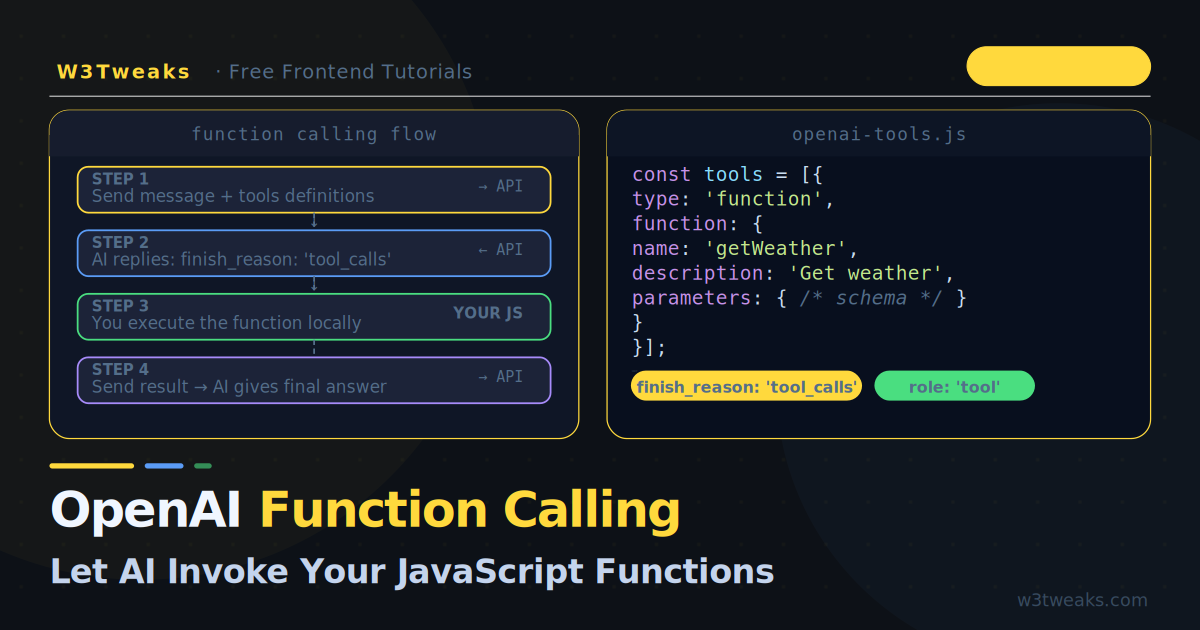
The flow has three steps that happen in a single conversation turn:
1. You send a message + a list of available tools (function schemas)
        ↓
2. The AI replies with tool_calls — which function to run and with what args
        ↓
3. You run the function, send the result back, AI generates the final response
In code:
// Step 1 — Send message + tools
const response = await callOpenAI(messages, tools);

// Step 2 — Check if AI wants to call a function
if (response.finish_reason === 'tool_calls') {
  const toolCall = response.message.tool_calls[0];
  const args     = JSON.parse(toolCall.function.arguments);

  // Step 3 — Execute the function yourself
  const result = await myFunctions[toolCall.function.name](args);

  // Send the result back for the final answer
  messages.push(response.message);
  messages.push({ role: 'tool', tool_call_id: toolCall.id, content: String(result) });

  const finalResponse = await callOpenAI(messages, tools);
  return finalResponse.message.content;
}
The AI never has direct access to your code or data. It just tells you what it wants — you decide whether to comply.
Step 1 — Define a Tool
A tool is a JSON Schema description of a function. The schema tells the AI the function’s name, what it does, and what parameters it accepts:
const tools = [
  {
    type: 'function',
    function: {
      name:        'getWeather',
      description: 'Get the current weather for a city. Call this whenever the user asks about weather or temperature.',
      parameters: {
        type: 'object',
        properties: {
          city: {
            type:        'string',
            description: 'The city name, e.g. London, Tokyo, New York'
          },
          unit: {
            type:        'string',
            enum:        ['celsius', 'fahrenheit'],
            description: 'Temperature unit. Default to celsius.'
          }
        },
        required: ['city']
      }
    }
  }
];
Writing a good description is the most important part. The AI reads this description — not your actual function code — to decide when and whether to call the tool. Be specific about what the function does and when it should be used.
Step 2 — Send the Request
Pass the tools array alongside messages in your fetch call. Set tool_choice: 'auto' to let the AI decide when to use tools:
async function callWithTools(messages, tools) {
  const res = await fetch('https://api.openai.com/v1/chat/completions', {
    method: 'POST',
    headers: {
      'Content-Type':  'application/json',
      'Authorization': `Bearer ${API_KEY}`
    },
    body: JSON.stringify({
      model:       'gpt-4o-mini',
      messages,
      tools,
      tool_choice: 'auto'   // AI decides when to call tools
    })
  });

  const data    = await res.json();
  const choice  = data.choices[0];
  return choice;
}
tool_choice options:
tool_choice: 'auto'              // AI decides — most common
tool_choice: 'none'              // AI must answer without tools
tool_choice: 'required'          // AI must call at least one tool
tool_choice: { type: 'function', function: { name: 'getWeather' } }
                                 // Force a specific function
Step 3 — Handle the Response
Check finish_reason to know whether the AI wants to call a function or is ready to respond:
const choice = await callWithTools(messages, tools);

if (choice.finish_reason === 'tool_calls') {
  // AI wants to call one or more functions
  console.log('Tool calls:', choice.message.tool_calls);

  // Each tool call has: id, type, function.name, function.arguments
  for (const toolCall of choice.message.tool_calls) {
    const name = toolCall.function.name;
    const args = JSON.parse(toolCall.function.arguments);

    console.log(`Calling ${name} with`, args);
  }
} else {
  // AI is responding directly — no function call needed
  console.log('Response:', choice.message.content);
}
The finish_reason is 'tool_calls' when the AI wants to use a tool, and 'stop' when it has a final answer ready.
Step 4 — Execute the Function and Return the Result
Your JavaScript runs the actual function, then adds the result to the conversation as a tool role message:
// Your actual function implementations
const functionMap = {
  async getWeather({ city, unit = 'celsius' }) {
    // In a real app, call a weather API here
    // For demo purposes, return mock data
    const mock = {
      London:   { temp: 14, condition: 'Cloudy',  humidity: 78 },
      Tokyo:    { temp: 22, condition: 'Sunny',   humidity: 55 },
      New_York: { temp: 18, condition: 'Windy',   humidity: 62 },
    };
    const data = mock[city.replace(' ','_')] ?? { temp: 20, condition: 'Clear', humidity: 60 };
    const temp = unit === 'fahrenheit' ? Math.round(data.temp * 9/5 + 32) : data.temp;
    return JSON.stringify({ city, temp, unit, condition: data.condition, humidity: data.humidity });
  },
};

async function runConversation(userMessage, tools) {
  const messages = [{ role: 'user', content: userMessage }];

  // First call — AI may request a tool
  let choice = await callWithTools(messages, tools);

  // Keep calling until AI gives a final answer
  while (choice.finish_reason === 'tool_calls') {
    // Add AI's tool-call message to history
    messages.push(choice.message);

    // Execute every requested tool call
    for (const toolCall of choice.message.tool_calls) {
      const name   = toolCall.function.name;
      const args   = JSON.parse(toolCall.function.arguments);
      const fn     = functionMap[name];

      if (!fn) throw new Error(`Unknown function: ${name}`);

      const result = await fn(args);

      // Add result as a tool message
      messages.push({
        role:         'tool',
        tool_call_id: toolCall.id,
        content:      result
      });
    }

    // Call again with the tool results
    choice = await callWithTools(messages, tools);
  }

  return choice.message.content;
}

// Usage
const answer = await runConversation("What's the weather in Tokyo right now?", tools);
console.log(answer);
// "The current weather in Tokyo is sunny with a temperature of 22°C and 55% humidity."
The while loop handles parallel tool calls — when the AI requests multiple functions in a single turn, you execute all of them and return all results before calling again.
Step 5 — Multiple Tools
Give the AI several tools and let it pick the right one based on context:
const tools = [
  {
    type: 'function',
    function: {
      name:        'getWeather',
      description: 'Get current weather for a city.',
      parameters: {
        type:       'object',
        properties: {
          city: { type: 'string', description: 'City name' }
        },
        required: ['city']
      }
    }
  },
  {
    type: 'function',
    function: {
      name:        'calculate',
      description: 'Evaluate a mathematical expression. Use for any arithmetic, unit conversions, or calculations.',
      parameters: {
        type:       'object',
        properties: {
          expression: {
            type:        'string',
            description: 'A JavaScript math expression, e.g. "15 * 24 + 100" or "Math.sqrt(144)"'
          }
        },
        required: ['expression']
      }
    }
  },
  {
    type: 'function',
    function: {
      name:        'searchDocs',
      description: 'Search the W3Tweaks documentation for CSS and JavaScript tutorials.',
      parameters: {
        type:       'object',
        properties: {
          query: {
            type:        'string',
            description: 'The search query, e.g. "flexbox centering" or "async await"'
          }
        },
        required: ['query']
      }
    }
  }
];

const functionMap = {
  async getWeather({ city }) { /* ... */ },

  async calculate({ expression }) {
    try {
      // eslint-disable-next-line no-new-func
      const result = new Function(`return ${expression}`)();
      return String(result);
    } catch {
      return 'Error: invalid expression';
    }
  },

  async searchDocs({ query }) {
    // In production, hit your real search API
    return JSON.stringify([
      { title: 'CSS Flexbox Complete Guide', url: '/css/flexbox-guide' },
      { title: 'CSS Grid Explained',         url: '/css/grid-explained' },
    ]);
  }
};
Now ask multi-step questions: “What is 15% of the Tokyo temperature in fahrenheit?” — the AI will call getWeather first, then calculate with the result, and return a natural-language answer.
Step 6 — Streaming with Function Calling
Streaming and tool calls can be combined. The pattern is more involved because tool call arguments arrive in chunks:
async function streamWithTools(messages, tools, onToken) {
  const res = await fetch('https://api.openai.com/v1/chat/completions', {
    method:  'POST',
    headers: { 'Content-Type': 'application/json', 'Authorization': `Bearer ${API_KEY}` },
    body: JSON.stringify({ model: 'gpt-4o-mini', messages, tools, tool_choice: 'auto', stream: true })
  });

  const reader  = res.body.getReader();
  const decoder = new TextDecoder();

  // Accumulate tool call arguments across chunks
  const toolCalls   = {};
  let   finishReason = null;

  while (true) {
    const { done, value } = await reader.read();
    if (done) break;

    for (const line of decoder.decode(value).split('\n').filter(l => l.startsWith('data: '))) {
      const raw = line.slice(6).trim();
      if (raw === '[DONE]') break;

      try {
        const chunk = JSON.parse(raw);
        const delta = chunk.choices[0]?.delta ?? {};
        finishReason = chunk.choices[0]?.finish_reason ?? finishReason;

        // Regular text token
        if (delta.content) onToken(delta.content);

        // Tool call chunk — accumulate arguments
        if (delta.tool_calls) {
          for (const tc of delta.tool_calls) {
            if (!toolCalls[tc.index]) {
              toolCalls[tc.index] = { id: '', name: '', arguments: '' };
            }
            toolCalls[tc.index].id        += tc.id            ?? '';
            toolCalls[tc.index].name      += tc.function?.name ?? '';
            toolCalls[tc.index].arguments += tc.function?.arguments ?? '';
          }
        }
      } catch { /* skip malformed chunks */ }
    }
  }

  // Return assembled tool calls if the AI wanted to use tools
  if (finishReason === 'tool_calls') {
    return Object.values(toolCalls).map(tc => ({
      id:       tc.id,
      name:     tc.name,
      arguments: JSON.parse(tc.arguments)
    }));
  }

  return null; // No tool calls — text was streamed via onToken
}
For most use cases, skip streaming on the tool-calling turn and only stream the final answer after you have injected the tool results. This is simpler and produces the same user experience.
Step 7 — Strict Mode
Set strict: true on individual tools to guarantee the AI returns valid JSON matching your schema exactly. This eliminates parse errors in production:
const tools = [
  {
    type: 'function',
    function: {
      name:        'createTask',
      description: 'Create a new task in the project board.',
      strict: true,           // ← guarantee schema compliance
      parameters: {
        type:                 'object',
        additionalProperties: false,     // required for strict mode
        properties: {
          title:    { type: 'string' },
          priority: { type: 'string', enum: ['low', 'medium', 'high'] },
          due_date: { type: 'string', description: 'ISO 8601 date string' }
        },
        required: ['title', 'priority', 'due_date']   // all fields required in strict mode
      }
    }
  }
];
In strict mode, additionalProperties must be false and all properties must be listed in required. The AI cannot deviate from the schema — you will never receive a partial or unexpected JSON shape.
A Complete Working Example
A self-contained assistant that answers questions, checks weather, and does maths:
const API_KEY = 'your-key-here';

const TOOLS = [
  {
    type: 'function',
    function: {
      name: 'getWeather',
      description: 'Get current weather for any city.',
      parameters: {
        type: 'object',
        properties: {
          city: { type: 'string' },
          unit: { type: 'string', enum: ['celsius', 'fahrenheit'] }
        },
        required: ['city']
      }
    }
  },
  {
    type: 'function',
    function: {
      name: 'calculate',
      description: 'Evaluate any mathematical expression.',
      parameters: {
        type: 'object',
        properties: {
          expression: { type: 'string' }
        },
        required: ['expression']
      }
    }
  }
];

const FUNCTIONS = {
  getWeather: ({ city, unit = 'celsius' }) => {
    const data = { temp: 18, condition: 'Partly Cloudy', humidity: 64 };
    const temp = unit === 'fahrenheit'
      ? Math.round(data.temp * 9/5 + 32)
      : data.temp;
    return JSON.stringify({ city, temp, unit, ...data });
  },
  calculate: ({ expression }) => {
    try {
      return String(new Function(`return ${expression}`)());
    } catch {
      return 'Error: could not evaluate expression';
    }
  }
};

async function ask(userMessage) {
  const messages = [{ role: 'user', content: userMessage }];

  while (true) {
    const res = await fetch('https://api.openai.com/v1/chat/completions', {
      method: 'POST',
      headers: {
        'Content-Type':  'application/json',
        'Authorization': `Bearer ${API_KEY}`
      },
      body: JSON.stringify({ model: 'gpt-4o-mini', messages, tools: TOOLS, tool_choice: 'auto' })
    });

    const { choices } = await res.json();
    const choice      = choices[0];
    messages.push(choice.message);

    if (choice.finish_reason !== 'tool_calls') {
      return choice.message.content; // Final answer
    }

    // Execute all requested tool calls
    for (const tc of choice.message.tool_calls) {
      const fn     = FUNCTIONS[tc.function.name];
      const args   = JSON.parse(tc.function.arguments);
      const result = fn ? fn(args) : 'Function not found';

      messages.push({
        role:         'tool',
        tool_call_id: tc.id,
        content:      result
      });
    }
    // Loop again with tool results — AI will give final answer
  }
}

// Examples
ask('What is 12.5% of 840?');
// → "12.5% of 840 is 105."

ask("What's the weather in Paris and how many degrees is that in fahrenheit?");
// → Calls getWeather, then calculate, then answers in one sentence.
Key Takeaways
- Function calling lets the AI invoke your JavaScript functions — you define the schema, the AI decides when to call and what arguments to pass
- The AI returns
finish_reason: 'tool_calls'when it wants a function — check this before readingmessage.content - Always push the AI’s tool-call message and the tool result back to
messagesbefore calling again - Use a
whileloop to handle multi-step tool use automatically — the AI will stop when it has a final answer - Write clear
descriptionfields on your tools — that text is what the AI reads to decide when to use each function strict: trueguarantees schema-compliant JSON — use it in production to eliminate parse errorstool_choice: 'auto'is the right default — only force a specific function when you have a strong reason to
FAQ
What is the difference between function calling and tool use?
They are the same feature under different names. OpenAI originally called it “function calling” when it launched in 2023. In 2024 the API was updated to use the tools array and tool_calls response field, and the feature is now commonly called “tool use” to reflect that it can support non-function tools in the future. The terms are interchangeable; the code in this article uses the current tools API.
Does the AI actually run my JavaScript functions?
No. The AI only returns a JSON object describing which function it wants to call and what arguments to pass. Your JavaScript code decides whether to actually execute it. This is an important security boundary — you always control execution. The AI has no access to your codebase, your network, or your users’ data unless you explicitly provide it through a tool result.
Can I use function calling with models other than GPT-4o?
Yes. gpt-4o-mini, gpt-4o, and gpt-4-turbo all support function calling. For local models, Ollama supports tool use with models like llama3.1, mistral, and qwen2.5-coder using the OpenAI-compatible /v1/chat/completions endpoint — the JavaScript code is identical.
What happens if the AI calls a function I didn’t define?
The AI can only call functions you include in the tools array. If a function name appears in tool_calls that isn’t in your functionMap, you should throw an error or return a descriptive error message as the tool result. The AI will see the error and adjust its next response accordingly.
How many tools can I define?
There is no hard limit on the number of tools, but performance and reliability degrade as the number grows. For most applications, 5–10 well-described tools work better than 20+ loosely-described ones. If you have many tools, consider dynamic tool selection — only include the tools relevant to the current conversation in each API call.
Can the AI call multiple functions in one turn?
Yes — this is called parallel tool use. The AI may return multiple entries in tool_calls in a single response. The while loop pattern in this article handles this correctly: it executes all requested tools and adds all results before calling the API again.