Every AI demo answers general knowledge questions. RAG — Retrieval-Augmented Generation — makes AI answer questions about your documents, your codebase, your product docs, your personal notes. The AI cannot hallucinate facts about your data because you provide the source text directly in the prompt.
The catch: most RAG tutorials require a Python backend, a vector database like Pinecone or Weaviate, and a deployment pipeline. This tutorial skips all of that. We build a complete RAG system that runs entirely in the browser — document ingestion, embedding, vector search, and AI generation — using nothing but the OpenAI API and vanilla JavaScript.
If you have not called the OpenAI API from JavaScript yet, read How to Call the OpenAI API with Vanilla JavaScript first — the fetch patterns here build on that foundation. For a free, offline alternative, the same embedding + search logic works with Ollama using the nomic-embed-text model.
Live Demo
Paste any document, click Ingest, then ask questions. See which chunks were retrieved before the AI generates its answer.
How RAG Works
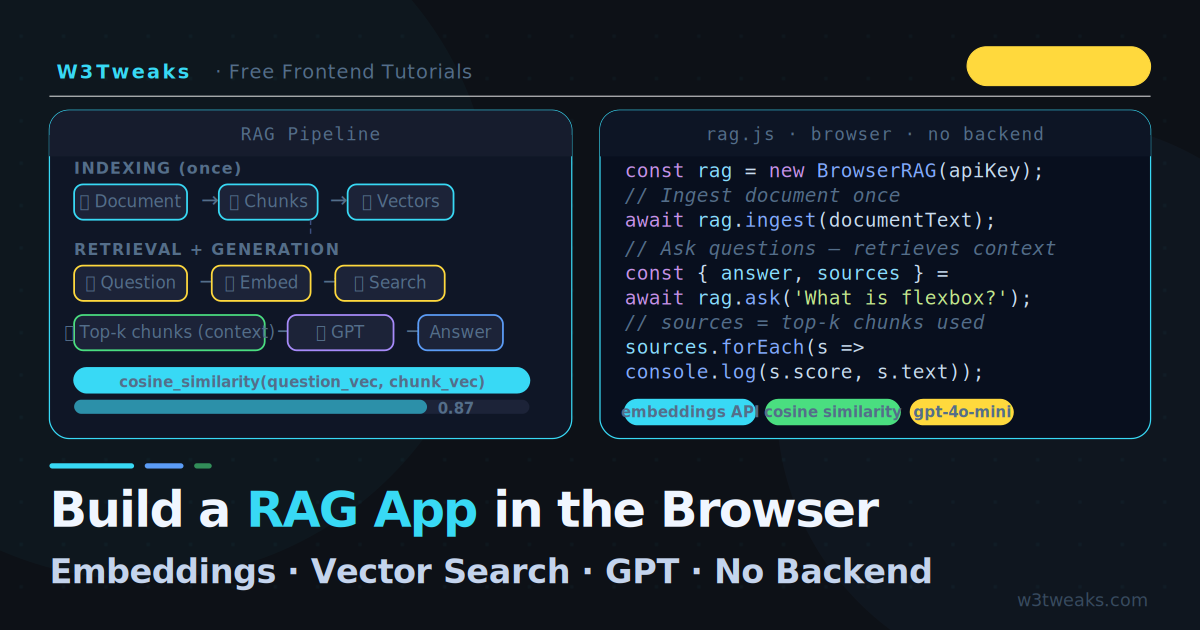
RAG has two phases — indexing (done once when the document is loaded) and retrieval + generation (done for every question):
INDEXING
  Document text
      → Split into chunks (e.g. 200 words each)
      → Embed each chunk (OpenAI Embeddings API)
      → Store chunks + their vectors in memory

RETRIEVAL + GENERATION
  User question
      → Embed the question (same API)
      → Find the top-k most similar chunks (cosine similarity)
      → Build a prompt: context chunks + question
      → Send to GPT → answer
The key insight: embeddings turn text into numbers (vectors) that capture semantic meaning. Similar text produces similar vectors. By finding the chunks closest to the question in vector space, you retrieve the most relevant passages — even when the exact words do not match.
Step 1 — Create Embeddings
The OpenAI Embeddings API converts any text into a 1,536-dimensional vector. The endpoint is /v1/embeddings:
async function embed(text, apiKey) {
  const res = await fetch('https://api.openai.com/v1/embeddings', {
    method: 'POST',
    headers: {
      'Content-Type':  'application/json',
      'Authorization': `Bearer ${apiKey}`
    },
    body: JSON.stringify({
      model: 'text-embedding-3-small',   // cheapest, 1536 dimensions
      input: text
    })
  });

  const data = await res.json();

  if (!res.ok) {
    throw new Error(data.error?.message ?? `Embedding error ${res.status}`);
  }

  return data.data[0].embedding; // array of 1536 numbers
}
Model options:
| Model | Dimensions | Cost | Best for |
|---|---|---|---|
text-embedding-3-small | 1,536 | Very cheap | Most use cases — start here |
text-embedding-3-large | 3,072 | Moderate | Higher accuracy needs |
text-embedding-ada-002 | 1,536 | Cheap | Legacy — prefer 3-small |
For a browser RAG app, text-embedding-3-small is the right choice — low cost, fast, and accurate enough for most documents. For pricing details and dimension trade-offs, see the OpenAI Embeddings guide.
Step 2 — Split the Document into Chunks
Embedding an entire document as one vector loses precision. A question about “flexbox gap property” should match the specific paragraph on gap, not a vague whole-document embedding. Split the document into smaller chunks first:
/**
 * Split text into overlapping chunks
 * @param {string} text       - Full document text
 * @param {number} chunkSize  - Target words per chunk (default 150)
 * @param {number} overlap    - Words to repeat between chunks (default 20)
 */
function chunkText(text, chunkSize = 150, overlap = 20) {
  const words  = text.split(/\s+/).filter(Boolean);
  const chunks = [];

  for (let i = 0; i < words.length; i += chunkSize - overlap) {
    const chunk = words.slice(i, i + chunkSize).join(' ');
    if (chunk.trim()) {
      chunks.push({
        text:  chunk,
        index: chunks.length,
        start: i,  // word offset — useful for highlighting source
      });
    }
    if (i + chunkSize >= words.length) break;
  }

  return chunks;
}
Why overlap? A sentence spanning two chunks would be split and lose context. Overlapping by 20 words ensures every sentence appears fully in at least one chunk.
Choosing chunk size:
- Too small (under 50 words): each chunk lacks context, retrieval is noisy
- Too large (over 300 words): each chunk covers too many topics, precision drops
- 100–200 words is the practical sweet spot for most documents
Step 3 — Index the Document
Combine chunking and embedding into a single ingest function. This creates your in-memory “vector database”:
/**
 * Ingest a document — chunk it, embed each chunk, store in memory
 * @param {string}   text   - Raw document text
 * @param {string}   apiKey - OpenAI API key
 * @returns {Array}         - Array of { text, embedding } objects
 */
async function ingestDocument(text, apiKey, onProgress) {
  const chunks    = chunkText(text, 150, 20);
  const vectorStore = [];

  for (let i = 0; i < chunks.length; i++) {
    const chunk = chunks[i];

    // Report progress to UI
    onProgress?.({ current: i + 1, total: chunks.length, chunk: chunk.text });

    const embedding = await embed(chunk.text, apiKey);
    vectorStore.push({ text: chunk.text, embedding });

    // Small delay to avoid rate limiting on large documents
    if (i < chunks.length - 1) await sleep(50);
  }

  return vectorStore;
}

const sleep = ms => new Promise(r => setTimeout(r, ms));
For a 2,000-word document with 150-word chunks, this creates roughly 14 chunks and makes 14 API calls. At text-embedding-3-small pricing, that costs a fraction of a cent.
Step 4 — Cosine Similarity Search
Once your chunks are embedded, find the most relevant ones for a question using cosine similarity — the standard way to compare embedding vectors:
/**
 * Cosine similarity between two vectors — returns value between -1 and 1.
 * 1.0 = identical meaning, 0 = unrelated, -1 = opposite meaning.
 */
function cosineSimilarity(vecA, vecB) {
  let dot = 0, normA = 0, normB = 0;

  for (let i = 0; i < vecA.length; i++) {
    dot   += vecA[i] * vecB[i];
    normA += vecA[i] * vecA[i];
    normB += vecB[i] * vecB[i];
  }

  if (normA === 0 || normB === 0) return 0;
  return dot / (Math.sqrt(normA) * Math.sqrt(normB));
}

/**
 * Retrieve the top-k most relevant chunks for a question
 * @param {string} question    - User's question
 * @param {Array}  vectorStore - Array of { text, embedding }
 * @param {string} apiKey      - OpenAI API key
 * @param {number} topK        - Number of chunks to retrieve (default 3)
 */
async function retrieve(question, vectorStore, apiKey, topK = 3) {
  // Embed the question with the same model
  const questionEmbedding = await embed(question, apiKey);

  // Score every chunk
  const scored = vectorStore.map(item => ({
    text:  item.text,
    score: cosineSimilarity(questionEmbedding, item.embedding)
  }));

  // Sort by score descending, return top k
  return scored
    .sort((a, b) => b.score - a.score)
    .slice(0, topK);
}
A score above 0.75 indicates strong semantic similarity. Scores below 0.5 are often noise — the question and chunk are probably unrelated. You can add a minimum score threshold to filter out irrelevant results:
const relevant = (await retrieve(question, vectorStore, apiKey, 5))
  .filter(chunk => chunk.score > 0.5);  // discard low-confidence chunks
Step 5 — Generate the Answer
Combine the retrieved chunks into a context block and send it with the question to the chat API:
async function generateAnswer(question, retrievedChunks, apiKey) {
  // Build the context from retrieved chunks
  const context = retrievedChunks
    .map((chunk, i) => `[Source ${i + 1}]\n${chunk.text}`)
    .join('\n\n');

  const systemPrompt = `You are a helpful assistant that answers questions based ONLY on the provided context.
If the answer is not in the context, say "I don't have enough information in the provided document to answer that."
Do not use any knowledge outside of the context below.

Context:
${context}`;

  const res = await fetch('https://api.openai.com/v1/chat/completions', {
    method: 'POST',
    headers: {
      'Content-Type':  'application/json',
      'Authorization': `Bearer ${apiKey}`
    },
    body: JSON.stringify({
      model:    'gpt-4o-mini',
      messages: [
        { role: 'system',  content: systemPrompt },
        { role: 'user',    content: question }
      ]
    })
  });

  const data = await res.json();

  if (!res.ok) {
    throw new Error(data.error?.message ?? `API error ${res.status}`);
  }

  return data.choices[0].message.content;
}
Why the strict system prompt? Without it, GPT supplements missing context with its own training data — and you lose the “ground truth in your document” guarantee that makes RAG valuable. The instruction “answer ONLY based on the context” keeps the AI honest.
Step 6 — Wire It All Together
The complete RAG pipeline in one class:
class BrowserRAG {
  constructor(apiKey) {
    this.apiKey      = apiKey;
    this.vectorStore = [];   // in-memory vector database
    this.isIndexed   = false;
  }

  /** Phase 1 — Ingest a document (call once) */
  async ingest(text, onProgress) {
    this.vectorStore = await ingestDocument(text, this.apiKey, onProgress);
    this.isIndexed   = true;
    return this.vectorStore.length; // number of chunks created
  }

  /** Phase 2 — Answer a question (call repeatedly) */
  async ask(question, topK = 3) {
    if (!this.isIndexed) {
      throw new Error('Call ingest() first to index a document.');
    }

    // Retrieve relevant chunks
    const chunks = await retrieve(question, this.vectorStore, this.apiKey, topK);

    // Generate answer with context
    const answer = await generateAnswer(question, chunks, this.apiKey);

    return {
      answer,
      sources: chunks,  // expose which chunks were used
    };
  }
}

// Usage
const rag = new BrowserRAG('your-api-key');

// Index your document once
const chunkCount = await rag.ingest(documentText);
console.log(`Indexed into ${chunkCount} chunks`);

// Ask questions repeatedly — no re-indexing needed
const { answer, sources } = await rag.ask('What is the main topic?');
console.log('Answer:', answer);
console.log('Based on:', sources.map(s => s.text.slice(0, 80)));
Step 7 — Streaming the Answer
Add streaming to the generation step so the answer appears word by word, matching the same pattern from the ChatGPT streaming text effect tutorial:
async function generateAnswerStream(question, chunks, apiKey, onToken) {
  const context = chunks
    .map((c, i) => `[Source ${i + 1}]\n${c.text}`)
    .join('\n\n');

  const res = await fetch('https://api.openai.com/v1/chat/completions', {
    method: 'POST',
    headers: {
      'Content-Type':  'application/json',
      'Authorization': `Bearer ${apiKey}`
    },
    body: JSON.stringify({
      model:    'gpt-4o-mini',
      stream:   true,
      messages: [
        {
          role:    'system',
          content: `Answer ONLY using the context below. If the answer isn't there, say so.\n\nContext:\n${context}`
        },
        { role: 'user', content: question }
      ]
    })
  });

  const reader  = res.body.getReader();
  const decoder = new TextDecoder();

  while (true) {
    const { done, value } = await reader.read();
    if (done) break;

    for (const line of decoder.decode(value).split('\n').filter(l => l.startsWith('data: '))) {
      const raw = line.slice(6).trim();
      if (raw === '[DONE]') return;
      try {
        const token = JSON.parse(raw).choices[0]?.delta?.content ?? '';
        if (token) onToken(token);
      } catch { /* skip malformed chunks */ }
    }
  }
}
Handling Large Documents
For documents longer than ~50,000 words, making one API call per chunk during ingestion becomes slow and costly. Two optimisations:
Batch embeddings — the API accepts up to 2,048 inputs per call:
async function embedBatch(texts, apiKey) {
  const res = await fetch('https://api.openai.com/v1/embeddings', {
    method: 'POST',
    headers: {
      'Content-Type':  'application/json',
      'Authorization': `Bearer ${apiKey}`
    },
    body: JSON.stringify({
      model: 'text-embedding-3-small',
      input: texts   // array of strings — up to 2048 items
    })
  });

  const data = await res.json();
  return data.data.map(d => d.embedding);
}

// Replace the per-chunk loop with a single batched call
async function ingestFast(text, apiKey) {
  const chunks     = chunkText(text, 150, 20);
  const texts      = chunks.map(c => c.text);
  const embeddings = await embedBatch(texts, apiKey);

  return chunks.map((chunk, i) => ({
    text:      chunk.text,
    embedding: embeddings[i]
  }));
}
Persist to localStorage — cache the embeddings so you do not re-index on every page load:
const CACHE_KEY = 'rag_vector_store';

function saveToCache(vectorStore) {
  try {
    localStorage.setItem(CACHE_KEY, JSON.stringify(vectorStore));
  } catch {
    console.warn('Vector store too large for localStorage — session only');
  }
}

function loadFromCache() {
  const raw = localStorage.getItem(CACHE_KEY);
  return raw ? JSON.parse(raw) : null;
}
Browser Limitations to Know
Cost: Embedding a 10,000-word document creates ~67 chunks and makes 1 batch API call. At text-embedding-3-small pricing this costs roughly $0.001 — essentially free. But every question adds another embedding call.
Storage: A 1,536-dimension float32 vector is ~6 KB. 100 chunks = ~600 KB of vectors — fine for localStorage. Beyond ~1,000 chunks, consider IndexedDB or moving embeddings server-side.
Speed: Cosine similarity on 500 vectors runs in under 1ms in JavaScript. The bottleneck is always the API calls, not the local computation.
Privacy: Document text and question text are sent to OpenAI’s API for embedding and generation. For sensitive documents, use Ollama with nomic-embed-text — both the embeddings and generation stay on your machine.
Key Takeaways
- RAG grounds AI answers in your own documents — the AI cannot hallucinate facts it wasn’t given
- Embeddings are vectors of numbers representing semantic meaning — similar text produces similar vectors
- Chunk your document into 100–200 word pieces with overlap before embedding for best retrieval precision
- Cosine similarity finds the most relevant chunks — scores above 0.75 are a strong match, below 0.5 are noise
- The
text-embedding-3-smallmodel is the right default — cheap, fast, and accurate for most use cases - Batch embedding requests handle multiple chunks in one API call — much faster for large documents
- Cache embeddings in
localStorageso you only pay the ingestion cost once per document - Use a strict system prompt: “answer ONLY based on the context” prevents the AI from mixing in its own training data
FAQ
What is RAG and why is it better than just pasting text into ChatGPT?
RAG (Retrieval-Augmented Generation) retrieves only the relevant passages from a large document before sending them to the AI. Pasting a full document into ChatGPT works for short texts but hits the context window limit (typically 128,000 tokens for gpt-4o-mini) on longer documents. RAG scales to documents of any size by only sending the 3–5 most relevant chunks per question, keeping every request small, fast, and cheap.
How accurate is in-browser RAG compared to a proper vector database?
For documents under 10,000 words and fewer than 500 chunks, the accuracy difference between in-memory cosine similarity and a production vector database (Pinecone, Weaviate, pgvector) is negligible. Vector databases add value at scale: millions of chunks, concurrent users, persistence across server restarts, and filtering by metadata. For a personal tool, a side project, or a document of any reasonable length, in-browser RAG is fully production-quality.
Can I use RAG with free models instead of OpenAI?
Yes. Ollama supports embedding models locally. Pull nomic-embed-text for embeddings and use any chat model (llama3.2, mistral) for generation. The JavaScript code is nearly identical — change the endpoint from api.openai.com to localhost:11434 and use Ollama’s model names. Zero cost, fully private, works offline.
What chunk size should I use?
Start with 150 words and 20-word overlap — it works well for most articles, documentation, and reports. Decrease chunk size (to ~80 words) for highly structured content like API references where precision matters. Increase it (to ~300 words) for narrative text like books where each chunk needs more context to make sense alone. Always prefer overlap: it ensures sentences at chunk boundaries are fully represented in at least one chunk.
How do I handle multiple documents?
Store each document’s chunks with a source tag alongside the text and embedding: { text, embedding, source: 'doc1.txt' }. During retrieval, add the source to the returned chunks and display it in the UI so users know which document the answer came from. The rest of the pipeline — cosine similarity, prompt building, generation — works identically.
Is the user’s document sent to OpenAI?
Yes — document text is sent to OpenAI’s API to create embeddings, and the retrieved chunks are sent again during generation. If your document contains sensitive data, use a locally-run model via Ollama so the text never leaves the machine, or deploy your own embedding server.