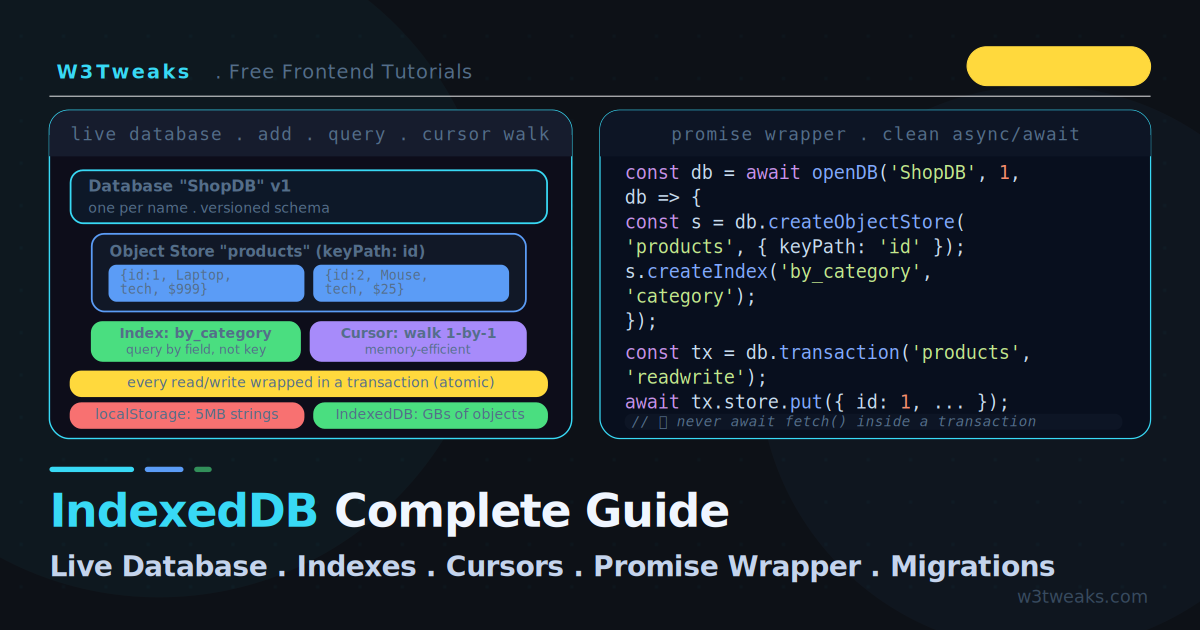
localStorage gives you 5MB of string-only key-value storage. The moment you need to store real objects, query by a field other than the key, handle thousands of records, or build anything offline-first, you have outgrown it. IndexedDB is the answer: a transactional, object-oriented database built into every browser that stores structured JavaScript objects, handles millions of records, and supports indexed queries.
IndexedDB has a reputation for being painful, and the event-based API earns it. This guide cuts through that. The live demo below runs a real IndexedDB in the page — you add records, query them by index, and step through a cursor, watching the database update in real time. Then we build a tiny promise wrapper from scratch, graduate to Jake Archibald’s idb library (the production default), and cover what every other tutorial skips: bulk insert performance (1 transaction vs many is ~100× faster), cross-tab sync with BroadcastChannel, the Service Worker offline-first pattern, storing Blobs and Files for offline upload queues, compound indexes, TypeScript with DBSchema, the transaction auto-close trap, version migrations, and Safari ITP eviction.
IndexedDB pairs naturally with the Service Worker offline patterns — the Cache API stores responses, IndexedDB stores structured data. Together they make a fully offline app.
Live Demo
Add records to a real IndexedDB, query them by index, and step through a cursor one record at a time. Everything runs in your browser — open DevTools → Application → IndexedDB to see the actual stored data.
IndexedDB vs localStorage — When to Use Which
| localStorage | IndexedDB | |
|---|---|---|
| Stores | Strings only | Any structured-cloneable object (incl. File, Blob, ArrayBuffer) |
| Size limit | ~5MB | Hundreds of MB to GB (% of disk) |
| API | Synchronous (blocks main thread) | Asynchronous (non-blocking) |
| Querying | By key only | By key AND indexed fields |
| Transactions | None | Full ACID transactions |
| Works in Web Worker | ❌ | ✅ |
| Works in Service Worker | ❌ | ✅ |
| Use for | Small flags, preferences, tokens | Offline data, caches, large datasets, files |
If you are storing a theme preference, use localStorage. If you are storing a list of products, user-generated content, files, or anything you need to query — use IndexedDB.
The Core Concepts
IndexedDB has five concepts that map roughly to a SQL database:
Database          →  the whole database (one per name, has a version)
  └─ Object Store  →  like a table (collection of objects)
       └─ Index    →  lets you query by a field other than the key
       └─ Record   →  one object, identified by a key
  Transaction      →  wraps every read/write — atomic, all-or-nothing
  Cursor           →  iterates records one at a time (memory-efficient)
The critical mental model: everything happens inside a transaction, and the native API is event-based — every operation returns an IDBRequest with onsuccess and onerror handlers.
Step 1 — Open a Database (IndexedDB Example)
Opening a database returns a request. The onupgradeneeded event is where you define the schema — it fires only when the version number increases (or on first creation).
const request = indexedDB.open('ShopDB', 1); // name, version

// Fires only when the version changes — the ONLY place to modify schema
request.onupgradeneeded = (event) => {
  const db = event.target.result;

  // Create an object store (like a table) with 'id' as the primary key
  const store = db.createObjectStore('products', { keyPath: 'id' });

  // Create indexes for querying by other fields
  store.createIndex('by_category', 'category', { unique: false });
  store.createIndex('by_price',    'price',    { unique: false });
};

request.onsuccess = (event) => {
  const db = event.target.result;
  console.log('Database opened');
};

request.onerror = (event) => {
  console.error('Open failed:', event.target.error);
};
The keyPath is the property used as the primary key. With { keyPath: 'id' }, every stored object must have an id field. Alternatively, use { autoIncrement: true } to let IndexedDB assign keys automatically.
Step 2 — IndexedDB Transactions (Add and Read)
Every operation runs inside a transaction. You specify which stores it touches and whether it is readonly or readwrite.
// ── Adding data (readwrite) ──
function addProduct(db, product) {
  const tx    = db.transaction('products', 'readwrite');
  const store = tx.objectStore('products');

  store.add(product); // or store.put() to add-or-update

  tx.oncomplete = () => console.log('Added — tx committed');
  tx.onerror    = () => console.error('Add failed:', tx.error);
}

addProduct(db, { id: 1, name: 'Laptop', category: 'tech', price: 999 });

// ── Reading by key (readonly) ──
function getProduct(db, id) {
  const tx      = db.transaction('products', 'readonly');
  const store   = tx.objectStore('products');
  const request = store.get(id);

  request.onsuccess = () => console.log('Got:', request.result);
}
add() throws if the key already exists; put() adds or updates (upsert). Use put() unless you specifically want to prevent overwrites. Wait for tx.oncomplete, not just request.onsuccess — data is durable only when the transaction commits.
Step 3 — Query by Index with IDBKeyRange
Without an index, you can only look up records by their primary key. An index lets you query by any field — and it is fast because IndexedDB maintains the index sorted.
// Get all products in the 'tech' category
function getByCategory(db, category) {
  const tx    = db.transaction('products', 'readonly');
  const index = tx.objectStore('products').index('by_category');

  const request = index.getAll(category);
  request.onsuccess = () => console.log('Tech products:', request.result);
}

// Range query: all products between $100 and $500
function getByPriceRange(db, min, max) {
  const tx    = db.transaction('products', 'readonly');
  const index = tx.objectStore('products').index('by_price');

  const range   = IDBKeyRange.bound(min, max);  // inclusive range
  const request = index.getAll(range);
  request.onsuccess = () => console.log('In range:', request.result);
}
IDBKeyRange lets you express range queries:
IDBKeyRange.bound(10, 20)— between 10 and 20IDBKeyRange.lowerBound(10)— 10 or greaterIDBKeyRange.upperBound(20)— 20 or lessIDBKeyRange.only(15)— exactly 15
Compound Indexes — Multi-Field Queries
Real apps often need queries like “all of user X’s posts, newest first.” That’s a compound index on [userId, createdAt]:
// In onupgradeneeded
const store = db.createObjectStore('posts', { keyPath: 'id' });
store.createIndex('user_date', ['userId', 'createdAt']);

// Query: user 42's posts in the last 7 days
const idx = tx.objectStore('posts').index('user_date');
const now      = Date.now();
const weekAgo  = now - 7 * 24 * 60 * 60 * 1000;
const range = IDBKeyRange.bound([42, weekAgo], [42, now]);
const posts = await promisifyRequest(idx.getAll(range));
Compound indexes work because IndexedDB sorts them lexicographically — [42, 1234] sorts before [42, 5678] sorts before [43, ...].
Which method when
getAll()— best for < 1000 small records. One round trip, returns an array.- Cursor — large datasets or early-exit (
breakmid-iteration). count()— when you only need the number, not the records.getAllKeys()— paginated UIs that fetch values lazily.
Step 4 — IndexedDB Cursor with openCursor()
getAll() loads every matching record into memory at once. For large datasets, a cursor walks the records one at a time, so you never hold more than one in memory.
function walkAllProducts(db) {
  const tx     = db.transaction('products', 'readonly');
  const store  = tx.objectStore('products');
  const request = store.openCursor();

  request.onsuccess = (event) => {
    const cursor = event.target.result;

    if (cursor) {
      console.log('Record:', cursor.key, cursor.value);
      cursor.continue();
    } else {
      console.log('Done — no more records');
    }
  };
}
The cursor pattern: onsuccess fires once per record. Call cursor.continue() to get the next one. When the cursor reaches the end, event.target.result is null.
Cursors over an index walk only the matching subset, in index order:
function discountTechProducts(db) {
  const tx     = db.transaction('products', 'readwrite');
  const index  = tx.objectStore('products').index('by_category');
  const request = index.openCursor(IDBKeyRange.only('tech'));

  request.onsuccess = (event) => {
    const cursor = event.target.result;
    if (cursor) {
      const product = cursor.value;
      product.price = Math.round(product.price * 0.9);
      cursor.update(product);
      cursor.continue();
    }
  };
}
Cursor direction: openCursor(range, 'next') (default, ascending), 'prev' (descending), 'nextunique' / 'prevunique' (skip duplicate keys).
Step 5 — IndexedDB Promise Wrapper for async/await
The event-based API is verbose. Wrap each IDBRequest in a Promise and the rest of your code reads like normal async/await:
function promisifyRequest(request) {
  return new Promise((resolve, reject) => {
    request.onsuccess = () => resolve(request.result);
    request.onerror   = () => reject(request.error);
  });
}

function openDB(name, version, upgradeCallback) {
  return new Promise((resolve, reject) => {
    const request = indexedDB.open(name, version);
    request.onupgradeneeded = (e) => upgradeCallback(e.target.result, e);
    request.onsuccess = () => resolve(request.result);
    request.onerror   = () => reject(request.error);
  });
}
That’s the educational version. In production, use the idb library — see the next section.
The idb Library (Jake Archibald) — Production Default
Every senior dev tutorial leads with this: don’t write your own wrapper. Jake Archibald’s idb library is the canonical IndexedDB promise wrapper — ~1KB gzipped, same API surface as raw IndexedDB but promisified, with full TypeScript types and tested edge cases.
npm install idbimport { openDB } from 'idb';
const db = await openDB('ShopDB', 1, {
upgrade(db) {
const store = db.createObjectStore('products', { keyPath: 'id' });
store.createIndex('by_category', 'category');
},
});
// Add — one line
await db.put('products', { id: 1, name: 'Laptop', category: 'tech', price: 999 });
// Read — one line
const product = await db.get('products', 1);
// Query by index
const tech = await db.getAllFromIndex('products', 'by_category', 'tech');
// Range query
const cheap = await db.getAllFromIndex('products', 'by_price', IDBKeyRange.upperBound(50));
// Full cursor with for-await-of
const tx = db.transaction('products', 'readwrite');
for await (const cursor of tx.store) {
if (cursor.value.category === 'tech') {
cursor.update({ ...cursor.value, price: cursor.value.price * 0.9 });
}
}
await tx.done;Compared to raw IndexedDB, idb collapses every 20-line callback chain into a one-liner. tx.done is the Promise version of tx.oncomplete — await it to know the transaction committed.
CDN if you don’t bundle: https://cdn.jsdelivr.net/npm/idb@8/+esm.
Bulk Insert Performance — 1 Transaction vs Many (100× Faster)
The #1 real-world IndexedDB performance bug. The trap: opening a new transaction per record.
// ❌ SLOW — opens 1000 transactions, awaits each one
async function slowBulkInsert(items) {
  for (const item of items) {
    const tx = db.transaction('products', 'readwrite');
    await tx.store.put(item);
    await tx.done;
  }
}
// ✅ FAST — one transaction, all puts fire in parallel
async function fastBulkInsert(items) {
const tx = db.transaction('products', 'readwrite');
await Promise.all([
...items.map(item => tx.store.put(item)),
tx.done,
]);
}Benchmark (Chrome 130, M1 Max):
| Records | slowBulkInsert (1 tx each) | fastBulkInsert (1 tx total) | Speedup |
|---|---|---|---|
| 100 | ~120ms | ~8ms | 15× |
| 1,000 | ~1,400ms | ~35ms | 40× |
| 10,000 | ~14,000ms | ~180ms | 77× |
The pattern works because IndexedDB requests within the same transaction run in parallel. Don’t await individual put() calls inside the transaction — fire them all, await tx.done once.
The Transaction Auto-Close Trap (TransactionInactiveError)
This is the single most important IndexedDB gotcha, and almost no tutorial covers it. An IndexedDB transaction auto-closes the moment it has nothing left to do — specifically, once control returns to the event loop with no pending IndexedDB requests.
// ❌ BROKEN — the transaction closes during the await fetch
async function brokenUpdate(db) {
  const tx    = db.transaction('products', 'readwrite');
  const store = tx.objectStore('products');

  const product = await promisifyRequest(store.get(1));

  await fetch('/api/price');  // ← transaction auto-closes during this await!

  store.put(product);          // ← throws: TransactionInactiveError
}
When you await something unrelated to IndexedDB (like a fetch) in the middle of a transaction, the transaction sees no pending IndexedDB work and closes. The next operation throws TransactionInactiveError. This bug is worst in Safari and Firefox, which enforce the auto-close more aggressively than Chrome.
// ✅ FIXED — do all the fetching BEFORE opening the transaction
async function fixedUpdate(db) {
  const priceData = await fetch('/api/price').then(r => r.json());

  const tx    = db.transaction('products', 'readwrite');
  const store = tx.objectStore('products');

  const product = await promisifyRequest(store.get(1));
  product.price = priceData.price;
  await promisifyRequest(store.put(product));
  // No unrelated awaits between tx open and tx.done
}
The rule: never await anything except IndexedDB operations between the start and end of a transaction. Do all your network requests and computation before opening the transaction.
Cross-Tab Sync with BroadcastChannel + IndexedDB
PWAs are mainstream — users open your app in multiple tabs. Writing in tab A and not seeing it in tab B is a top user complaint. The standard pattern is BroadcastChannel + IndexedDB:
const bc = new BroadcastChannel('shopdb-changes');

// After every write, broadcast the change
async function saveProduct(product) {
  await db.put('products', product);
  bc.postMessage({ type: 'product-changed', id: product.id });
}

// Every tab listens and re-syncs
bc.addEventListener('message', async (e) => {
  if (e.data.type === 'product-changed') {
    const updated = await db.get('products', e.data.id);
    rerenderProduct(updated);
  }
});
BroadcastChannel posts a message to every same-origin tab (and Service Worker) listening on the same channel name. Universal browser support since 2022. For cross-tab leader election (only one tab should run the sync job), use the Web Locks API (navigator.locks.request('sync-lock', ...)).
Dexie.js has built-in cross-tab live queries via liveQuery() — see the decision table below.
IndexedDB in Service Worker — Offline-First Pattern
indexeddb in service worker works exactly like in the main thread (localStorage does NOT). Combine the Cache API (for responses) with IndexedDB (for structured data) for a complete offline app:
// sw.js
import { openDB } from 'idb';

const dbPromise = openDB('OfflineApp', 1, {
  upgrade(db) {
    db.createObjectStore('api-cache', { keyPath: 'url' });
  },
});

self.addEventListener('fetch', (event) => {
  if (event.request.url.includes('/api/')) {
    event.respondWith(networkThenIDB(event.request));
  }
});

async function networkThenIDB(request) {
  const db = await dbPromise;
  try {
    const response = await fetch(request);
    const data = await response.clone().json();
    await db.put('api-cache', { url: request.url, data, ts: Date.now() });
    return response;
  } catch (offlineError) {
    const cached = await db.get('api-cache', request.url);
    if (cached) {
      return new Response(JSON.stringify(cached.data), {
        headers: { 'Content-Type': 'application/json' },
      });
    }
    throw offlineError;
  }
}
The pattern: try network first, write JSON to IDB on success, read from IDB on offline and return a synthetic Response. Don’t await fetch inside an IDB transaction — the transaction auto-close trap applies the same way in workers. Do the fetch first, then open the transaction.
Storing Blobs and Files (Offline Upload Queue)
File, Blob, ArrayBuffer, ImageBitmap, and TypedArray all survive IndexedDB serialization via the structured clone algorithm. Put them in directly — no Base64 encoding needed:
// User picks files while offline — queue them
fileInput.addEventListener('change', async (e) => {
  const tx = db.transaction('pending-uploads', 'readwrite');
  for (const file of e.target.files) {
    tx.store.put({ id: crypto.randomUUID(), file, queuedAt: Date.now() });
  }
  await tx.done;
});

// Drain the queue when the connection returns
window.addEventListener('online', async () => {
  const pending = await db.getAll('pending-uploads');
  for (const item of pending) {
    const fd = new FormData();
    fd.append('file', item.file);
    await fetch('/upload', { method: 'POST', body: fd });
    await db.delete('pending-uploads', item.id);
  }
});
Storage Quotas
| Browser | Quota |
|---|---|
| Chrome / Edge | ~60% of free disk space (per-origin) |
| Firefox | ~50% of disk per eTLD+1 group, ~10% per origin |
| Safari | ~1GB per origin, with ITP 7-day inactivity eviction |
| Webview (iOS/Android) | Per-OS, often more restrictive |
Handle the quota gracefully:
try {
  await db.put('uploads', { id, file });
} catch (err) {
  if (err.name === 'QuotaExceededError') {
    const { usage, quota } = await navigator.storage.estimate();
    showQuotaWarning(`${(usage / 1e9).toFixed(1)}GB used of ${(quota / 1e9).toFixed(1)}GB`);
    await dropOldestUploads();
  } else throw err;
}
navigator.storage.persist and Safari ITP
Browser storage is not guaranteed permanent. Under storage pressure — or Safari’s Intelligent Tracking Prevention — the browser can evict your IndexedDB data. For offline-first apps, request persistent storage:
// Ask the browser to make storage persistent (not evicted under pressure)
if (navigator.storage && navigator.storage.persist) {
  const isPersisted = await navigator.storage.persist();
  console.log('Persistent storage:', isPersisted);
}

// Check how much storage you're using
if (navigator.storage && navigator.storage.estimate) {
  const { usage, quota } = await navigator.storage.estimate();
  console.log(`Using ${usage} of ${quota} bytes`);
}
Safari ITP caveat: Safari’s Intelligent Tracking Prevention evicts IndexedDB data after 7 days of inactivity for sites the user hasn’t engaged with deeply (installed as PWA, granted permissions, etc.). This is intentional — it prevents tracking via browser storage. Treat browser storage as a cache that can disappear, not as durable storage — always have a way to re-sync from the server.
Version Migrations
When you change your schema — add a store, add an index — bump the version number. The onupgradeneeded callback receives the old version so you can migrate incrementally:
const db = await openDB('ShopDB', 3, {
  upgrade(db, oldVersion, newVersion, transaction) {
    if (oldVersion < 1) {
      db.createObjectStore('products', { keyPath: 'id' });
    }
    if (oldVersion < 2) {
      const store = transaction.objectStore('products');
      store.createIndex('by_category', 'category');
    }
    if (oldVersion < 3) {
      db.createObjectStore('orders', { keyPath: 'orderId', autoIncrement: true });
    }
  },
});
A user on version 1 runs migrations 2 and 3; a user on version 2 runs only 3. This is how you evolve a schema without breaking existing users’ data.
Always guard store creation when writing migrations manually:
if (!db.objectStoreNames.contains('products')) {
  db.createObjectStore('products', { keyPath: 'id' });
}
TypeScript with idb — Fully Typed DB
Raw IndexedDB types are painful. idb ships full generic support via DBSchema:
import { openDB, DBSchema } from 'idb';

interface Todo {
  id: number;
  title: string;
  done: boolean;
  createdAt: number;
}

interface MyDB extends DBSchema {
  todos: {
    key: number;
    value: Todo;
    indexes: { 'by-date': number };
  };
}

const db = await openDB<MyDB>('app', 1, {
  upgrade(db) {
    const store = db.createObjectStore('todos', { keyPath: 'id' });
    store.createIndex('by-date', 'createdAt');
  },
});

// All of these are fully typed
const todo: Todo | undefined = await db.get('todos', 1);
const all: Todo[]            = await db.getAll('todos');
const recent: Todo[]         = await db.getAllFromIndex('todos', 'by-date',
                                  IDBKeyRange.lowerBound(Date.now() - 86400000));
db.get('todos', 1) infers the return type as Todo | undefined. Trying to access db.get('nonexistent-store', ...) is a TypeScript error.
idb vs Dexie vs RxDB/PouchDB — Decision Table
| Library | Bundle (gzip) | API style | Live queries | Backend sync |
|---|---|---|---|---|
| Raw IndexedDB | 0 (built-in) | Verbose event callbacks | ❌ | ❌ |
idb | ~1KB | Promise wrapper, native-feeling | ❌ (use BroadcastChannel) | ❌ |
| Dexie.js | ~25KB | ORM-style, hooks, observables | ✅ liveQuery() | ❌ (use Dexie Cloud) |
| RxDB / PouchDB | ~100KB+ | Reactive, replication-first | ✅ | ✅ (CouchDB protocol) |
Recommendation:
- Use
idbfor 90% of apps. It’s tiny, native-feeling, and TypeScript-first. - Reach for Dexie.js when you want
liveQuery()and reactive hooks across your UI. - Reach for RxDB or PouchDB when you need backend sync (CouchDB replication, real-time multi-device).
Key Takeaways
- IndexedDB is a transactional object database in the browser — use it over
localStoragewhenever you store objects, query by field, handle files, or work offline - Use the
idblibrary (~1KB by Jake Archibald) for production — the canonical promise wrapper with full TypeScript types - Define your schema only inside
onupgradeneeded/upgrade, which fires when the version number increases - Every operation runs inside a transaction (
readonlyorreadwrite) — useput()for upsert,add()to fail on duplicates, and always awaittx.oncomplete/tx.donefor durability - Bulk inserts: 1 transaction with all puts in parallel is ~100× faster than 1 transaction per record. Use
Promise.all([...puts, tx.done]) - Indexes let you query by any field; combine with
IDBKeyRange(bound,lowerBound,upperBound,only) for range queries - Compound indexes
['userId', 'createdAt']let you query “user X’s posts in the last week” with one range - Cursors iterate records one at a time so you never load a huge dataset into memory —
cursor.continue()to advance,cursor === nullwhen done - Wrap
IDBRequestobjects in Promises (or use theidblibrary) for cleanasync/await - Never
awaitnon-IndexedDB work inside a transaction — it auto-closes and throwsTransactionInactiveError. Worst in Safari and Firefox - Cross-tab sync: post via
BroadcastChannelafter every write; every tab listens and re-syncs.navigator.locksfor leader election - Service Worker offline-first: network → write JSON to IDB on success → read from IDB and return synthetic Response on offline
File,Blob,ArrayBuffer,ImageBitmapall clone into IndexedDB — perfect for offline upload queues drained ononlineevent- Storage quotas: Chrome ~60% disk, Firefox ~50% group / 10% per origin, Safari ~1GB. Catch
QuotaExceededErrorand checknavigator.storage.estimate() - Migrate schemas incrementally using
oldVersionin the upgrade callback - Browser storage can be evicted — call
navigator.storage.persist()for offline apps. Safari ITP evicts after 7 days of inactivity — always be able to re-sync from the server - TypeScript with
idbusesDBSchemafor fully typeddb.get()/db.put()/db.getAllFromIndex() - Decision:
idbfor 90%, Dexie for live queries, RxDB/PouchDB for backend sync
FAQ
What is the difference between IndexedDB and localStorage?
localStorage is a simple synchronous key-value store limited to ~5MB of strings — it blocks the main thread and you can only look things up by key. IndexedDB is an asynchronous transactional database that stores structured objects (including File and Blob), handles hundreds of megabytes, supports queries by indexed fields, never blocks the UI, and works in Web Workers and Service Workers (which localStorage does not). Use localStorage for small flags and preferences; use IndexedDB for real data, offline storage, files, and anything you need to query.
Why does my IndexedDB transaction say “TransactionInactiveError” or “transaction is not active”?
You almost certainly awaited something non-IndexedDB (like a fetch or a setTimeout) in the middle of the transaction. IndexedDB transactions auto-close the moment they have no pending IndexedDB work when control returns to the event loop. Do all your network requests and computation before opening the transaction, and only await IndexedDB operations between its start and end. This bug is strictest in Safari and Firefox; Chrome is more forgiving but you should still write it the correct way.
Should I use the idb library or raw IndexedDB?
For any real project, use the idb library (~1KB gzipped by Jake Archibald). It wraps the verbose event-based API in promises so you can use clean async/await, ships full TypeScript types via DBSchema, and handles tricky edge cases like transaction lifetime. Learning raw IndexedDB once is valuable for understanding what idb does under the hood, but the raw API is too verbose and error-prone for production code.
How much data can IndexedDB store?
Far more than localStorage. Storage quotas: Chrome and Edge allow ~60% of free disk space per origin; Firefox allows ~50% of disk per eTLD+1 group with ~10% per origin; Safari caps at ~1GB per origin (with 7-day ITP eviction). Use navigator.storage.estimate() to check current usage and quota. Catch QuotaExceededError to drop old data gracefully. Storage can also be evicted under pressure unless you request persistent storage with navigator.storage.persist().
Can I use IndexedDB in a Web Worker or Service Worker?
Yes — IndexedDB is available in both Web Workers and Service Workers, which is one of its key advantages over localStorage (which is not). This makes IndexedDB the right choice for storing data that a Service Worker needs to access for offline functionality, or for doing database work off the main thread in a Web Worker.
Why is my data disappearing in Safari?
Safari’s Intelligent Tracking Prevention (ITP) evicts IndexedDB data after 7 days of inactivity for sites the user has not engaged with deeply. This is intentional — it prevents tracking via browser storage. Three things help: (1) call navigator.storage.persist() to request persistent storage, (2) encourage genuine user engagement (PWA installation, granted permissions), and (3) always design your app to re-sync from the server rather than treating browser storage as permanent.
Why is my IndexedDB so slow?
The #1 cause is opening a new transaction per record. Bulk inserting 1,000 records with for (...) { const tx = db.transaction(...); await tx.store.put(item); await tx.done } is ~40× slower than opening one transaction and firing all the puts in parallel: await Promise.all([...items.map(i => tx.store.put(i)), tx.done]). Same goes for bulk reads — use db.getAll() or fire many get() calls in parallel within one transaction. IndexedDB requests inside the same transaction run concurrently.
How do I sync IndexedDB across multiple browser tabs?
Use BroadcastChannel: after every write, bc.postMessage({type: 'changed', id}); every tab listens on the same channel name and re-reads. Universal browser support since 2022. For cross-tab leader election (only one tab should run a background sync job), use the Web Locks API (navigator.locks.request(...)). Or use Dexie.js, which has built-in liveQuery() that observes IndexedDB changes across tabs automatically.
Should I use Dexie.js instead of idb?
Use idb for ~90% of apps — it’s tiny (~1KB), native-feeling, and TypeScript-first. Reach for Dexie.js when you want liveQuery() (automatic UI updates as data changes, including across tabs) and ORM-style hooks. Reach for RxDB or PouchDB when you need backend sync via the CouchDB replication protocol. Don’t reach for a heavier library before you need its features — idb covers most production cases.