fetch() has no built-in way to cancel a request. Once it is in flight, it runs to completion even if you no longer need the result. This causes two real bugs: wasted bandwidth on requests nobody will read, and the fetch race condition javascript developers hit daily — where a slow earlier request resolves after a fast later one and overwrites the correct data with stale data.
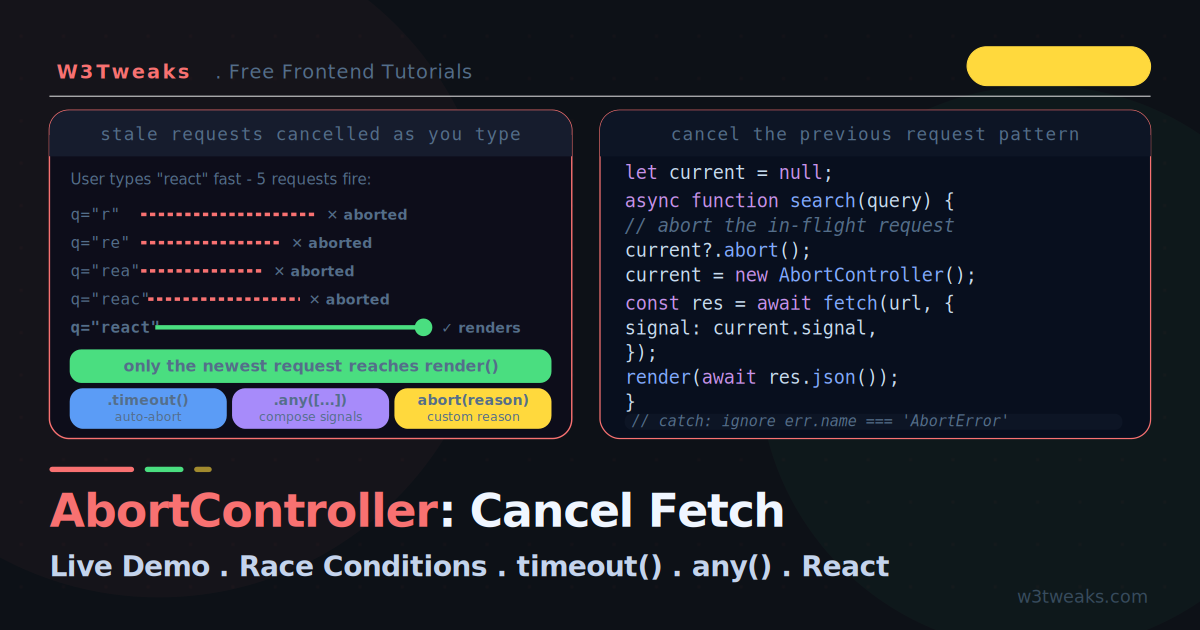
What is AbortController in JavaScript? A built-in object that cancels async work. It gives you a cancellation token (signal) that you pass to fetch, and an abort() method that immediately rejects the request. Most tutorials show that much and stop. This guide goes further: a live demo where you type into a search box and watch stale requests get cancelled the instant a newer keystroke arrives, plus the modern composition APIs — AbortSignal.timeout(), AbortSignal.any(), AbortSignal.throwIfAborted() — that almost nobody covers, the debounce + abort pattern for autocomplete, and how TanStack Query, SWR, and Axios handle signals automatically.
The race condition this solves is the same class of bug from the async/await guide, and AbortController pairs naturally with Promise.race for timeouts — this tutorial shows how they fit together.
Live Demo
Tab 1: type fast in the search box and watch stale requests get cancelled. Tab 2: fire many requests on one controller, abort all at once. Tab 3: race a request against a timeout with AbortSignal.
The fetch race condition javascript developers hit daily
// Type "react" quickly — fires 5 requests
input.addEventListener('input', async (e) => {
  const results = await fetch(`/search?q=${e.target.value}`).then(r => r.json());
  render(results);  // ← whichever resolves LAST wins, not the newest query
});

// Request order fired:  r → re → rea → reac → react
// Request order resolved: re → react → r → rea → reac  ← out of order!
// render() shows results for "r" because it resolved last
This is a race condition. Network latency is unpredictable, so requests can resolve out of order. The result for an old query overwrites the result for the current one, and the user sees wrong data. AbortController fixes this by cancelling the previous request every time a new one starts.
AbortController vs AbortSignal — What’s the Difference?
The most-asked beginner question on Stack Overflow. Controller = the remote. Signal = the wire.
AbortController | AbortSignal | |
|---|---|---|
| What it is | The object that triggers cancellation | The object that carries cancellation state |
| You call | controller.abort() | signal.addEventListener('abort', ...) / signal.aborted / signal.throwIfAborted() |
| You pass to fetch | ❌ Never | ✅ { signal: controller.signal } |
| Single-use? | Yes — once aborted, create new | Tied to the controller |
const controller = new AbortController();
const signal = controller.signal;

// Pass the SIGNAL to fetch, not the controller
fetch('/api/data', { signal });

// Call abort() on the CONTROLLER, not the signal
controller.abort();
This split exists because AbortSignal has static factories that produce signals without a controller — AbortSignal.timeout(ms), AbortSignal.any([...]), AbortSignal.abort(). These are signals that fire automatically (timer or composition), so no abort() method is needed.
The Basic Pattern — abortcontroller cancel fetch javascript
The AbortController API is how JavaScript cancels a fetch — no library required:
// 1. Create a controller
const controller = new AbortController();

// 2. Pass its signal to fetch
fetch('/api/data', { signal: controller.signal })
  .then(r => r.json())
  .then(data => console.log(data))
  .catch(err => {
    if (err.name === 'AbortError') {
      console.log('Request was cancelled');  // intentional — ignore
    } else {
      console.error('Real error:', err);      // genuine failure
    }
  });

// 3. Cancel whenever you want
controller.abort();  // the fetch promise rejects with an AbortError
Three pieces: a controller, its signal passed to fetch, and the abort() call. When you abort, the fetch promise rejects with a DOMException named AbortError.
Cancel Fetch Request React useEffect — The Race Condition Fix
Keep a reference to the current controller. Before each new request, abort the previous one:
let currentController = null;

async function search(query) {
  // Cancel the previous request if it's still in flight
  if (currentController) {
    currentController.abort();
  }

  // Create a fresh controller for this request
  currentController = new AbortController();

  try {
    const results = await fetch(`/search?q=${query}`, {
      signal: currentController.signal,
    }).then(r => r.json());

    render(results);  // only the newest request reaches here
  } catch (err) {
    if (err.name !== 'AbortError') {
      showError(err);  // ignore aborts, handle real errors
    }
  }
}

input.addEventListener('input', (e) => search(e.target.value));
Now when the user types quickly, each keystroke aborts the previous request. Only the final query’s results render — no more stale data overwriting fresh data.
Debounce + Abort Fetch Search — The Optimal Autocomplete Pattern
Pair debounce abort fetch search to stop both extra requests AND stale stragglers. Debounce alone fires fewer requests; cancellation alone fires one per keystroke. Together they’re the canonical autocomplete pattern:
import { useEffect, useState } from 'react';

function SearchAutocomplete() {
  const [query, setQuery] = useState('');
  const [results, setResults] = useState([]);

  useEffect(() => {
    if (!query) { setResults([]); return; }

    const controller = new AbortController();

    // Debounce: wait 250ms after the user stops typing
    const debounceTimer = setTimeout(() => {
      fetch(`/search?q=${query}`, { signal: controller.signal })
        .then(r => r.json())
        .then(setResults)
        .catch(err => {
          if (err.name !== 'AbortError') console.error(err);
        });
    }, 250);

    // Cleanup: cancel debounce timer + abort any in-flight request
    return () => {
      clearTimeout(debounceTimer);
      controller.abort();
    };
  }, [query]);

  return <input value={query} onChange={e => setQuery(e.target.value)} />;
}
Debounce reduces requests. Abort kills the in-flight stragglers. Typing “react” fires zero requests during typing, one request 250ms after you stop. If you start typing again before that 250ms expires, the timer is cleared and a new one starts.
The Single-Use Trap
An AbortController is single-use. Once you call abort(), that signal is permanently aborted — you cannot reuse it for a new request. This is the most common mistake.
// ❌ WRONG — reusing an aborted controller
const controller = new AbortController();

controller.abort();
fetch('/api/data', { signal: controller.signal }); // immediately rejects!
// The signal is already aborted, so fetch never even starts
// ✅ RIGHT — create a fresh controller for each request
function makeRequest(url) {
const controller = new AbortController(); // new every time
const promise = fetch(url, { signal: controller.signal });
return { promise, cancel: () => controller.abort() };
}Always create a new AbortController for each operation you want to be independently cancellable.
AbortSignal.timeout Fetch — The Modern Timeout Pattern
Before AbortSignal.timeout(), adding a fetch timeout javascript example meant manually juggling setTimeout and clearTimeout. Now it is a single line:
// ✅ Automatically aborts after 5 seconds — no manual timer
try {
  const res = await fetch('/api/slow', {
    signal: AbortSignal.timeout(5000),
  });
  const data = await res.json();
} catch (err) {
  if (err.name === 'TimeoutError') {
    console.log('Request timed out after 5s');   // from the timeout
  } else if (err.name === 'AbortError') {
    console.log('Request was cancelled manually'); // from a manual abort
  }
}
Key distinction: A timeout abort throws a TimeoutError, while a manual abort() throws an AbortError. This lets you tell why a request was cancelled — timeout versus user action — and respond differently (retry on timeout, stay quiet on user cancel).
AbortSignal.timeout() is available in all modern browsers (Baseline since April 2024) and in Web Workers and Node.js 18+.
Combining Signals with AbortSignal.any()
Real apps need to cancel for multiple reasons — the user clicks cancel, OR the request times out, OR they navigate away. AbortSignal.any() composes several signals into one that fires when any of them aborts. AbortSignal.any browser support hit Baseline in 2024 — safe to use without polyfill (Chrome 116+, Firefox 124+, Safari 17+).
const userController = new AbortController();
const pageController = new AbortController();

// Cancel on navigation
window.addEventListener('beforeunload', () => pageController.abort());

// Cancel on button click
cancelButton.addEventListener('click', () => userController.abort());

// Combine: user cancel OR page navigation OR 30s timeout
const signal = AbortSignal.any([
  userController.signal,
  pageController.signal,
  AbortSignal.timeout(30000),
]);

await fetch('/api/upload', { signal, method: 'POST', body: file });
// Aborts the moment ANY of the three conditions is met
This replaces a tangle of manual timer-and-listener coordination with one composed signal. The combined signal fires on the first condition to abort, and signal.reason tells you which one.
throwIfAborted AbortSignal — The Cooperative Cancellation Pattern
signal.throwIfAborted() (shipped 2023, Baseline now) is the canonical pattern for “your own abortable function.” Call it at every await point in a long-running operation, and if the signal has aborted between awaits, it throws immediately:
async function processItems(items, signal) {
  const results = [];

  for (const item of items) {
    // Throws AbortError immediately if signal aborted between iterations
    signal?.throwIfAborted();

    // Long-running work
    const processed = await transform(item);
    results.push(processed);
  }

  return results;
}

const controller = new AbortController();
setTimeout(() => controller.abort('user clicked cancel'), 100);

try {
  await processItems(largeArray, controller.signal);
} catch (err) {
  if (err.name === 'AbortError') console.log('Cancelled:', err.message);
}
The pattern: at every await boundary, check whether we should still be doing this work. If the signal has aborted, throwIfAborted() throws synchronously and the work stops.
This is cleaner than if (signal.aborted) throw signal.reason and standardized across runtimes (browsers, Node, Bun, Deno, Workers).
Custom Abort Reasons
abort() accepts an optional reason — any JavaScript value — that you can read from signal.reason:
const controller = new AbortController();

// Pass a reason when aborting
controller.abort('User navigated away');

// ... or a custom error
controller.abort(new Error('Session expired'));

// Read the reason in your handler
fetch('/api/data', { signal: controller.signal })
  .catch(() => {
    console.log('Aborted because:', controller.signal.reason);
    // "Aborted because: User navigated away"
  });
When you do not pass a reason, the default is an AbortError DOMException. Custom reasons are useful for logging and analytics — you can tell exactly why each cancellation happened.
Abort Fetch on Unmount — AbortController in React useEffect
The canonical React pattern: abort the in-flight request when the component unmounts or the dependency changes.
function UserProfile({ userId }) {
  const [user, setUser] = useState(null);
  const [error, setError] = useState(null);

  useEffect(() => {
    const controller = new AbortController();

    fetch(`/api/users/${userId}`, { signal: controller.signal })
      .then(r => r.json())
      .then(setUser)
      .catch(err => {
        if (err.name !== 'AbortError') {
          setError(err);  // ignore aborts — they're intentional
        }
      });

    // Cleanup: abort when userId changes OR component unmounts
    return () => controller.abort();
  }, [userId]);

  if (error) return <Error message={error.message} />;
  return <Profile user={user} />;
}
Why this matters: Without the cleanup abort, a fetch that resolves after the component unmounts tries to call setUser on an unmounted component, and an out-of-order resolution shows stale data when userId changes rapidly. The abort prevents both. This is the same memory-safety concern covered in the memory leak guide.
Libraries That Use AbortController Automatically
The #1 question after the basics: “do I still need this with React Query?” Most data libraries now handle AbortController automatically:
| Library | Signal source | Auto-cancel on unmount | Notes |
|---|---|---|---|
fetch (native) | Pass signal manually | ❌ DIY | The baseline |
| Axios | signal option (v0.22+) | ❌ DIY | CancelToken is deprecated — use AbortController |
| ky | signal option | ❌ DIY | Native AbortSignal support |
| ofetch (Nuxt) | signal option | ❌ DIY | Same shape as fetch |
| TanStack Query | Auto-passed to queryFn | ✅ Yes | useQuery({ queryFn: ({ signal }) => fetch(url, { signal }) }) |
| SWR | Manual via AbortController | ✅ Partial | Cleanup on key change handled |
react query abortsignal is automatic — every queryFn receives a { signal } object as its second argument. Just pass it through to fetch:
useQuery({
  queryKey: ['user', userId],
  queryFn: ({ signal }) => fetch(`/api/users/${userId}`, { signal }).then(r => r.json()),
});
// On unmount or queryKey change, TanStack Query aborts automatically
axios cancellation abortcontroller since v0.22 (2021) — the old CancelToken API is deprecated:
const controller = new AbortController();
axios.get('/api/data', { signal: controller.signal });
controller.abort();
Beyond Fetch: Aborting Anything
AbortSignal is a universal cancellation token — any API that accepts a signal can be cancelled the same way. The most useful beyond fetch is auto-removing event listeners:
const controller = new AbortController();

// All three listeners are removed when the controller aborts — no manual cleanup
element.addEventListener('click',     onClick,     { signal: controller.signal });
element.addEventListener('mousemove', onMouseMove, { signal: controller.signal });
window.addEventListener('resize',     onResize,    { signal: controller.signal });

// Later — removes ALL listeners at once
controller.abort();
This eliminates a whole class of memory leaks: instead of tracking and calling removeEventListener for each handler, you abort one controller and every listener bound to its signal is removed automatically.
What else accepts a signal?
| API | Signal usage |
|---|---|
fetch(url, { signal }) | Cancel the request |
addEventListener(type, listener, { signal }) | Auto-remove listener on abort |
navigator.mediaDevices.getUserMedia(constraints, { signal }) | Cancel camera/mic permission request |
navigator.locks.request(name, { signal }, callback) | Cancel a pending lock request |
ReadableStream.prototype.pipeTo(dest, { signal }) | Cancel an in-progress stream pipe |
Node.js fs.readFile(path, { signal }) | Cancel file I/O |
Node.js events.once(emitter, name, { signal }) | Cancel waiting for an event |
crypto.subtle (partial) | Some operations honor signal |
TanStack Query queryFn({ signal }) | Cancel on key change/unmount |
Any modern Web API that takes a signal option supports the same cancellation pattern.
Custom Abortable Functions
You can make your own functions abortable. The modern pattern uses throwIfAborted():
function delay(ms, { signal } = {}) {
  return new Promise((resolve, reject) => {
    signal?.throwIfAborted(); // reject immediately if already aborted

    const timer = setTimeout(resolve, ms);

    signal?.addEventListener('abort', () => {
      clearTimeout(timer);
      reject(signal.reason);
    }, { once: true });
  });
}

// Now delay is cancellable
const controller = new AbortController();
delay(5000, { signal: controller.signal }).catch(() => console.log('Delay cancelled'));
controller.abort();
The { once: true } matters — without it, the listener stays attached to the signal forever, leaking memory if the signal outlives the function.
Does AbortController Cause Memory Leaks?
The most common gotcha: long-lived signals accumulate abort listeners when re-attached to short-lived operations. If you do this:
// ❌ A long-lived signal (page-scoped) gets a new listener per fetch
function fetchWithRetry(url, { signal }) {
  for (let i = 0; i < 3; i++) {
    // Each iteration adds a new abort listener — never cleaned up!
    signal.addEventListener('abort', () => console.log(`retry ${i} cancelled`));
    await fetch(url, { signal });
  }
}
Each call to addEventListener('abort', ...) adds a listener that fires when the signal aborts. If the signal lives longer than the fetch, listeners accumulate. Always use { once: true } or scope the controller to the operation:
// ✅ once: true — listener removed after firing
signal.addEventListener('abort', cleanup, { once: true });

// ✅ Or tie controller lifetime to the operation
async function fetchWithRetry(url, parentSignal) {
  for (let i = 0; i < 3; i++) {
    const childController = new AbortController();
    parentSignal.addEventListener('abort', () => childController.abort(), { once: true });
    await fetch(url, { signal: childController.signal });
  }
}
Why fetch’s internal listener doesn’t leak: browsers attach with { once: true } internally and clean up when the request settles. Your own listeners need to do the same.
Runtime Support
AbortController is identical across the major runtimes thanks to WinterCG alignment:
- Browsers: Chrome 66+, Firefox 57+, Safari 11.1+ (since 2018)
- Node.js: 15+ (
fetchsince 18, polyfilled before that) - Bun: Full support since 0.1.0
- Deno: Full support since 1.0
- Cloudflare Workers: Full support
- Vercel Edge Runtime: Full support
- Service Workers:
fetch event.respondWith()accepts AbortSignal - Web Workers: Full support
AbortSignal.timeout() and AbortSignal.any() are Baseline since 2024 — same uniform support across all runtimes above.
The Cleanup Caveat: Aborting Does Not Stop Server Work
Aborting cancels the client’s request — it stops the browser waiting and frees the connection. But if the server already received the request, it may keep processing it (charging a card, sending an email). AbortController is cooperative on the client side only.
// The browser stops waiting, but the server may finish the operation
controller.abort();
// For operations with side effects, you need server-side idempotency
// or cancellation tokens — the client abort alone isn't enough
For read-only requests (search, fetching data), client-side abort is all you need. For mutations with side effects, design the server to handle duplicate or cancelled requests safely.
Key Takeaways
fetchcannot be cancelled on its own —AbortControllerprovides the cancellation token viasignal- AbortController vs AbortSignal: controller is the remote (triggers abort), signal is the wire (carries state). Pass
signalto fetch, callabort()on the controller - The core race-condition fix: keep a reference to the current controller and
abort()the previous request before starting a new one - Debounce + AbortController is the optimal autocomplete pattern — debounce reduces requests, abort kills in-flight stragglers
- An
AbortControlleris single-use — once aborted, create a fresh one for the next request - Always ignore
AbortErrorin your catch block — it means an intentional cancellation, not a real failure AbortSignal.timeout(ms)replaces manualsetTimeout/clearTimeoutand throws a distinctTimeoutErrorso you can tell timeouts from manual cancelsAbortSignal.any([...])composes multiple signals — user cancel, timeout, navigation — into one that fires on the first abort. Baseline since 2024AbortSignal.throwIfAborted()is the canonical cooperative cancellation pattern — call at every await pointabort(reason)accepts any value, readable fromsignal.reason, useful for logging- In React, create the controller inside
useEffectand return() => controller.abort()to cancel on unmount or dependency change - TanStack Query auto-passes
{ signal }to every queryFn — pass it through to fetch and cancellation on unmount is automatic - Axios v0.22+ uses AbortController natively —
CancelTokenis deprecated signalis universal — pass it toaddEventListener,getUserMedia,navigator.locks.request, streampipeTo, Nodefs.readFile, and more- Memory leak gotcha: long-lived signals accumulate listeners — always use
{ once: true }or tie controller lifetime to the operation - Runtime support is uniform: browsers, Node 15+, Bun, Deno, Cloudflare Workers, Vercel Edge — same API everywhere thanks to WinterCG
- Client abort does not stop server-side work — design mutations to be idempotent if cancellation must be safe
FAQ
What is AbortController in JavaScript?
A built-in JavaScript object that cancels async operations. It gives you a cancellation token (signal) you pass to fetch or other APIs, and an abort() method that immediately cancels them. Pass controller.signal to fetch’s options; later call controller.abort() to cancel. The fetch promise rejects with an AbortError. Supported in all modern browsers, Node 18+, Bun, Deno, Cloudflare Workers, and Vercel Edge with identical behavior thanks to WinterCG.
AbortController vs AbortSignal — what’s the difference?
Controller = the remote that triggers cancellation. Signal = the wire that carries it. You create a new AbortController(), then pass controller.signal to fetch and call controller.abort() to cancel. The split exists because AbortSignal has static factories — AbortSignal.timeout(ms), AbortSignal.any([...]), AbortSignal.abort() — that produce signals automatically (timer or composition) without needing a controller. Always pass the signal to APIs; call abort on the controller.
Why does my fetch still resolve after I call abort()?
Most likely the response already arrived before abort() ran (abort came too late), or you’re catching the AbortError and treating it as success. When abort() is called on an in-flight request, the fetch promise rejects with an AbortError — it does not resolve. Check err.name === 'AbortError' in your catch block. The race here is real: a fast network can complete the response in the milliseconds between starting fetch and calling abort.
Can I reuse an AbortController for multiple requests?
You can use one controller’s signal for multiple simultaneous requests — calling abort() once cancels all of them together, which is useful for cancelling a group of related fetches. But you cannot reuse a controller after it has been aborted — the signal stays permanently aborted. For a fresh cancellable request after aborting, create a new AbortController. This is the “single-use” trap.
What is the difference between AbortError and TimeoutError?
Both are DOMException objects, but with different names. A manual controller.abort() produces an AbortError. An AbortSignal.timeout() that expires produces a TimeoutError. Checking err.name lets you distinguish them: typically you retry on TimeoutError (the operation might succeed if tried again) but stay silent on AbortError (the user or app cancelled intentionally).
Do I need to abort fetch requests in React?
Yes, for any fetch in useEffect that could outlive the component or become stale. Without aborting, a slow request can resolve after the component unmounts (causing a state-update-on-unmounted-component warning) or after the dependency changes (causing stale data to overwrite fresh data). Return () => controller.abort() from your effect to prevent both. TanStack Query handles this automatically — it passes a signal to every queryFn and cancels on unmount or queryKey change. SWR cleans up on key change as well.
Does AbortController cause memory leaks?
Yes, if you attach abort listeners to a long-lived signal without { once: true } or proper scoping. Each signal.addEventListener('abort', ...) adds a listener that fires when the signal aborts. If the signal lives longer than the operation, listeners accumulate. Fix: use { once: true } when adding abort listeners, or tie the controller’s lifetime to the consumer’s lifetime by creating a fresh controller per operation. Browsers’ internal fetch listener already does this — your own listeners need to as well.
Does aborting a fetch stop the server from processing it?
No. AbortController cancels the request on the client side — the browser stops waiting and closes the connection. But if the server already received the request, it may continue processing (writing to a database, charging a card). For read-only requests this does not matter. For mutations with side effects, you need server-side idempotency or cancellation handling — the client abort alone is not enough.
Is AbortSignal.any() supported in all browsers?
AbortSignal.any() reached Baseline support across modern browsers in 2024: Chrome 116+, Firefox 124+, Safari 17+, plus Node.js 20+, Bun, Deno, and Cloudflare Workers. Safe to use without polyfill for modern targets. For older environments, you can polyfill it by manually creating a controller and adding abort listeners to each source signal that call your combined controller’s abort(). Feature-detect with typeof AbortSignal.any === 'function'.