Every Web Worker tutorial starts with “create a file called worker.js”. That means you need a server, a build tool, or at minimum two files open at the same time. It is an unnecessary barrier that stops most developers from ever trying workers in the first place.
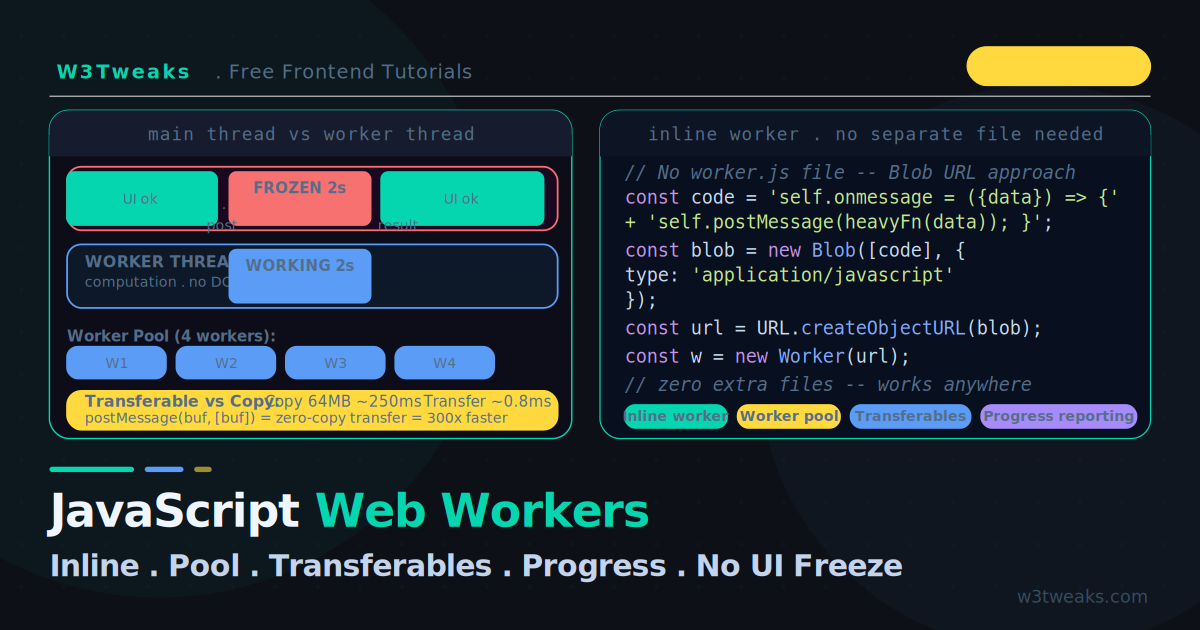
A JavaScript worker thread runs on its own event loop, isolated from the DOM. This tutorial starts differently: you can run every example by pasting it into a single HTML file and opening it in Chrome. Inline workers use a Blob URL to create a worker from a string of code — no separate file, no server, no build step.
From there: a worker pool with a real task queue, a live benchmark that proves transferable objects are 100–300× faster than copying for large data, Comlink for ergonomic worker APIs, OffscreenCanvas to render canvases off the main thread, SharedArrayBuffer + Atomics with the COOP/COEP headers you need, the structured clone gotchas that cause DataCloneError, modern Vite/React syntax for production projects, and the concrete numbers for when workers cost more than they save.
If you want to understand why the main thread freezes in the first place, the Event Loop Explained tutorial covers the underlying mechanics. For long-running work like caches, debounce timers, and async cleanup that also affect UI smoothness, see Debounce vs Throttle and Memory Leak Fix.
Live Demo
Tab 1: bouncing ball shows UI freeze vs smooth. Tab 2: worker pool running 8 tasks across 4 workers. Tab 3: transferable objects benchmark — copy vs transfer timing. Tab 4: progress reporting from worker to main thread.
Web Worker vs Main Thread — Why the UI Freezes
Choosing web worker vs main thread comes down to one number: does the task exceed 10 ms? JavaScript has one main thread. That thread handles:
- DOM updates and rendering
- User events (clicks, typing, scroll)
- Your JavaScript code
When your code runs a heavy computation, it monopolises the main thread. The browser cannot render, cannot process clicks, cannot scroll. The page freezes for the duration of the computation.
// ❌ This freezes everything for ~2 seconds
function heavySort(data) {
  return data.sort((a, b) => {
    return JSON.stringify(b).localeCompare(JSON.stringify(a));
  });
}

button.addEventListener('click', () => {
  const result = heavySort(millionItems); // 2s freeze
  renderTable(result);
});
The single-thread model is not a bug — it makes DOM manipulation safe and predictable. Web Workers are the escape hatch: run heavy code on a separate thread that cannot touch the DOM but can do everything else.
Step 1 — JavaScript Web Worker Example: The Inline Worker
The simplest javascript web worker example is an inline Blob URL — no separate file needed. The standard approach requires a worker.js file:
const worker = new Worker('worker.js'); // needs a file on a serverWeb Worker Without Separate File — The Blob URL Approach
You can spin up a web worker without a separate file by wrapping the script in a Blob URL:
// Create worker code as a string
const workerCode = `
  self.onmessage = function(event) {
    const { data, id } = event.data;

    // Heavy work happens here — off the main thread
    let result = 0;
    for (let i = 0; i < data.length; i++) {
      result += Math.sqrt(data[i]);
    }

    self.postMessage({ id, result });
  };
`;

// Convert the string to a Blob, create a URL for it
const blob   = new Blob([workerCode], { type: 'application/javascript' });
const blobUrl = URL.createObjectURL(blob);

// Create worker from the URL
const worker = new Worker(blobUrl);

// Clean up the URL when done (optional but good practice)
URL.revokeObjectURL(blobUrl);

worker.postMessage({ id: 1, data: [1, 4, 9, 16, 25] });
worker.onmessage = (event) => console.log('Result:', event.data.result);
A reusable inline worker factory:
function createInlineWorker(fn) {
  const code = `self.onmessage = function(e) {
    const result = (${fn.toString()})(e.data);
    self.postMessage(result);
  }`;

  const blob   = new Blob([code], { type: 'application/javascript' });
  const url    = URL.createObjectURL(blob);
  const worker = new Worker(url);
  URL.revokeObjectURL(url);
  return worker;
}

// Usage — pass any pure function
const sortWorker = createInlineWorker(function(data) {
  return data.sort((a, b) => a - b);
});

sortWorker.postMessage([5, 3, 8, 1, 9, 2]);
sortWorker.onmessage = (e) => console.log('Sorted:', e.data);
The limitation: The worker function must be pure — it cannot reference variables from the outer scope (closures do not cross thread boundaries). Everything the worker needs must be sent via postMessage.
Step 2 — Web Worker postMessage Example
Workers communicate with the main thread through message passing. Data is structured-cloned (deep-copied) in both directions by default. Below is a minimal web worker postMessage example showing both sides of the channel:
// ── Main thread ──────────────────────────────────────────────
const worker = new Worker('worker.js');

worker.postMessage({
  type:    'process',
  payload: { items: largeArray, config: { threshold: 0.5 } }
});

worker.onmessage = function(event) {
  const { type, result, error } = event.data;

  if (type === 'result') renderChart(result);
  if (type === 'progress') updateProgressBar(event.data.pct);
  if (type === 'error') showErrorMessage(error);
};

worker.onerror = function(event) {
  console.error('Worker error:', event.message, 'at', event.filename, ':', event.lineno);
  event.preventDefault();
};

// onmessageerror — fires when structured clone of an INCOMING message
// fails. Different from onerror (which catches uncaught exceptions in
// the worker). Common cause: receiving something with a function or DOM
// node in it.
worker.onmessageerror = function(event) {
  console.error('Message could not be cloned:', event);
};

worker.terminate();
// ── worker.js ────────────────────────────────────────────────
self.onmessage = function(event) {
const { type, payload } = event.data;
try {
if (type === 'process') {
for (let i = 0; i < payload.items.length; i++) {
processItem(payload.items[i], payload.config);
if (i % 1000 === 0) {
self.postMessage({
type: 'progress',
pct: Math.round((i / payload.items.length) * 100)
});
}
}
self.postMessage({ type: 'result', result: computedResult });
}
} catch (err) {
self.postMessage({
type: 'error',
error: { message: err.message, stack: err.stack }
});
}
};Structured Clone — What Survives, What Throws DataCloneError
postMessage uses the structured clone algorithm under the hood. Not everything can cross the thread boundary:
| Cloneable | NOT cloneable (throws DataCloneError) |
|---|---|
Date, RegExp, Map, Set | Function (any kind) |
ArrayBuffer, all TypedArrays | Error (only message + stack preserved) |
Blob, File, FileList, ImageData | DOM Node (Element, Document, Window) |
| Plain objects + arrays (recursively) | Symbol |
| Primitives (string, number, bigint, boolean, null) | WeakMap, WeakSet, WeakRef |
| Self-referencing structures | Class instances lose their prototype (become plain objects) |
If you need to send “behaviour” to a worker, send data the worker interprets as instructions (a discriminated union of message types), or use Comlink below which handles the function-passing problem cleanly.
Step 3 — Transferable Objects Web Worker: The 100-300× Speed Difference
By default, postMessage copies data. For a 64MB ArrayBuffer, copying via structured clone takes ~100-250ms — defeating the purpose of using a worker.
Transferable objects move ownership of the buffer to the receiving thread in ~1ms. The original reference becomes empty (zero-copy transfer, no serialisation). Real measured ratios on modern hardware land in the 100-300× range depending on buffer size and CPU memory bandwidth:
// ──────────────────────────────────────────────────────────────
// COPY (default): 64MB takes ~100-250ms to serialize and deserialize
// ──────────────────────────────────────────────────────────────
const buffer = new ArrayBuffer(64 * 1024 * 1024); // 64MB
const t0     = performance.now();
worker.postMessage({ buffer });                    // COPIES buffer
console.log('Copy time:', performance.now() - t0, 'ms');
// buffer is still usable on main thread

// ──────────────────────────────────────────────────────────────
// TRANSFER (zero-copy): same 64MB takes ~1ms
// ──────────────────────────────────────────────────────────────
const buffer = new ArrayBuffer(64 * 1024 * 1024); // 64MB
const t0     = performance.now();
worker.postMessage({ buffer }, [buffer]);          // TRANSFERS buffer
console.log('Transfer time:', performance.now() - t0, 'ms');
// buffer is NOW EMPTY on main thread — ownership moved to worker
console.log(buffer.byteLength); // 0 — transferred!
Transferable objects in a web worker hand off the buffer instead of copying it — hence the large speed gap. The second argument to postMessage is the transferables list — an array of objects to transfer instead of copy. Supported transferables:
ArrayBuffer(and typed arrays:Uint8Array,Float32Array, etc.)MessagePortOffscreenCanvas(see dedicated section below)ReadableStream,WritableStream,TransformStreamImageBitmap
// Practical: transfer image pixel data for processing
const canvas  = document.getElementById('myCanvas');
const ctx     = canvas.getContext('2d');
const pixels  = ctx.getImageData(0, 0, canvas.width, canvas.height);
const buffer  = pixels.data.buffer; // ArrayBuffer

worker.postMessage(
  { pixels: buffer, width: canvas.width, height: canvas.height },
  [buffer] // ← transfer, not copy
);

worker.onmessage = (e) => {
  const processed = new ImageData(
    new Uint8ClampedArray(e.data.buffer),
    canvas.width
  );
  ctx.putImageData(processed, 0, 0);
};
SharedArrayBuffer Web Worker Example — True Shared Memory
For true shared memory (instead of ownership transfer), use SharedArrayBuffer + Atomics. A SharedArrayBuffer web worker example needs COOP/COEP headers first. Without them, the constructor is undefined:
<!-- Required server-side headers -->
Cross-Origin-Opener-Policy: same-origin
Cross-Origin-Embedder-Policy: require-corp
// Feature-detect cross-origin isolation
if (!crossOriginIsolated) {
console.error('SharedArrayBuffer requires cross-origin isolation');
// Fall back to ArrayBuffer + transfer
}
// 4 bytes — one Int32 used as a shared counter
const sab = new SharedArrayBuffer(4);
const counter = new Int32Array(sab);
// Send to worker — NO transferables list, it's already shared
worker.postMessage({ counter: sab });
// Main thread can atomically increment + read
Atomics.add(counter, 0, 1);
console.log(Atomics.load(counter, 0)); // also visible in worker
// In the worker:
self.onmessage = ({ data }) => {
const sharedCounter = new Int32Array(data.counter);
// Wake up only when main thread changes the value (no busy-loop!)
Atomics.wait(sharedCounter, 0, 0);
console.log('Main thread incremented to:', Atomics.load(sharedCounter, 0));
};Atomics.wait and Atomics.notify give you busy-loop-free coordination between threads — essential for any non-trivial shared-state pattern. Use SharedArrayBuffer only when ownership transfer doesn’t work for your case (e.g., both threads need concurrent read access).
Step 4 — Web Worker Pool JavaScript: Build From Scratch
A single worker processes tasks one at a time. A worker pool maintains N workers and distributes tasks across them, enabling true parallel processing on multi-core CPUs.
Building a web worker pool in JavaScript takes about 40 lines once you have a task queue. Every tutorial mentions worker pools — nobody actually builds one:
class WorkerPool {
  constructor(workerScript, size = navigator.hardwareConcurrency || 4) {
    this.size    = size;
    this.workers = [];
    this.queue   = [];      // pending tasks
    this.idle    = [];      // available worker indices

    for (let i = 0; i < size; i++) {
      const worker = new Worker(workerScript);

      worker.onmessage = (event) => {
        const { resolve, reject } = this.tasks.get(event.data.taskId);

        if (event.data.error) {
          reject(new Error(event.data.error));
        } else {
          resolve(event.data.result);
        }

        this.tasks.delete(event.data.taskId);
        this._releaseWorker(i);
      };

      worker.onerror = (event) => {
        const pending = this.tasks.get(event.data?.taskId);
        if (pending) pending.reject(new Error(event.message));
        this._releaseWorker(i);
      };

      this.workers.push(worker);
      this.idle.push(i);
    }

    this.tasks  = new Map();
    this.taskId = 0;
  }

  run(data, transferables = []) {
    return new Promise((resolve, reject) => {
      const taskId = this.taskId++;
      this.tasks.set(taskId, { resolve, reject });

      if (this.idle.length > 0) {
        this._dispatch(this.idle.pop(), taskId, data, transferables);
      } else {
        this.queue.push({ taskId, data, transferables });
      }
    });
  }

  _dispatch(workerIndex, taskId, data, transferables) {
    this.workers[workerIndex].postMessage({ taskId, data }, transferables);
  }

  _releaseWorker(workerIndex) {
    if (this.queue.length > 0) {
      const { taskId, data, transferables } = this.queue.shift();
      this._dispatch(workerIndex, taskId, data, transferables);
    } else {
      this.idle.push(workerIndex);
    }
  }

  terminate() {
    this.workers.forEach(w => w.terminate());
    this.workers = [];
    this.idle    = [];
    this.queue   = [];
  }
}
Usage — process 16 datasets in parallel across 4 workers:
const pool = new WorkerPool('compute-worker.js', 4);

const results = await Promise.all(
  datasets.map(data => pool.run(data))
);

pool.terminate();
navigator.hardwareConcurrency returns the number of logical CPU cores — typically 4–16 on modern machines. Use this as the default pool size to match the hardware.
Step 5 — Comlink Web Worker Example
If you don’t want to write postMessage plumbing for every method, Comlink (Google, 1.1KB gzipped) wraps a Worker in an ES6 Proxy so you call worker functions like async functions on the main thread. Here’s a Comlink web worker example that turns postMessage into a Proxy-backed async call:
// ── worker.js ──
import * as Comlink from 'https://unpkg.com/comlink/dist/esm/comlink.mjs';

const api = {
  async heavyJob(payload) {
    let result = 0;
    for (let i = 0; i < payload.length; i++) {
      result += Math.sqrt(payload[i]);
    }
    return result;
  },

  async parseCSV(csvText) {
    return csvText.split('\n').map(row => row.split(','));
  },

  counter: 0,
  incrementCounter() { this.counter++; return this.counter; },
};

Comlink.expose(api);
// ── main.js ──
import * as Comlink from 'https://unpkg.com/comlink/dist/esm/comlink.mjs';
const worker = new Worker('worker.js', { type: 'module' });
const api = Comlink.wrap(worker);
// Looks synchronous — actually crosses thread boundary
const sum = await api.heavyJob([1, 2, 3, 4, 5]);
const rows = await api.parseCSV(csvString);
const count = await api.incrementCounter();No message-passing boilerplate, full TypeScript inference if you type the api object, and the same async/await ergonomics as any HTTP call. For production apps with more than 2-3 worker methods, Comlink is the recommended pattern.
The 20-Line Promise-Based Wrapper (Without Comlink)
If you don’t want to ship a dependency, the same idea hand-rolled:
function createWorkerProxy(worker) {
  let msgId = 0;
  const pending = new Map();

  worker.onmessage = ({ data }) => {
    const { id, result, error } = data;
    const { resolve, reject } = pending.get(id);
    pending.delete(id);
    if (error) reject(new Error(error));
    else resolve(result);
  };

  return new Proxy({}, {
    get: (_, method) => (...args) => new Promise((resolve, reject) => {
      const id = msgId++;
      pending.set(id, { resolve, reject });
      worker.postMessage({ id, method, args });
    }),
  });
}

// Usage
const api = createWorkerProxy(myWorker);
const result = await api.heavyJob(payload);
In the worker, dispatch by method name from event.data.method. ~20 lines, no dependency, ~80% of Comlink’s ergonomics.
Step 6 — OffscreenCanvas Web Worker
OffscreenCanvas in a web worker keeps Three.js animations smooth when the main thread is busy. The standard <canvas> only renders on the main thread — when the main thread freezes, canvas animation stops. OffscreenCanvas transfers control of the canvas to a worker that can drive requestAnimationFrame independently:
<canvas id="three-scene" width="800" height="600"></canvas>// ── main.js ──
const canvas = document.getElementById('three-scene');
const offscreen = canvas.transferControlToOffscreen();
const worker = new Worker('render-worker.js', { type: 'module' });
worker.postMessage({ canvas: offscreen }, [offscreen]); // TRANSFER the canvas// ── render-worker.js ──
self.onmessage = ({ data }) => {
const canvas = data.canvas;
const ctx = canvas.getContext('2d'); // or 'webgl' / 'webgl2' / 'webgpu'
let frame = 0;
function render() {
ctx.fillStyle = `hsl(${frame % 360}, 70%, 50%)`;
ctx.fillRect(0, 0, canvas.width, canvas.height);
frame++;
requestAnimationFrame(render); // ← workers have rAF too
}
render();
};Works with WebGL, WebGPU, and Three.js — the Three.js OffscreenCanvas example shows a full scene running entirely off the main thread. Browser support: Chrome 69+, Firefox 105+, Safari 17+. Universally Baseline as of late 2025.
Step 7 — Module Workers + Bundler Syntax for Vite / React
Workers can use ES module syntax — import/export — by adding { type: 'module' }:
const worker = new Worker('worker.js', { type: 'module' });// worker.js — can now use import
import { parseCSV } from './utils/csv.js';
import { computeStats } from './utils/stats.js';
self.onmessage = async ({ data }) => {
const rows = parseCSV(data.csv);
const stats = computeStats(rows);
self.postMessage(stats);
};How to Use Web Worker in React / Vite
For production projects with a bundler, how to use a web worker in React with Vite:
// The canonical Vite + modern bundler syntax
const worker = new Worker(
  new URL('./worker.ts', import.meta.url),
  { type: 'module' }
);

// OR: Vite's ?worker suffix for an ergonomic factory
import MyWorker from './worker.ts?worker';
const worker = new MyWorker();
// vite.config.ts
export default {
worker: {
format: 'es', // emit module workers (default in Vite 5+)
},
};For React, the react-use-worker and comlink-loader packages wrap the boilerplate further — but the raw new Worker(new URL(...)) pattern works with any framework. The Node.js counterpart is worker_threads: same conceptual model, different module name (import { Worker } from 'node:worker_threads').
Service Worker vs Web Worker (and Shared Worker)
Service worker vs web worker: same threading model, opposite job descriptions. Constantly confused. Here’s the breakdown including SharedWorker:
| Dedicated Worker | Shared Worker | Service Worker | |
|---|---|---|---|
| Purpose | Heavy compute off the main thread | State shared across tabs from same origin | Network intercept, offline cache, push |
| Lifespan | Lives until page closes or terminate() | Lives until last tab closes | Persists after pages close; lifetime managed by browser |
| Created with | new Worker(url) | new SharedWorker(url) | navigator.serviceWorker.register(url) |
| Cross-tab | ❌ No | ✅ Yes | ✅ Yes |
| Network intercept | ❌ No | ❌ No | ✅ fetch event |
| Push notifications | ❌ No | ❌ No | ✅ Yes |
| DOM access | ❌ No | ❌ No | ❌ No |
| Typical use | CSV parsing, image filters, large sorts | Single WebSocket shared across tabs, in-tab state sync | PWA offline, asset caching, push notifications |
This article is about Dedicated Workers. For Service Workers, the lifecycle, event model, and caching strategy are different enough that they need a dedicated tutorial. SharedWorker is genuinely useful for “all tabs from this origin share one WebSocket connection” — a real production pattern — but otherwise rare.
Partytown — Third-Party Scripts in a Worker
Partytown (by Builder.io, used by Astro, Next.js, Qwik, and Shopify Hydrogen) takes Google Analytics, Google Tag Manager, Meta Pixel, and other heavyweight third-party scripts and runs them inside a Web Worker. The page’s main thread stops being blocked by analytics tag JavaScript.
<!-- Tell Partytown which scripts to offload -->
<script type="text/partytown">
  // GA4 init code — now runs in worker
  window.dataLayer = window.dataLayer || [];
  function gtag(){ dataLayer.push(arguments); }
  gtag('config', 'G-XXXX');
</script>
The one caveat: Partytown proxies DOM access from the worker to the main thread via a synchronous-XHR trick, which makes each DOM call from the worker noticeably slower than it would be on the main thread. For analytics tags that fire-and-forget, this is fine. For interactive third-party widgets, it’s a tradeoff.
Progress Reporting From Worker
Long-running tasks should report progress back. Workers can call self.postMessage as many times as they want:
// worker.js — reports progress every 5%
self.onmessage = function({ data: { items, taskId } }) {
  const total   = items.length;
  const results = [];

  for (let i = 0; i < total; i++) {
    results.push(heavyProcess(items[i]));

    const pct = Math.floor((i + 1) / total * 100);
    if (pct % 5 === 0) {
      self.postMessage({ type: 'progress', taskId, pct });
    }
  }

  self.postMessage({ type: 'done', taskId, results });
};

// main.js
worker.onmessage = ({ data }) => {
  if (data.type === 'progress') {
    progressBar.style.width = data.pct + '%';
    progressLabel.textContent = data.pct + '%';
  }
  if (data.type === 'done') {
    renderResults(data.results);
    worker.terminate();
  }
};
When NOT to Use Web Workers
This is the section nobody writes. Workers have real overhead — for small tasks, using a worker is slower than doing the work on the main thread.
The overhead comes from:
- Worker creation: ~5–50ms (one-time, mitigated by reusing workers)
postMessageserialisation: proportional to data size- Context switching: ~0.1–1ms per message
The RAIL Budget Threshold (Surma’s Numbers)
Surma’s RAIL-aligned analysis gives concrete budgets for the 100ms response budget (RAIL’s interaction target):
- postMessage payloads ≤ 100 KiB stay within the 100ms response budget
- postMessage payloads ≤ 10 KiB are safe for animation frames (16ms budget)
- Above 100 KiB — use transferable objects to skip the structured clone cost
Combined with the “task must take more than the overhead” rule:
function shouldUseWorker(estimatedComputeMs, payloadKiB) {
  // Compute cost must exceed worker overhead
  if (estimatedComputeMs < 10) return false;

  // Payload above 100 KiB needs transferables to fit RAIL response budget
  if (payloadKiB > 100 && !canUseTransferables) return false;

  return true;
}

// Practical thresholds for common operations:
// JSON.parse:    > 500KB   (~10ms on a typical machine)
// Array sort:    > 50,000 items
// Text search:   > 100,000 records
// Image filter:  any canvas > 512×512px
Never use workers for:
- Operations that take < 5ms
- DOM manipulation (workers have no DOM access)
- Operations where you need the result before the next paint (use rAF instead)
- Very small, frequent messages (overhead accumulates)
Real-World Use Cases
| Task | Worker? | Why |
|---|---|---|
JSON.parse of API response > 500KB | ✅ Yes | ~20–200ms blocking |
| CSV parsing with 10K+ rows | ✅ Yes | String processing is CPU-heavy |
| Image filter / pixel manipulation | ✅ Yes | Each pixel = one operation |
| Three.js / WebGL animation | ✅ OffscreenCanvas | Renders independently of main thread |
| Full-text search across large dataset | ✅ Yes | 100K records × regex = expensive |
| Sorting 1M numbers | ✅ Yes | 50–500ms depending on algorithm |
| Cryptographic hash (bcrypt, SHA-256) | ✅ Yes | Deliberately CPU-intensive |
| Google Analytics / GTM third-party scripts | ✅ Partytown | Removes blocking from page load |
| Fibonacci(40) | ⚠ Maybe | ~800ms, but better algorithm fixes it |
JSON.parse of < 100KB response | ❌ No | < 5ms — overhead exceeds benefit |
| Sorting 100 items | ❌ No | Microseconds |
| DOM animation | ❌ No | Workers cannot touch the DOM |
Key Takeaways
- Inline workers with Blob URLs remove the “separate file” barrier — create workers from a string of code in any environment
- Workers communicate via
postMessage— data is deep-copied via the structured clone algorithm by default - Functions, DOM nodes, Symbols, and class-instance prototypes don’t survive
postMessage— sending them throwsDataCloneError. Useonmessageerrorto catch clone failures separately fromonerror - Transferable objects (
ArrayBuffer,ImageBitmap,OffscreenCanvas) transfer ownership instead of copying — 100-300× faster for large data, but the original reference becomes empty - SharedArrayBuffer + Atomics gives true shared memory; requires COOP/COEP headers and
crossOriginIsolatedfeature detection - A worker pool processes multiple tasks in parallel across N workers with a queue; use
navigator.hardwareConcurrencyas the default pool size - Comlink (Google’s 1.1KB library) wraps a Worker in an ES6 Proxy — call worker methods like async functions, no
postMessageboilerplate - OffscreenCanvas transfers a canvas to a worker for jank-free WebGL/Three.js animations — Baseline late 2025
- Module workers (
{ type: 'module' }) enableimport/export; in Vite usenew Worker(new URL('./w.ts', import.meta.url), { type: 'module' })or the?workersuffix - Service Worker vs Web Worker: same threading model, opposite jobs — workers for compute, service workers for network/offline
- Partytown runs third-party analytics scripts (GA, GTM, Pixel) in a worker to unblock the main thread
- Surma’s RAIL budgets: postMessage payloads ≤ 100 KiB fit the 100ms response target, ≤ 10 KiB fit the 16ms animation frame
- The serialisation overhead makes workers counterproductive for tasks under ~10ms
- Always call
worker.terminate()when done — pending promises on a terminated worker never resolve, so wrap them with a timeout
FAQ
Do Web Workers have access to fetch, localStorage, or console?
Workers have access to fetch, console.log, setTimeout/setInterval, WebSocket, IndexedDB, URL, crypto, performance, and most non-DOM Web APIs. They do not have access to localStorage or sessionStorage (synchronous, would block — use IndexedDB instead), the document or window objects, or any DOM APIs. Workers run in a DedicatedWorkerGlobalScope instead of window.
What is the difference between a Dedicated Worker, Shared Worker, and Service Worker?
A Dedicated Worker is owned by one page and terminates when the page closes — covers 99% of CPU-bound use cases. A Shared Worker can be accessed by multiple pages from the same origin — useful for sharing state between tabs (e.g., one WebSocket connection shared across tabs). A Service Worker intercepts network requests for offline caching and push notifications — completely different lifecycle, persists after the page closes, not used for CPU-bound computation.
How do I debug a Web Worker?
In Chrome DevTools, open the Sources panel and look for the Threads section in the sidebar. Your worker appears there by name. You can set breakpoints, step through code, and use console.log (messages appear in the main console) exactly as you would on the main thread. Use debugger statements inside worker code to pause execution.
Why is my web worker not working?
90% of the time it’s a DataCloneError or a missing type: 'module'. Open DevTools — the error usually says exactly which value couldn’t be cloned. Other common causes: (1) the worker file path is wrong (404 = silent failure with new Worker(url)), (2) you’re using import in the worker without { type: 'module' } on construction, (3) you’re in a sandboxed iframe without allow-scripts, (4) your inline Blob URL was created before the Worker constructor ran but you revoked it too early — keep the URL alive until the Worker is created.
Can I use a Web Worker in React?
Yes. The cleanest pattern in Vite-based React projects is new Worker(new URL('./worker.ts', import.meta.url), { type: 'module' }) or the Vite ?worker suffix: import MyWorker from './worker.ts?worker'. For more ergonomics, comlink + react-use-worker wrap the boilerplate. Create the worker once with useRef (or a module-level singleton), not on every render — recreating the worker on every render is a memory leak. See Memory Leak Fix for the cleanup pattern.
Can a worker create another worker?
Yes — workers can create their own child workers (subworkers) using new Worker() from inside a worker context. This enables hierarchical parallelism: a parent worker spawns multiple child workers for sub-tasks. Support is universal in modern browsers. Child workers terminate when their parent worker terminates.
What does terminating a web worker do to in-flight promises?
worker.terminate() kills the worker instantly — pending promises that wait on postMessage responses never resolve or reject, so they leak forever unless wrapped with a timeout. Pattern: Promise.race([workerCall, new Promise((_, rej) => setTimeout(() => rej(new Error('timeout')), 10000))]). For graceful shutdown, send a “shutdown” message and let the worker finish its queue, then terminate().
Is there a simpler API than raw postMessage?
Yes — Comlink (Google, ~1.1KB) wraps Web Workers in a Proxy that lets you call worker functions as if they were async functions on the main thread, completely hiding the message-passing boilerplate. For inline workers created with Blob URLs without a dependency, the 20-line createWorkerProxy pattern shown above gives you most of Comlink’s ergonomics in pure code.
What happens if I pass a function to postMessage?
Functions cannot be transferred between threads — the structured clone algorithm throws a DataCloneError. If you need to send behaviour to a worker, either send data that the worker interprets as instructions (discriminated union of message types), or use Comlink which handles function serialisation via the Proxy. For inline workers created with Blob URLs, you write the function as part of the worker code string rather than passing it at runtime.
How do I share memory between the main thread and a worker?
Use SharedArrayBuffer + Atomics. Requires the page to be cross-origin isolated via Cross-Origin-Opener-Policy: same-origin and Cross-Origin-Embedder-Policy: require-corp headers — feature-detect with if (crossOriginIsolated). Use Atomics.add for atomic mutation, Atomics.load/store for reads/writes, and Atomics.wait/notify for busy-loop-free coordination between threads.