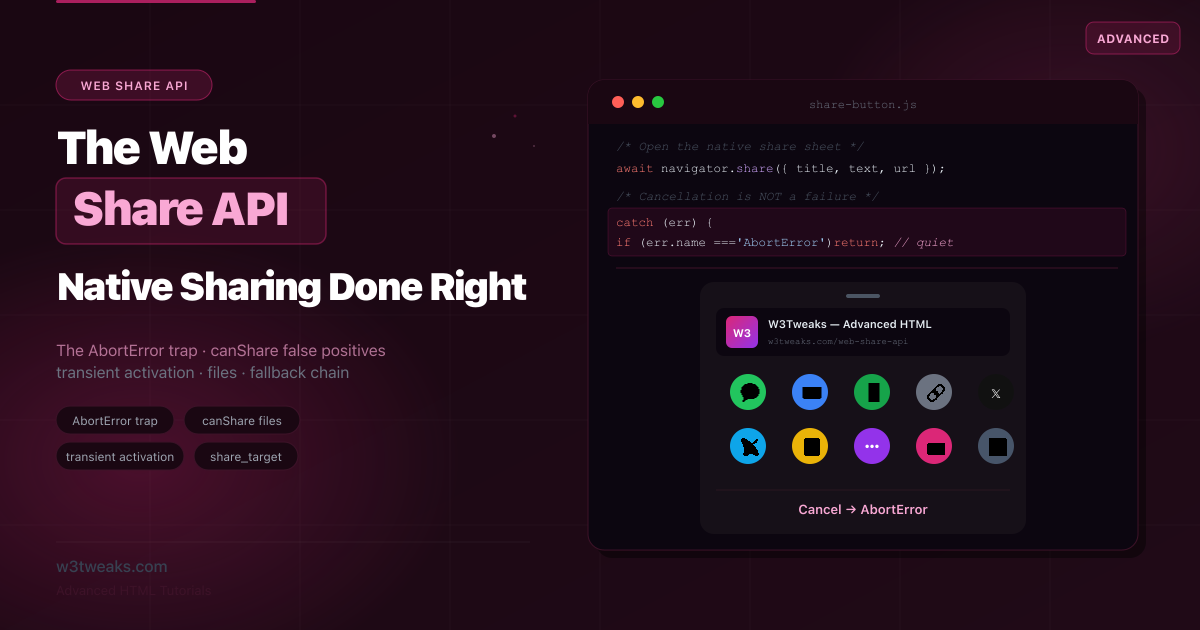
The Web Share API is one of the most satisfying browser features to use: call navigator.share() and the operating system’s native share sheet pops up — the same one native apps use — letting the user send your content to Messages, Mail, WhatsApp, AirDrop, or anything else they have installed. No share-button SDKs, no popup windows, no maintaining a list of social networks.
The API has two methods and looks trivial. But the trivial version has six bugs almost every tutorial ships:
navigator.share()rejects withAbortErrorwhen the user simply cancels — code that treats every rejection as a failure shows a bogus “sharing failed” toast every time someone changes their mind.navigator.canShare()returnstruefor data it will silently drop, because it ignores unrecognized dictionary keys.- Putting an
awaitbeforeshare()can consume the user gesture and make it throwNotAllowedError. - Passing both
textandurlproduces duplicate links on WhatsApp/Telegram/X — the #1 production complaint. - Embedded iframes throw
NotAllowedErrorunlessPermissions-Policy: web-shareallows them. - Next.js/Astro/SvelteKit hit
ReferenceError: navigator is not definedat build because the call isn’t guarded for SSR.
This guide covers all six, plus iOS vs Android quirks, a robust progressive fallback chain, and PWA share-target receivers with the service-worker code competitors skip.
Related tutorials: HTML Video Custom Controls · Accessible Forms · HTML Input Types
Live Demo
Five interactive sections: a native share-sheet simulator, the AbortError vs real-error handler, the canShare validator demonstrating the false-positive trap, file sharing with canvas → File → share(), and the progressive 3-tier fallback chain.
Web Share API Browser Support
| Browser | navigator.share (text/URL) | navigator.share (files) | Notes |
|---|---|---|---|
| iOS Safari 13+ | ✅ | 15+ ✅ | Native iOS share sheet; auto-prepends page title |
| Android Chrome | ✅ | ✅ | Native Android share sheet |
| Chrome Desktop | ✅ | ✅ | OS share sheet on Windows 10+, macOS 12.2+, ChromeOS |
| Edge Desktop | ✅ | ✅ | Windows share sheet |
| Firefox Desktop | ❌ | ❌ | Tracking bug 1312422 — no flag, no shim |
| Firefox Android | ✅ (79+) | ✅ | Shipped since Firefox 79 |
| Samsung Internet | ✅ | ✅ | Native sheet |
| Linux Chrome/Edge | ⚠ | ❌ | No OS share sheet target — share() rejects |
Global coverage currently: ~92% for text/URL sharing (Level 1), ~87% for file sharing (Level 2). Firefox desktop is the lone evergreen holdout — always pair navigator.share with a fallback chain.
navigator.share JavaScript — The Two Methods
The entire API is two methods on navigator:
// 1. share() — opens the native share sheet (returns a Promise)
await navigator.share({
  title: 'W3Tweaks',
  text: 'Check out this tutorial',
  url: 'https://w3tweaks.com/tutorial'
});

// 2. canShare() — validates data WITHOUT opening anything (returns boolean)
if (navigator.canShare({ url: 'https://w3tweaks.com' })) {
  // The data is shareable
}
The shareable data object (ShareData) accepts these members, all optional but at least one required:
| Member | Type | Notes |
|---|---|---|
title | string | A title for the shared content |
text | string | Arbitrary text body |
url | string | A URL (must be valid; can be relative to the page) |
files | File[] | An array of File objects — requires canShare validation first |
Three Hard Requirements
- HTTPS (secure context) — the API is unavailable on plain HTTP. Works on
localhostfor development. - Transient activation —
share()must be triggered by a user gesture (click/tap/keypress). You cannot call it on page load, on a timer, or after the gesture has expired. Permissions-Policy: web-share— if your page is embedded in a cross-origin iframe, the parent must allow it (covered below).
Web Share API Example — Basic Sharing
Here’s a Web Share API example showing the minimum correct implementation:
<button id="share-btn">Share</button>const shareBtn = document.getElementById('share-btn');
// Feature-detect: hide or repurpose the button if unsupported
if (!navigator.share) {
shareBtn.textContent = 'Copy link'; // We'll wire a fallback later
}
shareBtn.addEventListener('click', async () => {
const shareData = {
title: 'W3Tweaks — Advanced HTML',
text: 'The Web Share API tutorial is excellent.',
url: window.location.href
};
try {
await navigator.share(shareData);
// Shared (or at least handed off to a target) — usually no UI needed
} catch (err) {
// ⚠ This catch fires when the user CANCELS too — see the next section
if (err.name !== 'AbortError') {
console.error('Share failed:', err);
}
}
});The single most important line is if (err.name !== 'AbortError'). Without it, every cancellation looks like a failure.
Web Share API AbortError — Cancellation Is Not a Failure
When the share sheet opens and the user taps “Cancel” (or dismisses it, or there are no share targets available), navigator.share() rejects its Promise with an AbortError DOMException. The Web Share API AbortError fires when the user dismisses the sheet — treat it as a non-error in your catch block.
// ❌ Wrong: shows "sharing failed" every time the user cancels
try {
  await navigator.share(shareData);
} catch (err) {
  showToast('Sharing failed!'); // Fires on cancel — bad UX
}
// ✅ Correct: distinguish cancellation from a real error
try {
await navigator.share(shareData);
showToast('Thanks for sharing!'); // Only on actual success
} catch (err) {
if (err.name === 'AbortError') return; // User cancelled — say nothing
showToast("Couldn't open the share sheet.");
console.error(err);
}The error names you’ll encounter:
| Error name | Meaning | Show the user? |
|---|---|---|
AbortError | User cancelled, or no share targets available | No — it’s normal |
NotAllowedError | No transient activation, blocked by Permissions-Policy, or non-HTTPS | Maybe — usually a code bug |
TypeError | Invalid data (bad URL, empty object, unsupported files) | Maybe — usually a code bug |
DataError | The target failed to receive the data | Yes — offer a fallback |
A subtle privacy note: “user cancelled” and “no targets available” are intentionally both AbortError and indistinguishable — preventing sites from detecting which apps you have installed.
Share API Transient Activation — The await Trap
Share API transient activation means navigator.share() must run inside a user gesture handler, not after a stray await. The gesture stays “active” only briefly — if you await something slow before calling share(), the activation expires and share() throws NotAllowedError.
// ❌ Wrong: the await consumes/expires the activation
shareBtn.addEventListener('click', async () => {
  const blob = await fetch('/image.png').then(r => r.blob()); // slow await
  const file = new File([blob], 'image.png', { type: 'image/png' });
  await navigator.share({ files: [file] }); // May throw NotAllowedError
});
The fix: prepare data eagerly, call share() synchronously in the handler.
// ✅ Better: prepare the file ahead of time, share immediately on click
let preparedFile = null;

async function prepareShareFile() {
  const blob = await fetch('/image.png').then(r => r.blob());
  preparedFile = new File([blob], 'image.png', { type: 'image/png' });
}
prepareShareFile(); // run early — on page idle, not on click

shareBtn.addEventListener('click', async () => {
  if (!preparedFile) return;
  // No await before share() — the click's activation is still valid
  await navigator.share({ files: [preparedFile], title: 'Image' });
});
Web Share API Permissions-Policy
The Web Share API Permissions-Policy header lets sites and iframes opt in or out:
Permissions-Policy: web-share=(self)The default allowlist is self. Cross-origin iframes need explicit allow="web-share" or the call rejects with NotAllowedError:
<!-- Parent page embedding your sharer -->
<iframe src="https://embed.example.com" allow="web-share"></iframe>
Feature-detect both the API and the policy:
const canCallShare =
  'share' in navigator &&
  (document.featurePolicy?.allowsFeature('web-share') ?? true);
This catches the case where navigator.share exists but the policy blocks it — common in third-party embeds, AMP pages, and security-headers-strict environments.
Duplicate URLs — The text + url Footgun
The #1 production complaint, almost no tutorial covers it. Most receiver apps (WhatsApp, Telegram, X, Messages) auto-detect URLs in text and treat them as the share URL. If you pass both text containing a URL and a separate url, recipients see two links:
// ❌ Produces duplicate links in WhatsApp / Telegram / X
await navigator.share({
  title: 'Web Share API guide',
  text: 'Quick read: https://w3tweaks.com/web-share-api', // URL in text
  url:  'https://w3tweaks.com/web-share-api',           // AND separate url
});

// ✅ Put the URL only in `url`. Keep `text` URL-free.
await navigator.share({
  title: 'Web Share API guide',
  text: 'Quick read on the Web Share API',
  url:  'https://w3tweaks.com/web-share-api',
});
Rule of thumb: never embed a URL in text when url is also set.
iOS vs Android Sharing Quirks
The most under-documented area. Cross-platform behavior diverges sharply:
| Behavior | iOS Safari | Android Chrome |
|---|---|---|
title field | Auto-prepended to share; used as Email subject | Largely discarded by receivers |
text + url | SMS body = text + url; iMessage shows both | Often concatenated as text + ' ' + url |
| Page metadata | Safari always adds document.title + page URL | Not added |
| Files: mimetype | Broad support (images, video, audio, PDF) | Allowlist enforced (images/video/audio/text/PDF — not arbitrary binaries) |
| Receiver picker | Native iOS share sheet | Native Android share sheet |
Practical implications:
- On iOS, set
document.titlecarefully — it shows up in every share. - On Android, don’t rely on
titlereaching the recipient. Put critical info intext. - For images, always set the correct
typeon yourFileobject —'image/png'not'application/octet-stream'.
Web Share API Files — Sharing with canShare Validation
Web Share API files support arrived with Level 2; pass a files array of File objects. File sharing isn’t supported on every platform that supports text sharing — you must validate with navigator.canShare({ files }) first:
const fileShareBtn = document.getElementById('share-file-btn');

// Prepare eagerly (transient activation!)
let preparedFile = null;
fetch('/photo.jpg')
  .then(r => r.blob())
  .then(blob => { preparedFile = new File([blob], 'photo.jpg', { type: 'image/jpeg' }); });

fileShareBtn.addEventListener('click', async () => {
  if (!preparedFile) return;

  const shareData = { files: [preparedFile], title: 'A photo' };

  // ✅ Validate file sharing is supported BEFORE calling share()
  if (navigator.canShare?.(shareData)) {
    try {
      await navigator.share(shareData);
    } catch (err) {
      if (err.name !== 'AbortError') console.error(err);
    }
  } else {
    // File sharing not supported here — fall back to download
    downloadFile(preparedFile, 'photo.jpg');
  }
});

function downloadFile(blob, fileName) {
  const a = document.createElement('a');
  a.href = URL.createObjectURL(blob);
  a.download = fileName;
  document.body.append(a);
  a.click();
  setTimeout(() => { URL.revokeObjectURL(a.href); a.remove(); }, 1000);
}
Sharing a generated file (canvas, blob)
A common real case is sharing something the user created — a canvas drawing, generated chart, screenshot:
canvas.toBlob(async (blob) => {
  const file = new File([blob], 'creation.png', { type: 'image/png' });
  const data = { files: [file], title: 'My creation' };

  if (navigator.canShare?.(data)) {
    try { await navigator.share(data); }
    catch (err) { if (err.name !== 'AbortError') console.error(err); }
  } else {
    downloadFile(blob, 'creation.png');
  }
}, 'image/png');
The canShare() False-Positive Trap
canShare() validates a ShareData object — but any members the browser doesn’t recognize are silently ignored (WebIDL dictionary semantics). This means canShare() can return true for an object containing a key that share() will drop:
// canShare may return TRUE even though "weirdKey" will be ignored
const data = { url: 'https://w3tweaks.com', weirdKey: 'value' };
navigator.canShare(data); // → true (weirdKey is silently ignored)
To verify every member is supported, validate each individually:
function allMembersShareable(data) {
  return Object.entries(data).every(([key, value]) =>
    navigator.canShare({ [key]: value })
  );
}

if (allMembersShareable(shareData)) {
  navigator.share(shareData);
} else {
  // At least one member would be dropped
}
Overkill for most text/URL shares, but mandatory for file shares mixed with other data — prevents silently dropping the part the user cared about.
SSR-Safe navigator.share for Next.js / Astro / SvelteKit
The “ReferenceError: navigator is not defined” build error is a daily complaint. Server-side rendering doesn’t have navigator, so calling navigator.share at module scope or in a server component crashes the build:
// ❌ Crashes Next.js build: navigator is not defined
const canShare = 'share' in navigator;

export function ShareButton() {
  return <button onClick={() => navigator.share(...)}>Share</button>;
}
// ✅ React — guard with typeof + useEffect
import { useState, useEffect } from 'react';
export function ShareButton({ data }) {
const [canShare, setCanShare] = useState(false);
useEffect(() => {
setCanShare(typeof navigator !== 'undefined' && 'share' in navigator);
}, []);
const handleClick = async () => {
if (!canShare) return copyLinkFallback(data.url);
try { await navigator.share(data); }
catch (err) { if (err.name !== 'AbortError') console.error(err); }
};
return <button onClick={handleClick}>{canShare ? 'Share' : 'Copy link'}</button>;
}---
// ✅ Astro — wrap in a client island, never call at module scope
---
<button id="share">Share</button>
<script>
// This script runs client-side only
if ('share' in navigator) {
document.getElementById('share').addEventListener('click', async () => {
try { await navigator.share({ url: location.href }); }
catch (err) { if (err.name !== 'AbortError') console.error(err); }
});
}
</script>The general rule: typeof navigator !== 'undefined' && 'share' in navigator before any access. Never call navigator.share at module scope, in a server component, in getServerSideProps, or in an Astro frontmatter.
navigator.share Fallback — The Progressive 3-Tier Chain
A robust navigator.share fallback chain copies to clipboard, then falls back to manual share links. Three tiers in order:
async function smartShare(data) {
  // Tier 1: Web Share API (best — native share sheet)
  if ('share' in navigator && (!data.files || navigator.canShare(data))) {
    try {
      await navigator.share(data);
      return { method: 'web-share', success: true };
    } catch (err) {
      if (err.name === 'AbortError') {
        return { method: 'web-share', cancelled: true };
      }
      // Real error — fall through to clipboard
    }
  }

  // Tier 2: Clipboard API (copy the URL)
  if (navigator.clipboard && data.url) {
    try {
      await navigator.clipboard.writeText(data.url);
      showToast('Link copied to clipboard!');
      return { method: 'clipboard', success: true };
    } catch (err) {
      // Fall through to manual
    }
  }

  // Tier 3: Manual share links (universal fallback)
  showManualShareLinks(data);
  return { method: 'manual', success: true };
}
Tier 3 — Manual share links
When nothing else works, fall back to explicit per-network links:
function showManualShareLinks(data) {
  const url  = encodeURIComponent(data.url);
  const text = encodeURIComponent(data.text || '');

  const links = {
    'X / Twitter': `https://twitter.com/intent/tweet?url=${url}&text=${text}`,
    'Facebook':    `https://www.facebook.com/sharer/sharer.php?u=${url}`,
    'LinkedIn':    `https://www.linkedin.com/sharing/share-offsite/?url=${url}`,
    'Email':       `mailto:?subject=${encodeURIComponent(data.title || '')}&body=${text}%20${url}`,
    'WhatsApp':    `https://wa.me/?text=${text}%20${url}`,
    'Telegram':    `https://t.me/share/url?url=${url}&text=${text}`,
  };

  renderShareMenu(links);
}
This three-tier chain covers every browser while delivering the best available experience on each.
PWA Share Target — Receiving Shared Content
The reverse direction: your installed PWA can receive shares, appearing in the OS share sheet alongside native apps. Register your PWA share target in the web app manifest’s share_target field:
{
  "name": "W3Tweaks Reader",
  "share_target": {
    "action": "/share-receiver/",
    "method": "GET",
    "params": {
      "title": "shared_title",
      "text":  "shared_text",
      "url":   "shared_url"
    }
  }
}
For method: "GET", shared data arrives as URL query parameters:
// On the /share-receiver/ page
const params = new URLSearchParams(window.location.search);
const sharedTitle = params.get('shared_title');
const sharedText  = params.get('shared_text');
const sharedURL   = params.get('shared_url');

displaySharedContent({ title: sharedTitle, text: sharedText, url: sharedURL });
Receiving Shared Files — Service Worker (the part competitors skip)
To receive shared files, use method: "POST" with enctype: "multipart/form-data":
{
  "share_target": {
    "action": "/share-target/",
    "method": "POST",
    "enctype": "multipart/form-data",
    "params": {
      "files": [
        { "name": "media", "accept": ["image/*", "video/*"] }
      ]
    }
  }
}
Manifest config alone fails silently for files. You also need a service worker to handle the POST request — without it, the page reloads and the shared files are lost:
// sw.js
self.addEventListener('fetch', (event) => {
  const url = new URL(event.request.url);

  if (event.request.method === 'POST' && url.pathname === '/share-target/') {
    // 1. Mandatory 303 redirect — converts POST to GET so reloads don't re-trigger
    event.respondWith(Response.redirect('/share-target/?shared=1', 303));

    // 2. Read formData and stash for the page
    event.waitUntil((async () => {
      const data = await event.request.formData();
      const files = data.getAll('media');
      const client = await self.clients.get(event.resultingClientId);
      client?.postMessage({ files });
    })());
  }
});
The 303 redirect is mandatory — POST → GET — otherwise reloads re-trigger the share. The service worker reads the formData, then posts files to the now-loaded page via client.postMessage().
Share Button Accessibility
EU European Accessibility Act enforcement began June 2025 — accessible share buttons are no longer optional for many sites. Five-item checklist:
- Use
<button>, not<div>— native focus ring, native keyboard support (Enter/Space). aria-label="Share this article"when the button is icon-only.- Announce results with
aria-live="polite"toast, notalert(). - Return focus to the trigger button after a share/copy succeeds —
shareBtn.focus(). - No
tabindexhigher than0— keep the natural tab order.
<button id="share" aria-label="Share this article">
  <span aria-hidden="true">⤴</span>
  <span class="visually-hidden">Share</span>
</button>
<div id="toast" role="status" aria-live="polite" aria-atomic="true" hidden></div>
Web Share Analytics — What You Can (and Can’t) Track
PMs ask “did the share complete?” — the Web Share API tells you the Promise outcome, but never reveals which target the user picked (privacy by design):
try {
  await navigator.share(data);
  analytics.track('share_completed', { method: 'web_share' });
} catch (err) {
  if (err.name === 'AbortError') {
    analytics.track('share_cancelled');
  } else {
    analytics.track('share_failed', { error: err.name });
  }
}
You can measure:
- Share button impressions (button render).
- Share intent (button click).
- Outcome (resolve = completed, AbortError = cancelled, anything else = failed).
You cannot measure:
- Which app the user shared to (WhatsApp vs Mail vs X).
- Whether the recipient actually received the share.
For destination analytics, use Tier 3 manual share links — those are normal anchor clicks you can attribute.
Complete Example — A Robust Share Button
<button id="share" class="share-btn" aria-label="Share this page">
  <span class="share-icon" aria-hidden="true">⤴</span>
  <span class="share-label">Share</span>
</button>
<div id="toast" class="toast" role="status" aria-live="polite" hidden></div>
const shareBtn = document.getElementById('share');
const toast = document.getElementById('toast');
const shareData = {
title: document.title,
text: 'Check out this page on W3Tweaks',
url: window.location.href,
};
// Adjust the label to the available capability
if (!navigator.share) {
shareBtn.querySelector('.share-label').textContent =
navigator.clipboard ? 'Copy link' : 'Share';
}
shareBtn.addEventListener('click', async () => {
// Tier 1: native share
if (navigator.share) {
try {
await navigator.share(shareData);
shareBtn.focus(); // return focus
return;
} catch (err) {
if (err.name === 'AbortError') { shareBtn.focus(); return; }
}
}
// Tier 2: clipboard
if (navigator.clipboard) {
try {
await navigator.clipboard.writeText(shareData.url);
showToast('Link copied to clipboard!');
shareBtn.focus();
return;
} catch (err) { /* fall through */ }
}
// Tier 3: manual prompt
window.prompt('Copy this link:', shareData.url);
});
function showToast(message) {
toast.textContent = message;
toast.hidden = false;
setTimeout(() => { toast.hidden = true; }, 2500);
}Key Takeaways
- The Web Share API is two methods:
navigator.share(data)opens the native OS share sheet, andnavigator.canShare(data)validates data without opening anything - Browser support: ~92% Level 1, ~87% files. Firefox desktop is the lone evergreen holdout — always pair with a fallback chain
- Three hard requirements: HTTPS, transient activation (a real user gesture), and
Permissions-Policy: web-sharein cross-origin iframes navigator.share()rejects withAbortErrorwhen the user cancels the share sheet — this is normal, not a failure. Always checkerr.name === 'AbortError'and stay silent- “User cancelled” and “no share targets available” are both
AbortErrorand intentionally indistinguishable (a privacy measure against app-detection) - Transient activation trap: a slow
awaitbeforeshare()consumes the user gesture and throwsNotAllowedError. Prepare data eagerly; callshare()synchronously - The
text + urlduplicate-link bug: receivers like WhatsApp/Telegram/X auto-detect URLs intext. Put the URL only inurl; keeptextURL-free - iOS Safari always prepends
document.titleand the page URL; Android Chrome largely discardstitle. Plan for both - File sharing isn’t universal — validate with
navigator.canShare({ files })before callingshare(). Always provide a download fallback canShare()silently ignores unknown keys — to confirm every member is supported, validate each individually withcanShare({ [key]: value })- SSR safety: guard with
typeof navigator !== 'undefined' && 'share' in navigator. Never callnavigator.shareat module scope, in server components, or in Astro frontmatter - Permissions-Policy: web-share: cross-origin iframes need explicit
allow="web-share"from the parent or the call rejects withNotAllowedError - Build a progressive 3-tier fallback chain: Web Share API →
navigator.clipboard.writeText()→ manual per-network share links - For canvas/blob content,
canvas.toBlob()→new File()→canShare→share(), with a download fallback whencanSharereturns false - Your installed PWA becomes a share target via the
share_targetmanifest member —method: "GET"for text,method: "POST"withmultipart/form-dataplus a service worker doing a 303 redirect for files - Accessibility (EU EAA enforced): real
<button>witharia-label, results in anaria-live="polite"toast, focus returned after share, native keyboard handling - Analytics: track impression/intent/outcome. The browser never reveals which app the user shared to — privacy by design
FAQ
Why does navigator.share fail when the user cancels?
It doesn’t actually fail — it rejects with an AbortError DOMException, the spec’s signal that the user dismissed the share sheet without choosing a target. The mistake is treating every Promise rejection as an error. In your catch block, check if (err.name === 'AbortError') return; to silently ignore cancellation, and only show an error message for other names. “User cancelled” and “no targets available” are both AbortError and intentionally indistinguishable — a privacy measure preventing app-detection.
How do I share files with the Web Share API?
Create File objects (from a fetch blob, file input, or canvas.toBlob()), put them in a files array, and validate with navigator.canShare({ files }) before calling navigator.share(). File sharing isn’t supported on every platform that supports text sharing, so the canShare check is mandatory — passing unsupported files to share() throws. Always provide a download fallback for when canShare returns false. Prepare the file before the click so a slow fetch doesn’t expire the user gesture (transient activation).
Why does navigator.share throw NotAllowedError?
Four common causes, in order of frequency: (1) Lost transient activation — a slow await before the call let the user gesture expire. Prepare data eagerly and call share() synchronously in the handler. (2) Cross-origin iframe without allow="web-share" — the parent page must explicitly allow it via the iframe’s allow attribute or a Permissions-Policy: web-share header. (3) Not HTTPS — the API requires a secure context. (4) Browser permissions-policy blocks it site-wide.
Does the Web Share API work on desktop browsers?
Mostly yes: Chrome and Edge on Windows 10+, macOS 12.2+, and ChromeOS all open the native OS share sheet. Firefox desktop does not support it (tracking bug 1312422 — no flag, no shim). Safari on macOS supports it (uses iOS-style sheet). Linux Chrome/Edge expose navigator.share but reject because Linux has no OS share sheet target. Always feature-detect with if (navigator.share) and build a clipboard + manual-links fallback chain.
What is navigator.canShare used for?
canShare() validates whether a ShareData object can be shared, returning a boolean without opening any UI. Its main use is checking file-sharing support before calling share(), since files aren’t universally supported. Be aware of a gotcha: canShare() ignores dictionary members it doesn’t recognize, so it can return true for data containing an unsupported key that share() will silently drop. To verify every member is supported, validate them individually with canShare({ [key]: value }) for each key.
How do I make my web app receive shared content?
Turn your installed PWA into a share target by adding a share_target member to your web app manifest. Specify an action URL and params mapping. With method: "GET", shared title/text/url arrive as query parameters you read with URLSearchParams. With method: "POST" and enctype: "multipart/form-data", you can receive files — but you also need a service worker that intercepts the POST, reads the formData, and returns a 303 redirect so reloads don’t re-trigger the share. Without the service worker, file shares fail silently.
Why do my shares show duplicate URLs in WhatsApp / X / Telegram?
Because you’re passing both text (containing a URL) and a separate url. WhatsApp, Telegram, X, iMessage and most receiver apps auto-detect URLs in text and treat them as the share URL — so if both are present and text contains a URL, recipients see two links. Fix: put the URL only in url, keep text URL-free. Example: {title: 'Web Share API guide', text: 'Quick read on the API', url: 'https://...'} — not text: 'Quick read: https://...'.
Why does navigator.share fail in Next.js or Astro?
Server-side rendering doesn’t have navigator, so any module-scope or server-component call hits ReferenceError: navigator is not defined at build. Fix: always guard access — typeof navigator !== 'undefined' && 'share' in navigator. In React, gate state with useEffect. In Astro, wrap the call inside a client-rendered <script> block or client:load island. Never call navigator.share in getServerSideProps, server components, or Astro frontmatter — those run on the server.
Can I track who the user shared to with Web Share analytics?
No — by design. The Web Share API tells you whether the Promise resolved (share completed), rejected with AbortError (cancelled), or rejected with another error (failed). It never reveals which app the user picked, because that would let sites detect which apps you have installed. You can track impression, intent (button click), and outcome — but not destination. For per-network destination analytics, use Tier 3 manual share links instead, which are normal anchor clicks you can attribute.