TL;DR
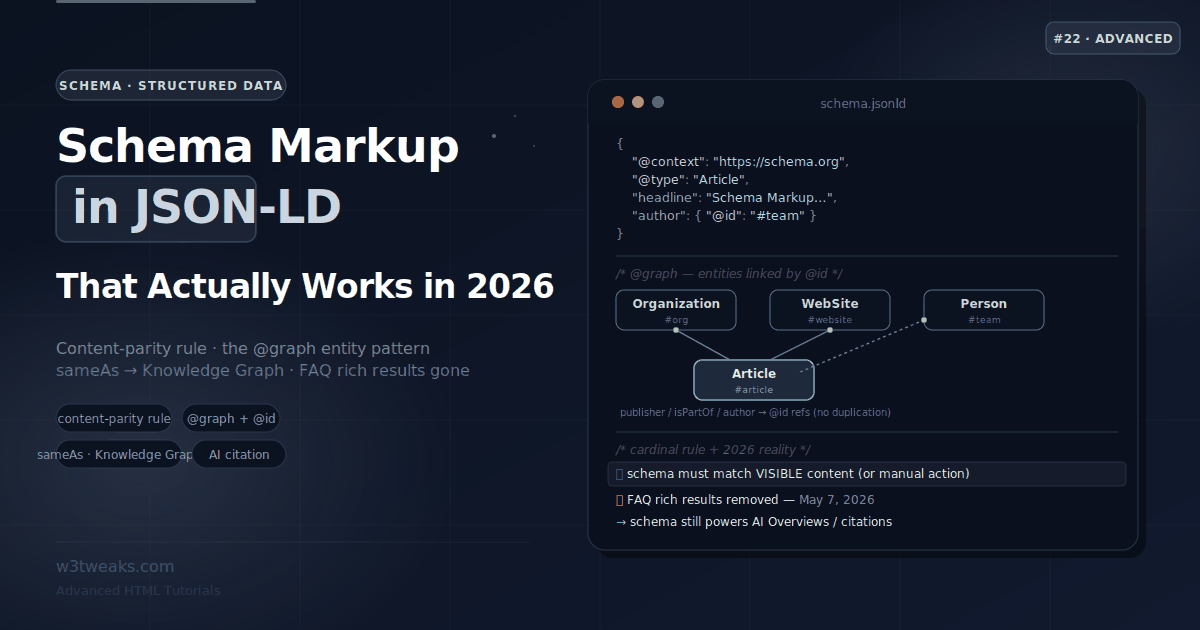
Schema markup adds a machine-readable meaning layer using the Schema.org vocabulary. JSON-LD is Google’s recommended format — a standalone <script> block, decoupled from your HTML:
<script type="application/ld+json">
{
  "@context": "https://schema.org",
  "@type": "Article",
  "headline": "Schema Markup & Structured Data",
  "image": ["https://w3tweaks.com/images/schema.png"],
  "datePublished": "2026-07-20T23:30:00-04:00",
  "author": { "@type": "Person", "name": "W3Tweaks Team" }
}
</script>
The cardinal rule — content parity: every property in your JSON-LD must describe content actually visible on the rendered page. Marking up prices/FAQs/reviews that don’t appear on the page violates Google’s spam policy and can trigger a manual action that removes rich results across the whole site.
Current reality: Google removed FAQ and HowTo rich results on May 7, 2026. The markup still helps AI engines parse your Q&A, but no more FAQ dropdowns in search. Roughly 31 types still earn rich results — Product, Article, Event, Recipe, Organization, BreadcrumbList, VideoObject, JobPosting, LocalBusiness are the ones that reliably move the needle.
Test with two tools: Google Rich Results Test (eligibility for a Google feature) + Schema.org Validator (structural validity). A single trailing comma silently voids the whole block.
→ Try it in the live demo — generate JSON-LD by type with required-vs-recommended fields flagged, preview how each type renders in Google (including the FAQPage “no rich result” banner), build an @graph with @id entity links, and validate a pasted block against 6 checks. Deep dive below for Recipe/LocalBusiness/JobPosting schemas, Merchant Listings, the HowTo migration, and the CMS-generated-schema-drift trap.
Schema markup is how you tell a search engine what your content means, not just what it says. A page about “Apple” could be a fruit or a company; a “$29” could be a price, a discount, or a shoe size. Structured data resolves that ambiguity by attaching a machine-readable layer — using the shared Schema.org vocabulary — that says this is a Product, this is its price, this is the author. Search engines use it to build rich results (star ratings, breadcrumbs, prices), and increasingly, AI engines use it to understand and cite your content.
The format that matters is JSON-LD: a single <script> block, cleanly separated from your HTML, that Google explicitly recommends over the older Microdata and RDFa approaches. But there’s more to getting it right than copying a template. The cardinal rule — the one that separates schema that helps from schema that gets you penalized — is content parity: your structured data must describe content that’s actually visible on the page. And the landscape shifted hard when Google removed FAQ and HowTo rich results entirely on May 7, 2026, so half the advice in older tutorials now points at features that no longer exist.
This guide covers JSON-LD properly for the current landscape: the types that matter, their required properties, the content-parity rule, the @graph entity pattern, and how schema now earns its keep through AI citations even where the rich results are gone.
Related tutorials: Meta Tags for SEO & Social · Semantic HTML · File System Access API
Live Demo
Five interactive sections: a JSON-LD generator by type, a rich-result SERP previewer, the Schema.org type hierarchy explorer, an @graph entity-linking builder, and a validator that catches the common mistakes.
Why JSON-LD (Not Microdata or RDFa)
Structured data can be written three ways, but only one is worth your time today:
| Format | How it works | Verdict |
|---|---|---|
| JSON-LD | A standalone <script type="application/ld+json"> block, decoupled from HTML | ✅ Google’s recommended format |
| Microdata | itemscope/itemprop attributes scattered through your HTML | ⚠️ Works, but error-prone and hard to maintain |
| RDFa | Similar inline attribute approach | ⚠️ Works, rarely worth it |
JSON-LD wins because it’s separate from your markup. You add it as a script block rather than weaving attributes into every element, which makes it dramatically easier to add, template, update, debug, and validate — without touching or risking your page layout. It can live in the <head> or the <body>; Google reads both, and it renders JavaScript, so dynamically-injected JSON-LD works too.
<script type="application/ld+json">
{
  "@context": "https://schema.org",
  "@type": "Article",
  "headline": "Schema Markup & Structured Data",
  "author": { "@type": "Person", "name": "W3Tweaks Team" },
  "datePublished": "2026-07-20"
}
</script>
Two keys appear in every block: @context (always https://schema.org, which defines the vocabulary) and @type (what kind of thing this is).
The Cardinal Rule — Content Parity
Before any specific type, internalize the one rule that keeps you safe: structured data must describe content that is visible on the rendered page.
If your JSON-LD declares a product price, that price must appear in the visible page content. If your FAQPage schema contains questions and answers, those Q&As must be on the page. Marking up content that exists only in the JSON-LD — hidden schema — violates Google’s spam policies and can trigger a manual action that removes your rich results (or worse) across the site.
// ❌ DANGER: schema describes content not on the page
{
  "@type": "Product",
  "name": "Wireless Headphones",
  "offers": { "@type": "Offer", "price": "49.99" }  // but the page shows $79.99
}

// ❌ DANGER: FAQ answers that don't appear anywhere on the page
The rule is simple and strict: every property in your schema must mirror what a human reader can see. Valid markup that describes the wrong content is worse than no markup at all — it puts you on a path toward a penalty. This single rule invalidates a surprising amount of “just add more schema” advice.
Required vs Recommended Properties
Every Google-supported type has required properties (miss one and you’re not eligible for the feature) and recommended properties (they improve how the result displays and how confidently AI systems cite you). Here are the essentials for the types that cover ~80% of real-world needs.
Article
{
  "@context": "https://schema.org",
  "@type": "Article",
  "headline": "Schema Markup & Structured Data",
  "image": ["https://w3tweaks.com/images/schema.png"],
  "datePublished": "2026-07-20T23:30:00-04:00",
  "dateModified": "2026-07-20T23:30:00-04:00",
  "author": {
    "@type": "Person",
    "name": "W3Tweaks Team",
    "url": "https://w3tweaks.com/about"
  }
}
headline and image are the practical essentials; datePublished, dateModified, and a proper author (as a Person or Organization with a url) are strongly recommended — they feed Top Stories eligibility, author display, and E-E-A-T signals.
Product (with Offer)
{
  "@context": "https://schema.org",
  "@type": "Product",
  "name": "Wireless Headphones",
  "image": ["https://w3tweaks.com/images/headphones.png"],
  "description": "Noise-cancelling over-ear headphones.",
  "offers": {
    "@type": "Offer",
    "price": "79.99",
    "priceCurrency": "USD",
    "availability": "https://schema.org/InStock"
  }
}
Product requires name, and for the merchant/price rich result the nested offers with price, priceCurrency, and availability (a schema.org enum URL). Add aggregateRating or review only if those ratings are genuinely on the page — and note Google prohibits self-serving reviews (a business reviewing itself).
BreadcrumbList
{
  "@context": "https://schema.org",
  "@type": "BreadcrumbList",
  "itemListElement": [
    { "@type": "ListItem", "position": 1, "name": "HTML", "item": "https://w3tweaks.com/html/" },
    { "@type": "ListItem", "position": 2, "name": "Schema Markup", "item": "https://w3tweaks.com/html/schema-markup-structured-data-json-ld/" }
  ]
}
BreadcrumbList produces the breadcrumb trail in the SERP and is one of the safest, highest-ROI types — every content page can use it.
FAQPage — still valid, but read the next section first
{
  "@context": "https://schema.org",
  "@type": "FAQPage",
  "mainEntity": [{
    "@type": "Question",
    "name": "Is schema markup a ranking factor?",
    "acceptedAnswer": { "@type": "Answer", "text": "No — it drives CTR via rich results and helps AI understand content, but it isn't a direct ranking signal." }
  }]
}
FAQPage requires mainEntity with Question items, each containing an acceptedAnswer. It’s structurally simple — but its value changed dramatically after Google’s May 7, 2026 rich-result removal.
Current Reality — FAQ and HowTo Rich Results Are Gone
This is the single most important update in the topic, and most tutorials haven’t caught up. On May 7, 2026, Google removed FAQ rich results from Search entirely. Previously they’d been restricted to government and health sites (since August 2023); now they’re gone for everyone. HowTo rich results were retired as well.
What this means practically:
- FAQPage schema no longer produces a FAQ dropdown in search results for any site. If you added FAQ sections purely to grab more SERP space, that tactic is dead.
- The markup is still worth keeping if you have genuine Q&A content, because AI engines (Google’s AI Overviews and AI Mode, plus ChatGPT, Perplexity, Gemini) use the clean question-and-answer structure to parse and cite your content. Structure your answers to lead with a direct one-sentence answer, then elaborate.
- Don’t add FAQ sections just for schema anymore — add them when they genuinely help the reader; the schema is then a bonus for AI parsing, not a SERP feature.
The HowTo Migration Path
HowTo left with FAQ, and where the content goes depends on what it actually is:
- Cooking instructions → move to
Recipe.recipeInstructionsasHowToStep[](Recipe still earns a full rich card — covered below). This is where 80% of legacy HowTo content lives. - Software / product tutorials →
SoftwareApplicationschema at the top of the page + numbered<ol>on the page. Keep the visible steps; drop the JSON-LD HowTo block. - General “how to do X” tutorials → convert to
Articlewith properarticleSection, semantic<ol>step markup, and lead each step with a direct action sentence (helps AI Overviews cite you).
Delete the HowTo blocks — leaving them isn’t neutral. Google flags orphaned HowTo markup as “unused structured data” in Search Console, and repeated warnings on the same domain can compound.
Post-removal, roughly 31 schema types still have active rich-result support in Google Search — the ones that reliably move the needle are Product, Article, Event, Recipe, Organization, BreadcrumbList, VideoObject, JobPosting, and LocalBusiness. When you plan schema now, check that the type still produces a rich result before assuming it will.
Recipe Schema — The Largest Rich-Result Economy
Recipe is one of the few schema types that still earns a full, image-heavy rich card — cook time, calories, star rating, video thumbnail, image carousel. Food publishing is disproportionately US/UK/CA/AU tier-1 traffic, which is why food bloggers spend more collective hours on schema than any other vertical:
{
  "@context": "https://schema.org",
  "@type": "Recipe",
  "name": "Miso Ramen at Home",
  "image": ["https://example.com/ramen.jpg"],
  "author": { "@type": "Person", "name": "Chef Rae" },
  "datePublished": "2026-07-10",
  "description": "Weeknight-friendly miso ramen with a soft-boiled egg.",
  "prepTime": "PT15M",
  "cookTime": "PT30M",
  "totalTime": "PT45M",
  "recipeYield": "4 servings",
  "recipeCategory": "Main course",
  "recipeCuisine": "Japanese",
  "recipeIngredient": [
    "4 tbsp red miso paste",
    "1 tbsp sesame oil",
    "200g fresh ramen noodles"
  ],
  "recipeInstructions": [
    { "@type": "HowToStep", "text": "Whisk miso paste with 100ml warm broth until smooth." },
    { "@type": "HowToStep", "text": "Boil noodles for 3 minutes, drain, and divide into bowls." },
    { "@type": "HowToStep", "text": "Ladle broth over noodles, top with soft-boiled egg." }
  ],
  "nutrition": {
    "@type": "NutritionInformation",
    "calories": "540 kcal",
    "proteinContent": "22g"
  },
  "aggregateRating": {
    "@type": "AggregateRating",
    "ratingValue": "4.7",
    "reviewCount": "184"
  },
  "video": {
    "@type": "VideoObject",
    "name": "How to make miso ramen",
    "thumbnailUrl": "https://example.com/ramen-thumb.jpg",
    "uploadDate": "2026-07-10",
    "contentUrl": "https://example.com/ramen.mp4"
  }
}
Note that recipeInstructions uses HowToStep items — the migration path for cooking content that used to live in the (now-dead) HowTo schema. prepTime/cookTime/totalTime are ISO 8601 durations (PT15M = 15 minutes). aggregateRating requires reviews genuinely visible on the page (content parity). Most food publishers author this through WP Recipe Maker, Tasty Recipes, or Recipe Card Blocks — each handles the HowToStep nesting automatically.
LocalBusiness / Restaurant / Store — Local SEO’s Foundation
LocalBusiness (and its subtypes like Restaurant, Store, MedicalClinic, AutoRepair, HotelBrand) is the second-highest tier-1 CPM cluster after Recipe — Local SEO SaaS bids heavily on this territory:
{
  "@context": "https://schema.org",
  "@type": "Restaurant",
  "@id": "https://example.com/#business",
  "name": "Nori Sushi Bar",
  "url": "https://example.com/",
  "telephone": "+1-415-555-0123",
  "priceRange": "$$",
  "servesCuisine": "Japanese",
  "address": {
    "@type": "PostalAddress",
    "streetAddress": "500 Market Street",
    "addressLocality": "San Francisco",
    "addressRegion": "CA",
    "postalCode": "94105",
    "addressCountry": "US"
  },
  "geo": {
    "@type": "GeoCoordinates",
    "latitude": 37.7897,
    "longitude": -122.3972
  },
  "openingHoursSpecification": [
    {
      "@type": "OpeningHoursSpecification",
      "dayOfWeek": ["Monday", "Tuesday", "Wednesday", "Thursday"],
      "opens": "17:00",
      "closes": "22:00"
    },
    {
      "@type": "OpeningHoursSpecification",
      "dayOfWeek": ["Friday", "Saturday"],
      "opens": "17:00",
      "closes": "23:00"
    }
  ],
  "image": "https://example.com/storefront.jpg",
  "sameAs": [
    "https://www.instagram.com/nori-sushi",
    "https://www.facebook.com/norisushi"
  ]
}
Two rules that catch multi-location brands: (1) LocalBusiness on non-homepage URLs must still point @id at the canonical business entity — one node per physical location, referenced by @id across every page; (2) openingHoursSpecification as an array (not a single object) lets you express different hours by day range. Multi-location brands typically manage this through Yext, BrightLocal, Whitespark, Moz Local, or Semrush Local rather than hand-authoring per URL — NAP data (Name/Address/Phone) changes often enough that a source-of-truth system pays for itself.
JobPosting — Google for Jobs Carousel
JobPosting powers the Google for Jobs carousel — extremely high tier-1 CPM territory since Indeed, LinkedIn, ZipRecruiter, Greenhouse, Lever, and Workable all compete inside it:
{
  "@context": "https://schema.org",
  "@type": "JobPosting",
  "title": "Senior Frontend Engineer",
  "description": "<p>We're hiring a senior engineer to lead our design-system team...</p>",
  "datePosted": "2026-07-10",
  "validThrough": "2026-09-10T23:59:59-04:00",
  "employmentType": "FULL_TIME",
  "directApply": true,
  "hiringOrganization": {
    "@type": "Organization",
    "name": "W3Tweaks",
    "sameAs": "https://w3tweaks.com/",
    "logo": "https://w3tweaks.com/logo.png"
  },
  "jobLocation": {
    "@type": "Place",
    "address": {
      "@type": "PostalAddress",
      "streetAddress": "500 Market Street",
      "addressLocality": "San Francisco",
      "addressRegion": "CA",
      "postalCode": "94105",
      "addressCountry": "US"
    }
  },
  "baseSalary": {
    "@type": "MonetaryAmount",
    "currency": "USD",
    "value": {
      "@type": "QuantitativeValue",
      "minValue": 180000,
      "maxValue": 240000,
      "unitText": "YEAR"
    }
  }
}
Two things Google now actively enforces:
validThroughis critical. Postings past their expiry get penalized in the carousel — Google actively removes expired jobs, and repeated stale postings on a domain compound into visibility loss. Set it to a real date and update it, or the JobPosting itself becomes a liability.directApply: true(added 2023) tells Google the user can apply on your page without leaving to a third party. This surfaces the direct-apply badge in the carousel — a measurable CTR lift.
For fully-remote roles, add jobLocationType: "TELECOMMUTE" and applicantLocationRequirements as a Country node. Google-for-Jobs eligibility explicitly requires a physical address OR the telecommute flag — omit both and the listing won’t appear.
Merchant Listings — The 2024 Product Schema Update
Since 2024, Google promotes organic Merchant Listings in search results with no ad spend if your Product markup includes the newer shipping and returns nodes. This is the highest-value e-commerce schema update in years:
| Property | Required for | Common mistake |
|---|---|---|
name, image | Product rich result (baseline) | Missing high-res image |
offers.price, offers.priceCurrency, offers.availability | Merchant listing price | Currency codes must be ISO 4217 (USD, not $) |
offers.shippingDetails (as OfferShippingDetails) | Merchant listing shipping badge | Missing shippingRate currency |
offers.hasMerchantReturnPolicy (as MerchantReturnPolicy) | Merchant listing returns badge | Missing returnPolicyCategory enum |
aggregateRating + review[] | Star rating | Self-serving (business reviewing itself) is prohibited |
The extended shape:
{
  "@context": "https://schema.org",
  "@type": "Product",
  "name": "Wireless Headphones",
  "image": ["https://example.com/headphones.jpg"],
  "brand": { "@type": "Brand", "name": "Acme" },
  "offers": {
    "@type": "Offer",
    "price": "79.99",
    "priceCurrency": "USD",
    "availability": "https://schema.org/InStock",
    "shippingDetails": {
      "@type": "OfferShippingDetails",
      "shippingRate": {
        "@type": "MonetaryAmount",
        "value": "0",
        "currency": "USD"
      },
      "shippingDestination": {
        "@type": "DefinedRegion",
        "addressCountry": "US"
      },
      "deliveryTime": {
        "@type": "ShippingDeliveryTime",
        "handlingTime": { "@type": "QuantitativeValue", "minValue": 0, "maxValue": 1, "unitCode": "DAY" },
        "transitTime": { "@type": "QuantitativeValue", "minValue": 1, "maxValue": 3, "unitCode": "DAY" }
      }
    },
    "hasMerchantReturnPolicy": {
      "@type": "MerchantReturnPolicy",
      "applicableCountry": "US",
      "returnPolicyCategory": "https://schema.org/MerchantReturnFiniteReturnWindow",
      "merchantReturnDays": 30,
      "returnMethod": "https://schema.org/ReturnByMail",
      "returnFees": "https://schema.org/FreeReturn"
    }
  }
}
Shopify and BigCommerce now ship shippingDetails + hasMerchantReturnPolicy in their default Product schema; WooCommerce, Adobe Commerce (Magento), and Salesforce Commerce typically need a plugin or theme edit. The organic Merchant Listings surface is measurable in Google Search Console under the “Merchant listings” report — pages that qualify get a distinct impressions/clicks bucket separate from regular Product rich results.
The @graph Pattern — Connecting Entities
Real sites aren’t a single isolated Article. They’re an Organization that publishes a WebSite containing a WebPage that hosts an Article written by a Person. The professional way to express these relationships — without duplicating data — is the @graph array with @id references.
{
  "@context": "https://schema.org",
  "@graph": [
    {
      "@type": "Organization",
      "@id": "https://w3tweaks.com/#org",
      "name": "W3Tweaks",
      "url": "https://w3tweaks.com/",
      "logo": "https://w3tweaks.com/logo.png",
      "sameAs": [
        "https://twitter.com/w3tweaks",
        "https://www.wikidata.org/wiki/Q000000"
      ]
    },
    {
      "@type": "WebSite",
      "@id": "https://w3tweaks.com/#website",
      "url": "https://w3tweaks.com/",
      "publisher": { "@id": "https://w3tweaks.com/#org" }
    },
    {
      "@type": "Article",
      "@id": "https://w3tweaks.com/html/schema-markup/#article",
      "headline": "Schema Markup & Structured Data",
      "isPartOf": { "@id": "https://w3tweaks.com/#website" },
      "publisher": { "@id": "https://w3tweaks.com/#org" },
      "author": { "@id": "https://w3tweaks.com/#team" }
    },
    {
      "@type": "Person",
      "@id": "https://w3tweaks.com/#team",
      "name": "W3Tweaks Team",
      "url": "https://w3tweaks.com/about"
    }
  ]
}
The mechanics: each entity gets a unique @id (a URL with a fragment like #org), and other entities reference it by @id instead of repeating its data. Declare your Organization once, then every Article links to it via publisher: { "@id": "…#org" }. This keeps a site-wide graph consistent and is exactly how well-built CMSs (and SEO plugins) structure their output.
The CMS-Schema-Drift Trap
The single biggest real-world schema bug on production WordPress sites: duplicate and conflicting @graph blocks. It’s rarely a bug in one plugin — it’s the interaction between plugins that each think they own the schema layer.
On a typical setup you might have:
- Yoast SEO emitting a full
@graphwithOrganization,WebSite,WebPage,Article - Rank Math (if installed alongside) emitting its own competing
@graph - Schema Pro or All in One Schema (AIOSEO) adding a third
- The theme injecting
OrganizationandPersonblocks separately - A page builder (Elementor, Divi, Bricks) emitting BreadcrumbList
Result: three Organization entities with different @ids, two competing WebSite blocks, BreadcrumbList in two flavors. Google Rich Results Test flags this as duplicate-entity warnings; more importantly, it dilutes entity signals for AI citation because there’s no clear canonical Organization for LLMs to lift.
The fix — pick one graph owner:
- Choose the plugin that owns your site-wide
@graph(usually Yoast Premium or Rank Math Pro). - Disable schema output on every competing source — Schema Pro’s toggle, AIOSEO’s toggle, theme options, page-builder schema settings.
- Validate the merged output in Google Rich Results Test — a single, coherent
@graphshould appear. - Site-audit tools like Screaming Frog SEO Spider (with custom extraction on
<script type="application/ld+json">) and Sitebulb (which parses schema natively) find duplicates across every URL in one crawl.
On headless stacks — Sanity, Contentful, Storyblok — and enterprise CMS like Sitecore, Kentico, Adobe Experience Manager, and Optimizely CMS, schema is usually rendered in the framework layer (Next.js, Nuxt, Astro) rather than the CMS itself. The drift risk shifts from “which plugin owns it” to “which layer of the render pipeline injects it” — same fix, different plumbing.
sameAs — Disambiguating Your Entity for the Knowledge Graph
sameAs is a small property with outsized importance. It links your entity to authoritative external references, telling search engines and AI systems “this Organization/Person is the same entity as the one described over there.”
{
  "@type": "Organization",
  "name": "W3Tweaks",
  "sameAs": [
    "https://en.wikipedia.org/wiki/…",
    "https://www.wikidata.org/wiki/Q000000",
    "https://www.linkedin.com/company/w3tweaks",
    "https://twitter.com/w3tweaks"
  ]
}
Why it matters more now: brand/name ambiguity (many entities share similar names) causes AI systems to omit citations when they can’t confidently resolve which entity you are. sameAs links resolve that. Wikidata is the strongest target because it’s a direct input to Google’s Knowledge Graph; Wikipedia, LinkedIn, Crunchbase, and official registers are strong secondary signals. For content-level entity linking, about and mentions pointing at Wikidata IDs are the strongest current signal for generative-AI retrieval.
Schema in the AI Era — Why It Matters More, Not Less
Schema markup has never been a direct ranking factor — Google has confirmed that repeatedly. Its value comes through two channels, and one of them is growing fast:
- Rich results → CTR. Where a type still earns a rich result (Product, Article, Breadcrumb, Review, Recipe, JobPosting, LocalBusiness, Event), the enhanced listing lifts click-through rate 15–35% at the same rank, because it captures more visual attention and communicates trust before the click.
- Machine clarity → AI citation. This is the growing half. AI Overviews, AI Mode, ChatGPT, Perplexity, and Gemini use structured data as a trust and entity signal to ground their answers and decide whether your content is worth citing. Notably, AI Mode’s citations increasingly diverge from the organic top 10 (overlap dropped to roughly 17–54% in early 2026 from ~76% a year earlier), which means AI is building its own citation graph where machine-readable entity signals carry more relative weight than in classic ranking.
The practical implication: don’t ship boilerplate. The optional properties — author, image, dateModified, description, sameAs — are exactly what give AI systems the context to cite you confidently rather than skip you. To measure whether your schema is actually feeding those citations, monitoring platforms like Otterly.AI, Peec AI, Profound, and Athena track brand mentions across LLM answer surfaces the same way rank trackers monitor SERPs — this category has emerged fast in 2025-2026 as tier-1 marketing teams try to measure AI-search visibility.
Comprehensive, accurate schema is now a foundational investment for both traditional search and AI visibility.
Testing — Two Tools, Two Different Jobs
Validation trips people up because there are two tools that answer different questions, and you need both:
| Tool | Answers | Use it to |
|---|---|---|
| Google Rich Results Test | ”Is this eligible for a Google rich result?” | Confirm Google can use your markup for a SERP feature |
Schema.org Validator (validator.schema.org) | “Is this structurally valid against the vocabulary?” | Confirm the markup is correct schema.org, independent of Google’s stricter rules |
Markup can be valid against schema.org yet fail Google’s stricter eligibility (e.g., correct FAQPage that won’t show a rich result post-May-2026). The old Structured Data Testing Tool has been retired — use these two.
After deploying, monitor the Enhancements reports in Google Search Console, which show valid pages, errors, and warnings after Googlebot actually crawls the page — pre-publish testing confirms it’s valid now; GSC confirms it stays valid in production. For site-wide auditing beyond single-URL testing, Ahrefs Site Audit, SEMrush, Screaming Frog SEO Spider with custom extraction, and Sitebulb crawl every page and diff the emitted JSON-LD against expected schemas.
A critical technical gotcha: a single JSON syntax error voids the entire block, silently. A trailing comma, a single quote instead of double, an unquoted key — any of these makes Google ignore the whole script with no visible warning on your page. Always run the JSON through a validator before deploying.
Complete Example — An Article Page
Putting the safe, high-value pieces together for a typical tutorial page:
<script type="application/ld+json">
{
  "@context": "https://schema.org",
  "@graph": [
    {
      "@type": "Article",
      "@id": "https://w3tweaks.com/html/schema-markup/#article",
      "headline": "Schema Markup & Structured Data",
      "image": ["https://w3tweaks.com/images/schema.png"],
      "datePublished": "2026-07-20T23:30:00-04:00",
      "dateModified": "2026-07-20T23:30:00-04:00",
      "author": { "@id": "https://w3tweaks.com/#team" },
      "publisher": { "@id": "https://w3tweaks.com/#org" }
    },
    {
      "@type": "BreadcrumbList",
      "itemListElement": [
        { "@type": "ListItem", "position": 1, "name": "HTML", "item": "https://w3tweaks.com/html/" },
        { "@type": "ListItem", "position": 2, "name": "Schema Markup", "item": "https://w3tweaks.com/html/schema-markup-structured-data-json-ld/" }
      ]
    },
    {
      "@type": "Organization",
      "@id": "https://w3tweaks.com/#org",
      "name": "W3Tweaks",
      "url": "https://w3tweaks.com/",
      "logo": "https://w3tweaks.com/logo.png",
      "sameAs": ["https://twitter.com/w3tweaks"]
    },
    {
      "@type": "Person",
      "@id": "https://w3tweaks.com/#team",
      "name": "W3Tweaks Team",
      "url": "https://w3tweaks.com/about"
    }
  ]
}
</script>
Article for the content, BreadcrumbList for navigation (still a live rich result), Organization and Person linked by @id for entity clarity and AI citation. Every value here reflects content visible on the page — which is the whole point.
Key Takeaways
- Schema markup adds a machine-readable meaning layer using the Schema.org vocabulary; JSON-LD is the format Google recommends because it’s a standalone
<script>block, decoupled from your HTML and easy to template, update, and validate - The cardinal rule is content parity: structured data must describe content visible on the rendered page — declaring prices, FAQs, or reviews that aren’t shown violates Google’s spam policy and can trigger a manual action
- Every Google-supported type has required properties (miss one and you lose eligibility) and recommended properties (they improve display and AI-citation confidence); Article, Product, BreadcrumbList, and Organization cover most needs
- As of May 7, 2026, Google removed FAQ and HowTo rich results from Search entirely — FAQPage schema no longer produces a SERP dropdown for anyone, though it still helps AI engines parse genuine Q&A content
- HowTo migration path: cooking content →
Recipe.recipeInstructionsasHowToStep[]; software tutorials →SoftwareApplication+ on-page steps; general tutorials →Articlewith semantic<ol>. Delete the HowTo blocks — Google flags orphans as “unused structured data” - Recipe still earns a full rich card (cook time, calories, star rating, video) — the largest rich-result economy on the web, with disproportionate US/UK/CA/AU traffic
- LocalBusiness subtypes (
Restaurant,Store, etc.) power Local SEO and Google Maps integration — one@idper physical location,openingHoursSpecificationas an array - JobPosting powers Google for Jobs —
validThroughis critical (expired jobs get penalized),directApply: truesurfaces the direct-apply badge - Merchant Listings (2024 update) promotes organic product results with
Productschema that includesoffers.shippingDetails(asOfferShippingDetails) andoffers.hasMerchantReturnPolicy(asMerchantReturnPolicy) — Shopify and BigCommerce ship this by default - Use the
@grapharray with@idreferences to connect entities (Organization, WebSite, Article, Person) once and link them, instead of duplicating data across separate script blocks - CMS schema drift is the #1 real-world bug: Yoast + Rank Math + Schema Pro + theme injections routinely emit duplicate
@graphblocks; pick one owner, disable the rest, validate the merged output sameAslinks your entity to authoritative sources (Wikidata is strongest, then Wikipedia, LinkedIn, official registers) to resolve entity ambiguity — increasingly important because AI systems omit citations when they can’t confidently identify your entity- Schema is not a direct ranking factor; its value is CTR uplift (15–35% where rich results still apply) and machine clarity for AI citation, which now carries more relative weight as AI builds its own citation graph
- Validate with two tools: the Rich Results Test (is it eligible for a Google feature?) and the Schema.org Validator (is it structurally valid?), then monitor the Enhancements reports in Google Search Console after deploying
- A single JSON syntax error — a trailing comma, single quote, or unquoted key — silently voids the entire block, so always run the JSON through a validator before shipping
FAQ
What is schema markup and does it help SEO?
Schema markup is structured data — code written in the Schema.org vocabulary, usually as JSON-LD — that tells search engines and AI systems what your content means, not just what it says. It is not a direct ranking factor; Google has confirmed that repeatedly. Its value is indirect: where a schema type still earns a rich result (like Product, Article, Breadcrumb, Recipe, JobPosting, LocalBusiness), the enhanced listing lifts click-through rate 15–35% at the same rank, and AI engines use structured data as a trust and entity signal when deciding whether to cite your content. Today it’s a foundational investment for both traditional and AI search visibility.
Why is my FAQ schema not showing rich results anymore?
Because Google removed FAQ rich results from Search entirely on May 7, 2026. They had previously been restricted to government and health sites since August 2023, and now they’re gone for everyone — HowTo rich results were retired too. So valid FAQPage markup no longer produces a FAQ dropdown in search results for any site. Don’t remove the markup if you have genuine Q&A content, though: AI engines like Google’s AI Overviews, ChatGPT, and Perplexity still use the clean question-and-answer structure to parse and cite your content. Just stop adding FAQ sections purely to grab SERP space, since that benefit no longer exists.
Where do I move my HowTo schema content now that it’s been removed?
Three paths depending on what the content is. Cooking instructions move to Recipe.recipeInstructions as an array of HowToStep items — Recipe is still a live rich result. Software or product tutorials move to SoftwareApplication schema plus visible numbered steps as a semantic <ol> on the page. General “how to do X” tutorials become plain Article with proper articleSection and semantic step markup. Delete the standalone HowTo blocks entirely — leaving them isn’t neutral, Google flags orphaned HowTo markup as “unused structured data” in Search Console and repeated warnings on the same domain compound.
What is the content parity rule in structured data?
Content parity means your structured data must describe content that is actually visible on the rendered page. If your JSON-LD declares a product price, that price must appear on the page; if your FAQPage schema has questions and answers, they must be on the page too. Marking up content that exists only in the JSON-LD — hidden schema — violates Google’s spam policies and can trigger a manual action that removes your rich results across the site. Every property in your schema should mirror what a human reader can see. Valid markup describing content that isn’t on the page is worse than no markup at all.
What is the @graph and @id pattern in JSON-LD?
@graph is an array that lets you declare multiple related entities in one JSON-LD block, and @id gives each entity a unique identifier (a URL with a fragment like #org) that others can reference instead of repeating its data. For example, you declare your Organization once with @id: "https://site.com/#org", then every Article links to it with publisher: { "@id": "https://site.com/#org" }. This connects your Organization, WebSite, Article, and Person into a consistent site-wide graph without duplication — it’s how well-built CMSs and SEO plugins structure their output.
How do I fix duplicate schema from multiple WordPress plugins?
Duplicate schema is the #1 real-world WordPress bug: Yoast, Rank Math, Schema Pro, AIOSEO, the theme, and your page builder each emit their own JSON-LD, producing conflicting @graph blocks with different @ids. Fix it by picking one graph owner — usually Yoast Premium or Rank Math Pro — then disabling schema output on every competing source (theme options, page-builder schema settings, other SEO plugins). Validate the merged output in Google Rich Results Test; a single coherent @graph should appear. Site-audit tools like Screaming Frog SEO Spider (with custom JSON-LD extraction) and Sitebulb find duplicates across every URL in one crawl.
What are the current required properties for Product schema?
Product still requires name, and for the standard price rich result the nested offers needs price, priceCurrency, and availability (a schema.org enum URL). For the organic Merchant Listings surface (which Google promotes in 2024-2026 without ad spend), add offers.shippingDetails as an OfferShippingDetails node (with shipping rate, destination, delivery time) and offers.hasMerchantReturnPolicy as a MerchantReturnPolicy node (with return window, method, fees). Shopify and BigCommerce ship these by default; WooCommerce, Adobe Commerce, and Salesforce Commerce typically need a plugin or theme edit. Currency codes must be ISO 4217 (USD, not $).
What does JobPosting schema need for Google for Jobs?
At minimum: title, description, datePosted, hiringOrganization, and either jobLocation (with a PostalAddress) or jobLocationType: "TELECOMMUTE" — Google-for-Jobs eligibility requires one or the other. Two properties Google now actively enforces: validThrough (an ISO 8601 date after which the posting expires — expired jobs get penalized in the carousel and remove-repeated-stale postings compound into visibility loss for the domain) and directApply: true (which surfaces the direct-apply badge if users can apply on your page without leaving to a third party). Add baseSalary as a MonetaryAmount with a QuantitativeValue for the range — it’s shown in the carousel and lifts click-through.
Which schema testing tool should I use?
Use two, because they answer different questions. Google’s Rich Results Test tells you whether your markup is eligible for a Google rich result — it applies Google’s stricter feature rules. The Schema.org Validator (validator.schema.org) tells you whether your markup is structurally valid against the vocabulary itself, independent of Google. Markup can be valid on schema.org yet fail Google’s eligibility, so check both. The old Structured Data Testing Tool has been retired. After deploying, monitor the Enhancements reports in Google Search Console, which show whether your markup stays valid after Googlebot actually crawls the page in production. For site-wide audits, Ahrefs, SEMrush, Screaming Frog SEO Spider, and Sitebulb crawl every URL and flag duplicates or drift.
Does schema markup help with AI search and ChatGPT?
Yes, increasingly. AI engines like Google’s AI Overviews and AI Mode, ChatGPT, Perplexity, and Gemini use structured data as a trust and entity signal to ground their answers and decide what to cite. This matters more today because AI systems are building their own citation graphs that diverge from traditional organic rankings, where machine-readable entity signals carry more relative weight. To help AI cite you confidently, include recommended properties like author, image, and dateModified, and use sameAs to link your entity to authoritative sources like Wikidata — ambiguity about which entity you are is a common reason AI omits a citation. Monitoring platforms like Otterly.AI, Peec AI, Profound, and Athena track brand mentions across LLM answer surfaces to measure this.