TL;DR
A dozen tags in the <head> control your search result AND your link preview. The absolute-minimum production set:
<meta charset="UTF-8">
<meta name="viewport" content="width=device-width, initial-scale=1.0">
<title>Your Page Title | Site</title>
<meta name="description" content="105-155 chars, front-load the value.">
<link rel="canonical" href="https://site.com/page/">
<meta name="robots" content="index, follow, max-image-preview:large">

<!-- Open Graph — Facebook, LinkedIn, Slack, Discord, iMessage, AI search -->
<meta property="og:title" content="Page Title">
<meta property="og:description" content="Same or shorter than meta description.">
<meta property="og:image" content="https://site.com/og.png">
<meta property="og:image:width" content="1200">
<meta property="og:image:height" content="630">
<meta property="og:url" content="https://site.com/page/">
<meta property="og:type" content="article">

<!-- X inherits from og:*, only card type is required -->
<meta name="twitter:card" content="summary_large_image">
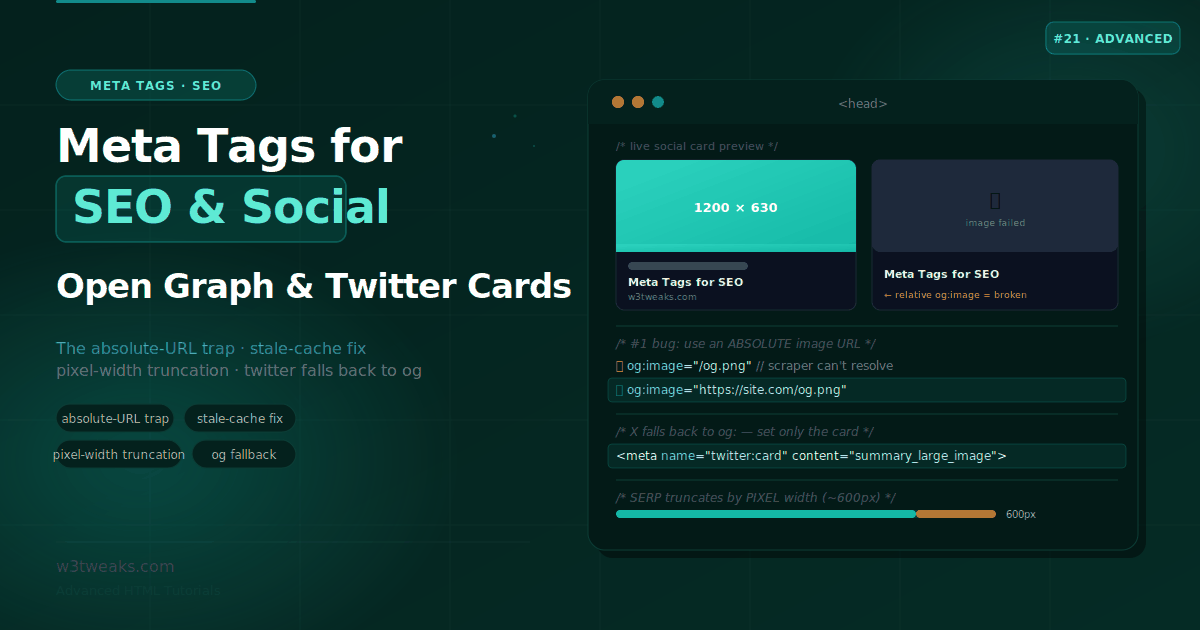
Watch out: the #1 reason previews break is a relative og:image URL — scrapers can’t resolve /images/og.png, always use the full https:// URL. And social platforms cache tags on first scrape and never re-fetch on their own — after changing a tag, force a re-scrape via Facebook’s Sharing Debugger, LinkedIn’s Post Inspector, or (since X deprecated its Card Validator) by pasting into the X composer.
Length is by pixel width, not chars. Title ~600px (~50-60 chars, but “WW” is 3× wider than “ii”), description ~920px. Front-load the topic.
→ Try it in the live demo — edit fields and watch Facebook/LinkedIn/X cards + a Google SERP snippet update live with pixel-width truncation, generate a copy-paste <head>, and validate a broken example against 6 common traps. Deep dive below for AI search citations (Perplexity/ChatGPT/AI Overviews), Article JSON-LD pairing, dynamic OG images (Vercel OG/satori), per-platform unfurl behaviour, Google Discover eligibility, and the canonical+noindex conflict.
Paste a link into Slack, iMessage, or LinkedIn and a rich card appears — a headline, a description, a wide image. Paste a link whose page forgot its meta tags and you get a bare blue URL nobody clicks. The difference is about a dozen lines in the <head>. Those same lines shape how your page looks in Google’s search results, whether Perplexity or ChatGPT cite it in an answer, whether accented characters render correctly, and whether search engines index the page at all.
Meta tags aren’t magic ranking levers — most of them have zero effect on where you rank. But the handful that matter are the difference between a page Google understands and displays correctly and a page that gets mis-snippeted, rendered badly on every social platform, or buried. And a few specific rules — use absolute image URLs, respect pixel-width truncation, force a re-scrape after changes — are the ones that quietly break previews for people who “did everything right.”
This guide covers the meta tags that actually matter in 2026: the SEO title and description that shape your SERP snippet, the Open Graph and Twitter Card tags that control social previews, the fallback hierarchy that lets you avoid duplicating tags, and the traps that make previews silently fail — plus AI search citation, per-platform quirks, and the schema pairing that unlocks rich results.
Related tutorials: File System Access API · Responsive Images · Semantic HTML
Live Demo
Five interactive sections: a live Open Graph / Twitter / LinkedIn card previewer, a Google SERP snippet simulator with pixel-width truncation, the full head tag generator, a Twitter Card type comparison, and a common-mistakes validator.
The Two Families of Meta Tags
Almost all the work is done by two groups of tags with two different audiences:
| Family | Audience | Controls |
|---|---|---|
SEO tags (title, meta description, canonical, robots) | Search engines + AI search | Your Google/Bing result and how Perplexity/ChatGPT cite you |
Social tags (Open Graph og:*, Twitter twitter:*) | Social platforms | Your link preview card |
Plus two structural tags every page needs — charset and viewport — which control rendering itself. We’ll cover all of them, and the critical detail is that these two families overlap: the social tags can fall back to each other, so you write less than you think.
The Structural Tags — charset and viewport
Two tags aren’t about SEO or social at all — they control how the browser renders the page — but they have a placement rule that bites people.
<head>
  <meta charset="UTF-8">                                   <!-- MUST be first -->
  <meta name="viewport" content="width=device-width, initial-scale=1.0">
  <title>…</title>
  <!-- everything else -->
</head>
charset must appear within the first 1024 bytes of the document — which in practice means first in <head>. The HTML spec requires it, and if a long <title> or other tags push it past that byte budget, the browser may misrender accented characters, currency symbols, and emoji. Always UTF-8, always first.
viewport is required for mobile-first indexing and correct mobile rendering — without it, phones render your page at desktop width and zoom out. These two are non-negotiable on every page.
The SEO Title Tag
The <title> is the single most important on-page SEO element and a confirmed ranking factor. It’s the blue headline in Google results, the browser tab label, and a primary signal of what the page is about.
<title>Meta Tags for SEO & Social — Open Graph & Twitter Cards | W3Tweaks</title>Length is governed by pixel width, not character count. Google displays roughly 600 pixels on desktop, which lands around 50–60 characters for typical text — but a title full of wide letters (W, M) truncates sooner than one full of narrow ones (i, l). Guidelines:
- Aim for ~50–60 characters, but preview the actual pixel width in a SERP simulator
- Front-load your primary topic in the first ~50 characters so it survives truncation
- Keep branding consistent, usually at the end after a
|or— - Make every page’s title unique — duplicate titles confuse search engines about which page to rank
Google may rewrite your title if it doesn’t match the query well, but a strong, relevant title is used most of the time.
The Meta Description
The meta description is the snippet text under your title in search results. Here’s the nuance most people get wrong: it is not a ranking factor — Google confirmed that years ago — but it is a powerful click-through-rate lever, and CTR is a behavioural signal that indirectly affects ranking over time.
<meta name="description"
content="The complete meta tags guide — SEO title and description, Open Graph and Twitter Cards, the absolute-URL trap, and the stale-cache fix. With a live previewer.">- Target ~105–155 characters for desktop; mobile truncates earlier (~120), so front-load the value
- Include your target keyword naturally — Google bolds query matches in the snippet, drawing the eye and lifting CTR
- Write a clear value proposition and a subtle call to action
- Avoid quotation marks in the content — they can cause truncation
- Make it unique per page; Google rewrites missing, duplicate, or mismatched descriptions (and generates its own for a large share of snippets anyway)
The CTR loop is the whole point: a description that lifts CTR from 3% to 6% doesn’t just double clicks — sustained strong CTR signals to Google that your result satisfies searchers, which helps hold or improve rankings.
Canonical, Robots, and the noindex Conflict
Two more tags that live in the head and control indexing rather than ranking:
<!-- The definitive URL for this content (de-duplicates www/non-www, params, http/https) -->
<link rel="canonical" href="https://w3tweaks.com/html/meta-tags-seo-open-graph-twitter-cards/">

<!-- Indexing control (index,follow is the default; state it only when you need to change it) -->
<meta name="robots" content="index, follow, max-image-preview:large, max-snippet:-1">
canonical isn’t technically a meta tag but belongs here — it tells search engines which URL is the definitive version, preventing duplicate-content dilution across www/non-www, trailing slashes, and query parameters. Best practice is a self-referencing canonical on every indexable page.
The robots meta tag controls indexing after crawling (unlike robots.txt, which controls crawling). Two directives worth knowing:
max-image-preview:large— allows Google to show a large image thumbnail next to your result, which lifts CTR. It’s also required for Google Discover eligibility — Discover only surfaces pages that grant this permission, and Discover is one of the highest-value tier-1 mobile traffic sources (US/UK/CA/AU).max-snippet:-1— allows unlimited snippet length, which lets AI search engines extract and cite longer passages from your content.
The canonical + noindex Trap
The most common tier-1 SEO trap: setting noindex on a page while also pointing canonical at a different URL. Google receives two contradictory signals — “don’t index me” and “the real me is over there” — and silently drops one, usually with unpredictable results:
<!-- ❌ Contradictory: don't index this page, but the canonical is elsewhere -->
<meta name="robots" content="noindex">
<link rel="canonical" href="https://example.com/other-page/">
Pick one: either drop the noindex (and let the canonical consolidate signals to the target) or drop the canonical and let the noindex do its work. Never both.
A subtle but important gotcha with noindex alone: it only works if the crawler can reach the page. If you block a URL in robots.txt, the crawler never sees the noindex, so the page can still end up indexed via inbound links. To truly remove a page, use noindex and don’t disallow it in robots.txt.
hreflang for International Variants
For tier-1 sites shipping US/UK/CA/AU variants of the same content, hreflang tells Google which language and region each URL targets:
<link rel="alternate" hreflang="en-us" href="https://example.com/us/page/">
<link rel="alternate" hreflang="en-gb" href="https://example.com/uk/page/">
<link rel="alternate" hreflang="en-ca" href="https://example.com/ca/page/">
<link rel="alternate" hreflang="en-au" href="https://example.com/au/page/">
<link rel="alternate" hreflang="x-default" href="https://example.com/page/">
Every URL in the group must list every other URL, plus x-default for the fallback. Site-audit tools like Screaming Frog SEO Spider, Ahrefs, and Sitebulb flag mismatched hreflang clusters as a top-tier issue.
Open Graph — The Social Card
Open Graph (originally a Facebook protocol) is now read by virtually everything that renders a link preview: Facebook, LinkedIn, Slack, Discord, WhatsApp, Telegram, iMessage, Bluesky, Mastodon, and many AI tools that ingest URLs. The core set:
<meta property="og:title" content="Meta Tags for SEO & Social">
<meta property="og:description" content="Open Graph, Twitter Cards, the absolute-URL trap, and the stale-cache fix.">
<meta property="og:image" content="https://w3tweaks.com/images/html/meta-tags.png">
<meta property="og:image:width" content="1200">
<meta property="og:image:height" content="630">
<meta property="og:url" content="https://w3tweaks.com/html/meta-tags-seo-open-graph-twitter-cards/">
<meta property="og:type" content="article">
<meta property="og:site_name" content="W3Tweaks">Note Open Graph uses the property attribute (not name). A few rules that matter:
og:imageshould be 1200×630 (the ~1.91:1 ratio), which renders correctly on Facebook, LinkedIn, Slack, Discord, and Twitter. Keep it under ~5–8 MB.og:image:widthandog:image:heightlet platforms reserve space and render the card faster on first scrape, before they’ve downloaded the image — and some scrapers rely on them. Include them.og:urlshould be the canonical, absolute URL.og:typeiswebsitefor most pages,articlefor blog posts (which unlocksarticle:*tags likearticle:published_time).
Per-Platform Unfurl Behaviour
Every platform reads Open Graph, but they cache differently, respect different image sizes, and have different quirks. This is why “works fine on Twitter but broken in Discord” is a real complaint:
| Platform | Reads | Cache TTL | Refresh method | Notes |
|---|---|---|---|---|
| Facebook / Meta | Open Graph | Weeks-months | Sharing Debugger → Scrape Again | Enforces 5 MB image cap |
| Open Graph | ~7 days | Post Inspector | Prefers 1200×627; older cached previews are sticky | |
| X (Twitter) | Twitter Cards → OG fallback | Days | Paste URL in composer (Card Validator deprecated) | Algorithm demotes external-link cards vs in-thread images |
| Slack | Open Graph + oEmbed | ~24 hours | /remind me refresh <url> doesn’t work — repost with ?v=2 | Respects theme-color for the accent bar |
| Discord | Open Graph | ~24 hours + | Repost with cache-busting query string | Respects theme-color; embeds show og:site_name |
| Open Graph | Long | Cache-bust the URL; no debugger | Image must be under 300 KB or preview shows blank | |
| iMessage | Open Graph | Session-level | Repost | Requires HTTPS; ignores non-https: images silently |
| Bluesky | Open Graph | Days | Repost with new URL params | Reads standard og:image, no custom tags needed |
| Mastodon | Open Graph | Federation-dependent | Repost | Each instance caches independently |
| Perplexity / ChatGPT / Claude web | og:title, og:description, meta description, og:image | Session-dependent | No manual refresh — respects Cache-Control | See AI search section |
The pattern that catches people: a working preview on Twitter/X doesn’t mean it works everywhere. WhatsApp’s 300 KB image cap is the classic silent failure — your 1200×630 PNG that renders beautifully on Slack shows blank on WhatsApp because you exceeded the byte budget.
Twitter Cards — And The Fallback That Saves You Work
Twitter/X has its own twitter:* tags, but here’s the key insight most tutorials bury: X reads your Open Graph tags as a fallback. If a twitter: tag is missing, X uses the matching og: tag.
<!-- The ONE tag you almost always must set explicitly -->
<meta name="twitter:card" content="summary_large_image">

<!-- Optional overrides — skip these if they'd just duplicate your og: tags -->
<meta name="twitter:site" content="@w3tweaks">
<meta name="twitter:creator" content="@w3tweaks">
<meta name="twitter:image:alt" content="Meta tags social card preview">
What this means in practice:
- If your title, description, and image are identical for search and social, you can skip
twitter:title,twitter:description, andtwitter:imageand let X inherit them fromog:title,og:description, andog:image. - The one tag you must set is
twitter:card, because without it X defaults to the smallsummarycard and crops your image into a tiny square — even if you have a large image ready. - Twitter Card tags use the
nameattribute, notproperty(the opposite of Open Graph). Mixing these up is a common silent failure.
summary vs summary_large_image
| Card type | Layout | Use for |
|---|---|---|
summary | Small square thumbnail beside the text | Rarely — profile/homepage where the image isn’t the focus |
summary_large_image | Large image above the title and description | Almost everything — blog posts, articles, products (2–5× more engagement) |
For summary_large_image, the 1200×630 OG image works perfectly; X wants roughly 2:1 but the 2-pixel difference from 1.91:1 is imperceptible.
The Absolute-URL Trap — The #1 Reason Previews Break
This single mistake silently breaks more link previews than anything else:
<!-- ❌ BROKEN: a relative path — scrapers can't resolve it -->
<meta property="og:image" content="/images/og-cover.png">

<!-- ✅ CORRECT: absolute HTTPS URL -->
<meta property="og:image" content="https://w3tweaks.com/images/og-cover.png">
Why relative paths fail: when a social platform scrapes your page, it fetches the meta tags without your page’s base-URL context the way a browser has it. A relative path like /images/og.png has no meaning to the scraper — it doesn’t know your domain in that context — so the image simply doesn’t load, and you get a card with no image. This applies to og:image, twitter:image, and og:url. Always use the full, absolute, HTTPS URL.
A related trap: unescaped special characters in a content attribute. A raw &, ", or < can break the tag parsing. Encode them — & becomes &, " becomes ". This is why the earlier examples write SEO & Social.
The Stale-Cache Problem — “Why Won’t My Preview Update?”
You fix your tags, re-share the link, and the old (or empty) preview still shows. This is the second-most-common frustration, and it’s not a bug in your code.
Social platforms cache your tags on the first scrape and do not re-fetch on their own. After you change the tags, the cached preview persists until you force a re-scrape. Each platform has a tool:
| Platform | How to force a re-scrape (2026) |
|---|---|
| Facebook / Meta | Sharing Debugger (developers.facebook.com/tools/debug/) → paste URL → Scrape Again |
Post Inspector (linkedin.com/post-inspector/) → inspect the URL to refresh its cache | |
| X / Twitter | The legacy Card Validator is deprecated — paste the link into the post composer (a draft) to trigger a fresh scrape |
| Slack / Discord / WhatsApp | Add a cache-busting query string (?v=2) — the URL is treated as new |
That X change trips people up: many older tutorials still send you to cards-dev.twitter.com/validator, which no longer works. Third-party tools opengraph.xyz, metatags.io, and social-share-preview.com render the previews without hitting the platform APIs — useful when the platform tool is rate-limited or down.
Always re-scrape after changing tags, especially before a launch or a viral moment — fixing a broken card after it’s spreading is far harder.
How AI Search Engines Read Your Meta Tags
The single largest emerging topic in 2026 SEO: Perplexity, ChatGPT web search, Google AI Overviews (formerly SGE), and Claude web browsing all parse your meta tags to build their citation cards. The tags they use are the same ones you already write — but the ranking dynamics are different:
og:titleandog:descriptionare what AI search shows in its citation carousel. A stale-tuned meta description Google would rewrite anyway becomes the exact text a Perplexity user sees.og:imageappears in Perplexity’s source cards and often in AI Overviews’ expanded snippets.max-snippet:-1in yourrobotsmeta tag materially affects whether an LLM quotes a full paragraph from your page or truncates at 150 characters — the same directive that unlocks featured snippets also unlocks longer AI citations.nosnippetandnoai/noimageaiopt-outs are respected by Google-Extended, Common Crawl, and most AI crawlers if you want to exclude your content from AI training or answers.
The practical impact: a page with the same tags as a competitor’s but a cleaner, more quotable meta description wins the AI citation, because LLMs prefer well-formed text over Google-generated snippet approximations. Tracking whether you’re actually cited is a new category — tools like Otterly.AI, Peec AI, and Profound monitor LLM citations the way rank trackers monitor SERPs, and they’ve become table stakes for tier-1 marketing teams targeting US/UK/CA/AU audiences where Perplexity and AI Overviews traffic is significant.
Article JSON-LD — Rich Results and Cleaner AI Citations
Meta tags shape the snippet; schema.org structured data unlocks rich results (large thumbnails, star ratings, byline dates in the SERP). For articles, pair your meta tags with an Article, NewsArticle, or BlogPosting JSON-LD block:
<script type="application/ld+json">
{
  "@context": "https://schema.org",
  "@type": "Article",
  "headline": "Meta Tags for SEO & Social",
  "description": "Open Graph, Twitter Cards, the absolute-URL trap, and the stale-cache fix.",
  "image": ["https://w3tweaks.com/images/html/meta-tags.png"],
  "datePublished": "2026-07-10T23:00:00-04:00",
  "dateModified": "2026-07-10T23:00:00-04:00",
  "author": [{
    "@type": "Person",
    "name": "W3Tweaks Team",
    "url": "https://w3tweaks.com/about/"
  }],
  "publisher": {
    "@type": "Organization",
    "name": "W3Tweaks",
    "logo": {
      "@type": "ImageObject",
      "url": "https://w3tweaks.com/logo.png"
    }
  }
}
</script>
Keep og:title and schema.headline identical, and og:image and schema.image matched — Google Search Console silently flags mismatches with a “text conflict” warning that can suppress rich results. dateModified is the freshness signal Google Discover leans on for evergreen content; update it when you make substantive edits, not on every publish.
Article JSON-LD is also the surest way to get consistent AI citations — Perplexity and ChatGPT lift headline, author, and datePublished verbatim into their source panels, where meta-description text alone might get paraphrased.
Google Discover Eligibility
Google Discover — the mobile card feed — is one of the highest-value tier-1 traffic sources (US/UK/CA/AU dominate its impressions). Discover eligibility isn’t a switch; it’s a set of technical requirements:
max-image-preview:largein yourrobotsmeta — mandatory, no exceptionsog:imageat least 1200 pixels wide, with a proper aspect ratio (Discover crops to 16:9 for the card thumbnail)- HTTPS and a valid canonical URL
- Article or NewsArticle JSON-LD with a fresh
dateModifiedfor time-sensitive content - AMP is no longer required (Google deprecated the AMP requirement in 2021)
Google Search Console’s Discover performance report shows which of your pages Discover has picked up, and CMSes like WordPress with Yoast or Rank Math, Ghost, Sanity, Contentful, and Storyblok expose Discover-friendly image fields in the post schema — check the defaults, because they often ship og:image as the site logo rather than a per-post visual.
Dynamic OG Images — One Image Per Post, Generated at the Edge
Every serious tier-1 site in 2026 generates per-post OG images programmatically. Hand-crafting a 1200×630 PNG for every article is a bottleneck; runtime generation gives you a unique preview per URL with the page’s title, byline, and category baked into the image.
Vercel OG is the standard on Vercel deployments — the @vercel/og package (built on satori) renders JSX to a 1200×630 PNG at the edge:
// pages/api/og.js (or app/opengraph-image.tsx in Next.js 15+)
import { ImageResponse } from '@vercel/og';

export const runtime = 'edge';

export default function handler(req) {
  const title = new URL(req.url).searchParams.get('title') ?? 'W3Tweaks';

  return new ImageResponse(
    (
      <div style={{ display: 'flex', width: '100%', height: '100%',
                    background: '#0d1117', color: '#fff',
                    fontSize: 72, padding: 80, alignItems: 'center' }}>
        {title}
      </div>
    ),
    { width: 1200, height: 630 }
  );
}
Then reference it from your page’s <head>:
<meta property="og:image"
      content="https://example.com/api/og?title=Meta%20Tags%20Guide">
Cloudflare Workers exposes the same primitive via satori directly, and Netlify Edge Functions supports the pattern with @vercel/og’s runtime shim. Design tools like Figma and Canva Pro ship 1200×630 OG templates for hand-crafted variants; SaaS platforms Bannerbear, Placid, and Recraft expose APIs to generate per-post images without spinning up your own satori pipeline. Static-site frameworks (Astro, Next.js, Nuxt, SvelteKit) all now ship first-class OG image generation.
The Complete <head> — Put Together
Here’s the full, correctly-ordered set for a typical article. Order doesn’t affect parsing (except charset needing to be early), but this convention keeps things readable:
<head>
<!-- Structural — charset first, within 1024 bytes -->
<meta charset="UTF-8">
<meta name="viewport" content="width=device-width, initial-scale=1.0">
<!-- SEO -->
<title>Meta Tags for SEO & Social — Open Graph & Twitter Cards | W3Tweaks</title>
<meta name="description" content="The complete meta tags guide with a live previewer — SEO, Open Graph, Twitter Cards, the absolute-URL trap, and the stale-cache fix.">
<link rel="canonical" href="https://w3tweaks.com/html/meta-tags-seo-open-graph-twitter-cards/">
<meta name="robots" content="index, follow, max-image-preview:large, max-snippet:-1">
<!-- Open Graph (Facebook, LinkedIn, Slack, Discord, iMessage, AI search…) -->
<meta property="og:type" content="article">
<meta property="og:title" content="Meta Tags for SEO & Social">
<meta property="og:description" content="Open Graph, Twitter Cards, the absolute-URL trap, and the stale-cache fix.">
<meta property="og:image" content="https://w3tweaks.com/images/html/meta-tags.png">
<meta property="og:image:width" content="1200">
<meta property="og:image:height" content="630">
<meta property="og:image:alt" content="Meta tags social card preview">
<meta property="og:url" content="https://w3tweaks.com/html/meta-tags-seo-open-graph-twitter-cards/">
<meta property="og:site_name" content="W3Tweaks">
<!-- Twitter / X (inherits the rest from og:*) -->
<meta name="twitter:card" content="summary_large_image">
<meta name="twitter:site" content="@w3tweaks">
<!-- Article JSON-LD for rich results + AI citations -->
<script type="application/ld+json">…</script>
</head>That’s the whole toolkit: two structural tags, four SEO tags, the Open Graph block, a single required Twitter tag that inherits everything else, and an Article JSON-LD stub.
Auditing Meta Tags at Scale
Site-wide meta tag audits are what tools like Ahrefs Site Audit, SEMrush On-Page SEO Checker, Moz Pro, Screaming Frog SEO Spider, and Sitebulb are built for — each crawls your pages and flags missing og:image, over-length titles, duplicate meta descriptions, and canonical/noindex conflicts as top-tier issues. Site-audit reports are what tier-1 SEO teams review weekly.
Downstream, Google Analytics 4 landing-page reports paired with Google Search Console query data show whether meta description changes actually moved CTR; product-analytics tools like Mixpanel, Amplitude, and PostHog surface downstream conversion from the same landing page. For CMS-driven sites, WordPress with Yoast or Rank Math, Sanity, Contentful, Storyblok, and Ghost all expose SEO fields as first-class schema types — but ship defaults you need to override (og:image often defaults to the site logo instead of a per-post visual; og:type often stays as website on blog posts).
E-commerce platforms need extra care: Shopify emits og:type=product and product:price:amount automatically; BigCommerce and Adobe Commerce (Magento) require a theme edit or plugin to output Open Graph on product pages. Marketing automation tools — HubSpot, Klaviyo, Mailchimp, Marketo — render Open Graph previews when subscribers paste your URLs into replies or forwards, so the same absolute-URL rules apply to email as to social. Social media managers like Buffer, Hootsuite, Sprout Social, and Metricool pull og:image and og:title at schedule time and cache them; if you update tags after queueing a post, re-fetch the URL in the tool before it publishes or the old preview goes out.
Key Takeaways
- Meta tags fall into two families: SEO tags (
title,meta description,canonical,robots) that shape your search result and AI search citations, and social tags (Open Graph, Twitter Cards) that control your link preview — pluscharsetandviewportfor rendering charsetmust appear within the first 1024 bytes of the document (effectively first in<head>) or accented characters and emoji can misrender; it’s always UTF-8- The
<title>is the top on-page SEO element and a ranking factor; length is governed by pixel width (~600px desktop, roughly 50–60 chars) so front-load the topic and preview it in a SERP simulator - The meta description is not a ranking factor but is a powerful CTR lever — keep it ~105–155 characters, include the keyword (Google bolds matches), and front-load for mobile
- Open Graph uses the
propertyattribute and its core set (og:title/description/image/url/type/site_name) drives previews on Facebook, LinkedIn, Slack, Discord, WhatsApp, Bluesky, Mastodon, and AI search citations; the image should be 1200×630 with explicitog:image:width/height - Twitter Cards use the
nameattribute (notproperty) and X falls back toog:tags — so with identical copy you only need to settwitter:cardand can skiptwitter:title/description/image twitter:cardis the one tag you must set explicitly, because without it X defaults to the smallsummarycard and crops your image into a square instead of showingsummary_large_image- The absolute-URL trap is the #1 reason previews break: relative
og:imagepaths fail because scrapers fetch tags without your page’s base-URL context — always use the full HTTPS URL, and escape&/"in content - Per-platform quirks matter: WhatsApp caps images at ~300 KB (over that = blank preview), Slack/Discord respect
theme-color, iMessage requires HTTPS, X algorithm demotes external-link cards - Social platforms cache tags on first scrape and never re-fetch; force a re-scrape with the Facebook Sharing Debugger, LinkedIn Post Inspector, or — since X deprecated its Card Validator — by pasting the URL into the X post composer; add
?v=2for Slack/Discord/WhatsApp - AI search (Perplexity, ChatGPT web, Google AI Overviews, Claude web) parses
og:title,og:description,meta description, andog:imagefor citation cards — a clean, quotable meta description wins the LLM citation over a Google-rewritten approximation;max-snippet:-1unlocks longer AI quotes - Article JSON-LD paired with meta tags unlocks Google rich results and Discover eligibility, and delivers more consistent AI citations — keep
og:titleandschema.headlineidentical to avoid Search Console mismatch warnings - Google Discover eligibility requires
max-image-preview:largein robots, a 1200px+ wideog:image, HTTPS, and ideally Article JSON-LD with a freshdateModified - Never mix
noindexwith acanonicalpointing to a different URL — pick one signal; andnoindexneeds the crawler to reach the page, so don’t also block it inrobots.txt - Use
hreflangfor US/UK/CA/AU variants of the same content — every URL must list every other URL plusx-default - Generate OG images dynamically per post — Vercel OG (
@vercel/og+ satori) at the edge, or Cloudflare Workers with satori directly — instead of hand-crafting 1200×630 PNGs - Meta tags are a traffic multiplier that raises ad revenue at every network tier: better titles/descriptions lift SERP CTR, large social cards get 2–5× the clicks, AI citations drive referral traffic that didn’t exist two years ago — all increasing pageviews and ad impressions on the same rankings
FAQ
Why is my link preview image not showing?
The most common cause is a relative og:image URL like /images/og.png. Social platform scrapers fetch your meta tags without your page’s base-URL context, so a relative path has no meaning to them and the image fails to load. Always use the full absolute HTTPS URL. The second most common cause is stale cache — if you recently changed the image, the platform is still showing the old (or empty) cached version, so force a re-scrape with the platform’s debugger. Third is WhatsApp specifically: its ~300 KB image cap silently drops previews from otherwise-valid tags. Confirm the image is at an accessible HTTPS URL, is 1200×630, and is under the platform’s size limit.
Why will my Open Graph preview not update after I changed the tags?
Social platforms cache your meta tags on the first scrape and do not re-fetch them automatically, so the old preview persists until you force a refresh. Use the Facebook Sharing Debugger and click “Scrape Again,” use the LinkedIn Post Inspector to re-inspect the URL, and for X/Twitter — whose legacy Card Validator is now deprecated — paste the URL into the post composer to trigger a fresh scrape. For Slack, Discord, or WhatsApp, add a cache-busting query string (?v=2) to the URL. Do this after every tag change, and especially before a launch, since fixing a broken card after it’s spreading is much harder.
Do I need both Open Graph and Twitter Card tags?
Not fully. X reads Open Graph tags as a fallback, so if your title, description, and image are the same for search and social, you can set the complete og:* block and add just twitter:card to control the card layout — X will inherit the rest from og:title, og:description, and og:image. The one Twitter tag you must set is twitter:card (use summary_large_image), because without it X defaults to the small square summary card. Add explicit twitter:* tags only when you want different copy or images specifically for X.
What size should my og:image be?
Use 1200×630 pixels, which is the ~1.91:1 ratio that renders correctly across Facebook, LinkedIn, Slack, Discord, and Twitter/X. Keep the file under about 5–8 MB for most platforms — but WhatsApp caps at ~300 KB, so if WhatsApp traffic matters, target that. Serve from an absolute HTTPS URL. Add og:image:width and og:image:height meta tags so platforms can reserve space and render the card faster before downloading the image. Keep important text and logos within the center ~80% of the image, since some platforms crop the edges or round the corners of the card. For Google Discover eligibility, ensure the image is at least 1200 pixels wide.
How long should my title tag and meta description be?
Both are limited by pixel width, not a hard character count. Titles display up to about 600 pixels on desktop, which is roughly 50–60 characters for typical text — front-load your primary topic in the first ~50 characters so it survives truncation. Meta descriptions display up to about 920 pixels desktop, roughly 105–155 characters, and mobile truncates earlier around 120, so put the value proposition first. Because a wide “W” takes more pixels than a narrow “i”, always preview the actual rendering in a SERP simulator rather than trusting a raw character count.
Does the meta keywords tag help SEO?
No. Google has ignored the <meta name="keywords"> tag as a ranking signal since 2009, and Bing may even treat a stuffed keywords tag as a spam signal. Including it has no positive effect and just adds a little page weight, so it’s safe and recommended to leave it out. The meta tags that still matter for SEO in 2026 are title, meta description, canonical, robots, viewport, and charset, plus the Open Graph and Twitter Card tags for social sharing and AI citations.
How do meta tags affect Perplexity, ChatGPT, and Google AI Overviews?
Perplexity, ChatGPT web search, Google AI Overviews, and Claude web browsing all read og:title, og:description, meta description, and og:image when composing their citation cards. A clean, quotable meta description often wins the LLM citation over a Google-rewritten snippet approximation. Two directives that materially affect AI citations: max-snippet:-1 in your robots meta unlocks longer AI quotes (LLMs otherwise truncate at ~150 characters), and noai/noimageai/Google-Extended opt-outs are respected if you want to exclude your content from AI training or answers. Article JSON-LD improves citation consistency because LLMs lift headline, author, and datePublished verbatim into their source panels.
What is the canonical + noindex trap?
Setting noindex on a page while also pointing canonical at a different URL sends Google two contradictory signals: “don’t index me” and “the real me is over there.” Google silently drops one, often with unpredictable results — sometimes the target URL is deindexed alongside the source, sometimes the canonical is ignored and the noindex page stays out of the index, but consolidation to the target does not happen. Pick one: either drop the noindex and let the canonical consolidate signals to the target, or drop the canonical and let the noindex do its work. Never both.
How do I generate dynamic Open Graph images per post?
Use @vercel/og (built on satori) on Vercel, Cloudflare Workers with satori directly, or Netlify Edge Functions with the same primitive. You author a JSX component that renders 1200×630, and the runtime produces a PNG at the edge in ~50 ms. Reference it from your page’s <head> as <meta property="og:image" content="https://example.com/api/og?title=...">. Static-site frameworks (Astro, Next.js 15+, Nuxt, SvelteKit) all ship first-class OG image generation now, and SaaS platforms Bannerbear, Placid, and Recraft expose the same via API if you’d rather not run the pipeline yourself.
What replaces the deprecated Twitter Card Validator?
X deprecated cards-dev.twitter.com/validator in 2024. In 2026, the reliable way to preview and refresh an X card is to paste the URL into the post composer as a draft — X scrapes it fresh and renders the card in-place. Third-party tools like opengraph.xyz, metatags.io, and social-share-preview.com render previews without hitting the platform API, useful when the platform tool is rate-limited or down. For LinkedIn use Post Inspector, for Facebook use Sharing Debugger; for Slack/Discord/WhatsApp use a cache-busting query string.