TL;DR
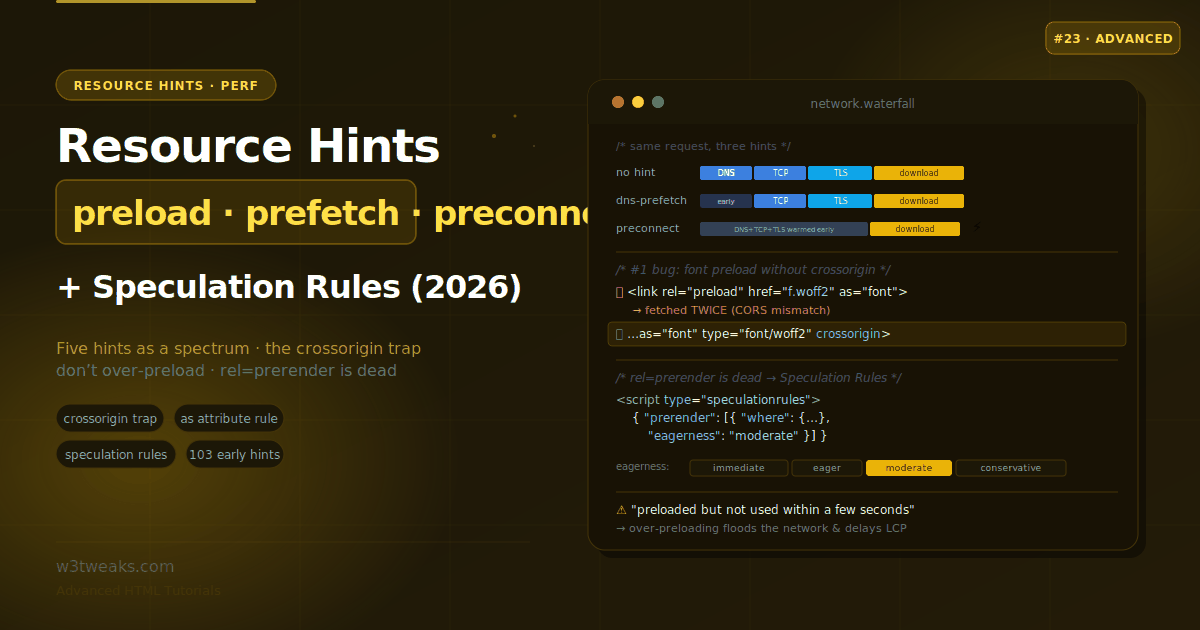
Five hints, mapped to the network phase they act on — lightest to heaviest:
<link rel="dns-prefetch" href="https://analytics.example.com">
<link rel="preconnect"   href="https://cdn.example.com" crossorigin>
<link rel="preload"      href="/hero.avif" as="image" fetchpriority="high">
<link rel="modulepreload" href="/app.js">
<link rel="prefetch"     href="/next-page.html" as="document">
Core distinction: preload is for the current page; prefetch is for the next page. Using both on the same resource wastes bandwidth.
Watch out — five traps:
- Font preload without
crossorigindownloads TWICE — fonts are always CORS mode; the non-CORS preload can’t be reused. Always addcrossorigin. preloadrequiresas— without it, the browser can’t match the preload to the real request, and the resource is fetched twice.preloaddoesn’t set image priority — addfetchpriority="high"explicitly on hero images.- Over-preloading floods the network and delays LCP — limit to 2–3 truly critical resources.
<link rel="prerender">is dead — use the Speculation Rules API instead.
Direct SEO win: cutting critical-origin TTFB via preconnect typically improves LCP by 100–300ms in the field — that’s a direct Core Web Vitals ranking-signal move, measurable in Google Search Console’s CrUX report.
Deliver via HTTP Link: headers or 103 Early Hints for maximum leverage — Cloudflare, Fastly, and Vercel automate this for many origins.
→ Try it in the live demo — see the five hints on a network-phase waterfall, watch preconnect cut DNS+TCP+TLS off the critical path, hit the font-preload crossorigin trap live (with a fetch counter), build a Speculation Rules block with eagerness levels, and use the decision guide to pick the right hint for any resource. Deep dive below for the full fetchpriority attribute, the LCP/INP direct SEO impact, CDN/edge automatic hints, framework auto-hints (Next.js/Astro/Nuxt/SvelteKit), and the anti-patterns to audit out of your existing codebase.
The browser’s preload scanner is already a good optimizer — it reads ahead in your HTML and starts fetching resources before the parser reaches them. But it can’t read your mind. It doesn’t know that a font referenced deep in a CSS file is render-critical, that a third-party API will be hit the moment the page loads, or that most users click “next” to the same page. Resource hints are how you tell it: this origin matters, get a head start.
They’re the best effort-to-payoff trade in performance — a single line of HTML (or an HTTP header) that makes the browser do the right work earlier. But they’re also easy to get subtly wrong in ways that waste bandwidth or even slow the page down. A font preloaded without crossorigin downloads twice. Preloading ten resources floods the network and can delay the one thing you actually need — your LCP image. And the old <link rel="prerender"> is deprecated and non-functional; the modern replacement is a completely different API.
This guide maps all five hints to the network phases they act on, covers the traps, and brings you up to date with the Speculation Rules API that now handles prefetch and full prerendering.
Related tutorials: Schema Markup · Native Lazy Loading · Responsive Images
Live Demo
Five interactive sections: the five hints on a network-phase waterfall, preconnect vs dns-prefetch connection setup, the preload playground with the crossorigin trap, the Speculation Rules builder, and a decision-guide validator.
The Five Hints as a Spectrum
The key mental model most tutorials miss: the hints form a spectrum from lightest to heaviest, based on how much of the network work they do ahead of time.
| Hint | What it does | For | Weight |
|---|---|---|---|
dns-prefetch | DNS resolution only | Third-party origins you might hit | Lightest (nearly free) |
preconnect | DNS + TCP + TLS (full connection) | 3–4 critical cross-origin origins | Light-medium |
preload | Fetch a specific resource, high priority | Critical current-page resources | Medium |
modulepreload | Fetch + parse + compile a JS module, recursively | ES module trees | Medium-heavy |
prefetch | Fetch a resource, low priority | A likely next-page resource | Speculative |
The single most important distinction: preload is for the current page; prefetch is for the next page. Using both on the same resource wastes bandwidth. All of them are <link> tags in the <head> (or HTTP Link: headers).
<link rel="dns-prefetch" href="https://analytics.example.com">
<link rel="preconnect"   href="https://cdn.example.com" crossorigin>
<link rel="preload"      href="/hero.avif" as="image" fetchpriority="high">
<link rel="modulepreload" href="/app.js">
<link rel="prefetch"     href="/next-page.html" as="document">
dns-prefetch and preconnect — Warming Connections
Before a browser can request anything from a third-party origin, it must resolve the DNS, open a TCP connection, and (for HTTPS) negotiate TLS. That’s up to three round trips of latency before the first byte of the actual resource. These two hints do that work early.
dns-prefetch — DNS only, nearly free
<link rel="dns-prefetch" href="https://analytics.example.com">dns-prefetch performs only the DNS resolution — no TCP, no TLS. It costs almost nothing in client resources, so you can use it liberally: every third-party origin you may eventually contact can have one without harming the page.
preconnect — the full connection, used sparingly
<link rel="preconnect" href="https://cdn.example.com" crossorigin>preconnect goes all the way: DNS + TCP + TLS. When the first real request to that origin fires, it goes straight to sending data. But it’s not free — every preconnect consumes socket and TLS-handshake capacity and holds a connection open for about 10 seconds. So use it for only the 3–4 most critical cross-origin origins (your CDN, image host, primary API).
The pattern: preconnect the critical few, dns-prefetch the long tail
<!-- Warm the critical origins fully -->
<link rel="preconnect" href="https://cdn.example.com" crossorigin>
<link rel="preconnect" href="https://fonts.gstatic.com" crossorigin>

<!-- DNS-only for the less-critical long tail -->
<link rel="dns-prefetch" href="https://analytics.example.com">
<link rel="dns-prefetch" href="https://widget.example.com">
A common belt-and-suspenders idiom is to list both for a critical origin — preconnect for modern browsers, dns-prefetch as a harmless fallback for older ones. If preconnect is supported, the DNS is already done and the dns-prefetch line does nothing; if it isn’t, you still save the DNS lookup.
The idle-connection trap
A preconnect warms a connection, but browsers drop idle connections after ~10 seconds. So preconnecting a payment origin in the <head> for a checkout button the user clicks minutes later is wasted — the connection is long gone by then. Warm connections near the moment of need (e.g. on hover or intent), or just dns-prefetch the long tail where timing is uncertain.
preconnect/preload and the crossorigin Trap
This is the single biggest cause of “my preconnect/preload doesn’t seem to work” reports, and it comes down to CORS mode matching.
A preconnected or preloaded connection can only be reused by the real request if their CORS modes match. Fonts are the classic case: font files are always fetched in CORS (anonymous) mode. So if you preload or preconnect for a font without crossorigin, the browser opens a non-CORS connection that the real CORS font request can’t reuse — so it opens a second connection anyway, and you’ve gained nothing (or wasted bandwidth on a duplicate fetch).
<!-- ❌ WRONG: font preload without crossorigin → fetched TWICE -->
<link rel="preload" href="/fonts/inter.woff2" as="font" type="font/woff2">

<!-- ✅ CORRECT: crossorigin makes the preload match the real CORS request -->
<link rel="preload" href="/fonts/inter.woff2" as="font" type="font/woff2" crossorigin>
The rule: always add crossorigin when the resource will be fetched in CORS mode — fonts always, and fetch() with credentials to a different origin. This applies to both preconnect and preload. The classic Google Fonts snippet gets this right:
<link rel="preconnect" href="https://fonts.googleapis.com">
<link rel="preconnect" href="https://fonts.gstatic.com" crossorigin>
Note fonts.gstatic.com (which serves the actual font files, fetched with CORS) has crossorigin, while fonts.googleapis.com (which serves the CSS) does not — because the CSS isn’t a CORS request. Matching the mode is the whole game. Google Fonts, Adobe Fonts, and Fontshare all publish snippets that respect this rule; if you’re self-hosting fonts via Fontsource, Cloudflare Fonts, or Bunny Fonts, apply the same pattern.
preload — Fetch Critical Resources Early
preload tells the browser to fetch a specific resource at high priority now, regardless of when the parser would otherwise discover it. This is where hints get genuinely powerful — and genuinely dangerous if misused.
<link rel="preload" href="/critical.css" as="style">
<link rel="preload" href="/hero.avif"   as="image" fetchpriority="high">
<link rel="preload" href="/fonts/inter.woff2" as="font" type="font/woff2" crossorigin>
The as attribute is required
Unlike the connection hints (which only need rel and href), preload requires the as attribute, and getting it right matters:
- It tells the browser the resource type (
style,script,font,image,fetch,document), so the browser sets the correct priority and sends the rightAcceptheader - Without
as, the resource may be fetched twice — once by the preload (as a generic fetch) and again by the actual reference, because the browser can’t match them
preload doesn’t set priority for images
A subtle one: preloading an image does not make it high priority — images are low priority by default and preload doesn’t change that. If you preload your LCP hero image, add fetchpriority="high" explicitly:
<link rel="preload" href="/hero.avif" as="image" fetchpriority="high">preload only fetches — it doesn’t apply
preload puts the resource in the cache; it doesn’t execute a script, apply a stylesheet, or render an image. You still need the actual <script>, <link rel="stylesheet">, or <img> — the preload just ensures it’s already downloaded when that reference is reached.
Don’t over-preload
Preloading everything is the same as preloading nothing. Every preload is a high-priority request competing for bandwidth, so limit preloads to 2–3 truly critical resources. Preload too much and you flood the network, delaying the one resource you most need — often your LCP image. If you preload a resource and then don’t use it within a few seconds, the browser logs a console warning: “The resource was preloaded but not used within a few seconds.” That warning means you’re wasting bandwidth — remove the hint.
fetchpriority — Full Attribute Reference
fetchpriority is a standalone attribute, not just a <link rel="preload"> option. It works on <img>, <link>, <script>, and iframe — and it’s often more powerful than adding a preload, because it re-prioritizes a resource the browser already knows about instead of adding a second request:
<!-- Boost the LCP image without any preload -->
<img src="/hero.avif" fetchpriority="high" alt="…">

<!-- Deprioritize a below-the-fold background so LCP wins -->
<img src="/background.jpg" fetchpriority="low" loading="lazy" alt="…">

<!-- Deprioritize a third-party analytics script -->
<script src="https://widget.example.com/embed.js" fetchpriority="low" async></script>

<!-- Even inside preload -->
<link rel="preload" href="/hero.avif" as="image" fetchpriority="high">
Three values: high, low, and auto (the default). Support: Chrome/Edge 102+, Safari 17.2+, Firefox 132+. The common LCP win: mark your hero image fetchpriority="high" directly on the <img> tag — often faster than adding a preload because it uses the browser’s existing discovery, just at higher priority.
Analytics scripts from Google Analytics 4, Mixpanel, Segment, and PostHog are natural fetchpriority="low" candidates — they need to run but should never compete with the LCP resource for bandwidth.
modulepreload — For ES Module Trees
When you load an ES module, the browser has to discover its dependencies sequentially: download the entry module, parse it, find its import statements, download those, parse them, find their imports, and so on. That’s a waterfall. modulepreload flattens it.
<link rel="modulepreload" href="/app.js">
<link rel="modulepreload" href="/utils.js">
<link rel="modulepreload" href="/api.js">
modulepreload differs from plain preload in two important ways:
- It doesn’t just fetch the module — it also parses and compiles it, so it’s ready to execute immediately when needed
- It can recursively fetch the module’s dependencies, so an entire module tree downloads in parallel instead of being discovered one level at a time
For a modern ES-module app, modulepreload on your entry point (and its key dependencies) is the right tool — preload with as="script" would fetch the file but wouldn’t compile it or follow its imports.
prefetch — For the Next Navigation
Everything above optimizes the current page. prefetch is speculative: it fetches a resource, at low priority, for a navigation that may or may not happen.
<!-- Fetch a likely next page's HTML at low priority -->
<link rel="prefetch" href="/likely-next-page.html" as="document">
It shines when you’ve identified a predictable user flow — a checkout funnel, a “read next” article, a paginated list. Prefetching the render-critical resource for that likely next page means it loads instantly when the user gets there. Two cautions: it’s low-priority so it won’t compete with current-page resources, and Safari doesn’t support prefetch (it has limited availability), so treat it as an enhancement. For full next-page optimization, the modern tool is Speculation Rules, next.
Speculation Rules — The Modern Prerender
Here’s a fact most tutorials haven’t absorbed: <link rel="prerender"> is deprecated and non-functional. Don’t use it, and don’t send rel=prerender in Link headers. The modern, far more capable replacement is the Speculation Rules API.
Speculation Rules live in a <script type="speculationrules"> block (or a Speculation-Rules HTTP header) and can do both prefetch and full prerender — where prerender loads and renders the entire next page in a hidden background tab that activates instantly on navigation.
<script type="speculationrules">
{
  "prerender": [{
    "where": { "href_matches": "/products/*" },
    "eagerness": "moderate"
  }],
  "prefetch": [{
    "where": { "href_matches": "/blog/*" },
    "eagerness": "conservative"
  }]
}
</script>
Eagerness — when to speculate
The eagerness setting controls when the browser acts, trading instant-ness against wasted work:
| Eagerness | Triggers | Use for |
|---|---|---|
immediate | As soon as the rule is parsed | A near-certain next step (single-path funnels) |
eager | On the slightest hint (cursor moving toward a link) | High-confidence flows |
moderate | Hovering a link for ~200ms (or pointer-down) | The common default for links |
conservative | On pointer-down / click start | Cheapest; the default for document rules |
Rule types
- List rules (
"urls": ["/checkout"]) — specific hardcoded URLs; default eagernessimmediate - Document rules (
"where": { "href_matches": "/products/*" }) — any link matching a URL pattern; default eagernessconservative
Important scoping: Speculation Rules target document URLs, so they’re for multi-page apps (real page navigations), not SPA internal route changes — for an SPA, use your framework’s own prefetch/prerender. Chrome and Edge cap concurrent speculations (a FIFO queue for eager/moderate/conservative) to protect the device, and prerendered pages run in a separate renderer (so their requests appear under a Sec-Purpose: prefetch;prerender header, not in the current page’s Network panel). Note Speculation Rules are not yet Baseline — they’re Chromium-only — so treat them as a progressive enhancement.
Framework Auto-Hints — What Next.js, Astro, Nuxt & SvelteKit Do For You
Modern frameworks emit resource hints automatically for their routing primitives. Knowing what each does saves you from hand-writing hints your framework already ships:
| Framework | Auto-hint mechanism | Default behavior |
|---|---|---|
| Next.js | <Link prefetch> (App Router prefetches by default in prod) | Prefetches route JS + RSC payload on viewport intersection |
| Astro | <ClientRouter> + data-astro-prefetch | Configurable strategies: hover, viewport, load, tap |
| Nuxt | <NuxtLink prefetch> | Prefetches chunks on hover / viewport by default |
| SvelteKit | data-sveltekit-preload-data + data-sveltekit-preload-code | Preloads data on hover, code on viewport |
| Remix / React Router 7 | <Link prefetch="intent"> | intent = hover/focus; render = on mount; viewport = intersection |
| Solid Start | <A> component with automatic prefetch | Similar to Next.js |
The rule: don’t hand-write prefetch hints for your own routes — the framework already does it correctly. Hand-write hints for third-party origins (CDN, fonts, analytics), your LCP image, and your critical CSS — those are outside what the framework’s router knows about.
For frameworks hosted on Vercel, Netlify, Cloudflare Pages, Fly.io, or Render, the framework’s build step often outputs both the client-side prefetch attributes AND server-side Link: headers automatically — check your build output to see what’s already being sent.
Delivering Hints via HTTP Headers & 103 Early Hints
Resource hints don’t have to be <link> tags in your HTML. They can be HTTP Link: headers, which browsers process before the HTML body arrives — a timing advantage:
Link: <https://cdn.example.com>; rel=preconnect,
      </css/main.css>; rel=preload; as=style,
      </js/app.js>; rel=preload; as=script
This gets even more powerful with 103 Early Hints, an informational HTTP status the server can send while it’s still generating the final response. During “server think time” — database queries, template rendering — the browser receives preliminary Link: headers and starts warming connections and preloading, overlapping client work with backend work.
Which platforms send Early Hints for you automatically:
- Cloudflare — Smart Early Hints (Enterprise + some Pro plans) inspects your HTML on the first response and automatically sends
preconnect/preloadon subsequent requests. Zero config. - Fastly — supports 103 Early Hints natively via VCL; commonly used for critical CSS + font hints.
- Vercel — sends
103for Next.js Server Components’ RSC payloads automatically on Node.js runtime; edge functions can emit them manually. - Netlify Edge Functions — support 103 via a
res.headersAPI on incoming requests. - Akamai — Ion Standard sends Early Hints for detected critical resources.
- Bunny.net, KeyCDN — via origin-forwarded
103where the origin supports it.
For CDN-fronted origins that don’t natively speak 103, the fallback is to include the same hints in the final response’s Link: header — browsers still process them faster than parsed HTML <link> tags.
The LCP + INP Direct SEO Impact
Resource hints are one of the shortest paths to a measurable Core Web Vitals improvement, and CWV is a confirmed Google ranking signal:
- LCP (Largest Contentful Paint) — the moment your largest above-the-fold element renders.
preconnectto your image CDN,preloadon the hero image withfetchpriority="high", and 103 Early Hints during server think time typically drop field LCP by 100–300ms — often the difference between “Good” (≤2.5s) and “Needs Improvement” bucket in Google Search Console’s Core Web Vitals report. - INP (Interaction to Next Paint) — replaced FID in March 2024 and became a ranking signal.
dns-prefetchandpreconnecton payment/checkout origins warmed just before the button click keeps interaction latency under the 200ms “Good” bucket. - TTFB — Early Hints during server think time let the browser start warming connections while your backend is still generating HTML. The saved round trips flow directly into LCP.
Measure the impact in field data — not lab data — via Google Search Console (CrUX data) and RUM tools: SpeedCurve, DebugBear, Calibre, Vercel Speed Insights, and RUM Vision all decompose LCP into DNS/TCP/TLS/TTFB/render segments so you can see exactly which phase your hints improved. APM platforms — Datadog RUM, Sentry Performance, New Relic Browser, LogRocket — surface INP regressions attributable to third-party origins in per-domain breakdowns.
The concrete SEO angle: a page that moves from “Poor” LCP (>4s) to “Good” (≤2.5s) via correct hint deployment shows up in Search Console within about 28 days (CrUX’s rolling window) and typically correlates with a small but measurable ranking bump on informational and commercial queries. This is one of the few CSS/HTML features with a direct, measurable search-ranking benefit.
Anti-Patterns — Audit and Remove
Before adding new hints, audit your codebase for these common wastes:
<link rel="prerender">still in the HTML — deprecated and non-functional. Remove it or migrate to Speculation Rules.preloadon a below-the-fold image — the “preload above-fold, lazy-load below-fold” split is the correct default. Preloading a lazy image wastes bandwidth AND delays your LCP resource.- Both
preloadandprefetchon the same URL — pick one. If it’s for this page, preload. If it’s for the next page, prefetch. Both is duplicate work. - Preloading a font without
crossorigin— the double-fetch trap. Addcrossoriginon every font preload. - Preloading a resource without
as— the browser can’t match it, fetches twice. - Over 5
preloadtags in the<head>— you’re competing with your own LCP. Trim to 2–3. preconnectfor origins the page rarely hits — those should bedns-prefetch.preconnectin<head>for an origin only used minutes later — the idle-connection drops after ~10s; warm closer to the moment of need.- Manual
<link rel="prefetch">for your own app routes — your framework (Next.js/Astro/Nuxt/SvelteKit) already handles this; the manual hint often duplicates work.
Run Lighthouse CI and the PageSpeed Insights audit “Preconnect to required origins” / “Preload key requests” — they’ll flag most of these automatically. WebPageTest waterfalls show which of your hints actually shortened the critical path. Chromatic or Percy visual regression catches LCP regressions when a hint change breaks the render.
The Decision Guide
When you’re deep in a redesign and someone asks “should we preload the homepage CTA bundle?”, run this flow:
Is the resource on a third-party origin?
  → More than ~4 origins? preconnect the top 3, dns-prefetch the rest
  → Is it a font or CORS fetch? add crossorigin (always, for fonts)

Is the resource critical for the CURRENT page (LCP image, critical CSS, key font)?
  → preload it (with as=…, and fetchpriority=high for images)
  → But only 2–3 total — don't flood the network

Is it an ES module (and its dependency tree)?
  → modulepreload

Is it for a LIKELY NEXT page?
  → A single resource: prefetch (as=document)
  → A whole page, MPA: Speculation Rules (prefetch or prerender + eagerness)
  → Framework route (Next.js/Astro/Nuxt/SvelteKit): use the framework's <Link prefetch> — don't hand-write

Will the resource be rendered lazily / below the fold?
  → Do NOT preload it — add fetchpriority="low" if needed

Does the server take >200ms to generate HTML?
  → Move the hints into 103 Early Hints headers (or enable your CDN's automatic Early Hints)
And always measure. Resource hints are hints — their real benefit depends on your specific page’s network waterfall. Verify in Chrome DevTools (the Network tab’s Initiator column shows “preload”/“prefetch”), WebPageTest waterfalls, or Lighthouse’s “Preconnect to required origins” and “Preload key requests” audits. A hint that doesn’t shorten time-to-LCP is just an extra request.
Key Takeaways
- Resource hints form a spectrum from lightest to heaviest:
dns-prefetch(DNS only) →preconnect(DNS+TCP+TLS) →preload(fetch current-page resource) →modulepreload(fetch + compile + recurse deps) →prefetch(fetch next-page resource, low priority) - The core distinction:
preloadis for the current page,prefetchis for the next page — using both on the same resource wastes bandwidth dns-prefetchis nearly free, so use it liberally on the long tail of third-party origins;preconnectcosts socket/TLS resources and holds a connection ~10s, so reserve it for the 3–4 most critical origins- The
crossorigin/CORS trap: fonts are always fetched in CORS mode, so apreload/preconnectwithoutcrossoriginopens a second connection the real request can’t reuse — always addcrossoriginfor fonts and cross-origin CORS fetches preloadrequires theasattribute to set the correct priority and Accept header and to avoid a double fetch; preloaded images still needfetchpriority="high"because images are low priority by defaultfetchpriorityis a standalone attribute — use it on<img>,<link>,<script>directly; the LCP win is often<img fetchpriority="high">on the hero without a preload at all- Don’t over-preload — limit to 2–3 truly critical resources; preloading too much floods the network and can delay your LCP, and an unused preload triggers the “preloaded but not used within a few seconds” console warning
modulepreloadbeats plainpreloadfor ES modules because it also parses/compiles the module and recursively fetches its dependency tree, flattening the import waterfall<link rel="prerender">is deprecated and non-functional — the Speculation Rules API (<script type="speculationrules">) is the modern replacement, doing prefetch and full prerender with eagerness levels (immediate/eager/moderate/conservative) for multi-page apps- Framework auto-hints: Next.js
<Link prefetch>, Astro<ClientRouter>withdata-astro-prefetchstrategies, Nuxt<NuxtLink prefetch>, SvelteKitdata-sveltekit-preload-data/-code, Remix/RR7<Link prefetch="intent">— don’t hand-write route prefetches your framework already ships - Resource hints can be delivered as HTTP
Link:headers, and with 103 Early Hints the server sends them during “server think time” before the final response — Cloudflare Smart Early Hints, Fastly, Vercel, Netlify Edge, Akamai Ion automate this - Direct SEO benefit: correct preconnect + preload + Early Hints deployment typically drops field LCP by 100–300ms, moving pages from “Poor” or “Needs Improvement” into the “Good” Core Web Vitals bucket — measurable in Google Search Console’s CrUX report within ~28 days
- Always measure impact in DevTools, WebPageTest, Lighthouse CI, or field RUM (SpeedCurve, DebugBear, Calibre, Vercel Speed Insights, Datadog RUM, Sentry Performance) — a hint that doesn’t shorten time-to-LCP is just an extra request
FAQ
What is the difference between preload, prefetch, and preconnect?
They act on different network phases. preconnect warms a connection to an origin by doing the DNS lookup, TCP handshake, and TLS negotiation ahead of time — it doesn’t fetch anything. preload fetches a specific resource for the current page at high priority, before the parser would normally discover it. prefetch fetches a resource at low priority for a likely next page the user might navigate to. The rule of thumb: preconnect warms connections, preload is for the current page, and prefetch is for the next page. Using preload and prefetch on the same resource wastes bandwidth.
Why do I need crossorigin when preloading fonts?
Because font files are always fetched in CORS (anonymous) mode. When you preload a font without crossorigin, the browser downloads it as a non-CORS request, but the real font request is a CORS request — and the two can’t be matched, so the browser fetches the font a second time. Adding crossorigin to the preload makes its CORS mode match the real request, so the preloaded file is actually used. This is the single most common reason a font preload “doesn’t work” and just wastes bandwidth. The same CORS-matching rule applies to preconnect.
When should I use dns-prefetch vs preconnect?
Use preconnect for the 3–4 third-party origins most critical to your page — your CDN, image host, or primary API — because it does the full connection setup (DNS + TCP + TLS) but costs socket and TLS resources and holds the connection open only ~10 seconds. Use dns-prefetch for the long tail of less-critical origins, since it only does the DNS lookup and is nearly free, so you can use it liberally. A common pattern is listing both for a critical origin: preconnect for modern browsers with dns-prefetch as a harmless fallback for older ones.
Why does my preload trigger a “preloaded but not used” warning?
The browser logs “The resource was preloaded but not used within a few seconds” when you preload something the page doesn’t actually reference soon after. It usually means one of three things: you preloaded a resource you don’t end up using, you got the as attribute wrong so the browser can’t match the preload to the real request, or you preloaded a font without crossorigin so it was fetched again instead. Each case wastes bandwidth that could have gone to resources you need. Fix the as/crossorigin value or remove the preload — over-preloading can delay your LCP resource.
Is link rel=prerender still supported?
No. <link rel="prerender"> is deprecated and non-functional across browsers — don’t use it in HTML or in Link headers. The modern replacement is the Speculation Rules API, delivered in a <script type="speculationrules"> block. It’s far more capable: it does both prefetch and full prerender (loading and rendering the next page in a hidden background tab that activates instantly), supports URL pattern matching, and offers configurable eagerness levels (immediate, eager, moderate, conservative). It targets document URLs, so it’s for multi-page apps rather than SPA route changes, and it’s currently Chromium-only, so treat it as a progressive enhancement.
What is modulepreload and how is it different from preload?
modulepreload is a resource hint specifically for JavaScript ES modules. Unlike plain preload (which only fetches a file into the cache), modulepreload also parses and compiles the module so it’s ready to execute, and it recursively fetches the module’s dependencies. This flattens the module waterfall — instead of the browser discovering imports one level at a time (download, parse, find imports, download those…), the whole dependency tree downloads in parallel. For a modern ES-module app, use modulepreload on your entry point and key dependencies; preload with as="script" would fetch the file but wouldn’t compile it or follow its imports.
What is fetchpriority and when should I use it?
fetchpriority is a standalone HTML attribute — not just a preload option — that hints the browser to fetch a resource at high, low, or auto (default) priority. It works on <img>, <link>, <script>, and iframe. The common LCP win is marking your hero image <img fetchpriority="high"> directly, which is often faster than adding a preload because it re-prioritizes a resource the browser’s preload scanner already found. Use low to deprioritize below-the-fold images, third-party analytics scripts, and non-critical widgets so they don’t compete with the LCP resource. Support: Chrome/Edge 102+, Safari 17.2+, Firefox 132+.
Do resource hints actually improve SEO?
Yes — directly. Correct preconnect on critical origins, preload + fetchpriority="high" on the LCP image, and 103 Early Hints during server think time typically drop field Largest Contentful Paint by 100–300ms. LCP and INP are both confirmed Google ranking signals since Core Web Vitals launched. A page moving from “Poor” or “Needs Improvement” into the “Good” LCP bucket (≤2.5s) shows up in Google Search Console’s CrUX report within about 28 days and typically correlates with a small but measurable ranking bump. Measure in Search Console + a RUM tool like SpeedCurve, DebugBear, Calibre, or Vercel Speed Insights.
Which CDNs send 103 Early Hints automatically?
Cloudflare Smart Early Hints (Enterprise + some Pro plans) inspects your HTML on the first response and automatically emits preconnect/preload on subsequent requests with zero config. Fastly supports Early Hints natively via VCL. Vercel sends 103 for Next.js Server Components’ RSC payloads on the Node.js runtime. Netlify Edge Functions expose a res.headers API for manual emission. Akamai Ion sends Early Hints for detected critical resources. For CDN-fronted origins that don’t natively speak 103, the fallback is including the same hints in the final response’s Link: header — browsers process them faster than parsed HTML <link> tags.
Should I hand-write prefetch hints for my own app routes?
Usually no. Modern frameworks emit route prefetch hints automatically: Next.js <Link prefetch> (App Router prefetches by default in prod), Astro <ClientRouter> with data-astro-prefetch strategies (hover/viewport/load/tap), Nuxt <NuxtLink prefetch>, SvelteKit data-sveltekit-preload-data/data-sveltekit-preload-code, Remix/React Router 7 <Link prefetch="intent">, Solid Start <A>. Hand-writing prefetch for your own routes usually duplicates work the framework already does correctly. Hand-write hints for third-party origins (CDN, fonts, analytics), your LCP image, and critical CSS — those are outside what the framework’s router knows about.