loading="lazy" is the rare web platform feature that’s genuinely one line: add the attribute to an <img> and the browser defers loading until the image nears the viewport. No library, no JavaScript, supported everywhere.
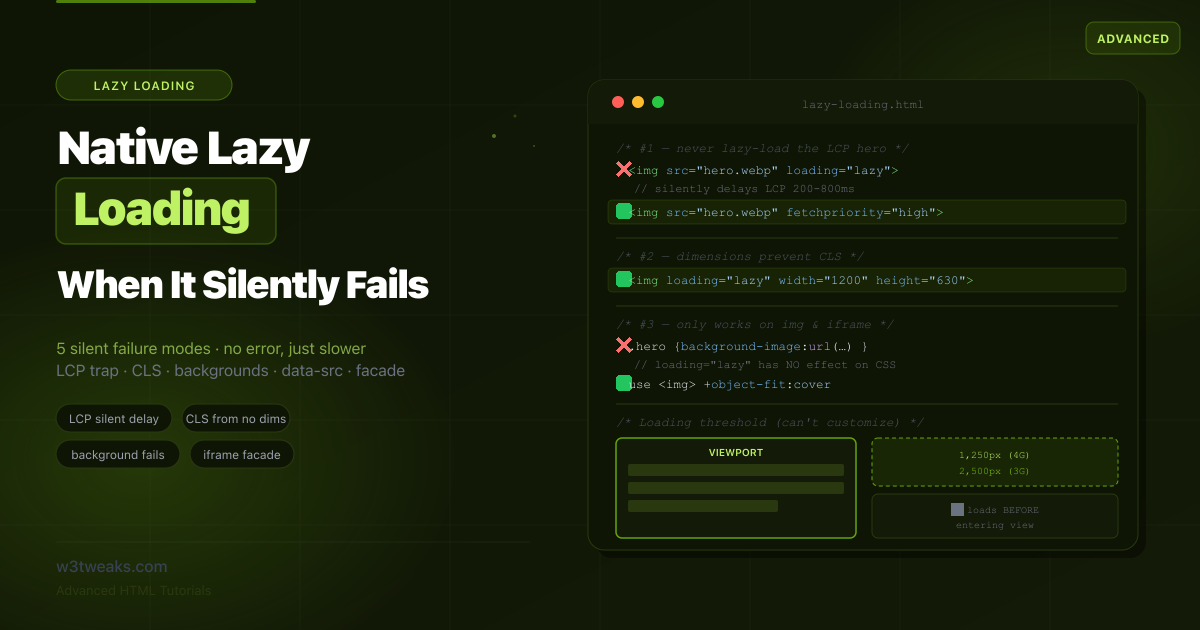
The problem is that when loading="lazy" is not working as expected, it doesn’t throw an error. It doesn’t warn you. It just quietly hurts your site. Apply it to your hero image and it silently delays your Largest Contentful Paint by hundreds of milliseconds. Apply it to a CSS background image and it does literally nothing — backgrounds aren’t <img> elements. Forget the width and height and it causes the exact layout shift it was supposed to prevent. Pair it with an old data-src lazy-loading library and your images disappear from Google Images. Add a <link rel="preload"> for the same URL and the lazy directive is silently overridden.
This guide is organized around those silent failures. First the part everyone gets right — the basic usage — then the six ways it quietly fails and how to fix each one, plus the WordPress + framework auto-lazy traps that produce them at scale.
Related tutorials: Responsive Images & Modern Formats · HTML Input Types · CSS aspect-ratio
Live Demo
Five interactive sections: the loading threshold visualizer, the LCP silent-failure trap, the CLS dimensions demo, why backgrounds don't lazy-load, and the iframe facade pattern.
The Part Everyone Gets Right — Basic Usage
<!-- The complete, correct lazy-loaded image -->
<img src="photo.webp"
     loading="lazy"
     decoding="async"
     width="1200"
     height="630"
     alt="Descriptive alt text">
loading=lazy vs eager — When to Use Each
Choosing between loading="lazy" vs eager comes down to one question: is the image above the fold?
| Value | Behavior |
|---|---|
lazy | Defer loading until the image nears the viewport |
eager | Load immediately, even if off-screen (this is the default, but eager makes intent explicit) |
| (omitted) | Browser default — loads normally, may still be deprioritized if offscreen |
It works on exactly two elements:
<!-- ✅ Works on <img> -->
<img src="photo.jpg" loading="lazy" width="800" height="600" alt="…">

<!-- ✅ Works on <iframe> -->
<iframe src="https://example.com/embed" loading="lazy" width="560" height="315"></iframe>
Combining loading="lazy" decoding="async" is the modern baseline — both are non-blocking and complementary. The decoding="async" companion tells the browser to decode the image off the main thread, preventing it from blocking other rendering work.
Browser support is universal — every modern browser supports native lazy loading, covering over 95% of global usage. Browsers that don’t support it simply ignore the attribute and load the image normally, so there’s no fallback to write.
Silent Failure #1 — Lazy Loading Above the Fold (LCP Killer)
This is the most damaging mistake because the page still works perfectly — it’s just slower, and nothing tells you why.
According to the 2025 Web Almanac, 10.4% of mobile pages still native-lazy-load their LCP image, and another 5.9% use JavaScript-based lazy loading — roughly 1 in 6 pages actively delaying their most important content.
Lazy loading above the fold is the most common LCP-killing mistake on the web:
<!-- ❌ The classic mistake: lazy-loading the hero -->
<section class="hero">
  <img src="hero.webp" loading="lazy" alt="Welcome">
</section>
Why this destroys your LCP
When the browser parses an <img loading="lazy">, it does NOT start fetching immediately. The sequence becomes:
- Browser parses HTML, sees
loading="lazy", skips the image - Browser downloads CSS, JavaScript, fonts, other resources
- Browser calculates layout
- Browser realizes the image is actually in the viewport
- Now the browser starts downloading the hero
- LCP fires after an unnecessary delay
Lazy images also download with low priority, so even normal images, deferred scripts, and fonts get scheduled ahead of them. The combination of removing lazy-loading and adding fetchpriority="high" can improve LCP by 200-800ms on image-heavy pages.
fetchpriority=“high” for the LCP Image
Setting fetchpriority="high" on your LCP image is the single most impactful one-line LCP fix:
<!-- ✅ Hero loads eagerly (default) with high priority -->
<section class="hero">
  <img src="hero.webp"
       fetchpriority="high"
       decoding="async"
       width="1600" height="900"
       alt="Welcome">
</section>
fetchpriority=“low” — The Forgotten Sibling
fetchpriority accepts three values, not just high. The forgotten one is low: demoting non-critical images so the LCP wins the bandwidth race.
<!-- LCP hero: fetched first -->
<img src="hero.webp" fetchpriority="high" alt="Hero">

<!-- Below-fold gallery: lazy + demoted, leaves bandwidth for the LCP -->
<img src="gallery-1.webp" loading="lazy" fetchpriority="low" alt="">
<img src="gallery-2.webp" loading="lazy" fetchpriority="low" alt="">
Use case: large below-fold product gallery thumbnails on an e-commerce PDP. Without fetchpriority="low", the browser still treats loading="lazy" images as medium priority once they enter the viewport — competing for bandwidth with later-fold content the user is actually scrolling toward.
loading=lazy + fetchpriority=high together is contradictory
An image with loading="lazy" and fetchpriority="high" is still delayed while it’s off-screen, then fetched with high priority once it’s almost within the viewport. If the image is in the initial viewport, the lazy deferral is the dominant effect and you’ve gained nothing. Pick one based on position: above-the-fold → fetchpriority="high"; below-the-fold → loading="lazy".
Framework Auto-Lazy Defaults — The Hidden LCP Trap
All three major image components default to loading="lazy" except when a priority flag is set — and they all silently mis-prioritize the LCP image if the dev forgets the priority flag:
| Framework | Default behavior | Opt-out for LCP |
|---|---|---|
Next.js <Image> | loading="lazy", no priority | priority={true} (sets loading="eager" + fetchpriority="high") |
Astro <Image> | loading="lazy" | loading="eager" + add <link rel="preload"> manually |
| Nuxt Image | loading="lazy" | preload={true} or loading="eager" |
Gatsby <StaticImage> | loading="lazy" | loading="eager" |
If your LCP doesn’t pass Core Web Vitals after using these components, check whether the priority/preload flag is set on the hero image.
Silent Failure #2 — loading=lazy Not Working Without Dimensions (CLS)
Lazy loading is supposed to help performance. Without explicit dimensions, it causes the Cumulative Layout Shift it was meant to avoid.
According to the 2025 Web Almanac, 62% of mobile pages still have at least one image without dimensions.
<!-- ❌ No dimensions: page jumps when the image loads -->
<img src="feature.webp" loading="lazy" alt="Feature">
When a lazy-loaded image finally loads and expands its container from zero height to its natural height, that’s a layout shift. Everything below it jumps down. On a lazy image this is worse than on an eager one, because the load happens later — often while the user is reading content that suddenly shifts.
The fix — always reserve space
<!-- ✅ Explicit dimensions: browser reserves space, no shift -->
<img src="feature.webp"
     loading="lazy"
     width="1200" height="630"
     alt="Feature">

<!-- ✅ Responsive: aspect-ratio reserves space, width scales -->
<img src="feature.webp"
     loading="lazy"
     width="1200" height="630"
     style="width: 100%; height: auto; aspect-ratio: 1200 / 630;"
     alt="Feature">
The browser uses width and height attributes to compute the aspect ratio and reserve the correct space before the image loads. For responsive layouts, see CSS aspect-ratio for the complete pattern with one-line responsive proportions.
This is best practice for all images, but lazy loading makes it critical.
Silent Failure #3 — Lazy Loading Background Image CSS
This one fails the most silently of all: you add lazy-loading logic, and the image loads eagerly anyway, because there is no native lazy loading for background-image CSS.
/* ❌ This is NOT lazy-loaded — loading="lazy" is HTML, not CSS */
.hero {
  background-image: url("big-background.jpg"); /* Loads immediately */
}
Native lazy loading only works on <img> and <iframe> elements. There is no CSS equivalent of loading="lazy". Here are three workarounds.
Fix A — Use an <img> instead of a background
The simplest fix is often to not use a background image at all. Use <img> with object-fit: cover to get the same visual result with lazy loading:
<div class="hero-wrap">
  <img src="big-background.jpg"
       loading="lazy"
       width="1920" height="1080"
       alt=""
       class="hero-bg">
  <div class="hero-content">…</div>
</div>
.hero-wrap { position: relative; }
.hero-bg {
position: absolute; inset: 0;
width: 100%; height: 100%;
object-fit: cover;
z-index: -1;
}Fix B — IntersectionObserver for true background lazy-loading
When you must use a CSS background, use IntersectionObserver to add the background only when the element nears the viewport:
<div class="lazy-bg" data-bg="big-background.jpg"></div>const observer = new IntersectionObserver((entries, obs) => {
entries.forEach(entry => {
if (!entry.isIntersecting) return;
const el = entry.target;
el.style.backgroundImage = `url("${el.dataset.bg}")`;
el.classList.add('loaded');
obs.unobserve(el);
});
}, {
rootMargin: '200px'
});
document.querySelectorAll('.lazy-bg').forEach(el => observer.observe(el));Fix C — content-visibility auto example
A typical content-visibility: auto example pairs it with contain-intrinsic-size to prevent layout shift while the content is hidden:
.below-fold-section {
  content-visibility: auto;
  /* Reserve estimated space so collapsed sections don't break scrollbar / anchor links */
  contain-intrinsic-size: auto 600px;
}
content-visibility: auto skips ALL rendering work for an offscreen element — not just images, but layout, paint, and style calculations. The browser only renders the section when it nears the viewport. contain-intrinsic-size reserves an estimated height so the scrollbar doesn’t jump as sections collapse and expand.
Performance impact: on a long page with 50+ offscreen sections, content-visibility: auto can cut initial render time by 30-50%. It’s the modern primitive for skipping all offscreen work, not just lazy-loading.
Browser support: Chrome 85+, Firefox 125+ (2024), Safari 18+ (2024).
Silent Failure #4 — data-src Lazy Loading SEO Trap
Using data-src for lazy loading hurts SEO when Googlebot can’t resolve the real image URL during render. Old JavaScript lazy-loading libraries (lazysizes and similar) move the real URL into a data-src attribute and only populate src when the image scrolls into view. This creates an SEO hazard that produces no visible error.
<!-- ❌ Googlebot may never see the real image URL -->
<img data-src="product.jpg"
     src="placeholder.gif"
     class="lazyload"
     alt="Product">
Google has stated that if a lazy-loading script hides image URLs in data-src or similar nonstandard attributes, Googlebot may not pick them up — if the URL isn’t in the src or srcset attribute, it won’t be indexed. For an e-commerce site, this means product images silently missing from Google Images.
The fix — use native lazy loading, which keeps URLs in src
<!-- ✅ Real URL stays in src — fully crawlable AND lazy -->
<img src="product.jpg"
     loading="lazy"
     width="800" height="800"
     alt="Product">
The NoScript Fallback (for legacy libraries you can’t migrate)
If you must keep a JavaScript lazy-loading library, add a <noscript> fallback so bot fetchers, social card scrapers (Facebook, Slack, Twitter), and accessibility tools can find the real URL:
<img data-src="product.jpg"
     src="placeholder.gif"
     class="lazyload"
     alt="Product">
<noscript>
  <img src="product.jpg" alt="Product" width="800" height="800">
</noscript>
Googlebot does render JavaScript now, but Twitterbot, FacebookBot, SlackBot, and most older crawlers still don’t. The noscript fallback ensures the URL is in the rendered HTML for those clients.
The better fix is to migrate off data-src entirely — native loading="lazy" has no SEO downside because the real URL stays in the standard src attribute.
Silent Failure #5 — Stacking Multiple Lazy Loading Methods
A common scenario, especially on CMS platforms: the browser’s native lazy loading, a performance plugin’s lazy loading, and a theme’s JavaScript lazy loader all apply to the same images. They conflict, and the result is unpredictable — sometimes images don’t load at all, sometimes they double-load, sometimes the LCP image gets lazy-loaded by one layer despite another excluding it.
<!-- ❌ Three lazy-loading systems fighting over one image -->
<img src="placeholder.gif"
     data-src="photo.jpg"
     loading="lazy"
     class="lazyload wp-lazy"
     alt="Photo">
The fix — choose ONE method
Pick a single lazy-loading mechanism and disable the others:
- Prefer native
loading="lazy"— it’s the most efficient and has no JS cost - If a CMS plugin adds its own lazy loading, disable the plugin’s version or the native one, never both
- If a theme ships a
data-srcJS loader, remove it in favor of native
WordPress Automatic Lazy Loading and the Hero Problem
WordPress 5.5+ adds loading="lazy" to all images by default — including potentially the LCP hero. WordPress 5.9+ added a “skip the first image” heuristic, but theme builders (Elementor, Divi, WPBakery) break this constantly by wrapping the hero in their own markup that doesn’t trigger the skip.
The fix is a filter that forces eager on the hero image:
// functions.php — force eager loading on the first content image
add_filter('wp_get_attachment_image_attributes', function($attrs, $attachment, $size) {
  static $first_image_seen = false;
  if (!$first_image_seen && is_singular()) {
    $attrs['loading'] = 'eager';
    $attrs['fetchpriority'] = 'high';
    $first_image_seen = true;
  }
  return $attrs;
}, 10, 3);
For Elementor: in the widget’s advanced settings, add a CSS class like lcp-hero and target it in your theme’s filter.
For pages with explicit hero markup, the cleanest fix is to disable WP’s auto-lazy entirely and add loading="lazy" only where you actually want it:
add_filter('wp_lazy_loading_enabled', '__return_false');Silent Failure #6 — preload Overrides loading=lazy
A documented footgun: when a build tool, CMS, or <link rel="preload"> directive preloads an image URL, preload wins and the lazy directive is silently wasted. The image loads immediately during HTML parsing, before the browser even sees the loading="lazy" attribute.
<head>
  <!-- ❌ This preload OVERRIDES loading=lazy on the matching <img> below -->
  <link rel="preload" as="image" href="hero.webp">
</head>
<body>
  <img src="hero.webp" loading="lazy" alt="Hero">
  <!-- Image is NOT lazy — preload already started the download -->
</body>
This happens silently — there’s no warning, no Lighthouse audit. The image just loads eagerly while your code says it should be lazy.
Common causes:
- WordPress Performance Lab plugin auto-preloads detected LCP images
- Next.js auto-preloads images marked
priority={true} - Build-time HTML scanners (CDN edge workers, Cloudflare Polish) sometimes inject preload directives
- A
<link rel="preload">you added for one image accidentally matches the URL of another
The fix: audit your <head> for preload directives matching lazy-loaded image URLs. If you want preload, drop the lazy attribute on that image. If you want lazy, remove the preload.
Lazy Loading with picture and srcset
For <picture> with srcset and lazy loading, place loading="lazy" on the inner <img>, not the <source> tags. The <picture> and <source> elements only supply candidates; the <img> is the rendered element where all loading behavior lives:
<picture>
  <!-- AVIF first (smallest) -->
  <source
    type="image/avif"
    srcset="hero-400.avif 400w, hero-800.avif 800w, hero-1600.avif 1600w"
    sizes="(max-width: 768px) 100vw, 50vw">

  <!-- WebP fallback -->
  <source
    type="image/webp"
    srcset="hero-400.webp 400w, hero-800.webp 800w, hero-1600.webp 1600w"
    sizes="(max-width: 768px) 100vw, 50vw">

  <!-- JPEG fallback + lazy loading lives HERE -->
  <img src="hero-800.jpg"
       srcset="hero-400.jpg 400w, hero-800.jpg 800w, hero-1600.jpg 1600w"
       sizes="(max-width: 768px) 100vw, 50vw"
       alt="Hero"
       width="1600" height="900"
       loading="lazy"
       decoding="async">
</picture>
Same rule for fetchpriority: it goes on the inner <img>. The browser picks the format from <source>, picks the resolution from srcset/sizes, and applies the loading behavior from the <img> attributes.
For the complete responsive images pattern with modern formats, see Responsive Images & Modern Formats.
The Loading Threshold You Can’t Control
A detail most tutorials skip: browsers don’t wait until an image is exactly in the viewport. They start loading it when it’s within a distance threshold, so it’s usually ready by the time the user scrolls to it.
Chrome’s thresholds (which you cannot customize):
| Connection | Distance before viewport |
|---|---|
| Fast (4G) | ~1,250px |
| Slow (3G or below) | ~2,500px |
These thresholds are why native lazy loading feels seamless — the image loads just ahead of being seen. In testing, on 4G, 97.5% of lazy-loaded images were fully loaded within 10ms of becoming visible; even on slow 2G, 92.6% loaded within 10ms.
IntersectionObserver rootMargin for Custom Thresholds
Tuning IntersectionObserver rootMargin lets you preload earlier than Chrome’s 1250px/2500px defaults:
const observer = new IntersectionObserver((entries, obs) => {
  entries.forEach(entry => {
    if (!entry.isIntersecting) return;
    const img = entry.target;
    img.src = img.dataset.src;
    if (img.dataset.srcset) img.srcset = img.dataset.srcset;
    img.removeAttribute('data-src');
    obs.unobserve(img);
  });
}, {
  rootMargin: '500px 0px' // Load 500px before entering viewport
});

document.querySelectorAll('img[data-src]').forEach(img => observer.observe(img));
Use native loading="lazy" by default. Reach for IntersectionObserver only when you specifically need a custom distance, background-image lazy loading, or facade behavior.
The iframe Facade Pattern — YouTube, Maps, AdSense
loading="lazy" works on iframes, but for heavy third-party embeds it’s not enough. A YouTube iframe ships 800KB+ of JavaScript; Google Maps ships 300KB+; Disqus ships 500KB+; Intercom widget ships 200KB+. Even lazy-loaded, once the iframe nears the viewport it loads that entire payload.
The facade pattern replaces the embed with a lightweight placeholder (a thumbnail image and a play button) and only loads the real iframe when the user clicks.
<!-- Facade: a thumbnail that loads the real iframe on click -->
<div class="yt-facade"
     data-id="VIDEO_ID"
     role="button"
     tabindex="0"
     aria-label="Play video">
  <img src="https://i.ytimg.com/vi/VIDEO_ID/hqdefault.jpg"
       loading="lazy" width="560" height="315" alt="Video thumbnail">
  <button class="play-btn" aria-hidden="true">▶</button>
</div>
function loadEmbed(facade) {
const id = facade.dataset.id;
const iframe = document.createElement('iframe');
iframe.width = 560;
iframe.height = 315;
iframe.src = `https://www.youtube.com/embed/${id}?autoplay=1`;
iframe.title = 'YouTube video player';
iframe.allow = 'accelerometer; autoplay; clipboard-write; encrypted-media; gyroscope; picture-in-picture';
iframe.allowFullscreen = true;
facade.replaceWith(iframe);
}
document.querySelectorAll('.yt-facade').forEach(facade => {
facade.addEventListener('click', () => loadEmbed(facade));
facade.addEventListener('keydown', (e) => {
if (e.key === 'Enter' || e.key === ' ') {
e.preventDefault();
loadEmbed(facade);
}
});
});For iframe loading="lazy" on a YouTube embed, the facade pattern saves ~800KB until the user clicks play. For Maps it saves ~300KB. For Disqus and similar comment systems, 500KB+.
Lazy Loading on AdSense and Embed Iframes
Heavy below-fold blockers on most sites are ad units and third-party embeds. Google explicitly recommends loading="lazy" on ad iframes since 2023:
- AdSense auto-ads ship with
loading="lazy"automatically since late 2024 - Manually-placed
<ins class="adsbygoogle">units don’t lazy-load by default — addloading="lazy"to the resulting iframe via thedata-load-policyattribute or post-load script - Disqus, Intercom, Drift — none lazy-load by default. Wrap them in a facade trigger (“Load comments”)
- Twitter/X embeds — wrap in a facade because the embed iframe pulls the full Twitter client
For comments, a common pattern: replace the Disqus iframe with a button — “Show comments (24)” — that only loads the iframe on click. Most users never scroll to the bottom.
Lighthouse Removed the Defer Offscreen Images Audit
A current detail worth knowing: as of Lighthouse 13 (October 2025), the “defer offscreen images” audit was removed entirely. The Chrome team determined that modern browsers already deprioritize offscreen images automatically, so the audit generated more noise than useful feedback.
What this means in practice:
- You no longer need to chase a Lighthouse warning to lazy-load every offscreen image
- Browsers already deprioritize offscreen images even without
loading="lazy" - Lazy loading is still worth applying to below-the-fold images for the bandwidth savings, but it’s an optimization, not a Lighthouse-mandated fix
- The one Lighthouse audit that remains relevant is the LCP-lazy-loaded warning (Silent Failure #1) — that one still fires and still matters
The Decision Checklist
For every image, ask:

☐ Is it in the initial viewport (above the fold)?
   YES → loading="eager" (or omit), add fetchpriority="high" if it's the LCP
   NO  → loading="lazy" + optionally fetchpriority="low" for below-fold demotion

☐ Does it have explicit width and height?
   NO  → add them (or CSS aspect-ratio) — required to prevent CLS

☐ Is it a CSS background image?
   YES → loading="lazy" won't work; use <img> + object-fit, IntersectionObserver, or content-visibility: auto

☐ Is it loaded via a data-src JS library?
   YES → migrate to native loading="lazy" so the URL stays crawlable in src.
         If you can't migrate, add a <noscript> fallback

☐ Is there a <link rel="preload"> for this image's URL?
   YES → preload OVERRIDES loading="lazy". Pick one: drop the preload OR drop the lazy

☐ Are multiple lazy-loading systems active (CMS + plugin + theme)?
   YES → disable all but one. On WordPress, use the wp_get_attachment_image_attributes filter

☐ Is it a heavy third-party embed (YouTube, Maps, AdSense, Disqus)?
   YES → use the facade pattern, not just loading="lazy"

☐ Is it inside <picture> with multiple <source>?
   YES → place loading="lazy" on the inner <img>, NOT on <source> elements
Key Takeaways
loading="lazy"is one attribute and works on exactly two elements —<img>and<iframe>— with no CSS equivalent and universal browser support- Never lazy-load the LCP image; it silently delays Largest Contentful Paint by 200-800ms — use
fetchpriority="high"on the hero instead fetchpriority="low"is the forgotten sibling — demote non-critical below-fold images so the LCP wins bandwidth- Framework Image components (Next.js, Astro, Nuxt, Gatsby) all default to
loading="lazy"— opt out withpriority={true}orloading="eager"for the LCP - Always set explicit
widthandheight(or CSSaspect-ratio) on lazy-loaded images — without them, the image causes the CLS that lazy loading was meant to prevent loading="lazy"does nothing on CSS background images — switch to an<img>withobject-fit: cover, use IntersectionObserver, or usecontent-visibility: auto+contain-intrinsic-sizefor offscreen sections (cuts initial render 30-50% on long pages)- Old
data-srclazy-loading libraries can hide image URLs from Googlebot — native lazy loading keeps the URL insrc; if you can’t migrate, add a<noscript>fallback for bot fetchers and social card scrapers <link rel="preload" as="image">overridesloading="lazy"silently — audit your<head>for preload directives matching lazy-loaded URLs- Never stack multiple lazy-loading systems (native + CMS plugin + theme JS) — they conflict unpredictably; choose exactly one
- WordPress 5.5+ auto-lazies ALL images including the hero — Elementor/Divi break the “skip first image” heuristic. Use
wp_get_attachment_image_attributesfilter to force eager - Chrome’s loading threshold is ~1,250px on fast connections and ~2,500px on slow ones — use IntersectionObserver with
rootMarginwhen you need a different distance - For heavy third-party embeds (YouTube 800KB, Maps 300KB, Disqus 500KB), use the facade pattern — saves 500KB-1MB versus lazy-loading the iframe alone
- AdSense auto-ads ship lazy since late 2024; manually-placed
<ins>units don’t — add lazy manually - For
<picture>+srcset+ lazy: placeloading="lazy"on the inner<img>, not on<source>elements - As of Lighthouse 13 (October 2025) the “defer offscreen images” audit was removed because browsers now deprioritize offscreen images automatically, but the LCP-lazy-loaded warning still fires and still matters
FAQ
Why is my lazy loading not working?
The most common reasons native lazy loading appears not to work: (1) you applied it to a CSS background image — loading="lazy" only works on <img> and <iframe> elements; (2) the image is above the fold, so the browser loads it immediately anyway, which is correct behavior; (3) a JavaScript lazy-loading library or CMS plugin is overriding the native behavior; (4) a <link rel="preload" as="image"> directive in your <head> matches the URL — preload overrides lazy; or (5) the image is within the browser’s ~1,250px loading threshold, so it loads earlier than you expected. Check that the element is an <img>, is below the fold, isn’t being handled by another lazy-loading system, and has no matching preload directive.
Should I lazy-load all images on my page?
No. Lazy-load only below-the-fold images. Any image in the initial viewport — especially your hero or LCP image — should load eagerly (the default). Lazy-loading above-the-fold images silently delays your Largest Contentful Paint by hundreds of milliseconds. The correct pattern is loading="lazy" for below-the-fold content and fetchpriority="high" for the LCP image. As of Lighthouse 13, browsers deprioritize offscreen images automatically, so lazy loading is an optional bandwidth optimization, not a required fix.
Does lazy loading hurt SEO?
Native loading="lazy" does not hurt SEO because the real image URL stays in the standard src attribute, where Googlebot can read it. The SEO risk comes from old JavaScript lazy-loading libraries that hide the URL in a data-src attribute and only populate src on scroll — Googlebot may never see those URLs, so the images don’t get indexed. Migrate from data-src libraries to native lazy loading, or ensure your library populates the final src/srcset in the rendered markup. For bot fetchers that don’t run JavaScript (FacebookBot, SlackBot, Twitterbot), add a <noscript> fallback.
Why does lazy loading cause layout shift?
Lazy loading causes Cumulative Layout Shift when the image has no explicit dimensions. Without width and height (or aspect-ratio), the browser can’t reserve space before the image loads, so when it finally loads it expands its container and pushes content down. Because lazy images load later — often while the user is reading — this shift is especially disruptive. Always set width and height attributes on lazy-loaded images, or use CSS aspect-ratio for responsive layouts.
Can I lazy-load CSS background images?
Not with loading="lazy" — that attribute only works on <img> and <iframe> elements, not CSS backgrounds. Three workarounds: replace the background with an <img> element using object-fit: cover (native lazy works), use IntersectionObserver to set the background-image only when the element nears the viewport, or use content-visibility: auto paired with contain-intrinsic-size to skip all rendering work for entire offscreen sections.
What is the facade pattern for iframes?
The facade pattern replaces a heavy third-party embed (YouTube, Maps, Disqus, Intercom) with a lightweight placeholder — typically a thumbnail image and a play button — and only loads the real iframe when the user clicks. Embeds ship large JavaScript payloads (YouTube 800KB, Maps 300KB, Disqus 500KB) that load even when the iframe is lazy-loaded, as soon as it nears the viewport. The facade defers that entire payload until the user actually interacts, saving 500KB-1MB on initial load.
How do I disable WordPress lazy loading on the hero?
WordPress 5.5+ auto-adds loading="lazy" to all images, including the hero. The 5.9+ “skip first image” heuristic is broken by Elementor, Divi, and WPBakery wrappers. Fix with a filter in functions.php: hook wp_get_attachment_image_attributes, check if it’s a singular page, set loading => 'eager' and fetchpriority => 'high' on the first image seen per request. To disable WP’s auto-lazy entirely and add loading="lazy" only where you actually want it, use add_filter('wp_lazy_loading_enabled', '__return_false');.
Where did the Lighthouse defer offscreen images audit go?
Removed in Lighthouse 13 (October 2025). The Chrome team determined that modern browsers already deprioritize offscreen images automatically, so the audit generated more noise than useful feedback. You no longer need to chase that warning. The one Lighthouse audit that remains relevant is the LCP-lazy-loaded warning — that one still fires and still matters. Lazy loading is now a bandwidth optimization, not a Lighthouse-mandated fix.