The classic “fetch a list of videos from a YouTube channel” tutorial dates to the jQuery + search.list era. Three things are wrong with that approach:
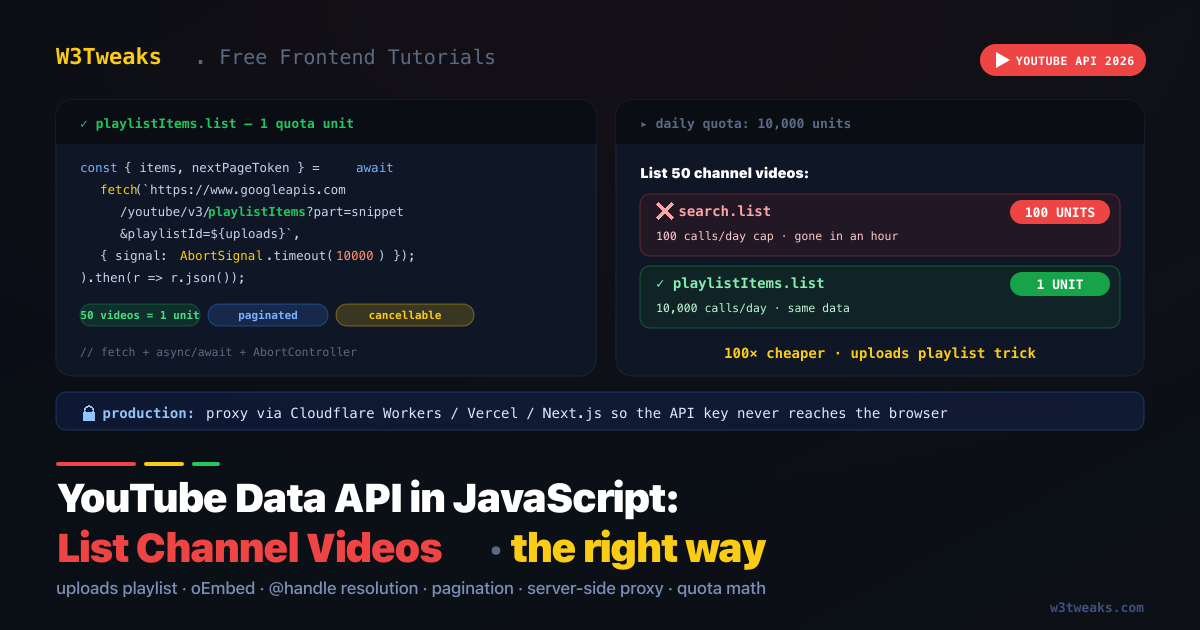
search.listcosts 100 quota units per call. Your free YouTube Data API tier is 10,000 units/day. One careless dev with auto-refresh burns through your quota in 100 calls — that’s an hour of testing.- The API key is exposed in the browser. Anyone can grab it from DevTools and use your quota until you get rate-limited or billed.
- jQuery is 86KB of legacy for what
fetchdoes in one line.
The right pattern : resolve the channel’s “uploads” playlist ID once, then call playlistItems.list which costs 1 quota unit and returns the same data. Pair that with server-side API key proxying (Cloudflare Workers, Vercel, Next.js Route Handlers) so the key never reaches the browser. And for the simplest case — embedding a single known video — YouTube’s oEmbed endpoint needs no API key at all.
This guide covers all three patterns: the modern fetch + uploads-playlist + paginated approach, server-side key proxying for production apps, and the oEmbed escape hatch. Related: JavaScript API Call: fetch, Axios, TanStack Query, ky · AbortController: Cancel Fetch Properly.
What You Need First
- Google Cloud project with the YouTube Data API v3 enabled
- API key restricted to: HTTP referrers (your domain) for client-side use, OR an unrestricted server-side key kept in env vars
- Channel ID — looks like
UCaWd5_7JhbQBe4dknZhsHJg, NOT a@handle(we’ll cover handle resolution below)
To create the API key: Google Cloud Console → APIs & Services → Credentials → Create API key → Restrict key → set Application restrictions to “HTTP referrers” → add your domain(s) → set API restrictions to “YouTube Data API v3 only”.
The 100× Quota Mistake — search.list vs playlistItems.list
Most tutorials use search.list?channelId=…&type=video. That endpoint costs 100 units per call because it runs a full-text search. To list a channel’s videos you don’t need search — you need to read the channel’s “uploads” playlist directly.
| Approach | Endpoint | Quota cost | Pagination | Notes |
|---|---|---|---|---|
| ❌ Search the channel | search.list | 100 units | nextPageToken | What every old tutorial does |
| ✅ Read uploads playlist | playlistItems.list | 1 unit | nextPageToken | Same videos, 100× cheaper |
| ⚠ Get channel metadata | channels.list | 1 unit | n/a | Needed ONCE to get the uploads playlist ID |
Every YouTube channel has a hidden “uploads” playlist containing all its public videos. Get its ID from the channel resource, then paginate through it.
The Modern Pattern — fetch + async/await
const API_KEY = 'YOUR_API_KEY'; // see "API Key Safety" below

// Step 1 (one time, 1 quota unit): get the uploads playlist ID
async function getUploadsPlaylistId(channelId) {
  const url = new URL('https://www.googleapis.com/youtube/v3/channels');
  url.searchParams.set('part', 'contentDetails');
  url.searchParams.set('id', channelId);
  url.searchParams.set('key', API_KEY);

  const res = await fetch(url, { signal: AbortSignal.timeout(10_000) });
  if (!res.ok) throw new Error(`HTTP ${res.status}: ${await res.text()}`);

  const data = await res.json();
  if (!data.items?.length) throw new Error(`Channel not found: ${channelId}`);
  return data.items[0].contentDetails.relatedPlaylists.uploads;
}

// Step 2 (per page, 1 quota unit): list videos in the uploads playlist
async function listChannelVideos(uploadsPlaylistId, pageToken) {
  const url = new URL('https://www.googleapis.com/youtube/v3/playlistItems');
  url.searchParams.set('part', 'snippet,contentDetails');
  url.searchParams.set('playlistId', uploadsPlaylistId);
  url.searchParams.set('maxResults', '50'); // max per page
  url.searchParams.set('key', API_KEY);
  if (pageToken) url.searchParams.set('pageToken', pageToken);

  const res = await fetch(url, { signal: AbortSignal.timeout(10_000) });
  if (!res.ok) throw new Error(`HTTP ${res.status}: ${await res.text()}`);

  const data = await res.json();
  return {
    videos: data.items.map(item => ({
      videoId:    item.contentDetails.videoId,
      title:      item.snippet.title,
      published:  item.snippet.publishedAt,
      thumbnail:  item.snippet.thumbnails.medium.url,
      url:        `https://www.youtube.com/watch?v=${item.contentDetails.videoId}`,
    })),
    nextPageToken: data.nextPageToken,    // present if more pages
    totalResults:  data.pageInfo.totalResults,
  };
}

// Usage
const channelId = 'UCaWd5_7JhbQBe4dknZhsHJg';
const uploadsPlaylistId = await getUploadsPlaylistId(channelId);
const { videos, nextPageToken } = await listChannelVideos(uploadsPlaylistId);

console.log(`${videos.length} videos loaded, more available: ${!!nextPageToken}`);
Total quota for 50 videos: 1 (channels.list) + 1 (playlistItems.list) = 2 units. Same task with search.list: 100 units. 50× cheaper for the first page; 100× cheaper for every subsequent page.
Pagination with nextPageToken
playlistItems.list returns up to 50 items per call. For more, follow nextPageToken until it’s undefined:
async function listAllChannelVideos(uploadsPlaylistId, maxPages = 10) {
  const allVideos = [];
  let pageToken = undefined;
  let pagesLoaded = 0;

  do {
    const { videos, nextPageToken } = await listChannelVideos(uploadsPlaylistId, pageToken);
    allVideos.push(...videos);
    pageToken = nextPageToken;
    pagesLoaded++;
  } while (pageToken && pagesLoaded < maxPages);

  return allVideos;
}
Each page costs 1 quota unit. 10 pages of 50 videos = 500 videos at 10 quota units total — sustainable.
YouTube Channel Handle → Channel ID
YouTube migrated to @handle URLs in 2022 (e.g. youtube.com/@google). The Data API still requires the underlying channel ID (UC...) for most endpoints. Resolve a handle to an ID with channels.list:
async function handleToChannelId(handle) {
  // Strip leading @ if present
  const forHandle = handle.startsWith('@') ? handle.slice(1) : handle;

  const url = new URL('https://www.googleapis.com/youtube/v3/channels');
  url.searchParams.set('part', 'id');
  url.searchParams.set('forHandle', forHandle);
  url.searchParams.set('key', API_KEY);

  const res = await fetch(url);
  if (!res.ok) throw new Error(`HTTP ${res.status}`);

  const data = await res.json();
  if (!data.items?.length) throw new Error(`No channel for handle ${handle}`);
  return data.items[0].id;
}

// Usage
const channelId = await handleToChannelId('@googledevelopers');
// Now use channelId with getUploadsPlaylistId / listChannelVideos
forHandle costs 1 quota unit and was added to the Data API in late 2023 specifically for this migration. Older tutorials use forUsername (legacy Google+ usernames) — that doesn’t work for modern handles.
API Key Safety — Don’t Ship Your Key to the Browser
The original version of this article (and most tutorials online) hard-codes the API key in client-side JavaScript:
// ❌ Anyone can grab this from DevTools
const apiKey = 'AIzaSyD-_y-3...your-actual-key';
fetch(`https://www.googleapis.com/...key=${apiKey}`);
This is a security and quota anti-pattern. Attackers scrape exposed keys and use them until you get billed or rate-limited. Three escalating fixes:
Defense 1: Restricted client-side keys
If you must call the API from the browser, restrict the key in Google Cloud Console:
- Application restrictions → HTTP referrers → add your exact domain(s) (
https://www.example.com/*) - API restrictions → YouTube Data API v3 only (not “Don’t restrict key”)
A scraped restricted key only works from your domain’s pages — useless to attackers. This is the minimum acceptable for any production deployment.
Defense 2: Server-side proxy (the real fix)
For real safety, the key never reaches the browser. Your frontend calls your backend, your backend calls YouTube with the key. The key lives in an environment variable.
Cloudflare Workers (free tier, runs at the edge):
// worker.js
export default {
  async fetch(request, env) {
    const url = new URL(request.url);
    const channelId = url.searchParams.get('channelId');
    const pageToken = url.searchParams.get('pageToken') ?? '';

    if (!channelId) return new Response('channelId required', { status: 400 });

    const api = new URL('https://www.googleapis.com/youtube/v3/playlistItems');
    api.searchParams.set('part', 'snippet,contentDetails');
    api.searchParams.set('playlistId', channelId);
    api.searchParams.set('maxResults', '50');
    api.searchParams.set('key', env.YOUTUBE_API_KEY);   // never exposed
    if (pageToken) api.searchParams.set('pageToken', pageToken);

    const res = await fetch(api);
    return new Response(await res.text(), {
      status: res.status,
      headers: {
        'Content-Type': 'application/json',
        'Cache-Control': 'public, max-age=300', // cache 5min, save quota
      },
    });
  },
};
Frontend calls /api/channel-videos?channelId=... — your worker calls YouTube — key stays in env.YOUTUBE_API_KEY.
Vercel / Next.js Route Handlers (App Router):
// app/api/channel-videos/route.ts
import { NextRequest, NextResponse } from 'next/server';

export async function GET(request: NextRequest) {
  const playlistId = request.nextUrl.searchParams.get('playlistId');
  if (!playlistId) {
    return NextResponse.json({ error: 'playlistId required' }, { status: 400 });
  }

  const url = new URL('https://www.googleapis.com/youtube/v3/playlistItems');
  url.searchParams.set('part', 'snippet,contentDetails');
  url.searchParams.set('playlistId', playlistId);
  url.searchParams.set('maxResults', '50');
  url.searchParams.set('key', process.env.YOUTUBE_API_KEY!);

  const res = await fetch(url, { next: { revalidate: 300 } }); // ISR 5min cache
  if (!res.ok) {
    return NextResponse.json({ error: `HTTP ${res.status}` }, { status: res.status });
  }
  return NextResponse.json(await res.json());
}
Astro / SvelteKit / Nuxt / Express — same pattern: an HTTP handler that takes the request, calls YouTube with a server-only key, returns JSON.
Defense 3: Cache aggressively
Both Cache-Control: public, max-age=300 (5 minutes) and Next.js revalidate: 300 (ISR) above cache the upstream response. Most channels don’t publish new videos every minute — caching for 5-30 minutes can reduce quota usage 100×. Even better: store the response in KV / Redis / Vercel Data Cache and refresh it on a cron schedule, not per-request.
Error Handling — 403 Quota Exceeded, 400 Bad Channel
YouTube Data API returns specific error codes for specific failures:
| Status | Reason | Fix |
|---|---|---|
400 | Invalid channel/playlist ID | Validate the ID before calling — ^UC[\w-]{22}$ for channel IDs |
403 | Quota exceeded OR key restricted to wrong referrer | Check quota in Google Cloud Console; verify HTTP referrer matches |
403 | API key disabled / billing issue | Check key status + project billing in Cloud Console |
404 | Channel/playlist not found OR private | Confirm the channel is public and the ID is correct |
async function safeListVideos(playlistId) {
  try {
    const res = await fetch(/* ... */);

    if (res.status === 403) {
      const body = await res.json();
      const reason = body.error?.errors?.[0]?.reason;
      if (reason === 'quotaExceeded') {
        throw new Error('YouTube API quota exhausted. Try again tomorrow.');
      }
      throw new Error(`YouTube API forbidden: ${reason}`);
    }

    if (res.status === 404) throw new Error('Channel not found or private');
    if (!res.ok) throw new Error(`HTTP ${res.status}`);

    return res.json();
  } catch (err) {
    if (err.name === 'TimeoutError') throw new Error('YouTube API timeout — retrying');
    throw err;
  }
}
YouTube oEmbed — The No-API-Key Alternative
For simple cases — embedding a single known video by URL, getting its title and thumbnail — YouTube oEmbed needs no API key at all and has no quota:
async function getVideoEmbed(youtubeUrl) {
  const oembedUrl = new URL('https://www.youtube.com/oembed');
  oembedUrl.searchParams.set('url', youtubeUrl);
  oembedUrl.searchParams.set('format', 'json');

  const res = await fetch(oembedUrl);
  if (!res.ok) throw new Error('Video not found or private');

  return res.json();
  // { title, author_name, thumbnail_url, html (the <iframe> embed), width, height, ... }
}

const embed = await getVideoEmbed('https://www.youtube.com/watch?v=dQw4w9WgXcQ');
document.querySelector('#video').innerHTML = embed.html;
oEmbed limits: one video at a time, no listing. If you have a known URL, oEmbed; if you need the full channel’s video list, you still need the Data API.
For more on the iframe payload side, see the iframe facade pattern in Native Lazy Loading — replacing the heavy YouTube iframe with a click-to-load thumbnail saves ~800KB of JS per embed.
Rendering the Video Grid (HTML + CSS)
The actual UI side is straightforward. Use semantic markup, aspect-ratio for the thumbnails, and loading="lazy" for off-screen images:
<ul class="video-grid" id="video-grid"></ul>.video-grid {
display: grid;
grid-template-columns: repeat(auto-fill, minmax(280px, 1fr));
gap: 16px;
list-style: none;
padding: 0;
}
.video-card {
background: #1e293b;
border-radius: 12px;
overflow: hidden;
transition: transform 0.2s;
}
.video-card:hover { transform: translateY(-2px); }
.video-card a { color: inherit; text-decoration: none; }
.video-thumb {
width: 100%;
aspect-ratio: 16 / 9;
object-fit: cover;
background: #0f172a;
}
.video-title {
font-size: 14px;
font-weight: 600;
padding: 12px;
line-height: 1.4;
display: -webkit-box;
-webkit-line-clamp: 2;
-webkit-box-orient: vertical;
overflow: hidden;
}function renderVideos(videos) {
const grid = document.getElementById('video-grid');
grid.innerHTML = videos.map(v => `
<li class="video-card">
<a href="${v.url}" target="_blank" rel="noopener">
<img class="video-thumb"
src="${v.thumbnail}"
alt=""
width="320" height="180"
loading="lazy"
decoding="async">
<h3 class="video-title">${escapeHTML(v.title)}</h3>
</a>
</li>
`).join('');
}
function escapeHTML(s) {
return s.replace(/[&<>"]/g, c => ({ '&':'&','<':'<','>':'>','"':'"' }[c]));
}aspect-ratio: 16 / 9 reserves the slot height before the thumbnail loads — no layout shift. See the CSS aspect-ratio guide for the full pattern. And loading="lazy" defers off-screen thumbnails — see the native lazy loading guide for what to watch for.
TypeScript Types for the Data API Response
For type-safe code, the YouTube Data API response shape:
interface PlaylistItemsResponse {
  kind: 'youtube#playlistItemListResponse';
  etag: string;
  nextPageToken?: string;
  prevPageToken?: string;
  pageInfo: {
    totalResults: number;
    resultsPerPage: number;
  };
  items: PlaylistItem[];
}

interface PlaylistItem {
  kind: 'youtube#playlistItem';
  etag: string;
  id: string;
  snippet: {
    publishedAt: string;     // ISO 8601
    channelId: string;
    title: string;
    description: string;
    thumbnails: {
      default:  Thumbnail;
      medium:   Thumbnail;
      high:     Thumbnail;
      standard?: Thumbnail;
      maxres?:   Thumbnail;
    };
    channelTitle: string;
    playlistId: string;
    position: number;
    resourceId: { kind: string; videoId: string };
  };
  contentDetails: {
    videoId: string;
    videoPublishedAt: string;
  };
}

interface Thumbnail { url: string; width: number; height: number; }
For full Data API types, the @types/gapi.client.youtube-v3 package exposes every endpoint’s request/response shape if you’re using the Google APIs JavaScript client.
Quota Budget Math — What Fits in 10,000 Units/Day
The free YouTube Data API tier is 10,000 units/day. Here’s what fits:
| Operation | Cost | What fits in 10K/day |
|---|---|---|
channels.list (resolve channel) | 1 | 10,000 channel lookups |
playlistItems.list (50 videos) | 1 | 10,000 pages = 500,000 videos |
videos.list (50 video details) | 1 | 10,000 detail lookups |
search.list (50 results) | 100 | 100 searches — gone in an hour |
commentThreads.list (100 comments) | 1 | 10,000 comment lookups |
| Most write operations | 50 | 200 writes |
Practical takeaway: if you stick to playlistItems.list + cache server-side, even a moderately popular site needs only a few quota units per minute. The default 10,000-unit limit is generous if you’re not using search.list.
To request more: Google Cloud Console → IAM & Admin → Quotas → request increase. They generally approve reasonable requests for real apps.
Key Takeaways
- Don’t use
search.listto list a channel’s videos — it costs 100 quota units. UseplaylistItems.liston the channel’s uploads playlist (1 unit) instead — same data, 100× cheaper - Get the uploads playlist ID once via
channels.list?part=contentDetails&id=…&forHandle=…then read itscontentDetails.relatedPlaylists.uploads - Modern fetch + async/await, not jQuery.
fetchis built into every browser and runtime;async/awaitmakes the flow readable - Pair fetch with
AbortSignal.timeout(ms)so a slow YouTube response doesn’t hang your UI - Never expose your API key in client JS without HTTP referrer restrictions — anyone in DevTools can scrape it and burn your quota
- Production answer: server-side proxy via Cloudflare Workers, Vercel, Next.js Route Handlers, or any backend. Key lives in
env.YOUTUBE_API_KEY, never in the browser bundle - Cache aggressively — 5-30 minute cache on the proxy response cuts quota 100×. Use
Cache-Control: public, max-age=300or framework ISR - YouTube migrated to @handles in 2022 — resolve
@handle→ channel ID withchannels.list?forHandle=…. The oldforUsernamedoesn’t work for handles - Paginate with
nextPageToken—playlistItems.listreturns max 50 per call; follownextPageTokenuntil undefined for the full list - YouTube oEmbed (
https://www.youtube.com/oembed?url=…) needs no API key — perfect for embedding a single known video without quota concerns - For embed performance, use the facade pattern — a thumbnail that loads the real iframe on click saves ~800KB per embed
response.okis mandatory — fetch doesn’t reject on 403/404/500. Always check before parsing. See the JavaScript API call guide for the complete error handling pattern
FAQ
What’s the cheapest way to list a YouTube channel’s videos?
Use playlistItems.list on the channel’s “uploads” playlist (1 quota unit per page of 50 videos), not search.list?channelId=… (100 units per page). To get the uploads playlist ID, call channels.list?part=contentDetails&id=CHANNEL_ID once and read items[0].contentDetails.relatedPlaylists.uploads. Total cost for listing 50 of a channel’s videos: 2 quota units (1 for channels.list + 1 for playlistItems.list) instead of 100. This is the single most impactful YouTube Data API optimization.
How do I convert a YouTube @handle to a channel ID?
Use channels.list?part=id&forHandle=HANDLE_WITHOUT_AT. The forHandle parameter was added in late 2023 specifically for the @handle migration. For example: forHandle=googledevelopers (no leading @) returns the channel ID UC_x5XG1OV2P6uZZ5FSM9Ttw. Old tutorials use forUsername (legacy Google+ usernames from 2013) — that doesn’t work for modern handles. Costs 1 quota unit.
Is it safe to put my YouTube API key in client-side JavaScript?
Only if you restrict it to your domain via HTTP referrer restrictions in Google Cloud Console. Otherwise no — anyone can grab the key from DevTools and use it until your quota runs out. The production-safe answer is server-side proxying: your frontend calls your backend (Cloudflare Workers, Vercel, Next.js Route Handlers), and the backend calls YouTube with the key stored in an environment variable. The key never reaches the browser.
What’s the YouTube Data API quota limit?
The default free tier is 10,000 quota units per day. Operations cost between 1 and 100 units each. playlistItems.list and channels.list are 1 unit; search.list is 100 units; most write operations are 50 units. If you exceed your quota, the API returns 403 with reason: quotaExceeded and you wait until the next day’s reset (midnight Pacific Time). You can request a quota increase via Google Cloud Console → Quotas — they generally approve real production use cases.
Can I list YouTube videos without an API key?
Only for the simple case of embedding a single known video — use YouTube’s oEmbed endpoint (https://www.youtube.com/oembed?url=YOUTUBE_URL&format=json). It returns the video’s title, author, thumbnail, and HTML iframe code without any API key or quota. For listing a channel’s full video catalog or searching, you still need the Data API key. oEmbed is also useful for blog post embeds where you don’t want to manage keys.
How do I paginate through all of a channel’s videos?
playlistItems.list returns up to 50 items per call. Each response includes a nextPageToken if more pages exist. Pass that token to the next call via the pageToken parameter; repeat until the response has no nextPageToken. Each page costs 1 quota unit. A channel with 500 videos = 10 pages = 10 quota units. Cap the loop at a reasonable maximum (e.g. 20 pages = 1,000 videos) for safety.
What does the playlistItem.contentDetails.videoId vs snippet.resourceId.videoId distinction mean?
They’re the same value, accessible via either path. Old tutorials use snippet.resourceId.videoId; newer ones use contentDetails.videoId (added later). To get contentDetails, you must request part=contentDetails in your call. If you only request part=snippet, use snippet.resourceId.videoId. Both paths return the YouTube video ID like dQw4w9WgXcQ.
How should I handle YouTube API errors in production?
Wrap your fetch in try/catch and inspect both response.status and the body’s error.errors[0].reason. Common cases: 403 quotaExceeded (wait until tomorrow’s reset or upgrade quota), 403 keyInvalid (key disabled or wrong referrer), 404 (channel/video private or deleted), 400 (malformed ID). Use AbortSignal.timeout() to bound how long you wait for a slow API response. For high-traffic apps, cache successful responses for 5-30 minutes to reduce both latency and quota burn.