You write a rule that should win. It doesn’t. You add !important. Now something else breaks. You wrap the selector in the parent, the grandparent, the body tag. The CSS works — but now it’s unmaintainable.
Specificity fights are the most common source of CSS frustration. Most tutorials cover the basics but stop before the parts that actually trip developers up: how !important really works, why stacking 11 classes still loses to 1 ID, how modern selectors like :is(), :where(), and @layer change the rules entirely, the brand-new CSS Nesting & specificity trap that’s about to become a common’s most common specificity bug, and how Tailwind / Vue scoped styles / CSS Modules each take radically different approaches. This guide covers all of it. For how specificity interacts with stacking order, see CSS z-index & stacking contexts explained.
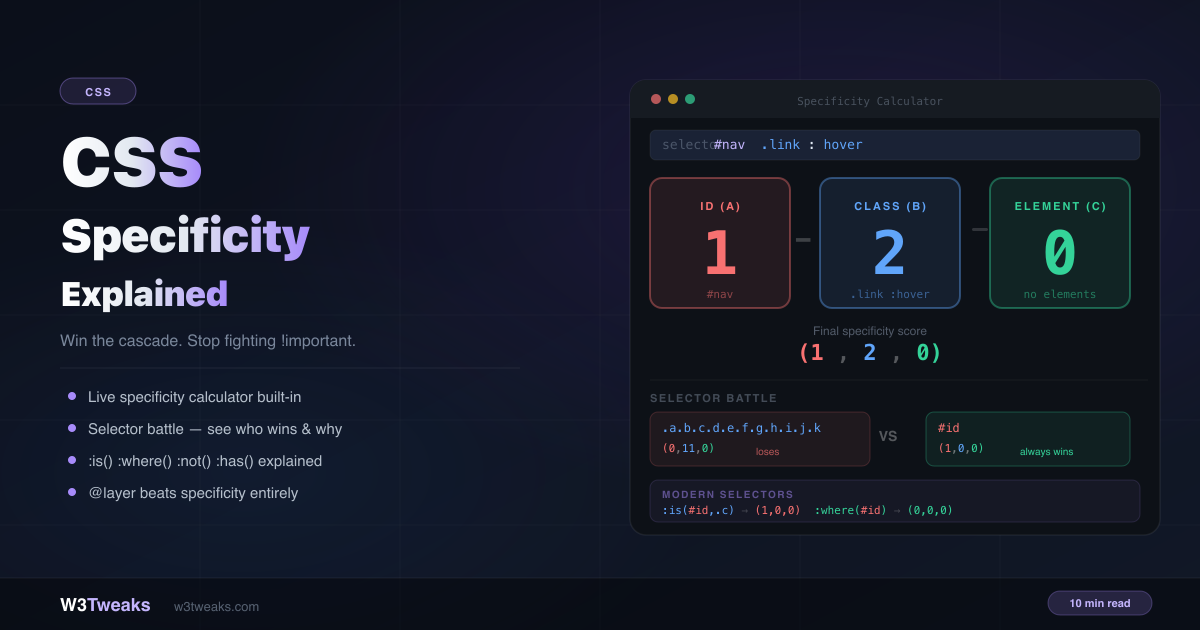
Live Demo
Three tabs: a live specificity calculator that scores any selector token by token, a selector battle that compares two selectors and tells you exactly why one wins, and the modern selectors :is() :where() :not() :has() with @layer's complete override of specificity.
How the Browser Decides Which Rule Wins
When two CSS rules target the same element and set the same property, the browser needs a tiebreaker. It runs through four stages in order:
- Origin — browser defaults vs author styles vs user styles
- Importance —
!importantdeclarations - Specificity — the score of each selector
- Source order — which rule appears later in the stylesheet
Specificity only matters when the first two stages result in a tie — same origin, neither (or both) marked !important. This is where your selector’s score decides the winner.
The (A, B, C) Scoring System
Specificity is represented as three independent columns — not a single number:
| Column | Counts | Examples |
|---|---|---|
| A — ID | #id selectors | #hero, #nav |
| B — CLASS | Class selectors, attribute selectors, pseudo-classes | .btn, [type="text"], :hover, :focus |
| C — ELEMENT | Element type selectors, pseudo-elements | div, p, ::before |
Each selector earns points in these columns. The result is written as (A,B,C):
p                /* (0,0,1) — 1 element */
.btn             /* (0,1,0) — 1 class */
#nav             /* (1,0,0) — 1 ID */
div p.note       /* (0,1,2) — 1 class + 2 elements */
#nav .link:hover /* (1,2,0) — 1 ID + 1 class + 1 pseudo-class */
Why 11 Classes Never Beats 1 ID
Specificity is not a decimal number. (0,11,0) is not bigger than (1,0,0). The three columns are compared independently, left to right — like version numbers, not like a base-10 integer.
(1,0,0)  vs  (0,11,0)
 ^                ^
 Column A is compared first.
 1 > 0 — Column A decides. Column B is never even checked.
 Winner: (1,0,0)
You cannot overflow column B into column A regardless of how many classes you stack.
/* Still loses to #btn — (0,11,0) vs (1,0,0) */
.a.b.c.d.e.f.g.h.i.j.k { color: blue; }

/* Wins — (1,0,0) */
#btn { color: red; }
This is exactly why ID selectors in stylesheets are considered bad practice — they create a wall that classes can never break through without !important or more IDs.
What Each Selector Type Scores
/* Column A — IDs only */
#hero                  /* (1,0,0) */
#nav #sidebar          /* (2,0,0) */

/* Column B — classes, attributes, pseudo-classes */
.btn                   /* (0,1,0) */
.btn.active            /* (0,2,0) */
[type="text"]          /* (0,1,0) */
:hover                 /* (0,1,0) */
:nth-child(2)          /* (0,1,0) */
:focus-visible         /* (0,1,0) */

/* Column C — elements and pseudo-elements */
p                      /* (0,0,1) */
div p                  /* (0,0,2) */
ul li                  /* (0,0,2) */
::before               /* (0,0,1) */
li::marker             /* (0,0,2) */

/* Zero specificity */
*                      /* (0,0,0) — universal selector */
>  +  ~  (combinators) /* (0,0,0) — ignored */
Modern Selectors — The Rules Nobody Explains
Most tutorials stop here. Modern pseudo-classes have unique specificity behaviour that surprises experienced developers.
:is() — takes the most specific argument
:is() makes it easy to write compact selector lists. But its specificity isn’t zero — it takes the specificity of its most specific argument, regardless of which argument actually matched.
/* :is(#nav, .link) — specificity of #nav = (1,0,0) */
:is(#nav, .link) p {
  color: red;
}

/*
  Even when .link matches (not #nav), the score is still (1,0,1)
  because :is() always uses its most specific argument's score.
  This trips up developers who expect it to score like .link p = (0,1,1)
*/
/* Practical impact */
:is(h1, h2, h3) { font-weight: 800; }
/* Score: (0,0,1) — h1 is the most specific argument */
:is(#hero, .section, article) h2 { margin: 0; }
/* Score: (1,0,1) — #hero is the most specific argument */
/* Even when .section or article matches — the ID's score always applies */:where() — always zero specificity
:where() was specifically designed to be easy to override. It contributes 0 to specificity regardless of what’s inside it — making it perfect for design system base styles.
/* :where() scores (0,0,0) — even with an ID inside */
:where(#nav, .link) p {
  color: blue;
}
/* Score: (0,0,1) — only p counts */

/* Real-world use: base styles that should always be overridable */
:where(h1, h2, h3, h4, h5, h6) {
  font-weight: 700;
  line-height: 1.2;
}
/* Score: (0,0,0) — any downstream rule overrides this */

/* Component override — even a simple class wins */
.article h2 {
  font-weight: 600;
  line-height: 1.4;
}
/* Score: (0,1,1) — beats :where() base styles easily */
Use :where() for CSS resets, base typography, and framework defaults — anything you want users to override without a specificity fight.
:not() — takes argument’s specificity
:not() itself adds nothing to specificity — but its argument’s specificity is counted:
p:not(.active)  /* (0,1,1) — .active contributes 1 class + p contributes 1 element */
p:not(#id)      /* (1,0,1) — #id contributes 1 ID + p contributes 1 element */
p:not(*)        /* (0,0,1) — * contributes 0 */
:has() — takes argument’s specificity
Like :not(), :has() itself contributes nothing — but its argument’s specificity is counted:
.card:has(img)    /* (0,1,1) — .card (0,1,0) + img (0,0,1) */
.card:has(#hero)  /* (1,1,0) — .card (0,1,0) + #hero (1,0,0) */
article:has(> p)  /* (0,0,2) — article (0,0,1) + p (0,0,1) */
The CSS Nesting & Specificity Trap (A New Footgun)
CSS Nesting went Baseline Widely Available currently, and almost every modern stylesheet uses &. But there’s a subtle specificity behaviour nobody documents that’s about to become the most common new specificity bug:
& is implicitly wrapped in :is() for specificity purposes. That means a nested rule inherits the specificity of the most specific selector in its parent’s list — not the specificity of whichever parent actually matched at runtime.
/* Looks innocent — a styling rule for paragraphs inside cards */
.card,
#hero {
  & p {
    color: red;
  }
}
What you’d expect: p inside .card scores (0,1,1), p inside #hero scores (1,0,1). Two separate rules with appropriate specificity each.
What actually happens: the nested rule always scores (1,0,1) regardless of which parent it’s matching. The browser de-sugars it to:
:is(.card, #hero) p {
  color: red;
}
/* Specificity: (1,0,1) — because :is() uses the most specific arg's score
   So even when this rule applies to a p inside .card (not #hero),
   it still has ID-level specificity. */
The bug: any “simple” override targeting .card p (which scores (0,1,1)) silently loses to that nested rule — even though visually you wrote what looks like a class-based stylesheet. You only notice when something starts not working and you can’t figure out why your override is losing.
Fixes that work:
/* Fix 1 — Split the rule so each parent gets its own nested block */
.card { & p { color: red; } }   /* (0,1,1) */
#hero { & p { color: red; } }   /* (1,0,1) */

/* Fix 2 — Wrap in :where() to force zero specificity contribution */
:where(.card, #hero) {
  & p { color: red; }            /* (0,0,1) — :where() neutralises the parent */
}

/* Fix 3 — Just don't mix ID and class in the same nesting parent list */
.card, .hero {
  & p { color: red; }            /* (0,1,1) — safe, both parents are classes */
}
The trap is specifically about mixing different specificity levels in the parent list. A list of all classes is fine; the moment you add an ID, every nested rule inherits ID-level specificity. As CSS Nesting adoption grows, this will become the new “wait, why is my override not working?”
@layer — The Nuclear Option
@layer (cascade layers) changes the rules entirely. Layer order is resolved before specificity — a lower-specificity rule in a later layer always beats a higher-specificity rule in an earlier layer.
/* Declare layer order — later layers have higher priority */
@layer base, components, overrides;

@layer base {
  #hero .title { color: red; } /* (1,1,0) — very high specificity */
}

@layer components {
  .title { color: blue; } /* (0,1,0) — lower specificity */
}

@layer overrides {
  p { color: green; } /* (0,0,1) — lowest specificity of all three */
}

/* Result: green — @layer overrides wins because it's in the last layer,
   even though p has the lowest specificity of all three rules */
You can write low-specificity selectors in higher-priority layers and they’ll beat high-specificity rules from lower layers. No !important, no ID escalation.
The two @layer rules nobody mentions
Rule 1 — Unlayered styles beat all layered styles by default.
This catches everyone migrating an existing codebase. The moment you add @layer to some of your CSS but leave the rest unlayered, the unlayered styles automatically win — regardless of source order or specificity.
@layer components {
  .btn { color: blue; }
}

/* Unlayered — this wins, even though it has the same specificity
   and appears EARLIER in the source */
.btn { color: red; }
The fix for migrating a codebase: wrap your legacy styles in an explicit legacy layer that you list first, so new code you add (unlayered or in later layers) wins by default:
@layer legacy, components, utilities;

@layer legacy {
  /* ... 5000 lines of legacy CSS ... */
}

@layer components { /* new code wins automatically */ }
.new-utility { /* unlayered — wins everything */ }
Rule 2 — !important inverts layer priority.
Counter-intuitive but true: within !important declarations, earlier layers win over later layers — the opposite of the normal order.
@layer base, overrides;

@layer base {
  .btn { color: red !important; }
}

@layer overrides {
  .btn { color: blue !important; }
}

/* Result: RED — base layer wins for !important declarations */
The reasoning: !important is supposed to be the last word. If a low-priority layer says “this is important,” upper layers shouldn’t be able to override it casually. So !important flips the order — earlier layers get the final say. Almost no tutorial explains this; it surprises every developer the first time they hit it.
!important — The Biggest Misconception
Here’s what most tutorials get wrong: !important does not increase specificity. It moves the declaration into a completely separate cascade origin — the “important” origin — which is evaluated before the regular author origin.
/* !important does NOT change the (A,B,C) score */
.btn {
  color: blue !important; /* specificity still (0,1,0) */
}

/* The declaration is now in a different origin:
   Authored !important > Authored regular styles
   So it wins — but not because of specificity */
When two !important declarations compete, specificity is used to break the tie:
.btn { color: blue !important; }   /* (0,1,0) important */
#btn { color: red !important; }    /* (1,0,0) important */
/* Result: red — higher specificity breaks the !important tie */
The fix to an !important problem is never more !important. The correct fix is restructuring your selectors so you don’t need it.
The !important tax — the arms race nobody quantifies
!important compounds. Every one you add makes the next override harder, and the codebase pays the tax forever. A real progression looks like this:
Year 1, fresh codebase   →   0 !important declarations
Year 1, month 6          →   3 !important (mostly emergency Friday fixes)
Year 2                   →   17 !important
Year 3                   →   47 !important — every new override now needs one
Year 3, month 9          →   "Just add !important" is the team's reflex
Year 4                   →   Stylesheet is unmaintainable
The escape that doesn’t require rewriting everything: wrap the legacy CSS in @layer legacy {} and write all new code unlayered (or in a later layer). Unlayered styles automatically beat layered ones, so new code wins without !important — and you didn’t touch a single line of legacy.
/* Done once, at the entry point of your CSS bundle */
@layer legacy {
  @import url('legacy.css'); /* 5000 lines, 47 !important, untouched */
}

/* All new CSS, written unlayered — wins automatically */
.new-button { color: red; } /* beats anything in legacy, no !important */
This single move turns a years-deep !important arms race into a clean slate without a rewrite. It’s probably the single most useful thing @layer is for in established codebases.
Inline Styles — The Fourth Column
Inline styles (the style="" attribute) sit in a fourth position above all stylesheet selectors:
<!-- Inline style always beats any stylesheet rule -->
<div id="hero" class="featured" style="color: green;">...</div>#hero.featured { color: red; } /* (1,1,0) — loses to inline style */Only !important in a stylesheet can override an inline style — and even then, an !important inline style beats an !important stylesheet rule.
Specificity in the Framework Era
Most developers don’t write raw CSS — they write Tailwind, scoped Vue/Svelte styles, CSS Modules, or component libraries. Each takes a radically different approach to specificity. Understanding which one your stack uses changes how you debug.
Tailwind flattens specificity to (0,1,0) for everything
Every Tailwind utility is a single class — .p-4, .text-red-500, .hover\:bg-blue-600. They all score (0,1,0). No utility is more specific than another. So class="p-4 p-8" in your HTML doesn’t pick p-8 because it’s “more specific” — it picks whichever utility appears later in Tailwind’s generated CSS output, which depends on how Tailwind orders its classes, not on the order you wrote them in HTML.
<!-- Both classes score (0,1,0). Which wins? -->
<div class="p-8 p-4">  <!-- Tailwind output order decides -->
This is why Tailwind has the ! important modifier (!p-4) and the important: true config option — they exist precisely because all utilities have the same specificity and source order is your only real lever.
Vue / Svelte scoped styles bump specificity with [data-v-hash]
When you write <style scoped> in a Vue SFC (or <style> in Svelte), the compiler rewrites every selector to include a unique data attribute:
/* You write */
.btn { color: red; }

/* What the browser actually sees */
.btn[data-v-7ba5bd90] { color: red; }
/* Specificity: (0,2,0) — your .btn just got an attribute selector bolted on */
The practical consequence: any “global” override targeting .btn (scoring (0,1,0)) silently loses to the scoped version (0,2,0). You write a global theme override expecting it to apply, and it doesn’t — because the scoped version is more specific. The fix is either using Vue’s :deep() modifier, writing your global override with higher specificity, or restructuring to avoid the conflict.
CSS Modules sidesteps specificity entirely
CSS Modules (used by Next.js, CRA, and others) hashes every class name at build time:
/* You write */
.btn { color: red; }

/* Bundled output */
.Button_btn__a3f2b9 { color: red; }
The hashed class name makes accidental collisions impossible, so specificity essentially becomes a non-issue within a component — but the moment you need to override a CSS Modules class from outside the component (e.g., from a parent), you can’t target it without knowing the hash. CSS Modules solves the “global namespace” problem by replacing it with the “you can’t override from outside” problem.
Web Components / Shadow DOM ignores outer specificity entirely
Styles inside a :host shadow root are completely isolated from the page’s stylesheet. No outer selector — no matter how specific, not even !important — can reach into the shadow DOM. The only way to style across the boundary is the explicit ::part() and ::slotted() APIs, or CSS custom properties (which DO inherit through).
The takeaway: before you debug a specificity bug currently, identify which system is involved. The same selector behaves completely differently in a Tailwind, Vue-scoped, CSS-Modules, or Shadow-DOM context. Most “the CSS isn’t working” Stack Overflow questions are actually framework-context confusion, not specificity confusion.
Debug Specificity with DevTools — The 4-Step Workflow
When a rule isn’t applying, DevTools is the fastest way to diagnose it. The exact flow nobody shows step-by-step:
Step 1 — Inspect the element and find the struck-through rule
Right-click the element → Inspect. In the Styles panel on the right, look for your rule. If a property is crossed out with strikethrough text, it’s been overridden by something more specific or higher-priority.
.card .title { color: red; }    ← your rule — color: red is struck through
                ────────────
.title { color: blue; }          ← winning rule — color: blue applied
If your rule isn’t there at all, the selector doesn’t match the element — that’s a different bug (typo, wrong DOM structure). Specificity isn’t your problem.
Step 2 — Hover the selector to see its specificity tuple
In Chrome and Edge, hover over the selector text in the Styles panel. A tooltip shows the specificity score, like (0, 1, 0) or (1, 0, 1). Compare against the rule that’s winning. Whichever tuple is higher (compared left-to-right, not as a decimal) is the one applying.
Hover over `.card .title`  → Specificity (0, 2, 0)
Hover over `.title`        → Specificity (0, 1, 0)
                            ───
                            (0,2,0) > (0,1,0) — your rule should win
                            If it doesn't, you have a different cascade issue.
Firefox shows the tuple inline next to each selector by default. Safari has it under the inspector’s “Specificity” badge.
Step 3 — Check the Computed tab for the actual winner
If specificity says your rule should win but the visible style is wrong, switch to the Computed tab. It shows the final resolved value for every property and which rule it came from (click the arrow next to the value to expand the cascade chain). The actual winning rule will be at the top with a “src” link.
This is where you discover things like:
- An inline
style=""attribute you didn’t know was set (element.style.color = 'blue'from some JavaScript) - A
!importantdeclaration from a third-party library you forgot was loaded - A scoped styles
[data-v-hash]selector adding(0,1,0)you didn’t expect - A
@layerhigher-priority layer overriding everything you’ve tried
Step 4 — Check the Layers / Cascade tab if you suspect @layer
In Chrome DevTools → click the three-dot menu → More tools → Layers (or in the Styles panel, click the “Toggle CSS Layers” button — newer versions). It shows the declared layer order and which layer each rule belongs to. If a rule from a later layer is winning despite lower specificity, you’re seeing @layer in action.
The diagnostic order, every time:
- Styles panel — is your rule there? Is it struck through?
- Hover the selector — is the specificity what you expect?
- Computed tab — what rule actually won, and from where?
- Layers panel — is
@layerordering involved?
This takes 30 seconds and beats every “let me just add !important to it” instinct.
Common Gotchas
The universal selector has zero specificity:
* { box-sizing: border-box; }    /* (0,0,0) */
div { box-sizing: content-box; } /* (0,0,1) — always wins */
Combinators don’t add specificity:
div > p { } /* (0,0,2) — same as: div p {} */
ul + ol { } /* (0,0,2) */
Source order as the final tiebreaker:
/* Both (0,1,0) — source order decides */
.red { color: red; }
.blue { color: blue; } /* wins — appears later */
:nth-child() and similar pseudo-classes count as class specificity:
li:nth-child(2)   /* (0,1,1) — 1 pseudo-class + 1 element */
li:first-child    /* (0,1,1) */
li.selected       /* (0,1,1) — same as :first-child! */
Scoping with @scope inherits rules:
/* @scope specificity adds the :scope pseudo-class = (0,1,0) baseline */
@scope (.card) {
  p { color: red; } /* effective specificity: (0,1,1) */
}
How to Escape Specificity Wars Permanently
The architecture-level fixes that prevent specificity wars before they start:
- Keep specificity flat — use single classes everywhere. BEM exists for this.
- Never use IDs in stylesheets — use them for JavaScript hooks, not CSS selectors.
- Use
@layer— explicit layer ordering lets low-specificity utility rules override high-specificity component rules by design. - Use
:where()for base styles — ensures downstream rules never need to fight for priority. - Wrap legacy CSS in
@layer legacy {}— instant escape from a years-deep!importantarms race. - Pick one framework approach and stick with it — mixing Tailwind, scoped styles, and global CSS in one app multiplies the specificity surface area.
/* BEM: everything is a single class — flat (0,1,0) specificity throughout */
.card { }
.card__title { }
.card__title--featured { }
.card--dark { }
Browser Support
The (A,B,C) specificity model has been supported since CSS1. :is(), :not(), and :has() are all Baseline — supported in Chrome 88+, Firefox 78+, Safari 15.4+, Edge 88+. :where() is supported in Chrome 88+, Firefox 78+, Safari 14+, Edge 88+. @layer is supported in Chrome 99+, Firefox 97+, Safari 15.4+, Edge 99+. CSS Nesting is Baseline Widely Available today — Chrome 120+, Firefox 117+, Safari 17.2+, Edge 120+. All safe for production use. For exact data see MDN’s specificity reference and caniuse.com/css-cascade-layers.
Key Takeaways
- Specificity is not a decimal number — it’s three independent columns compared left to right
- Column A (IDs) always beats B (classes) which always beats C (elements) — you cannot overflow between columns
- 11 classes never beats 1 ID — column A is checked first and decides immediately
:is()takes the specificity of its most specific argument — even when a less specific argument matches:where()always contributes zero specificity — the escape hatch for overridable base styles:not()and:has()add their argument’s specificity to the selector’s score- CSS Nesting
&is implicitly:is()— mixing IDs and classes in a parent list bumps every nested rule to ID-level specificity. The new footgun. !importantdoes not increase specificity — it moves to a separate cascade origin@layerresolves before specificity — a later layer’s low-specificity rule beats an earlier layer’s high-specificity rule- Unlayered styles beat all layered styles by default — the escape hatch for migrating legacy codebases is
@layer legacy {} !importantinverts@layerorder — earlier layers win over later layers for!importantdeclarations- The
!importanttax compounds — wrap legacy CSS in@layer legacy {}to escape an arms race without a rewrite - Framework context changes everything: Tailwind flattens specificity to
(0,1,0), Vue/Svelte scoped styles add(0,1,0)via[data-v-hash], CSS Modules sidesteps it via hashed names, Shadow DOM isolates it entirely - Debug with DevTools: Styles panel → hover for specificity tuple → Computed tab for actual winner → Layers panel if
@layeris involved
FAQ
What is CSS specificity?
CSS specificity is the algorithm browsers use to decide which CSS rule wins when multiple rules target the same element and set the same property. It is expressed as a three-column score (A, B, C) representing IDs, classes, and elements respectively. The rule with the highest score wins — compared column by column from left to right.
Why does my CSS rule not apply even though it’s more specific?
Check the cascade stages in order: (1) if another rule has !important, it wins regardless of specificity — check the Styles panel in DevTools for struck-through properties; (2) if it’s in a lower-priority @layer, layer order beats specificity; (3) if an inline style="" attribute is set on the element, it beats all stylesheet rules except !important; (4) if you’re using CSS Nesting with & and the parent selector list mixes IDs and classes, every nested rule inherits ID-level specificity due to implicit :is() wrapping; (5) if you’re in a Vue/Svelte scoped style, your selector has an extra [data-v-hash] attribute adding (0,1,0).
Why do 11 classes not beat 1 ID?
Because specificity is not a decimal number. The three columns (ID, Class, Element) are compared independently left to right — like version numbers. A single ID (1,0,0) is always compared in column A first, and 1 beats 0 before columns B and C are ever checked. You cannot overflow column B into column A no matter how many classes you stack.
What is the difference between :is() and :where()?
Both accept a selector list, but their specificity behavior is opposite. :is() takes the specificity of its most specific argument — even when a less specific argument matches, the score is still calculated from the most specific one. :where() always contributes zero specificity regardless of what’s inside it. Use :where() for base styles you want to be easily overridden, and :is() for concise selector lists where specificity should work normally.
Why does my CSS Nesting rule have unexpectedly high specificity?
CSS Nesting’s & is implicitly wrapped in :is() for specificity purposes. If your parent selector list mixes specificity levels — like .card, #hero { & p { ... } } — every nested rule inherits the specificity of the most specific parent, which is the ID. So that p rule scores (1,0,1) whenever it applies, even when it’s matching inside .card, not #hero. The fixes: split the rule per parent, wrap the parent list in :where(), or don’t mix ID and class in the same parent list.
Does !important increase specificity?
No. !important does not change a rule’s specificity score. It moves the declaration into a separate cascade origin — the “important” origin — which is evaluated before regular author styles. When two !important declarations compete, specificity is then used to break that tie. The fix to a specificity problem is never adding more !important.
How does @layer affect specificity?
@layer resolves before specificity in the cascade. A rule in a later-declared layer always wins over a rule in an earlier layer, regardless of specificity scores. Two extra rules trip people up: (1) unlayered styles beat all layered styles by default — so adding @layer to part of a codebase makes the unlayered part win automatically; (2) !important inverts the layer order — earlier layers win for !important declarations, the opposite of normal rules.
How do Tailwind, Vue scoped styles, and CSS Modules each handle specificity?
Tailwind flattens every utility to (0,1,0) — source order in the generated stylesheet is the only tiebreaker. Vue/Svelte scoped styles add a [data-v-hash] attribute selector to every rule, bumping specificity by (0,1,0) — so “global” overrides silently lose to scoped ones. CSS Modules hashes class names so collisions are impossible — specificity becomes a non-issue within a component but external overrides are impossible without knowing the hash. Identify which system you’re in before debugging a specificity bug; the same selector behaves completely differently in each context.