You set z-index: 9999 on a tooltip. It still hides behind a modal. You bump it to z-index: 99999. Nothing changes. You’ve hit a stacking context — and until you understand them, you’re just guessing.
This tutorial explains exactly how z-index works, what a stacking context is, which CSS properties silently create one, and how to debug every layering problem you’ll ever face. The MDN reference on stacking context covers the formal spec — this guide focuses on the practical patterns you’ll actually hit in production. For the underlying mechanics of how positioned elements work in the first place, see CSS Positioning: A Beginner’s Guide — position: relative or higher is what makes z-index apply at all.
Live Demo
Three tabs: ① drag sliders to control z-index live, ② see the stacking context trap — z-index: 9999 losing to z-index: 2, ③ toggle opacity, transform, filter, will-change to watch the child element get trapped.
How z-index Actually Works
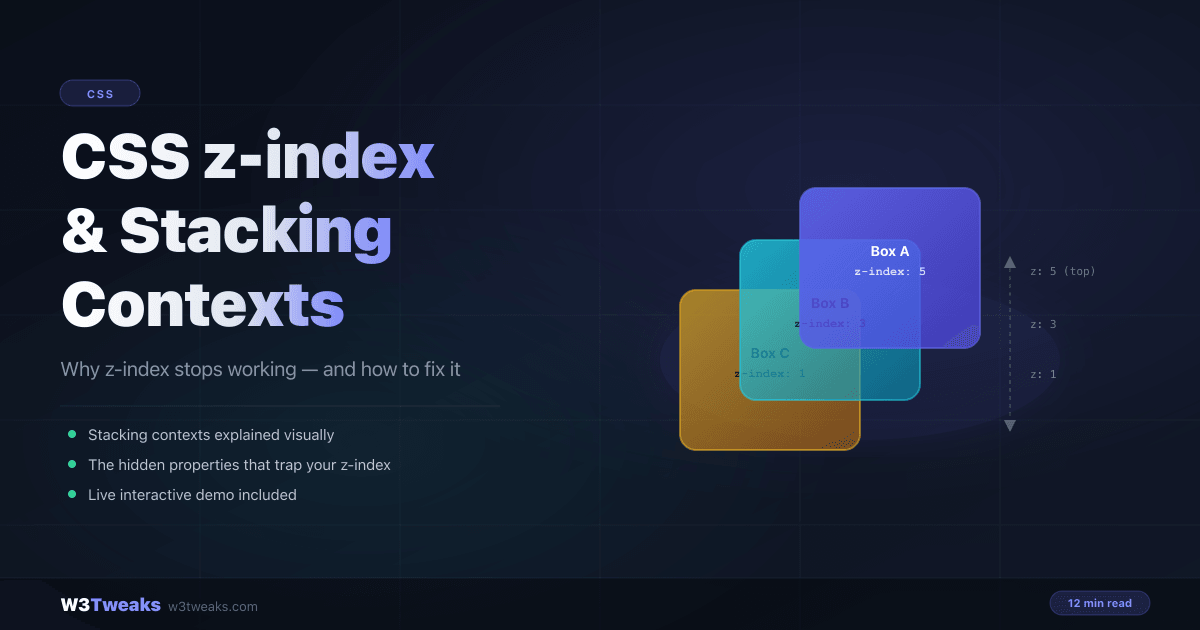
z-index controls the paint order of overlapping elements along the z-axis — toward and away from the viewer. Higher values appear in front of lower values.
But there’s a catch: z-index only works on positioned elements — elements with a position value other than the default static.
/* ❌ z-index is ignored — position is static by default */
.tooltip {
  z-index: 999;
}

/* ✅ Works — element is positioned */
.tooltip {
  position: relative; /* or absolute, fixed, sticky */
  z-index: 999;
}
This is mistake #1. Elements with position: static simply ignore z-index, no matter what value you set.
What is a Stacking Context?
A stacking context is an isolated layer in the page’s z-axis stack. Every page starts with a single stacking context on <html>. When an element creates its own stacking context, it becomes a self-contained layer — its children can only be ordered within that layer.
No matter how high a child’s z-index is, it can never paint above elements that belong to a higher parent stacking context.
Think of it like two books on a table. Book A is on top of Book B. A page inside Book B can never appear above any page in Book A — even if that page is labelled “page 9999”. The books are the stacking contexts.
Root stacking context
├── .parent-1  (z-index: 1, creates its own context)
│   ├── .child  (z-index: 9999 ← trapped inside parent-1)
│   └── .child  (z-index: 1)
└── .parent-2  (z-index: 2, creates its own context)
    └── .child  (z-index: 1 ← always above ALL of parent-1)
The result: .parent-2 > .child with z-index: 1 paints above .parent-1 > .child with z-index: 9999. The parent’s context wins, always.
The Properties That Create a Stacking Context
This is the list every CSS developer should memorise. Each of these properties silently creates a new stacking context when applied to an element:
| Property | Trigger Condition |
|---|---|
position + z-index | Any positioned element with z-index other than auto |
opacity | Any value less than 1 (even 0.99) |
transform | Any value other than none |
filter | Any value other than none |
backdrop-filter | Any value |
will-change | When set to transform, opacity, or similar |
position: fixed | Always, regardless of z-index |
position: sticky | Always, regardless of z-index |
Flex/Grid child + z-index | A direct flex or grid child with any non-auto z-index |
isolation: isolate | Always — deliberate context creation |
mix-blend-mode | Any value other than normal |
clip-path | Any value other than none |
contain | When set to layout, paint, or strict |
The most common accidental triggers are opacity, transform, and will-change — because developers add them for animation and don’t realise they’ve created a containment boundary. The same transform you use to animate cards in our CSS view transitions API guide silently creates a stacking context — perfectly fine for the animation itself, but it can trap modal/tooltip z-index of any descendant element.
Your First Debugging Session
You have a dropdown menu that hides behind a card. Here’s how to debug it step by step.
Step 1 — Check the element has a non-static position:
/* Add this if missing */
.dropdown {
  position: relative;
  z-index: 100;
}
Step 2 — Walk up the DOM tree and check ancestors for stacking context triggers:
/* Look for any of these on parent/grandparent elements */
.card {
  transform: translateY(0);   /* ← creates a context! */
  opacity: 0.98;               /* ← creates a context! */
  will-change: transform;      /* ← creates a context! */
  filter: drop-shadow(...);    /* ← creates a context! */
}
Step 3 — Fix it:
/* Option A: Remove the trigger entirely */
.card {
  /* remove: transform: translateY(0); */
}

/* Option B: Move the trigger to an inner wrapper */
.card-inner {
  transform: translateY(0); /* visual effect preserved, no context on .card */
}

/* Option C: Use isolation on the right element */
.dropdown-wrapper {
  isolation: isolate;
}
The isolation Property — Your Best Friend
isolation: isolate creates a stacking context with zero visual side effects. Its only purpose is to establish a new stacking context — unlike opacity or transform, it doesn’t change how the element looks.
/* Creates a stacking context with no visual impact */
.modal {
  isolation: isolate;
  position: fixed;
  inset: 0;
  z-index: 50;
}

.modal .tooltip {
  position: absolute;
  z-index: 10; /* battles other modal children only, not the whole page */
}
This is exactly what React portals and modal libraries do internally to avoid z-index conflicts.
Real Use Case: Sticky Header Behind a Card
A sticky header that hides behind a card with a hover animation:
/* ❌ Problem: card transform creates a stacking context */
.site-header {
  position: sticky;
  top: 0;
  z-index: 100;
}

.hero-card {
  transform: translateY(-8px); /* creates a stacking context — card wins! */
}
/* ✅ Fixed: move transform to an inner element */
.site-header {
position: sticky;
top: 0;
z-index: 100; /* now wins correctly */
}
.hero-card { /* no transform here */ }
.hero-card-inner {
transform: translateY(-8px); /* effect preserved, no context on .hero-card */
transition: transform 0.2s ease;
}
.hero-card:hover .hero-card-inner {
transform: translateY(-12px);
}The Paint Order — How Browsers Stack Everything
Within a stacking context, the browser paints elements in this exact order (lowest to highest):
- Background and borders of the stacking context element
- Positioned elements with negative z-index
- Block-level elements in normal flow
- Floating elements
- Inline elements in normal flow
- Positioned elements with
z-index: autoorz-index: 0 - Positioned elements with positive z-index (higher = painted later = on top)
The useful trick from this list: z-index: -1 on a pseudo-element places it behind its parent’s background — great for decorative glows and border effects.
/* Glowing border effect using z-index: -1 on ::before */
.card { position: relative; }

.card::before {
  content: "";
  position: absolute;
  inset: -3px;
  background: linear-gradient(135deg, #6366f1, #22d3ee);
  border-radius: 16px;
  z-index: -1; /* behind .card but visible as a glow */
}
Common Gotchas
opacity: 1 does NOT create a stacking context — only values below 1:
.parent { opacity: 1; }    /* ✅ No stacking context */
.parent { opacity: 0.99; } /* ❌ Creates a stacking context */
transform: none does NOT create a stacking context:
.parent { transform: none; }          /* ✅ No context */
.parent { transform: translateX(0); } /* ❌ Creates a context */
position: fixed always creates a stacking context — even without z-index:
.overlay {
  position: fixed; /* always creates a context, z-index or not */
}
Flex children create stacking contexts without position:
.flex-parent { display: flex; }
.flex-child  { z-index: 5; } /* enough — no position needed */
Debugging Checklist
When z-index isn’t working, run through this in order:
- Does the element have a non-static
position? - Is
z-indexset to a value (notauto)? - Do any ancestors have
opacity < 1? - Do any ancestors have a
transformvalue? - Do any ancestors have a
filtervalue? - Do any ancestors have
will-change? - Is the element a flex/grid child with
z-indexset? - Open DevTools → Layers panel — shows every stacking context visually
Browser Support
z-index and stacking contexts are part of CSS 2.1 — supported in every browser without exception. isolation: isolate is supported in Chrome 41+, Firefox 36+, Safari 8+, and Edge 79+ — 100% safe in production with no polyfill needed.
Key Takeaways
z-indexonly works on positioned elements —positionmust not bestatic- A stacking context is an isolated z-axis layer — children cannot escape it
opacity < 1,transform,filter,will-change, andposition: fixed/stickyall silently create stacking contexts- When z-index fails, walk up the DOM and check ancestors for these triggers
- Use
isolation: isolateto create intentional stacking contexts with no visual side effects - A child’s
z-index: 9999will always lose to a sibling stacking context withz-index: 2 - The Layers panel in DevTools shows every stacking context as a visual layer
FAQ
Why does my z-index not work even though I set position: relative?
The most likely cause is a stacking context trap on an ancestor element. Open DevTools, click your element, and inspect the Computed styles of every parent up to <body>. Look for any parent with opacity less than 1, any transform value, a filter, or will-change. Any one of those creates a stacking context that traps your element’s z-index inside it.
What is the difference between z-index: 0 and z-index: auto?
z-index: auto means the element participates in the parent stacking context but does not create a new one. z-index: 0 has the same visual position but does create a new stacking context. Prefer z-index: auto for positioned elements that don’t need their own context — it keeps the DOM flatter.
Can I use z-index on non-positioned elements?
On regular block/inline elements, no — z-index is ignored. However, flex and grid children are an exception: a direct child of a flex or grid container can use z-index without any position property, and doing so creates a stacking context on that child.
How do I bring an element above a fixed header?
Both elements must share the same stacking context for their z-index values to be directly compared. If either element is inside a parent that creates its own context, restructure the DOM or remove the context-creating property from the ancestor.
What does isolation: isolate actually do?
It creates a new stacking context identical in effect to z-index: 0 + position: relative — but with no position changes and no visual side effects. It’s the clean, semantic way to say “all z-index battles inside this element stay inside this element.” Ideal for component libraries and design systems.
Is z-index: 9999 bad practice?
Yes — it’s a symptom of not understanding stacking contexts. Use the smallest z-index that achieves the result. A documented scale works best: 1 for cards, 10 for dropdowns, 50 for modals, 100 for toasts — and store it in CSS custom properties or design tokens.