TL;DR
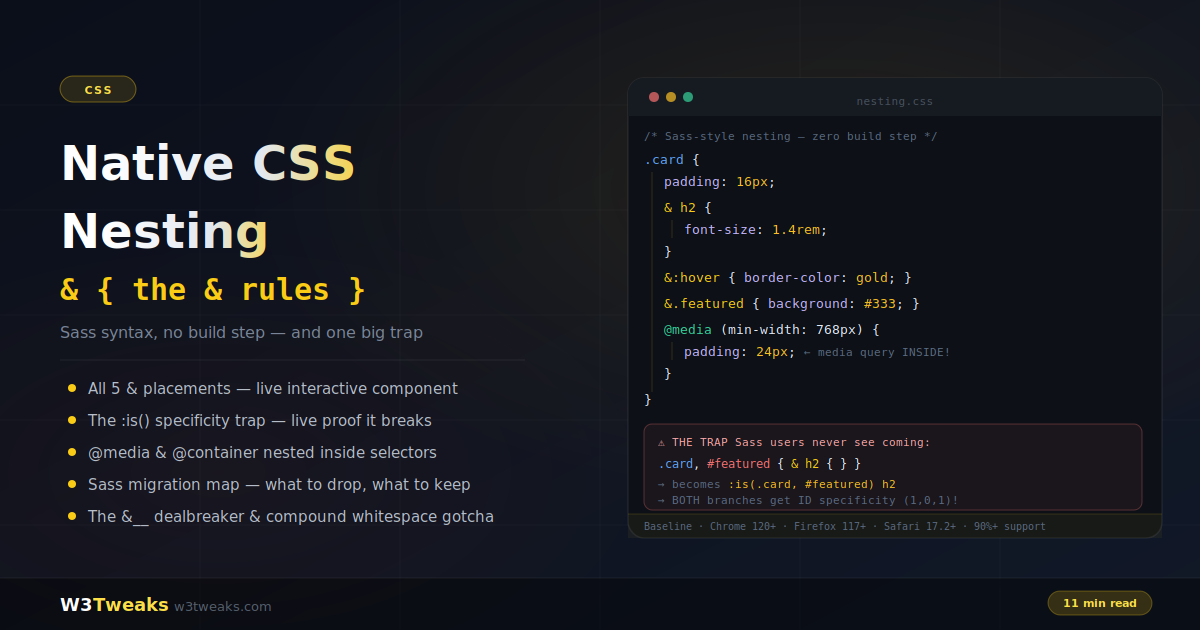
Write style rules inside style rules — with & as the parent reference — no preprocessor, no build step:
.card {
  padding: 16px;
  & h2 { font-size: 1.4rem; }
  &:hover { border-color: gold; }
  &.featured { background: #333; }

  @media (min-width: 768px) { padding: 24px; }
}
Watch out: nesting wraps the parent in :is(), which takes the specificity of its most specific item — an ID in a nested comma list (.card, #hero) silently gives every branch ID-level specificity and later class overrides mysteriously stop working. Also: &__element Sass-style concatenation is not supported (native & is a live selector, not a string), and bare .active nested = descendant (needs & for compound).
Support: Baseline Widely Available — Chrome/Edge 120+, Firefox 117+, Safari 17.2+. Over 90% global.
→ Try it in the live demo — hover a nav styled entirely with native nesting, toggle a .dark ancestor and watch descendants restyle, and see the :is() specificity trap defeat a class override in real time. Deep dive below for @scope pairing, Tailwind v4 output, @starting-style composition, framework SFC scoped-CSS behavior, and the honest Sass migration map.
The single feature that made an entire generation of developers install Sass — nesting — is now native CSS. No preprocessor, no build step, no node_modules. Write it, ship it, the browser parses it:
.card {
  padding: 16px;

  & h2 { font-size: 1.4rem; }

  &:hover { border-color: gold; }

  &.featured { background: #333; }

  @media (min-width: 768px) {
    padding: 24px; /* yes — a media query INSIDE the rule */
  }
}
But native nesting is not a Sass clone. The parent selector gets wrapped in :is() — which silently changes specificity in a way that breaks Sass-trained instincts. &__element concatenation doesn’t exist. A bare .active nested inside a rule means something different than you think. This guide covers the full syntax, every & placement, nesting at-rules inside components, the honest Sass migration map, and — with a live proof — the specificity trap. Nesting pairs with CSS custom properties to replace most of Sass, and with container queries for fully self-contained components.
Live Demo
Three tabs: ① a nav component styled entirely with native nesting plus all five & placements as interactive elements — including the .dark & context flip, ② the :is() specificity trap with live proof — watch a class override genuinely lose to a nested rule, plus the compound whitespace gotcha and invalid-rule isolation, ③ a container query nested inside a component's own rule (drag to resize), the Sass migration map, the &__ dealbreaker, and the 3-level depth rule.
The Basics — Nesting Rules Inside Rules
Nesting means writing a style rule inside another rule; the inner selector is relative to the outer one:
/* Flat CSS — the parent repeated five times */
.nav { padding: 10px; }
.nav ul { display: flex; }
.nav ul li { flex: 1; }
.nav ul li a { padding: 9px; }
.nav ul li a:hover { color: gold; }

/* Nested — the structure mirrors your mental model */
.nav {
  padding: 10px;

  & ul {
    display: flex;

    & li {
      flex: 1;

      & a {
        padding: 9px;
        &:hover { color: gold; }
      }
    }
  }
}
Less repetition, related styles grouped, and the file can genuinely get smaller — you stop re-typing selector prefixes.
The relaxed syntax — when & is optional
Since the late-2023 spec relaxation, the & is optional for simple element and class descendants:
/* Both are valid and equivalent */
.card {
  & h2 { color: white; }
  h2 { color: white; }
}
You must use & in three situations — compounds, pseudo-classes on self, and context flips — all covered next. Most 2026 style guides recommend writing & everywhere anyway: it’s a visual marker that nesting is happening.
The & — Five Placements, Five Meanings
& represents the parent selector. Where you put it changes everything:
.chip {
  /* 1. Pseudo-class on SELF — no space */
  &:hover { background: #333; }
  &:focus-visible { outline: 2px solid gold; }

  /* 2. Compound (self + another class) — no space */
  &.active { background: gold; color: black; }

  /* 3. Descendant — with a space */
  & .icon { margin-right: 6px; }

  /* 4. CONTEXT FLIP — & at the end */
  .dark & { background: #1e293b; color: #e2e8f0; }
  /* = ".dark .chip" — restyle when an ANCESTOR has .dark */

  /* 5. Sibling relationships */
  & + & { margin-left: 8px; } /* ".chip + .chip" — between pairs */
}
Placement 4 is the one people miss: putting & last reverses the relationship. .dark & compiles to .dark .chip — “this chip, when somewhere inside a .dark ancestor.” It’s the cleanest way to express theme-context styling from inside the component’s own block, and it composes beautifully with the dark mode patterns.
& + & — The Modern Flow-Content Pattern
& + & is the best-in-class replacement for Heydon Pickering’s “lobotomized owl” selector (.stack > * + *). It reads more clearly, localizes the rule to the component that owns it, and gains logical-property variants for free:
/* Old — global rule, action-at-a-distance */
.stack > * + * { margin-block-start: 1rem; }

/* Modern — the rule lives with the component */
.stack-item {
  padding: 12px;

  & + & { margin-block-start: 1rem; }
  /* = ".stack-item + .stack-item" — spacing between adjacent items only */
}
The advantage over the owl selector: it doesn’t accidentally match unrelated children (<h2>, <hr>, injected script tags), and readers understand what “between siblings of this component” means without decoding a universal selector.
Nesting At-Rules — Responsive Logic Inside the Component
Media queries, container queries, feature queries, and layers can all nest inside a selector block. The component’s entire behavior lives in one place:
.card {
  display: flex;
  flex-direction: column;
  padding: 14px;

  /* Viewport-responsive — no & needed, applies to .card */
  @media (min-width: 768px) {
    padding: 24px;
  }

  /* Container-responsive */
  @container (min-width: 400px) {
    flex-direction: row;

    & .card-image { width: 140px; }
  }

  /* Feature-gated */
  @supports (display: subgrid) {
    display: subgrid;
  }

  /* Even user preferences */
  @media (prefers-reduced-motion: no-preference) {
    transition: transform 0.2s;
    &:hover { transform: translateY(-2px); }
  }
}
Declarations directly inside a nested at-rule apply to the outer selector — no & required (though allowed). This is the pattern that makes components genuinely portable: everything about .card, including its responsive and feature-detection logic, lives between one pair of braces.
@starting-style Inside a Nested Rule
The @starting-style at-rule (Chrome 117+, Safari 17.5+) declares the starting values for a transition — the pattern that finally lets popovers and dialogs animate on open with pure CSS. Nested inside the target rule, the before-open state lives right next to the open state:
[popover] {
  opacity: 1;
  transform: translateY(0);
  transition:
    opacity 0.2s ease,
    transform 0.2s ease,
    display 0.2s allow-discrete,
    overlay 0.2s allow-discrete;

  /* The moment the popover appears, animate FROM these values */
  @starting-style {
    opacity: 0;
    transform: translateY(8px);
  }
}
Before native nesting, this required either a global @starting-style [popover] { ... } at the top level or a compiler transform. Nesting brings all the entry-animation state into one component block — the same reason you nest :hover and @media.
The Trap: Nesting Wraps Parents in :is()
Here’s the difference that catches every Sass veteran. Native nesting doesn’t concatenate selector strings like Sass does — it wraps the parent in :is():
.card {
  & h2 { color: red; }
}
/* Browser interprets: :is(.card) h2 */
Harmless for a single selector. Dangerous for comma lists. :is() takes the specificity of its most specific argument:
/* Nest inside a comma list that includes an ID */
.card, #featured {
  & h2 { color: red; }
}
/* Browser: :is(.card, #featured) h2
   Specificity: (1,0,1) — ID strength for BOTH branches */

/* This later override — (0,2,0) — LOSES: */
.my-component h2 { color: green; } /* defeated by the nested rule */
In Sass, the same source compiles to two separate flat rules — .card h2 at class specificity and #featured h2 at ID specificity — and the override works for .card. In native CSS, both branches carry ID weight. Identical code, different cascade.
The rules to stay safe:
- Never put IDs in nested comma selector lists — split the ID into its own rule
- When auditing “why won’t my override apply,” check whether the winning rule is nested under a group containing an ID or high-specificity selector
:where()wrapping zeroes it out if you need grouped low-specificity parents::where(.card, #featured) { & h2 {} }gives (0,0,1)
The full mechanics of specificity calculation are covered in CSS specificity.
The Compound Whitespace Gotcha
When a nested selector starts with a class and no &, the browser inserts a descendant space:
.chip {
  .active { background: gold; }
  /* = ".chip .active" — a DESCENDANT with class .active */

  &.active { background: gold; }
  /* = ".chip.active" — the chip ITSELF with class .active */
}
State classes on the component itself always need &. The symptom of forgetting: your .active styling works in the inspector when applied to a child, but the component itself never reacts to the class toggle.
Invalid Nested Rules Fail Gracefully
An invalid selector inside a nested block only kills its own rule — not the parent, not the siblings:
.parent {
  color: white;          /* ✓ applies */

  & %invalid { }         /* ✗ only this rule ignored (% is invalid) */

  & .valid { color: gold; } /* ✓ still applies! */
}
This is more forgiving than a syntax error in flat CSS, which can invalidate everything up to the next matching brace. One bad nested selector won’t take a component down.
@scope + Nesting — The Modern BEM Replacement
@scope (Chrome 118+, Safari 17.4+) bounds a set of rules to a subtree; nesting handles the rules inside the boundary. Together they replace what BEM naming conventions used to protect against — accidental style bleed across components:
@scope (.card) to (.card-footer) {
  /* These rules only match INSIDE .card, but stop at .card-footer.
     No class prefix required, no accidental collisions. */

  :scope {
    display: flex;
    padding: 16px;
  }

  & h2 {
    font-size: 1.4rem;
    &:hover { color: gold; }
  }

  & .actions {
    margin-top: auto;
    & button { padding: 8px 14px; }
  }

  @media (min-width: 640px) {
    :scope { flex-direction: row; }
  }
}
:scope refers to the scope root; & inside works exactly as before. The to (.card-footer) clause is the lower boundary — rules stop before descending into a nested footer, so <button> inside a footer keeps its footer styles. Design system platforms like Zeroheight, Supernova, and Storybook now document component CSS with these boundaries preserved, mirroring how the code ships. Component libraries like Radix Themes, Shadcn UI, Chakra UI, and Material UI are moving internal styles to @scope + nesting as older BEM-style prefixes retire.
Tailwind v4 (and CSS-in-JS) Emits Native Nesting
If you use Tailwind CSS, this is the biggest practical intersection of nesting in 2026. Tailwind v4 (Oxide engine) generates native nested CSS in its output — and its @apply composition depends on it. This changes what you inspect in DevTools and lets you drop postcss-nesting from your build config:
/* Tailwind v3 output (flattened, via postcss-nesting) */
.card { padding: 1rem; }
.card:hover { border-color: gold; }
.card > * + * { margin-top: 0.5rem; }

/* Tailwind v4 output (native nested) */
.card {
  padding: 1rem;

  &:hover { border-color: gold; }
  & + & { margin-block-start: 0.5rem; }
}
Same rules, half the bytes, and the source maps show the original nested structure in DevTools. Sites deployed on Vercel, Netlify, or Cloudflare Pages can drop postcss-nesting from their build config and shave PostCSS pass time off every deploy. The same shift is happening in CSS-in-JS: Emotion 11.11+, styled-components 6, vanilla-extract, and Panda CSS now emit native nested CSS instead of flattening. Compiled bundles are smaller and the DevTools rules pane reads like the source.
Nesting in Scoped SFCs (.vue, .svelte, .astro)
This is where “works in one file, breaks in another” tickets come from. Framework SFCs rewrite selectors with hash attributes ([data-v-abc123]) inside <style scoped> blocks. Native nesting inside a scoped block is transformed by the compiler, not the browser — and the transform order matters:
| Framework | <style scoped> + nesting | Notes |
|---|---|---|
| Vue 3.4+ | ✅ Native nesting supported | Nested rules get the scope hash applied to each selector; & resolves before the hash is appended |
| Svelte 5 | ✅ Native nesting supported | Svelte compiler now recognizes &; earlier versions treated it as an invalid selector |
| Astro | ✅ Passes native nesting through | Astro’s scoped <style> uses data-astro-cid-*; the browser handles nesting after Astro adds the attribute |
| Nuxt | ✅ (inherits Vue 3.4+ behavior) | |
| SolidStart / SvelteKit | ✅ (inherits Svelte 5) |
The pattern that trips people up: a nested .dark & context flip inside a scoped block. The compiler must rewrite this as .dark [data-v-abc123] — some earlier compiler versions rewrote it as [data-v-abc123].dark &, which is wrong. If a context flip only works when you flatten it by hand, upgrade the framework’s compiler or move that specific rule to a non-scoped stylesheet.
DevTools Inspection — Chrome vs Firefox
The Rules pane in each browser handles nested CSS differently, and knowing which view you’re reading matters for debugging specificity:
- Chrome DevTools (from Chrome 120) shows nested rules in their nested form — click the parent selector to expand the tree. Specificity is shown per-rule reflecting the
:is()-wrapped compilation. - Firefox DevTools flattens nested rules for display — you see
.card h2:hoveras one line, without the visual hint that it was authored nested. - Safari Web Inspector currently flattens, matching Firefox’s behavior.
Nested rules survive source maps cleanly, so session-replay platforms like Sentry, LogRocket, Datadog, and FullStory show the original nested selector in captured stylesheets rather than the flattened compiled output — an under-appreciated debug improvement over Sass, where source maps could drift out of sync with runtime CSS. Visual regression platforms like Chromatic, Percy, and Applitools diff the rendered output, so migrating a stylesheet from Sass nesting to native nesting produces zero visual diffs when the specificity math holds — which is exactly the confidence signal a refactor needs.
Can You Finally Drop Sass? The Honest Map
| Sass feature | Native equivalent | Verdict |
|---|---|---|
| Nesting (descendants, pseudo-classes, modifiers) | & — native nesting | ✅ Drop Sass |
$variables | CSS custom properties | ✅ Drop Sass |
| Nested media queries | @media inside rules | ✅ Drop Sass |
darken()/lighten() | color-mix(), relative oklch(from ...) | ✅ Drop Sass |
&__element (BEM concatenation) | Not supported | ❌ Keep Sass |
@each loops / maps | No equivalent | ❌ Keep Sass |
| Mixins with logic | Partially (custom properties + if()) | ⚠️ Depends |
The &__ dealbreaker
In Sass, & is a string you can concatenate — &__icon inside .btn builds .btn__icon. In native CSS, & is a live selector reference, not text. There is no concatenation:
/* Sass — works */
.btn {
  &__icon { margin-right: 6px; } /* → .btn__icon */
}
/* Native CSS — invalid, rule silently dropped */
.btn {
&__icon { margin-right: 6px; } /* ✗ */
}BEM codebases built on &__element must either flatten those names into full class selectors, keep Sass for those files, or migrate the architecture to @scope (covered above). Design-to-code exports from Figma Dev Mode, Framer, and Webflow now emit native nested CSS by default, so teams shipping design-token pipelines no longer need a Sass preprocessor step for that half of the codebase.
The migration path
- Audit: grep your Sass for
&__and@each— those files stay Sass - Variables:
$primary: #4ade80→--primary: #4ade80(the biggest mechanical change, the simplest conceptually) - Copy nesting blocks into
.cssfiles — relaxed syntax means most Sass nesting parses as-is - Test in the browser — there’s no build step to wait for; scratch environments like StackBlitz, CodeSandbox, or GitHub Codespaces all ship browsers current enough for Baseline nesting support
- Remove the Sass pipeline from migrated files
Sass and native nesting coexist in one project without friction: .scss for the two edge cases, .css for everything else. Most teams find 80%+ of files migrate cleanly.
The 3-Level Rule — Don’t Repeat Sass’s Mistakes
The classic Sass disease was DOM-mirroring: nesting six levels deep because the HTML nests six levels deep, producing brittle, over-specific selectors nobody could override. Native nesting enables the same mistake:
/* ❌ Mirroring the DOM — long, rigid, over-specific */
.page {
  & .main {
    & .section {
      & .card {
        & .card-body {
          & .title { }
} } } } }

/* ✅ Nest for STATES and CONTEXTS, not structure */
.card-title {
  font-size: 1.2rem;

  &:hover { }
  &.featured { }
  .dark & { }
  @media (min-width: 768px) { }
}
Keep nesting to 3 levels or fewer. Nest pseudo-classes, state modifiers, context flips, and at-rules — the things that genuinely belong to the component. Don’t nest to reproduce your HTML tree; use flat, well-named classes for structure.
Browser Support
Native CSS nesting is Baseline: Chrome 120+, Edge 120+, Firefox 117+, Safari 17.2+ — over 90% global support in 2026. (Original stricter-syntax support landed even earlier: Chrome 112, Safari 16.4.)
Fallbacks are rarely needed. For the exceptions:
/* Feature detection */
@supports selector(&) {
  /* nesting-dependent enhancements */
}
Or run a PostCSS nesting plugin at build time — write nested syntax today, ship flattened CSS to everything.
Key Takeaways
- Native CSS nesting puts rules inside rules with the
&parent reference — Sass’s killer feature, zero build step, Baseline in every evergreen browser - Five
&placements:&:hover(pseudo on self),&.active(compound),& .icon(descendant),.dark &(context flip),& + &(sibling pairs) & + &is the modern replacement for the lobotomized-owl selector (.stack > * + *) — clearer, locally scoped, and it doesn’t accidentally match unrelated children- The relaxed syntax makes
&optional for simple descendants — but compounds and pseudo-classes on self require it - At-rules nest inside selectors:
@media,@container,@supports, and@starting-styleinside a component’s block keep all its logic in one place - The trap: nesting wraps parents in
:is(), which takes the highest specificity in the list — an ID in a nested comma group gives every branch ID-level specificity, silently defeating later overrides - Bare
.activenested = descendant (.chip .active);&.active= compound (.chip.active) — state classes need& - Invalid nested rules fail alone — parent and sibling rules survive
- Pair with
@scopefor boundary-based namespacing that replaces BEM prefixes — modern component libraries (Radix, Shadcn, Chakra, MUI) are moving to this pattern - Tailwind v4 (Oxide engine) and modern CSS-in-JS (Emotion, styled-components, vanilla-extract, Panda) emit native nested output — no more
postcss-nestingin the build pipeline <style scoped>in Vue 3.4+, Svelte 5, and Astro all support native nesting; earlier versions of these compilers had transform-order bugs with context flips- Chrome DevTools shows nested rules nested; Firefox and Safari flatten them for display — know which view you’re reading when debugging specificity
- Native nesting + custom properties +
color-mix()replaces ~80% of Sass;&__BEM concatenation and@eachloops are the two holdouts - Keep nesting ≤3 levels: nest states and contexts, never mirror the DOM tree
- Baseline support: Chrome 120+, Firefox 117+, Safari 17.2+ — production-ready without fallbacks for most audiences
FAQ
What is native CSS nesting?
Native CSS nesting lets you write style rules inside other rules, with the inner selector relative to the outer one — the same authoring pattern Sass popularized, but parsed directly by the browser with no preprocessor or build step. The & symbol references the parent selector, and nested rules can include pseudo-classes (&:hover), compound states (&.active), descendants, and even at-rules like @media inside a component’s block.
Is CSS nesting supported in all browsers?
Yes — native CSS nesting is Baseline, supported in Chrome 120+, Edge 120+, Firefox 117+, and Safari 17.2+, covering over 90% of global browser usage as of 2026. For legacy targets, @supports selector(&) provides feature detection, or a PostCSS plugin can flatten nesting at build time.
Does CSS nesting replace Sass?
For nesting itself, variables (via custom properties), nested media queries, and color manipulation (via color-mix()), yes — roughly 80% of typical Sass usage. Two features have no native equivalent: &__element BEM-style selector concatenation (native & is a selector reference, not a string) and @each loops over maps for generating utility classes. Projects using those keep Sass for the affected files; the two approaches coexist fine.
Why is my nested CSS selector not working?
The most common causes: (1) a bare class where a compound was intended — nested .active means “descendant with .active”; use &.active for “self with .active”; (2) &__element concatenation copied from Sass — invalid in native CSS, the rule is silently dropped; (3) the :is() specificity trap — nesting under a comma list containing an ID gives every branch ID-level specificity, which can defeat rules you expect to win; (4) inside a framework <style scoped> block, an outdated compiler may transform context flips (.dark &) incorrectly — upgrade to Vue 3.4+ or Svelte 5+.
Does CSS nesting increase specificity?
Nesting itself doesn’t add specificity — but the parent selector gets wrapped in :is(), which takes the specificity of its most specific item. Nesting under .card behaves as expected; nesting under .card, #featured gives the nested rules ID-level specificity for both branches, because #featured is in the list. Avoid IDs in nested comma groups, or use :where() to zero out the parent’s weight.
How deep should CSS nesting go?
Three levels or fewer. Deep nesting produces long, highly specific selectors that are difficult to override and slower to match — the exact maintainability disease that plagued over-nested Sass codebases. Nest pseudo-classes, state modifiers, context flips, and at-rules that belong to the component; use flat, well-named classes for document structure instead of mirroring the HTML tree.
How do I combine @scope with CSS nesting?
@scope (.card) to (.card-footer) { ... } bounds a selector namespace to the .card subtree, stopping at any nested .card-footer. Inside the scope block, use :scope to refer to the scope root and & inside nested rules exactly as normal. The pairing replaces BEM naming conventions — no .card__title prefixes needed because the @scope boundary prevents style bleed. Chrome 118+ and Safari 17.4+ ship it; use @supports at-rule(@scope) to gate the enhancement.
Does Tailwind CSS emit native nesting?
Yes — Tailwind v4’s Oxide engine generates native nested CSS output directly, and @apply composition relies on it. This lets you drop the postcss-nesting plugin from your build config and inspect nested rules in DevTools as authored. The same shift is happening across CSS-in-JS libraries: Emotion, styled-components, vanilla-extract, and Panda CSS all emit native nested output in current versions.
Does native nesting work inside Vue, Svelte, or Astro scoped styles?
Yes, from Vue 3.4+, Svelte 5, and current Astro. The framework compilers recognize & and apply the scope hash to nested selectors before compiling the file. Earlier compiler versions had transform-order bugs — particularly with the .dark & context-flip pattern, which some compilers rewrote incorrectly. If a nested context flip only works when you flatten it by hand, upgrade the framework’s compiler or move that specific rule outside the scoped block.
How is & + & different from .stack > * + *?
& + & targets adjacent siblings of the current component, while .stack > * + * targets adjacent direct children of .stack regardless of what they are. & + & reads more clearly, stays localized to the component’s own block, and won’t accidentally match unrelated injected content — headings, horizontal rules, or third-party script tags — that happen to sit between component instances. It’s the modern successor to Heydon Pickering’s lobotomized owl selector for flow-content spacing.