TL;DR
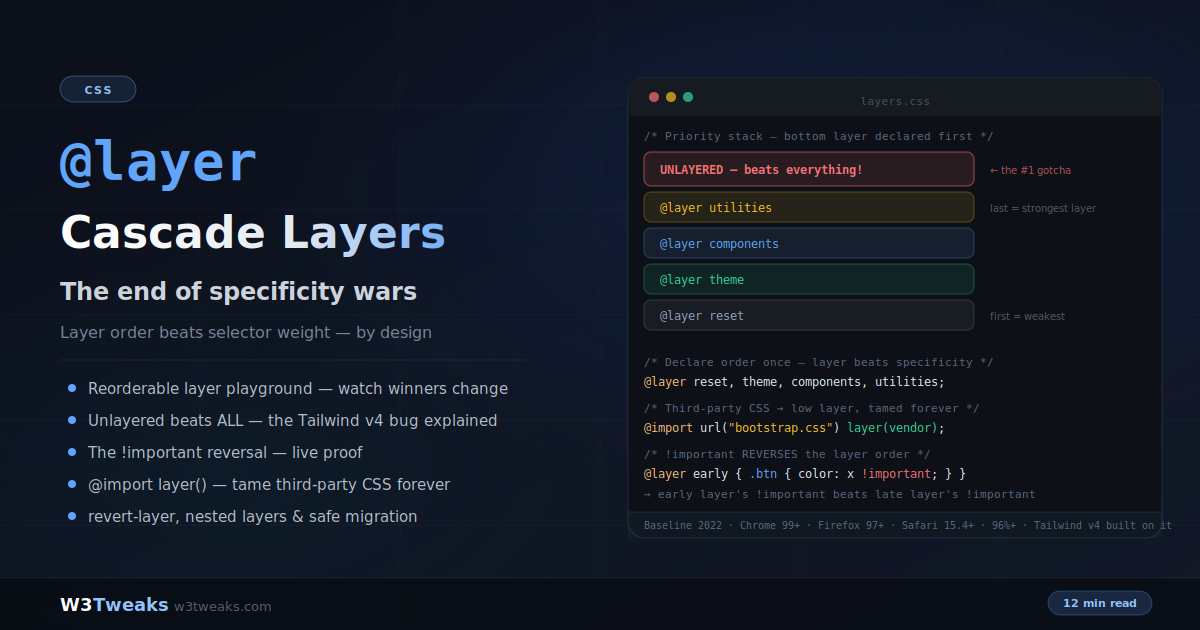
@layer adds a cascade step checked before specificity. Layer order decides between layers; specificity only breaks ties within a layer. Declare order once, at the top of your entry CSS:
@layer reset, tokens, base, components, utilities, overrides;

@layer reset {
  #app button#main.btn { background: slategray; }  /* (2,1,2) */
}
@layer utilities {
  button { background: gold; }  /* (0,0,1) — WINS anyway */
}
Watch out — three traps:
- Unlayered beats every layer (deliberate, for safe migration — but the #1 Tailwind v4 upgrade bug: a bare
a { color: black }inglobals.csssilently defeats every utility). !importantreverses the order — earlier layers’!importantbeat later layers’. Genius, not a bug: it lets a low-priorityresetlayer protect a11y-critical declarations.- First
@layerdeclaration wins permanently — later reorderings are ignored. Put your master declaration at the very top of your entry stylesheet.
Support: Baseline since March 2022 (Chrome 99+, Firefox 97+, Safari 15.4+ — 96%+ global). Zero runtime cost — resolves at parse time.
→ Try it in the live demo — reorder layers and watch a (0,0,1) selector beat a (2,1,2) one, flip the unlayered toggle to see it defeat everything, and see the !important reversal render live. Deep dive below for Shadow DOM’s independent layer graph, design system contracts (Radix/shadcn/MUI/Chakra), the empty-layer reservation pattern, @scope + @container placement, and CSS-in-JS libraries emitting layers.
Every CSS developer has lived this: your clean .content p selector loses to a framework’s .container .row .col-md-6 .card .card-body p, so you add a wrapper class, then an ID, then — defeated — !important. A codebase with 47 !importants isn’t a developer problem; it’s an architecture problem CSS couldn’t solve for 25 years.
@layer solves it at the root. Layers add a new step to the cascade that’s checked before specificity — you declare which groups of styles win, once:
/* One line. This is the architecture. */
@layer reset, theme, components, utilities;

@layer reset {
  #app button#main.btn { background: slategray; } /* (2,1,2) */
}

@layer utilities {
  button { background: gold; } /* (0,0,1) — WINS anyway */
}
The utilities rule wins with the weakest selector on the page, because its layer comes later. Specificity still applies within a layer — but between layers, order is law.
This guide covers everything production usage demands: the syntax, the full cascade order including the two famous gotchas (unlayered styles beating everything, and the !important reversal), taming third-party CSS with @import layer(), how Tailwind v4 is built entirely on layers, nested layers, revert-layer, and a migration strategy that can’t break existing styles. It builds directly on CSS specificity fundamentals and pairs with native nesting for modern architecture.
Live Demo
Three tabs: ① a reorderable layer playground — move layers up and down and watch which color wins the button, with per-rule specificity shown so you can verify a (0,0,1) selector beating a (2,1,2) one, plus the unlayered-rule toggle that beats everything, ② the !important reversal — side-by-side priority stacks for normal vs important declarations with a live two-!important proof button, ③ production architecture — the standard layer stack, @import layer() for frameworks, the Tailwind v4 bug, nested layers, revert-layer, and safe migration.
The Syntax — Three Ways to Create Layers
/* 1. Statement form — declare names and ORDER (no styles) */
@layer reset, theme, components, utilities;

/* 2. Block form — declare and fill */
@layer components {
  .btn { padding: 8px 16px; background: #3b82f6; }
}

/* 3. Import form — pull a whole file into a layer */
@import url("bootstrap.css") layer(framework);
The statement form is the important one: the first declaration of layer order wins, permanently. Later @layer statements can add new layers but can’t reorder existing ones:
@layer utilities, components; /* ← this order sticks */

/* ...later, even in another file... */
@layer components, utilities; /* ✗ TOO LATE — ignored for ordering */
Put your master @layer statement at the very top of your entry stylesheet, before any imports that use layers. It’s one line of code that defines your entire cascade architecture.
Once order is declared, you can fill layers from anywhere, in any file, in any sequence — the declared order governs, not source position.
The Empty-Layer Reservation Pattern
In code-split apps — Next.js App Router chunks, lazy-loaded routes, dynamic import()s that pull CSS with them — a layer’s first appearance is what fixes its position. If your entry CSS never mentions components, but a lazy chunk later emits @layer components { … }, that layer slots in after everything already declared. Order becomes deploy-timing-dependent.
The fix is a one-line reservation up top:
/* entry.css — declare the whole stack, empty, BEFORE any @import */
@layer reset, tokens, base, layouts, components, utilities, overrides;

/* ...later imports and lazy chunks fill in the reserved slots */
@import url("./reset.css") layer(reset);
@import url("./tokens.css") layer(tokens);
Every layer name now has its position locked before any body arrives — lazy routes drop into their reserved slot regardless of load order. This is table stakes for Next.js on Vercel, Nuxt on Netlify, and SvelteKit on Cloudflare Pages where CSS ships per-route and route order depends on the user’s navigation path.
How Layers Change the Cascade
The cascade resolution order for normal declarations becomes:
- Inline
style=""attributes — strongest - Unlayered styles — any rule outside every
@layer - Later layers (last declared)
- …
- Earlier layers (first declared) — weakest
Specificity and source order still break ties — but only within the same layer. Between layers, the layer order decides and specificity is ignored entirely.
@layer low, high;

@layer low {
  #super .specific #selector { color: red; } /* (2,1,0) */
}

@layer high {
  p { color: green; } /* (0,0,1) — wins */
}
This is the entire point: selecting elements and prioritizing rules are finally separate concerns. Selectors select; layers prioritize.
Gotcha 1: Unlayered Styles Beat Every Layer
Any rule outside all layers outranks any rule inside any layer:
@layer base, utilities;

@layer utilities {
  .text-blue { color: blue; } /* in the HIGHEST layer */
}

/* Unlayered — anywhere in any stylesheet */
p { color: red; } /* ← still beats .text-blue */
This is deliberate — it’s what makes incremental migration safe (your existing unlayered CSS keeps winning while you adopt layers underneath). But it’s also the single biggest source of layer bugs in the wild, because…
The Tailwind v4 Upgrade Trap
Tailwind CSS v4 rebuilt its architecture on native cascade layers, replacing the PostCSS-based layer emulation of v3:
/* Tailwind v4 generates: */
@layer theme { /* design tokens */ }
@layer base { /* preflight resets */ }
@layer components { /* component classes */ }
@layer utilities { /* utility classes */ }
Now add a typical globals.css — the same file that shipped fine on v3:
/* ❌ Unlayered — silently beats every Tailwind utility */
a { text-decoration: none; color: black; }
button { background: transparent; }
Every text-blue-500, every bg-indigo-600 on links and buttons — silently defeated by these bare rules, regardless of class order or specificity. If you migrated to Tailwind v4 and utilities stopped working, grep for unlayered rules in your global CSS first — this is the top v3→v4 migration bug. The DevTools clue: the winning rule shows no layer attribution — a bare selector with a file reference, while your utility appears struck through.
The fix — layer your globals:
@layer base {
  a { text-decoration: none; color: black; }
  button { background: transparent; }
}
Rule of thumb for layered codebases: everything goes in a layer. Unlayered CSS should be a conscious exception, not a default.
Gotcha 2: !important Reverses the Layer Order
The mind-bender. With !important, the priority order flips — earlier layers win:
| Priority | Normal declarations | !important declarations |
|---|---|---|
| Strongest | Inline styles | @layer reset (first) !important |
| ↓ | Unlayered styles | @layer theme !important |
| ↓ | @layer utilities (last) | @layer components !important |
| ↓ | @layer components | @layer utilities (last) !important |
| ↓ | @layer theme | Unlayered !important |
| Weakest | @layer reset (first) | Inline !important |
Live proof:
@layer early, late;

@layer early { .btn { background: seagreen !important; } }
@layer late  { .btn { background: crimson !important; } }

/* Normal rules: late wins.
   !important rules: EARLY wins. The button is seagreen. */
Why reversal is genius, not a bug
Think about what !important means semantically: “this declaration must not be casually overridden.” A design system’s low-priority reset layer can mark accessibility-critical declarations !important — focus outlines, reduced-motion guards, screen-reader-only positioning — and nothing above it can override them, not later layers, not even unlayered app styles.
The layer that yields by default becomes the layer that protects on demand. In a layered codebase, !important shifts meaning from “force this” to “protect this” — and it finally works predictably.
The practical warning: an !important inside an imported third-party layer is now harder to override, not easier — your unlayered !important loses to it. Audit vendor CSS for !important before importing it into a layer.
Taming Third-Party CSS — The Killer Use Case
/* Put the entire framework in a low layer */
@import url("bootstrap.css") layer(framework);

@layer framework, custom;

@layer custom {
  .btn-primary {
    background: #1a73e8;
    padding: 0.75rem 1.5rem;
  }
}
Your simple .btn-primary now beats Bootstrap’s — regardless of what selector monstrosities the framework uses internally. The years of “inspect the framework’s selector, then write something more specific” end with one layer() function on the import.
This works for any vendor CSS: UI libraries, WordPress plugin styles, CMS themes. The pattern is always the same — vendor in an early layer, your styles in a later layer or unlayered. Designers exporting from Webflow or Framer can wrap the exported CSS in @layer vendor { … } to keep it below your custom design-system layer.
Design System Layer Contracts — Radix, shadcn, MUI, Chakra
Adopting a component library means knowing which layer to write your overrides in. Each library ships a different contract, and getting it wrong means either your overrides silently lose or you fight the library’s !importants forever:
| Library | Emits into layer | Your overrides go in |
|---|---|---|
| shadcn/ui | Unlayered (by design — its .tsx components render Tailwind class strings) | @layer components (matching Tailwind’s Preflight → base → components → utilities chain) |
| Radix Themes | @layer radix | Any layer declared after radix in your stack |
| Material UI (v6) | Unlayered by default; opt-in @layer mui via GlobalStyles | @layer mui-overrides declared after mui |
| Chakra UI (v3) | @layer chakra | @layer chakra-overrides declared after chakra |
| Ant Design | Unlayered (heavy specificity via .ant-* prefixes) | Layer it yourself via @import url(antd.css) layer(antd) |
The general recipe when adopting any of these:
/* Your entry.css */
@layer reset, tokens, radix, chakra, mui, custom, utilities;

@import url("@radix-ui/themes/styles.css") layer(radix);
@import url("your-mui-globals.css") layer(mui);

@layer custom {
  /* your app overrides win, regardless of what selectors the libraries use */
}
shadcn/ui is deliberately unlayered because it renders Tailwind class strings inside your components — those classes belong to Tailwind’s utilities layer, and your Tailwind-authored overrides live in the same chain. Radix Themes and Chakra v3 both take the opposite approach: their styles live in a named layer so you can guarantee your overrides win with one line at the top of your stylesheet.
Nested Layers, @scope, and @container Placement
Layers nest, creating scoped sub-orderings:
@layer framework {
  @layer theme { /* framework.theme */ }
  @layer components { /* framework.components */ }
}

/* Address a sub-layer directly */
@layer framework.theme {
  :root { --accent: #60a5fa; }
}

/* Import into a sub-layer */
@import url("tailwind.css") layer(vendor.tailwind);
The outer layer’s position determines priority against your other top-level layers; the inner ordering is scoped inside. This lets a vendor manage its own internal layer structure without interfering with yours — exactly how Tailwind’s four internal layers coexist with your app’s stack.
@scope and @container — narrow, don’t order
@scope (Chrome 118+, Safari 17.4+) and @container do not participate in layer ordering. They add to specificity and proximity resolution within whichever layer they sit in. Nesting them inside a layer is the correct pattern:
@layer components {
  @scope (article) to (.comments) {
    /* Narrowly targets article descendants except inside .comments,
       but still part of the components layer for cascade purposes. */
    p { line-height: 1.7; }
  }

  @container (min-width: 400px) {
    .card { grid-template-columns: 130px 1fr; }
  }
}
Layers order rules; scope and container narrow them. They’re complementary, not competitive — you use all three in a modern codebase.
revert-layer — The Surgical Escape Hatch
revert-layer rolls a property back to whatever lower layers computed — un-styling without knowing or repeating the lower value:
@layer base, special;

@layer base {
  .card { background: navy; border: 1px solid slateblue; }
}

@layer special {
  .card.plain {
    background: revert-layer; /* → falls back to base's navy */
    border: revert-layer;
  }
}
Compare the alternatives: initial nukes to the spec default, inherit grabs the parent, revert goes all the way to browser defaults — but revert-layer says precisely “pretend this layer never set it.” For layered design systems it’s the correct way to express “this variant opts out of the override.”
Shadow DOM Has Its Own Layer Graph
Every shadow root is an independent selector scope — and it’s also an independent layer scope. A @layer components declared in the light DOM is not the same layer as a @layer components inside a web component’s shadow root; they don’t share ordering, they don’t stack:
<my-card>
  #shadow-root
    <style>
      @layer components { .inner { padding: 16px; } }
    </style>
    <div class="inner">…</div>
</my-card>
/* Host document — this is a DIFFERENT `components` layer */
@layer reset, components, utilities;
@layer components { my-card { border: 2px solid cyan; } }Two independent cascades: the host document decides how my-card itself is styled; the shadow root decides how .inner is styled. Layer names in one cannot influence rules in the other. This is by design — part of the encapsulation guarantee that makes web components reusable.
::part() styling follows normal cascade rules in the host’s layer graph — so exposing internals via part="inner" and styling them from an outer @layer components block works as you’d expect. If you need cross-boundary reactivity beyond ::part(), reflect state to a host attribute and select on that.
Migration Strategy — Safe by Design
Because unlayered beats layered, migration can’t break anything:
- Layer the third-party CSS first:
@import url("vendor.css") layer(vendor);— instant, permanent victory in every specificity war with the vendor, zero change to your own styles’ behavior - Your existing CSS stays unlayered — it already beat the vendor by specificity fights; now it beats it by architecture
- Declare your target layer stack at the entry point:
@layer vendor, reset, base, components, utilities; - Migrate your files into layers one at a time during normal refactors — not a dedicated sprint
- Test per file: the one risk zone is legacy CSS with internal specificity wars — wrapping such a file in a layer can flip which internal rule wins
Rollout observability: ship a layer migration behind a feature flag and watch Sentry, LogRocket, Datadog RUM, or Vercel Speed Insights for CSS-related layout-shift and visual-completeness regressions before flipping it on globally. Visual-regression platforms like Chromatic and Percy catch the unlayered-rule leaks that Storybook’s isolated component preview would otherwise hide.
Performance cost: zero. Layer order resolves at parse time — it’s a cascade rule, not a runtime operation.
The standard destination architecture:
@layer reset,      /* normalization */
       tokens,     /* design tokens / custom properties */
       base,       /* element defaults */
       layouts,    /* page-level patterns */
       components, /* UI components */
       utilities,  /* single-purpose helpers */
       overrides;  /* escape hatch — use sparingly */
CSS-in-JS Libraries Emitting @layer
Runtime and zero-runtime CSS-in-JS libraries have moved onto native layers. If you mix hand-authored CSS with a CSS-in-JS library, you need to know the injection point:
- PandaCSS ships
@layer reset, base, tokens, recipes, utilitiesat build time — recipes slot as “components,” utilities are its own utility layer. Declare your app layers aroundpanda.utilitiesor beforepanda.reset. - vanilla-extract exposes
layer()from@vanilla-extract/css— your.css.tsfiles declare membership at compile time:import { layer } from '@vanilla-extract/css'; const app = layer('app');. - Emotion 11.11+ accepts a
layeroption on the cache — one line at setup:createCache({ key: 'css', prepend: true, container: document.head, insertionPoint: <layerNode> }). - styled-components 6 emits into a configurable layer via
StyleSheetManager— setenableVendorPrefixesandtarget={layerContainer}to route into a named layer. - Linaria and Compiled emit atomic classes; wrap the output via PostCSS
@layer utilities { … }at build time.
Teams syncing Figma variables through Style Dictionary or Tokens Studio usually land tokens in @layer tokens, nested under a design-system parent layer — the same pattern PandaCSS ships out of the box.
Debugging Layers in DevTools
Both Chrome and Firefox show layer attribution in the Styles panel — each rule displays its layer name above the selector. The debugging heuristics:
- A winning rule with no layer badge = unlayered CSS — the usual suspect when layered styles mysteriously lose
- Struck-through rule in a later layer losing to an earlier one = check for
!importanton the winner (reversal in action) - A layer missing from the expected order = check whether the first
@layerstatement in load order declared a different sequence
Firefox DevTools additionally shows the full layer graph in the Rules panel (its “layer tree” view), while Chrome shows layers inline per-rule but not the full graph. Each snippet in this guide runs live in StackBlitz or CodeSandbox if you want to inspect a working stylesheet in a scratch project rather than your app.
Browser Support
Cascade layers are universally supported: Chrome 99+, Firefox 97+, Safari 15.4+, Edge 99+ — Baseline since March 2022, over 96% global support. No polyfills or fallbacks needed for any mainstream audience. In genuinely ancient browsers, rules inside @layer blocks are skipped entirely — so for those rare targets, keep critical base styles unlayered.
Key Takeaways
@layeradds a cascade step checked before specificity — layer order decides between layers; specificity only breaks ties within a layer- Declare order once with the statement form (
@layer a, b, c;) at the top of your entry CSS — the first declaration wins permanently and later statements can’t reorder - Empty-layer reservation locks position before code-split chunks arrive —
@layer reset, tokens, base, components, utilities;at the top ofentry.csswith no bodies keeps lazy-route CSS in its slot - Unlayered styles beat all layers — deliberate (enables safe migration), but the #1 bug source: unlayered globals silently defeat Tailwind v4 utilities; fix by layering everything
- The Tailwind v4 upgrade trap: v4 moved utilities into
@layer utilities, so unlayered legacyglobals.cssrules now silently defeat every utility class — grep for unlayered rules first when utilities stop working !importantreverses layer order — earlier layers’!importantbeats later layers’!important; use it to protect declarations (a11y-critical rules in low layers), and audit vendor CSS for!importantbefore importing@import url() layer(name)tames third-party CSS forever — your simple selectors beat framework selector monsters by architecture; same trick works for Webflow/Framer exports and CMS theme CSS- Design system layer contracts: shadcn/ui ships unlayered (renders Tailwind classes), Radix Themes uses
@layer radix, MUI v6 offers opt-in@layer mui, Chakra v3 uses@layer chakra— declare your overrides layer after each library’s layer in your stack - Nested layers (
vendor.tailwind) scope a vendor’s internal ordering without polluting your top-level stack @scopeand@containerdon’t participate in layer ordering — they narrow within whichever layer they sit in, so nest them inside@layer components { @scope(...) { … } }@layerdoes not pierce Shadow DOM — each shadow root has an independent layer graph; use::part()for host-controlled styling of exposed internalsrevert-layerrolls a property back to lower layers’ value — surgical opt-out without repeating values- CSS-in-JS emits layers now: PandaCSS ships
@layer reset, base, tokens, recipes, utilities; vanilla-extract, Emotion 11.11+, and styled-components 6 all expose layer APIs - Migration is risk-free: vendor CSS into layers first, your unlayered CSS keeps winning, migrate file-by-file during refactors — ship behind a flag and monitor Sentry/LogRocket/Datadog RUM for regressions
- Zero runtime cost — layers resolve at parse time
- Baseline since 2022: Chrome 99+, Firefox 97+, Safari 15.4+ — use it today, everywhere
FAQ
What is CSS @layer?
@layer creates cascade layers — named groups of styles with an explicitly declared priority order. When rules in different layers target the same element, the later-declared layer wins regardless of selector specificity. This separates selecting elements from prioritizing rules, ending the pattern of escalating selector specificity or adding !important just to override other styles.
How does @layer order work?
The first @layer statement establishing an order wins permanently — @layer reset, components, utilities; makes utilities the strongest layer, and later statements cannot reorder existing layers. Styles can then be added to any layer from anywhere in any file; the declared order governs, not source position. Within a single layer, normal specificity and source-order rules still apply.
Why do unlayered styles override my layers?
By design: any rule outside every @layer block outranks all layered rules. This makes incremental adoption safe — existing CSS keeps winning while you layer new code — but causes the common Tailwind v4 bug where bare rules in a globals file silently defeat utility classes (which live in Tailwind’s layers). The fix is to move global rules into an appropriate layer, typically @layer base.
What happens to !important in cascade layers?
The priority order reverses: for !important declarations, earlier layers beat later layers, and layered !important beats unlayered !important. This lets low-priority layers protect critical declarations — a reset layer’s !important focus styles cannot be overridden by anything above it. In layered codebases, !important effectively means “protect this declaration” rather than “force this override.”
How do I use @layer with Bootstrap or Tailwind?
For any third-party framework, import it into a low-priority layer: @import url("bootstrap.css") layer(framework); — then your own styles in later layers (or unlayered) override it regardless of the framework’s selector specificity. Tailwind v4 already generates its own layers (theme, base, components, utilities); the key rule there is to put your custom global CSS inside a layer too, or it will override Tailwind’s utilities.
What is revert-layer in CSS?
revert-layer is a CSS-wide value that rolls a property back to whatever value lower-priority layers computed — as if the current layer never set it. Unlike initial (spec default), inherit (parent value), or revert (browser default), revert-layer targets exactly one step of the layer stack, making it the precise tool for variants that opt out of a layer’s override.
Do cascade layers work inside Shadow DOM?
Yes, but each shadow root has an independent layer graph — a @layer components declared in the host document is not the same layer as @layer components inside a web component’s shadow root. They don’t share ordering. This is by design and part of the encapsulation guarantee. For cross-boundary styling, expose internals with part="…" and select them via ::part() in the host’s layer graph, or reflect state to a host attribute.
Which layer should I write my overrides in for shadcn, Radix, MUI, or Chakra?
Each library has a different contract. shadcn/ui ships unlayered by design because it renders Tailwind class strings in your components — write overrides in @layer components matching Tailwind’s chain. Radix Themes emits @layer radix and expects overrides in any layer declared after radix in your stack. Material UI v6 ships unlayered by default but offers opt-in @layer mui — declare @layer mui-overrides after it. Chakra UI v3 uses @layer chakra — put overrides in @layer chakra-overrides declared after. Always declare the full stack up front so ordering is deterministic.
How do I stop lazy-loaded CSS chunks from breaking my layer order?
Use the empty-layer reservation pattern: declare all your layer names at the top of your entry stylesheet with no bodies, e.g. @layer reset, tokens, base, components, utilities, overrides;. A layer’s position is fixed at first sight of its name, so any lazy chunk that later emits @layer components { … } slots into the reserved position instead of appending to the end. This is critical for code-split apps on Next.js, Nuxt, or SvelteKit where CSS ships per-route.
Do @scope or @container participate in layer ordering?
No. @scope and @container do not create or interact with cascade layers — they only narrow which elements a rule matches within whichever layer they sit in. The correct pattern is to nest them inside a @layer block: @layer components { @scope (article) to (.comments) { … } }. Layers order rules across the whole cascade; scope and container narrow which elements those rules apply to. They’re complementary.