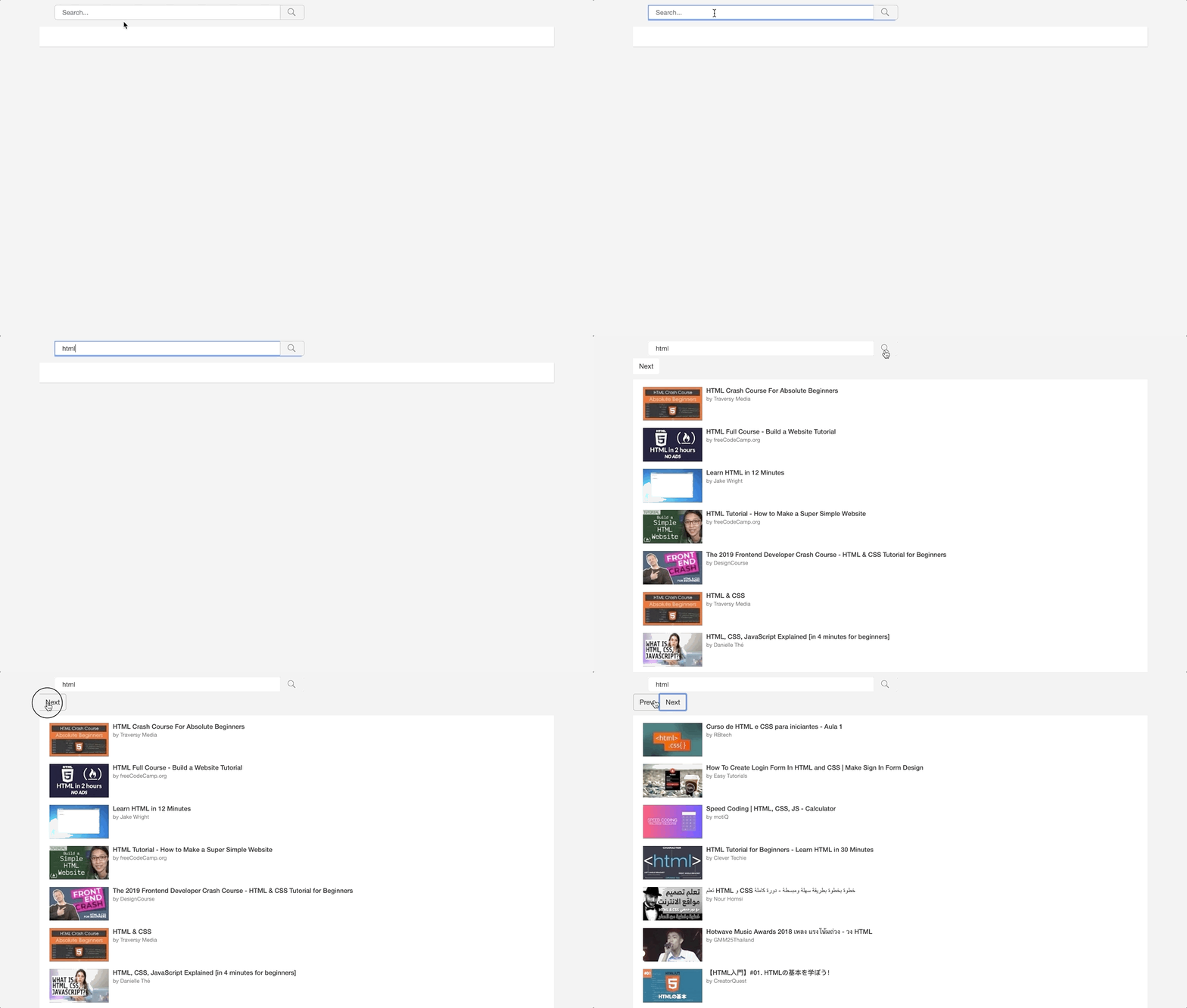
W3 Tweaks developed the YouTube Search V3 API tutorial and demo for the user. So here we have covered the YouTube search autocomplete suggestion API and the YouTube video search API. We already have a separate tutorial for search suggestions with basic implementation. From this tutorial, the user can easily understand merging both APIs into a single demo. YouTube pagination is also implemented user can find the demo and download the instant youtube search code below
Ok, we can start our tutorial. Below YouTube, a video search tutorial will explain how to work with the Jquery plugin and YouTube V3 API.
Include 3rd party dependency JavaScript and CSS.
`<link rel="stylesheet" href="//code.jquery.com/ui/1.11.4/themes/smoothness/jquery-ui.css" type="text/css" />
<link rel="stylesheet" href="https://maxcdn.bootstrapcdn.com/bootstrap/3.3.5/css/bootstrap.min.css" />
<script src="//code.jquery.com/jquery-2.1.4.js" type="text/javascript"></script>
<script src="//code.jquery.com/ui/1.11.4/jquery-ui.js" type="text/javascript"></script>`
In the above dependency files, jQuery UI is used for the search input box.
And include the below CSS file to get youtube like theme. If you want to modify the style you are good to go because this is developed by w3 Tweaks.
`<link rel="stylesheet" href=”http://w3tweaks.com/demo/youtube_search_videos/maincss.css” type="text/css">`Note: Advice to download the “maincss.css” locally
CSS Code
Below the CSS style will be the YouTube search box. Include the below code inside the HTML header
`<style type="text/css">
    body {
        background-color: #efefef;
    }

    .container-4 input#hyv-search {
        width: 500px;
        height: 30px;
        border: 1px solid #c6c6c6;
        font-size: 10pt;
        float: left;
        padding-left: 15px;
        -webkit-border-top-left-radius: 5px;
        -webkit-border-bottom-left-radius: 5px;
        -moz-border-top-left-radius: 5px;
        -moz-border-bottom-left-radius: 5px;
        border-top-left-radius: 5px;
        border-bottom-left-radius: 5px;
    }

    .container-4 button.icon {
        height: 30px;
        background: #f0f0f0 url('images/searchicon.png') 10px 1px no-repeat;
        background-size: 24px;
        -webkit-border-top-right-radius: 5px;
        -webkit-border-bottom-right-radius: 5px;
        -moz-border-radius-topright: 5px;
        -moz-border-radius-bottomright: 5px;
        border-top-right-radius: 5px;
        border-bottom-right-radius: 5px;
        border: 1px solid #c6c6c6;
        width: 50px;
        margin-left: -44px;
        color: #4f5b66;
        font-size: 10pt;
    }
</style>`
Note: Find the search icon in the download pack
HTML Code
`<div class="row-fluid">
    <main id="content" role="main" class="span12">
        <!-- Begin Content -->
        <div id="hyv-page-container" style="clear:both;">
            <div class="hyv-content-alignment">
                <div id="hyv-page-content" class="" style="overflow:hidden;">
                    <div class="container-4">
                        <form action="" method="post" name="hyv-yt-search" id="hyv-yt-search"> <input type="search" name="hyv-search" id="hyv-search" placeholder="Search..." class="ui-autocomplete-input" autocomplete="off"> <button class="icon" id="hyv-searchBtn"></button> </form>
                    </div>
                    <div> <input type="hidden" id="pageToken" value="">
                        <div class="btn-group" role="group" aria-label="..." style="display:none;"> <button type="button" id="pageTokenPrev" value="" class="btn btn-default">Prev</button> <button type="button" id="pageTokenNext" value="" class="btn btn-default">Next</button> </div>
                    </div>
                    <div id="hyv-watch-content" class="hyv-watch-main-col hyv-card hyv-card-has-padding">
                        <ul id="hyv-watch-related" class="hyv-video-list"> </ul>
                    </div>
                    <!-- Ads width 300px holder start -->
                    <div id="hyv-watch-sidebar-ads" style="float:left;">
                        <div id="hyv-watch-channel-brand-div" class="">
                            <div id="hyv-watch-channel-brand-div-text">Advertisement</div>
                            <div class="hyv-watch-sidebar-section">
                                <div style="font-weight:bold;height:10px;">JSON Responce</div>
                                <div class="hyv-watch-sidebar-body"></div>
                            </div>
                        </div>
                    </div>
                    <!-- Ads width 300px holder end -->
                </div>
            </div>
        </div>
    </main>
</div>`
JavaScript Code
Below JavaScript code for YouTube Search autocomplete suggestion API
`  $(document).ready(function() {
      $("#pageTokenNext").on("click", function(event) {
          $("#pageToken").val($("#pageTokenNext").val());
          youtubeApiCall();
      });
      $("#pageTokenPrev").on("click", function(event) {
          $("#pageToken").val($("#pageTokenPrev").val());
          youtubeApiCall();
      });
      $("#hyv-searchBtn").on("click", function(event) {
          youtubeApiCall();
          return false;
      });
      jQuery("#hyv-search").autocomplete({
          source: function(request, response) { //console.log(request.term);
              var sqValue = [];
              jQuery.ajax({
                  type: "POST",
                  url: "http://suggestqueries.google.com/complete/search?hl=en&ds=yt&client=youtube&hjson=t&cp=1",
                  dataType: 'jsonp',
                  data: jQuery.extend({
                      q: request.term
                  }, {}),
                  success: function(data) {
                      console.log(data[1]);
                      obj = data[1];
                      jQuery.each(obj, function(key, value) {
                          sqValue.push(value[0]);
                      });
                      response(sqValue);
                  }
              });
          },
          select: function(event, ui) {
              setTimeout(function() {
                  youtubeApiCall();
              }, 300);
          }
      });
  });`
Below JavaScript function will pull the YouTube videos from YouTube Search V3 API
` function youtubeApiCall() {
     $.ajax({
         cache: false,
         data: $.extend({
             key: 'API_KEY',
             q: $('#hyv-search').val(),
             part: 'snippet'
         }, {
             maxResults: 20,
             pageToken: $("#pageToken").val()
         }),
         dataType: 'json',
         type: 'GET',
         timeout: 5000,
         url: 'https://www.googleapis.com/youtube/v3/search'
     }).done(function(data) {
         $('.btn-group').show();
         if (typeof data.prevPageToken === "undefined") {
             $("#pageTokenPrev").hide();
         } else {
             $("#pageTokenPrev").show();
         }
         if (typeof data.nextPageToken === "undefined") {
             $("#pageTokenNext").hide();
         } else {
             $("#pageTokenNext").show();
         }
         var items = data.items,
             videoList = "";
         $("#pageTokenNext").val(data.nextPageToken);
         $("#pageTokenPrev").val(data.prevPageToken);
         $.each(items, function(index, e) {
             videoList = videoList + '<li class="hyv-video-list-item"><div class="hyv-content-wrapper"><a href="" class="hyv-content-link" title="' + e.snippet.title + '"><span class="title">' + e.snippet.title + '</span><span class="stat attribution">by <span>' + e.snippet.channelTitle + '</span></span></a></div><div class="hyv-thumb-wrapper"><a href="" class="hyv-thumb-link"><span class="hyv-simple-thumb-wrap"><img alt="' + e.snippet.title + '" src="' + e.snippet.thumbnails.default.url + '" width="120" height="90"></span></a></div></li>';
         });
         $("#hyv-watch-related").html(videoList);
         // JSON Responce to display for user
         new PrettyJSON.view.Node({
             el: $(".hyv-watch-sidebar-body"),
             data: data
         });
     });
 }`
Note: Replace API_KEY with your YouTube API Key
Without video duration
With video duration
Tutorial: Open Dynamic Youtube Videos in fancybox or Modal window or lightbox